
1. پروڈکٹ ختمview
The AI Carecam NPK Intelligent Camera is a wireless indoor security camera designed for home and office use. It features 360° pan and tilt capabilities, 2MP 1080P Full HD resolution, night vision, two-way audio communication, and motion detection. The camera supports up to a 128GB Micro SD card for local storage and is controlled via a mobile application.
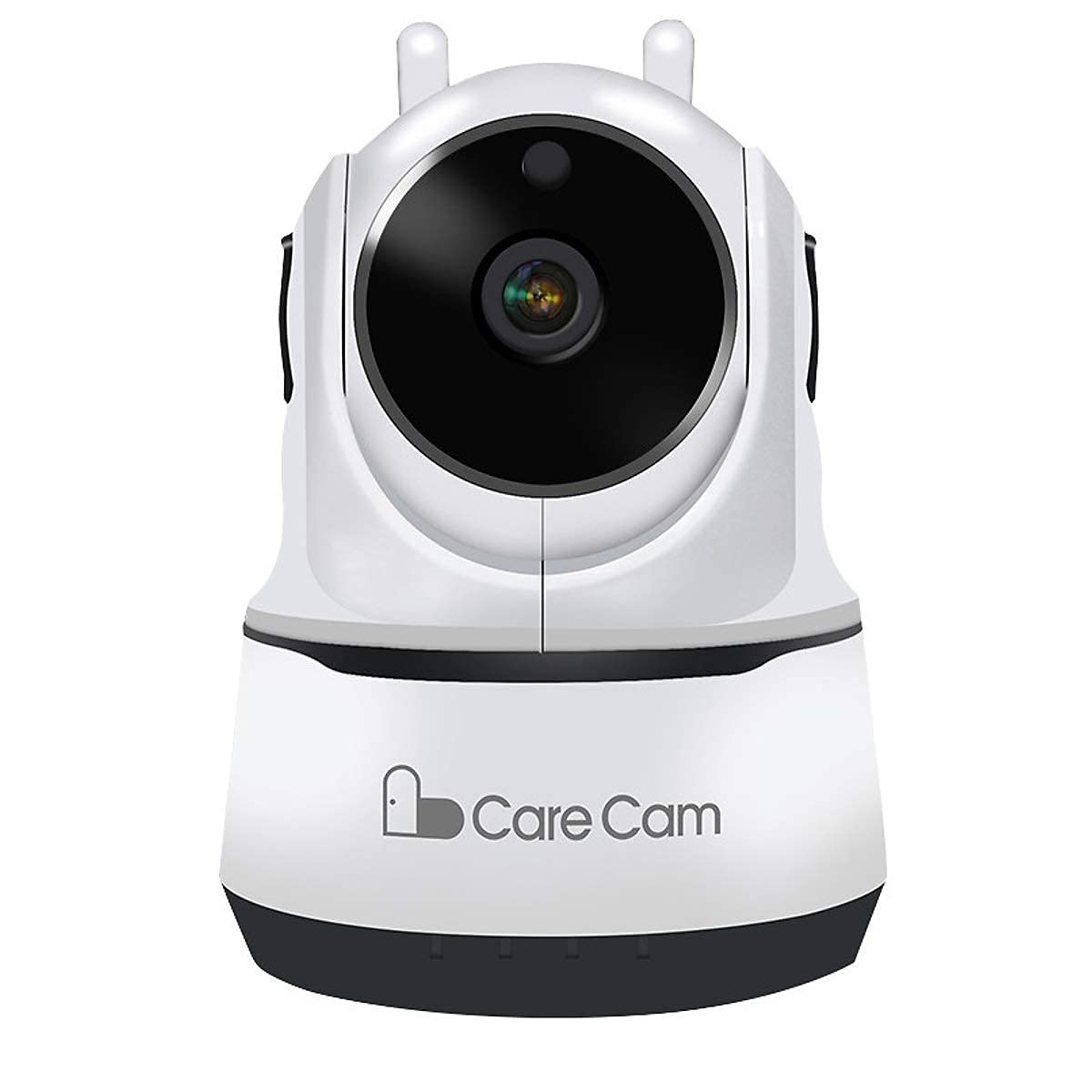
تصویر 1: سامنے والا view of the AI Carecam NPK Intelligent Camera, showing the lens and base.
2. پیکیج کے مشمولات
- AI Carecam NPK Intelligent Camera
- پاور اڈاپٹر
- صارف دستی (یہ دستاویز)
3. سیٹ اپ ہدایات
3.1 Identifying Camera Ports
Before setup, familiarize yourself with the camera's ports and interfaces.
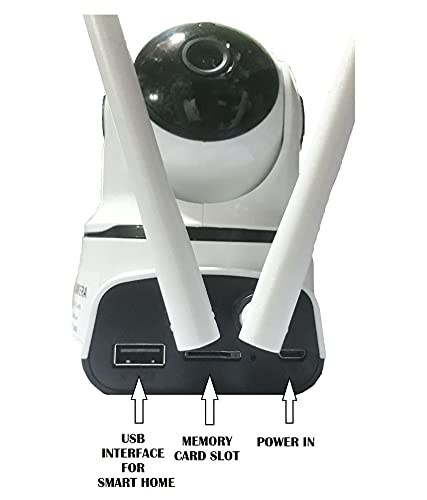
تصویر 2: پیچھے view of the camera showing the USB interface, memory card slot, and power input port.
- USB انٹرفیس: For smart home integration (if applicable).
- میموری کارڈ سلاٹ: Insert a Micro SD card (up to 128GB) for local video storage.
- پاور ان: فراہم کردہ پاور اڈاپٹر کو یہاں جوڑیں۔
3.2 کیمرہ آن کرنا
- Connect the provided power adapter to the "Power In" port on the camera.
- اڈاپٹر کو معیاری الیکٹریکل آؤٹ لیٹ میں لگائیں۔
- The camera will power on and initiate its self-test sequence. Wait for the camera to indicate readiness (e.g., a specific LED indicator or voice prompt).
3.3 Installing the Mobile Application
The camera is controlled via a dedicated mobile application, compatible with Android and iOS devices. تلاش کریں۔ "Carecam" or the recommended app name in your device's app store.

تصویر 3: The camera supports control via Android and iOS mobile applications.
3.4 وائی فائی سے جڑنا
- Ensure your mobile device is connected to the 2.4GHz Wi-Fi network you intend to use for the camera.
- Open the installed Carecam application.
- Follow the in-app instructions to add a new device. This typically involves scanning a QR code on the camera or entering Wi-Fi credentials.
- ایک بار منسلک ہونے کے بعد، کیمرے کا اسٹیٹس انڈیکیٹر بدل جائے گا، اور آپ کو ایپ میں ایک تصدیق موصول ہوگی۔
4. آپریٹنگ ہدایات
4.1 لائیو View اور پین/جھکاؤ کنٹرول
After successful setup, open the app to view the live feed from your camera. Use the on-screen controls to adjust the camera's viewING زاویہ

تصویر 4: Control the camera's 355° pan and 90° tilt movements directly from the mobile application.
- پین: کیمرے کو افقی طور پر 355° تک گھمائیں۔
- جھکاؤ: کیمرے کو عمودی طور پر 90° تک ایڈجسٹ کریں۔
4.2 دو طرفہ آڈیو کمیونیکیشن
The camera supports two-way audio, allowing you to listen and speak through the camera using the mobile app.

تصویر 5: The camera features clear two-way audio with a sensitive microphone to restore vocals.
- لائیو میں view, tap the microphone icon to speak.
- کیمرے کے مقام سے آڈیو سننے کے لیے اسپیکر کے آئیکن کو تھپتھپائیں۔
4.3 نائٹ ویژن
The camera automatically switches to night vision mode in low-light conditions, providing clear monitoring even in darkness using infrared light.
4.4 حرکت کا پتہ لگانا اور الرٹس
Configure motion detection settings within the app to receive alerts on your mobile device when movement is detected. The camera is designed for motion-only alerts.
- ایپ میں کیمرے کی ترتیبات پر جائیں۔
- Locate the "Motion Detection" or "Alert Settings" section.
- Enable motion detection and customize sensitivity levels and alert schedules as needed.
4.5 Micro SD Card Storage
The camera supports local storage on a Micro SD card up to 128GB. Ensure a compatible card is inserted for continuous recording or event-triggered recordings.

تصویر 6: The camera supports Micro SD (TF) card storage up to 128GB for recording video footage.
- Insert the Micro SD card into the designated slot with the contacts facing the correct direction.
- Format the Micro SD card through the camera's app settings for optimal performance.
5 دیکھ بھال
5.1 کیمرے کی صفائی
- صاف کرنے سے پہلے یقینی بنائیں کہ کیمرہ پاور آف اور ان پلگ ہے۔
- Use a soft, dry cloth to gently wipe the camera body.
- For the lens, use a specialized lens cleaning cloth to avoid scratches. Do not use liquid cleaners directly on the lens.
5.2 Micro SD Card Management
- Regularly check the storage status of your Micro SD card via the app.
- Format the card periodically to maintain optimal recording performance and free up space.
- Back up important recordings before formatting the card.
6 خرابیوں کا سراغ لگانا
- کیمرہ وائی فائی سے منسلک نہیں ہے:
- یقینی بنائیں کہ آپ کا Wi-Fi نیٹ ورک 2.4GHz ہے۔ کیمرہ 5GHz نیٹ ورکس کو سپورٹ نہیں کرتا ہے۔
- تصدیق کریں کہ ایپ میں وائی فائی پاس ورڈ صحیح طریقے سے درج کیا گیا ہے۔
- Move the camera closer to the Wi-Fi router to improve signal strength.
- کیمرہ اور اپنے راؤٹر کو دوبارہ شروع کریں۔
- کوئی تصویر یا خراب تصویر کا معیار نہیں:
- Check the power connection to ensure the camera is on.
- یقینی بنائیں کہ کیمرے کا لینس صاف اور رکاوٹوں سے پاک ہے۔
- اپنے انٹرنیٹ کنکشن کی رفتار کی تصدیق کریں۔
- حرکت کا پتہ لگانا کام نہیں کر رہا ہے:
- Check the motion detection settings in the app to ensure it is enabled and configured correctly.
- حساسیت کی سطح کو ایڈجسٹ کریں۔
- کیمرے کے فیلڈ کو یقینی بنائیں view واضح ہے.
- Micro SD card not recording:
- یقینی بنائیں کہ مائیکرو ایس ڈی کارڈ صحیح طریقے سے داخل کیا گیا ہے۔
- Format the Micro SD card through the app.
- Check if the card is full; if so, back up data and format it.
- Verify the card is not damaged.
7. وضاحتیں
| فیچر | تفصیل |
|---|---|
| برانڈ | AI |
| ماڈل کا نام | NPK Carecam (HVG Carecam) |
| کنیکٹوٹی ٹیکنالوجی | وائرلیس (وائی فائی) |
| خصوصی خصوصیت | 2MP کیمرہ |
| انڈور / آؤٹ ڈور استعمال | انڈور |
| طاقت کا منبع | کورڈڈ الیکٹرک |
| کنیکٹیویٹی پروٹوکول | وائی فائی |
| کنٹرولر کی قسم | Android, iOS (App) |
| رنگ | سفید |
| فارم فیکٹر | گنبد |
| پانی کی مزاحمت کی سطح | پانی مزاحم نہیں |
| انتباہ کی قسم | صرف موشن |
| کمرے کی قسم | آفس ، ہوم |
| روشنی کا ذریعہ | Infrared (for Night Vision) |
| کنٹرول کا طریقہ | ایپ |
| نیٹ ورک کنیکٹیویٹی ٹیکنالوجی | وائرلیس |
| وائرلیس ٹکنالوجی کی قسم | وائی فائی |
| ویڈیو کیپچر ریزولوشن | 1080P (FHD), H.264 |
| ویڈیو کیپچر فارمیٹ | MP4, AVI |
| نائٹ ویژن | رات کا رنگ |
| آئٹم کے طول و عرض | 10 x 10 x 10 سینٹی میٹر |
| شے کا وزن | 200 گرام |
| یونٹ شمار | 1 شمار |
| اشیاء کی تعداد | 1 |
| بلٹ ان میڈیا | اڈاپٹر |
| Viewآئی اینگل | 360 ڈگری |
| فیلڈ آف۔ View | 360 ڈگری |
| زوم کی قسم | آپٹیکل زوم |
| فوٹو سینسر ٹیکنالوجی | CMOS |
| فلیش میموری کی قسم | مائیکرو ایس ڈی (128 جی بی تک) |
8. وارنٹی کی معلومات
The AI Carecam NPK Intelligent Camera comes with a 1 سال کی صنعت کار وارنٹی from the date of purchase. This warranty covers defects in materials and workmanship under normal use. Please retain your proof of purchase for warranty claims. The warranty does not cover damage caused by misuse, accidents, unauthorized modifications, or natural disasters.
9. سپورٹ
For technical assistance, troubleshooting, or warranty inquiries, please contact the manufacturer or your point of purchase. The packer contact information is provided below:
Packer Contact: HOTSPOT ELECTRONICS, MUMBAI 400004
Please have your product model number (NPK Carecam) and proof of purchase ready when contacting support.