
1. تعارف
This manual provides essential information for setting up, operating, maintaining, and troubleshooting your new iBUYPOWER Element MR 202i Gaming PC. This high-performance desktop features an Intel i7-11700F processor, NVIDIA GeForce GTX 1660 graphics card, 16GB DDR4 RAM, a 240GB SSD, and a 1TB HDD, running on Windows 10 Home. Please read this manual thoroughly before using your computer.

Image: The iBUYPOWER Element MR 202i Gaming PC tower, showcasing its tempered glass side panel and internal RGB lighting.
2. باکس میں کیا ہے۔
احتیاط سے تمام اجزاء کو کھولیں اور یقینی بنائیں کہ درج ذیل اشیاء شامل ہیں:
- iBUYPOWER Desktop PC
- کوئیک اسٹارٹ گائیڈ
- iBUYPOWER USB Keyboard
- iBUYPOWER USB Mouse
- پاور کی ہڈی
- Windows Install CD
- Drivers Install CD(s)

Image: The iBUYPOWER Element MR 202i PC tower displayed alongside the included iBUYPOWER USB keyboard and mouse.
3. سیٹ اپ
3.1 پیک کھولنا اور جگہ کا تعین کرنا
Remove the PC and all accessories from their packaging. Place the PC on a stable, flat surface with adequate ventilation. Ensure no vents are obstructed.
3.2 کنیکٹنگ پیری فیرلز
- مانیٹر: Connect your monitor to the graphics card's video output ports (HDMI, DVI, or DisplayPort) using the appropriate cable.
- کی بورڈ اور ماؤس: Connect the included USB keyboard and mouse to any available USB ports on the rear of the PC.
- طاقت: Connect the power cord to the PC's power supply unit (PSU) and then to a wall outlet or surge protector.
- نیٹ ورک (اختیاری): For a wired connection, connect an Ethernet cable from your router/modem to the RJ-45 port on the PC. For Wi-Fi, ensure the Wi-Fi antenna (if included separately) is attached.
3.3 ابتدائی پاور آن
Press the power button located on the front or top of the PC. The system will boot up, and you should see the iBUYPOWER logo or Windows loading screen on your monitor.
3.4 آپریٹنگ سسٹم سیٹ اپ
Follow the on-screen instructions to complete the Windows 10 Home setup process. This typically involves selecting your region, language, creating a user account, and accepting the license agreement.

Image: A complete iBUYPOWER Element MR 202i gaming setup on a desk, including the PC tower, monitor, keyboard, and mouse, all powered on with RGB lighting.
4. آپ کے کمپیوٹر کو آپریٹ کرنا
4.1 بنیادی استعمال
Your iBUYPOWER Element MR 202i is ready for use once Windows 10 Home setup is complete. You can begin installing applications, browsing the internet, and engaging in gaming activities.
4.2 آر جی بی لائٹنگ کنٹرول
The Element MR 202i features a tempered glass RGB gaming case with 16-color RGB lighting. Control software for customizing the lighting effects may be pre-installed or available for download from the iBUYPOWER website. Refer to the specific software's instructions for detailed customization options.

تصویر: سامنے view of the iBUYPOWER Element MR 202i PC tower, highlighting the three vibrant RGB fans behind the front panel.
4.3 نیٹ ورک کنیکٹیویٹی
Your PC supports both wired Ethernet (10/100/1000) and 802.11AC Wi-Fi for internet access. For Wi-Fi, connect to your preferred network via the Windows network settings. For Ethernet, simply plug in the cable.

Image: A close-up detail of the mirror glass finish on the side panel of the iBUYPOWER Element MR 202i PC, showing the iBUYPOWER logo.
5 دیکھ بھال
5.1 صفائی
Regular cleaning helps maintain optimal performance and longevity. Use a soft, dry cloth to clean the exterior. For internal components, use compressed air to remove dust from fans and heatsinks. Ensure the PC is powered off and unplugged before cleaning inside.
5.2 سافٹ ویئر اپ ڈیٹس
Keep your operating system (Windows 10) and device drivers (especially graphics drivers) updated to ensure stability, security, and performance. Windows Update can be accessed via Settings, and graphics drivers can be updated through the NVIDIA control panel or webسائٹ
5.3 اسٹوریج مینجمنٹ
Periodically manage your storage by deleting unnecessary files, uninstalling unused programs, and utilizing disk cleanup tools. This helps maintain performance on both your 240GB SSD and 1TB HDD.
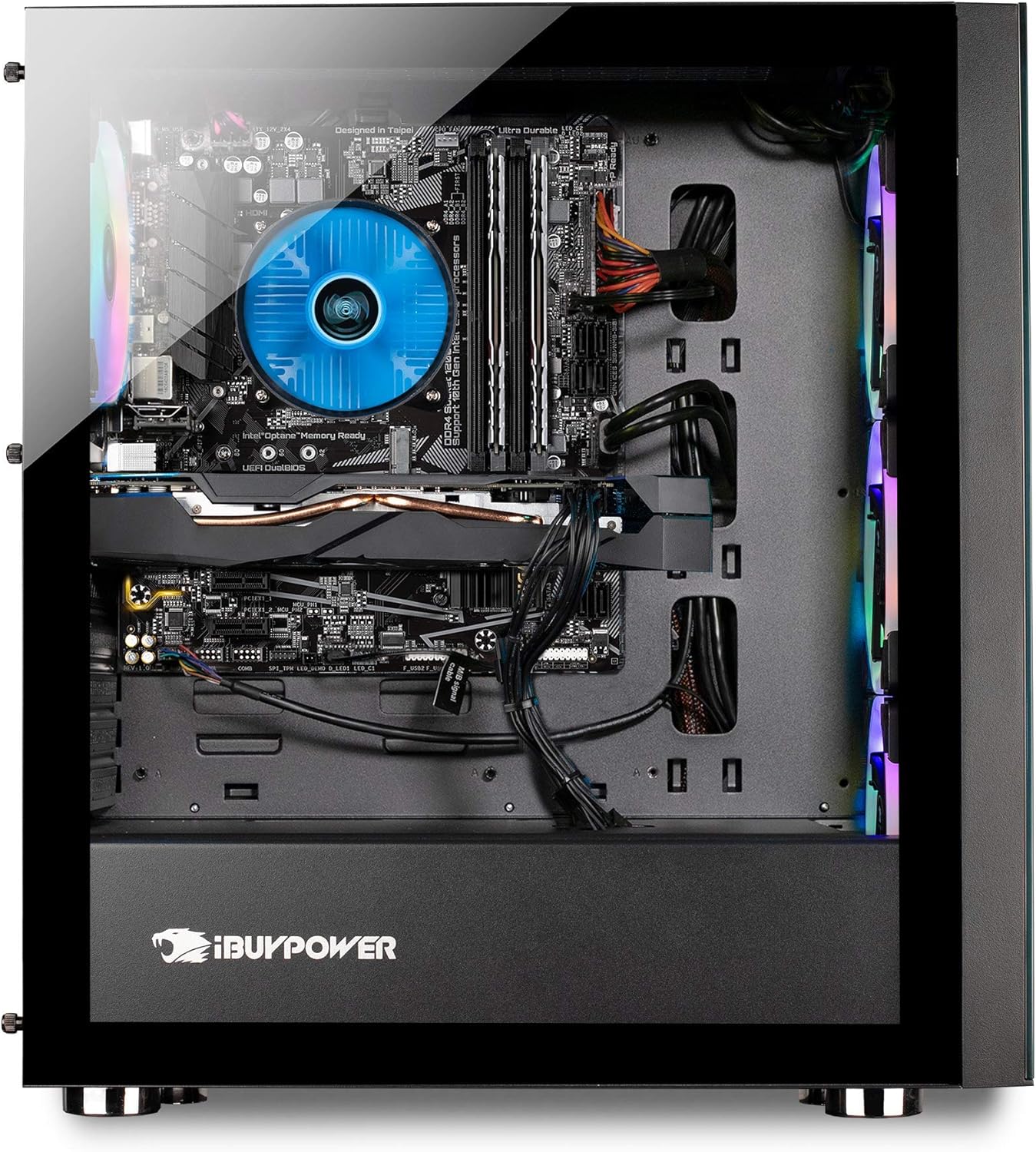
تصویر: ایک اندرونی view of the iBUYPOWER Element MR 202i PC, showing the motherboard, CPU cooler, graphics card, and cable management.
6 خرابیوں کا سراغ لگانا
If you encounter issues with your PC, refer to the following common troubleshooting steps:
- کوئی طاقت نہیں: Ensure the power cord is securely connected to both the PC and the wall outlet. Check if the power supply switch is in the 'On' position.
- کوئی ڈسپلے نہیں: Verify that your monitor is powered on and correctly connected to the graphics card. Try a different video cable or monitor if possible.
- سسٹم کی عدم استحکام/کریشز: Ensure all drivers are up to date. Check for overheating by monitoring component temperatures. If issues persist, consult the official troubleshooting guide.
- رابطے کے مسائل: For Wi-Fi, ensure the antenna is connected and drivers are installed. For Ethernet, check cable connections and router status.
مزید تفصیلی خرابیوں کا سراغ لگانے کے لیے، براہ کرم آفیشل سے رجوع کریں۔ ٹربل شوٹنگ گائیڈ (پی ڈی ایف).
7. وضاحتیں
Key technical specifications for the iBUYPOWER Element MR 202i Gaming PC:
| جزو | تفصیل |
|---|---|
| پروسیسر | Intel Core i7-11700F (2.5GHz base, up to 4.9GHz Max Turbo) |
| گرافکس کارڈ | NVIDIA GeForce GTX 1660 6GB |
| رام | 16GB DDR4 |
| ذخیرہ | 240GB SSD + 1TB HDD |
| آپریٹنگ سسٹم | ونڈوز 10 ہوم 64 بٹ |
| کنیکٹوٹی | 802.11AC Wi-Fi, Ethernet (10/100/1000) |
| USB پورٹس | 4 X USB 3.0 ، 2 x USB 2.0 |
| ویڈیو آؤٹ پٹ | 1x DVI, 1x HDMI, 1x DisplayPort |
| آڈیو | 7.1 چینل |
| کیس | Tempered Glass RGB Gaming Case |
8. وارنٹی اور سپورٹ
Your iBUYPOWER Element MR 202i Gaming PC comes with a 1 سال کے پرزے اور لیبر وارنٹی. Additionally, iBUYPOWER provides Free Lifetime US Tech Support آپ کی مصنوعات کے لئے.
For technical assistance or warranty claims, please visit the official iBUYPOWER support website or contact their customer service. Keep your purchase receipt and product serial number readily available when seeking support.
اضافی وسائل: