
1. تعارف
This manual provides essential instructions for the installation, operation, and maintenance of your Hikvision 8MP AcuSense WDR Mini Bullet Network Camera, model DS-2CD2083G2-IU. Please read this manual thoroughly before using the product and retain it for future reference.
پروڈکٹ ختمview
The Hikvision DS-2CD2083G2-IU is a high-performance 8-megapixel (4K) network camera designed for advanced surveillance. It features AcuSense technology for accurate human and vehicle target classification, Wide Dynamic Range (WDR) for clear imaging against strong backlight, and a fixed 2.8mm lens for a wide field of view. Its IP67 rating ensures robust outdoor performance, and the integrated microphone allows for audio monitoring.
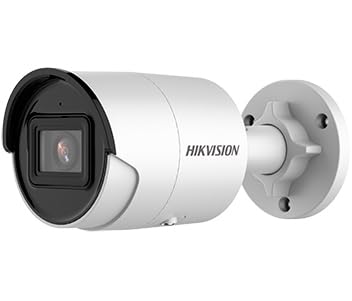
Figure 1: Hikvision 8MP AcuSense WDR Mini Bullet Network Camera (DS-2CD2083G2-IU)
This image displays the Hikvision 8MP AcuSense WDR Mini Bullet Network Camera, highlighting its compact bullet-style design suitable for various installation environments.
کلیدی خصوصیات
- 8 Megapixel (4K) Resolution: Delivers high-quality, detailed video.
- ایکو سینس ٹیکنالوجی: Reduces false alarms by accurately classifying human and vehicle targets.
- وائڈ ڈائنامک رینج (WDR): Ensures clear images even in scenes with strong contrast.
- Fixed 2.8mm Lens: Provides a broad viewING زاویہ
- اورکت (IR) روشنی: نائٹ ویژن 40 میٹر تک۔
- IP67 ویدر پروف ریٹنگ: مختلف موسمی حالات میں بیرونی استعمال کے لیے موزوں۔
- بلٹ ان مائیکروفون: Enables audio monitoring.
- Integrated Card Reader: Supports local storage (microSD card not included).
2. حفاظتی معلومات
مصنوعات کو چوٹ یا نقصان سے بچنے کے لیے براہ کرم درج ذیل حفاظتی تدابیر پر عمل کریں:
- Ensure the power supply meets the camera's requirements (6.5 Watts).
- کیمرہ کو انتہائی درجہ حرارت، نمی، یا سنکنرن ماحول کے سامنے نہ رکھیں۔
- Avoid pointing the lens directly at strong light sources, as this may damage the sensor.
- تنصیب مقامی برقی کوڈز کے مطابق اہل عملہ کے ذریعہ کی جانی چاہئے۔
- کارخانہ دار کے ذریعہ مخصوص کردہ لوازمات ہی استعمال کریں۔
- Clean the camera lens with a soft, dry cloth. Avoid harsh chemicals.
3. سیٹ اپ اور انسٹالیشن
3.1 پیک کھولنا
Carefully unpack the camera and check for any signs of damage. Ensure all components are present. (Typical components include: camera unit, mounting template, screws, waterproof connector, quick start guide).
3.2 جسمانی تنصیب
The camera is designed for ceiling mounting. Select a suitable location that provides the desired field of view and is within reach of network and power cables. Due to its IP67 rating, it is suitable for outdoor environments.
- Use the provided mounting template to mark drill holes on the ceiling.
- Drill the necessary holes and insert wall plugs if required.
- فراہم کردہ پیچ کا استعمال کرتے ہوئے کیمرہ بیس کو بڑھتے ہوئے سطح پر محفوظ کریں۔
- زیادہ سے زیادہ کوریج کے لیے کیمرے کے زاویے کو ایڈجسٹ کریں۔
3.3 نیٹ ورک اور پاور کنکشن
This is an IP network camera. It requires a network connection and power. Power over Ethernet (PoE) is typically supported, simplifying installation by delivering both power and data over a single Ethernet cable. If PoE is not used, a separate 12V DC power adapter (not included) will be required.
- Connect an Ethernet cable from your network switch/router to the camera's RJ45 port. Use the waterproof connector for outdoor installations.
- اگر PoE استعمال نہیں کررہے ہیں، تو 12V DC پاور اڈاپٹر کو کیمرے کے پاور ان پٹ سے جوڑیں۔
- Once connected, the camera will power on. Allow a few minutes for it to boot up.
3.4 ابتدائی کنفیگریشن
کیمرے تک رسائی حاصل کریں۔ web انٹرفیس کے ذریعے a web browser using its default IP address (refer to the quick start guide or use Hikvision's SADP tool to discover the IP address). You will be prompted to set a strong password for security. Follow the on-screen instructions to configure network settings, date/time, and other basic parameters.
4. آپریٹنگ ہدایات
4.1 لائیو View اور ریکارڈنگ
After initial setup, you can view the live feed from the camera through its web interface, a Network Video Recorder (NVR), or Hikvision's client software (e.g., iVMS-4200) or mobile app (Hik-Connect). Configure recording schedules and methods (continuous, motion-triggered) via the camera's settings or NVR.
4.2 AcuSense Smart Features
The AcuSense technology allows the camera to distinguish between humans, vehicles, and other moving objects, significantly reducing false alarms caused by animals, rain, or falling leaves. Configure these detection rules in the camera's event settings to receive more accurate alerts.
- حرکت کا پتہ لگانا 2.0: Set up detection zones and sensitivity for human and vehicle events.
- دخل اندازی: Define virtual boundaries, and the camera will trigger an alarm if a human or vehicle crosses them.
- لائن کراسنگ کا پتہ لگانا: Similar to intrusion, but for a specific line.
4.3 Wide Dynamic Range (WDR)
WDR compensates for extreme lighting conditions, such as strong backlight, to ensure that both bright and dark areas of the image are clearly visible. This feature is typically enabled by default but can be adjusted in the image settings.
4.4 Infrared (IR) Night Vision
The camera automatically switches to IR mode in low-light conditions, providing clear black-and-white video up to 40 meters. Ensure no obstructions block the IR LEDs for optimal night vision performance.
4.5 آڈیو مانیٹرنگ
With its built-in microphone, the camera can capture audio from the surveillance area. Audio settings, including gain control, can be configured in the camera's web interface. Ensure local regulations regarding audio recording are followed.
5 دیکھ بھال
- صفائی: باقاعدگی سے کیمرے کے لینس اور ہاؤسنگ کو نرم سے صاف کریں، ڈیamp کپڑا کھرچنے والے کلینر کا استعمال نہ کریں۔
- فرم ویئر اپ ڈیٹس: وقتا فوقتا Hikvision اہلکار کو چیک کریں۔ website for firmware updates. Keeping the firmware updated ensures optimal performance, new features, and security enhancements.
- کیبل معائنہ: For outdoor installations, periodically inspect cables and connections for wear or damage, especially the waterproof connectors.
- پاس ورڈ مینجمنٹ: Regularly change your camera's password to maintain security.
6 خرابیوں کا سراغ لگانا
| مسئلہ | ممکنہ وجہ | حل |
|---|---|---|
| کوئی تصویر/کیمرہ آف لائن نہیں۔ | کوئی پاور نہیں، نیٹ ورک کیبل منقطع ہے، غلط IP پتہ۔ | Check power supply and network cable. Verify IP address using SADP tool. Restart camera. |
| خراب تصویر کا معیار | Dirty lens, incorrect focus (if adjustable), poor lighting, network bandwidth issues. | Clean the lens. Ensure adequate lighting. Check network connection speed. Adjust image settings (WDR, exposure). |
| حرکت کا پتہ لگانے سے غلط الارم | Sensitivity too high, environmental factors (trees, animals), AcuSense not configured. | Adjust motion detection sensitivity. Configure AcuSense human/vehicle detection. Adjust detection zones. |
| رسائی نہیں ہو سکتی web انٹرفیس | Incorrect IP address, network connectivity issue, browser compatibility. | Verify IP address. Ensure camera and PC are on the same network segment. Try a different browser. |
اگر ان حلوں کو آزمانے کے بعد بھی مسئلہ برقرار رہتا ہے، تو براہ کرم Hikvision تکنیکی معاونت سے رابطہ کریں۔
7. وضاحتیں
| فیچر | تفصیل |
|---|---|
| ماڈل نمبر | DS-2CD2083G2-IU |
| تصویری سینسر | CMOS |
| زیادہ سے زیادہ قرارداد | 8 MP (4K) |
| لینس | 2.8mm فکسڈ لینس۔ |
| IR کی حد | 40 میٹر تک |
| ڈبلیو ڈی آر | حمایت کی |
| ایکو سینس | Human and Vehicle Target Classification |
| آڈیو | بلٹ ان مائیکروفون |
| مقامی اسٹوریج | Integrated Card Reader (MicroSD slot) |
| ویدر پروف ریٹنگ | آئی پی 67 |
| بجلی کی کھپت | 6.5 واٹ |
| طول و عرض (L x W x H) | 15 x 15 x 8 سینٹی میٹر (تقریبا) |
| چڑھنے کی قسم | چھت کا پہاڑ |
| انتباہ کی قسم | Motion Only (configurable for human/vehicle) |
8. وارنٹی اور سپورٹ
Hikvision products typically come with a limited manufacturer's warranty. Please refer to the warranty card included with your product or visit the official Hikvision webتفصیلی وارنٹی شرائط و ضوابط کے لیے سائٹ جو آپ کے علاقے کے لیے مخصوص ہے۔
For technical support, firmware downloads, or further assistance, please visit the official Hikvision support portal or contact their customer service department. Ensure you have your product model number (DS-2CD2083G2-IU) and serial number ready when contacting support.
سرکاری Hikvision Webسائٹ: www.hikvision.com