
Anova Culinary AN900-10
Anova Precision Smart Oven User Manual
ماڈل: AN900-10
تعارف
The Anova Precision Smart Oven is a versatile countertop appliance designed to bring professional-grade cooking capabilities to your home kitchen. It combines convection, steam, bake, broil, roast, and dehydrate functions, offering precise temperature control for a wide range of culinary tasks. This manual provides essential information for the safe and effective operation and maintenance of your Anova Precision Smart Oven.
For optimal performance and longevity, please read this manual thoroughly before first use and retain it for future reference.
حفاظتی معلومات
آگ، برقی جھٹکا، اور افراد کو چوٹ لگنے کے خطرے کو کم کرنے کے لیے برقی آلات کا استعمال کرتے وقت ہمیشہ بنیادی حفاظتی احتیاطی تدابیر پر عمل کریں۔
- گرم سطحوں کو مت چھونا۔ ہینڈل یا نوبس کا استعمال کریں۔
- بجلی کے جھٹکے سے بچانے کے لیے، ڈوری، پلگ، یا آلات کو پانی یا دیگر مائع میں نہ ڈبویں۔
- جب کوئی بھی آلات بچوں کے ذریعہ یا اس کے قریب استعمال ہوتا ہے تو قریبی نگرانی ضروری ہے۔
- استعمال میں نہ ہونے پر اور صفائی سے پہلے آؤٹ لیٹ سے ان پلگ کریں۔ پرزے لگانے یا اتارنے سے پہلے ٹھنڈا ہونے دیں۔
- کسی بھی آلات کو خراب شدہ ڈوری یا پلگ سے، یا آلے کی خرابی کے بعد یا کسی بھی طریقے سے نقصان پہنچانے کے بعد نہ چلائیں۔
- آلات کے مینوفیکچرر کی طرف سے تجویز کردہ آلات کے اٹیچمنٹ کا استعمال چوٹوں کا سبب بن سکتا ہے۔
- باہر استعمال نہ کریں۔
- ڈوری کو میز یا کاؤنٹر کے کنارے پر لٹکنے نہ دیں، یا گرم سطحوں کو چھونے نہ دیں۔
- گرم گیس یا الیکٹرک برنر پر یا اس کے قریب یا گرم تندور میں نہ رکھیں۔
- گرم تیل یا دیگر گرم مائعات پر مشتمل آلات کو حرکت دیتے وقت انتہائی احتیاط برتیں۔
- مطلوبہ استعمال کے علاوہ آلات کا استعمال نہ کریں۔
اجزاء ختمview
Familiarize yourself with the main components of your Anova Precision Smart Oven:
- تندور کی گہا: The main cooking chamber.
- پانی کا ٹینک: Removable tank for steam generation. Located on the side.
- کنٹرول پینل: Digital display and knobs for setting temperature, time, and cooking modes.
- فوڈ پروب: Detachable probe for precise internal temperature monitoring.
- Removable Racks: Multiple racks for various cooking needs.
- بیکنگ پین: Included pan for general baking and roasting.

شکل 1: سامنے view of the Anova Precision Smart Oven, showing the main oven cavity, control panel, and side-mounted water tank.

شکل 2: داخلہ view of the Anova Precision Smart Oven, illustrating the two removable racks and the included baking pan.

Figure 3: A user demonstrating the removal of the clear water tank from the side of the Anova Precision Smart Oven for refilling or cleaning.
سیٹ اپ
پیک کھولنا اور جگہ کا تعین کرنا
- پیکیجنگ سے تندور اور تمام لوازمات کو احتیاط سے ہٹا دیں۔
- Remove any protective film or packaging materials from the oven.
- Place the oven on a stable, level, heat-resistant surface with adequate clearance from walls and other appliances for ventilation. Ensure at least 4 inches of space on all sides and above the oven.
- یقینی بنائیں کہ پاور آؤٹ لیٹ آسانی سے قابل رسائی ہے۔
ابتدائی صفائی
- پہلے استعمال سے پہلے، تندور کے اندرونی اور بیرونی حصے کو اشتہار سے صاف کریں۔amp کپڑا
- Wash the removable racks, baking pan, and water tank with warm, soapy water. Rinse thoroughly and dry completely.
پانی کے ٹینک کی تیاری
- Remove the water tank from its housing on the side of the oven.
- Fill the water tank with distilled water. Do not use tap water as it can lead to mineral buildup.
- Securely reinsert the water tank into its housing until it clicks into place.
پاور کنکشن
Plug the oven into a grounded electrical outlet. The display will illuminate, indicating the oven is ready for use.
آپریٹنگ ہدایات
کنٹرول پینل ختم۔view
The Anova Precision Smart Oven features an intuitive control panel with a digital display and rotary knobs for setting cooking parameters. The display shows temperature, time, and current cooking mode.
Connecting to the Anova App
For enhanced control and access to a recipe library, download the Anova Oven app on your smartphone. Follow the in-app instructions to connect your oven via Wi-Fi.
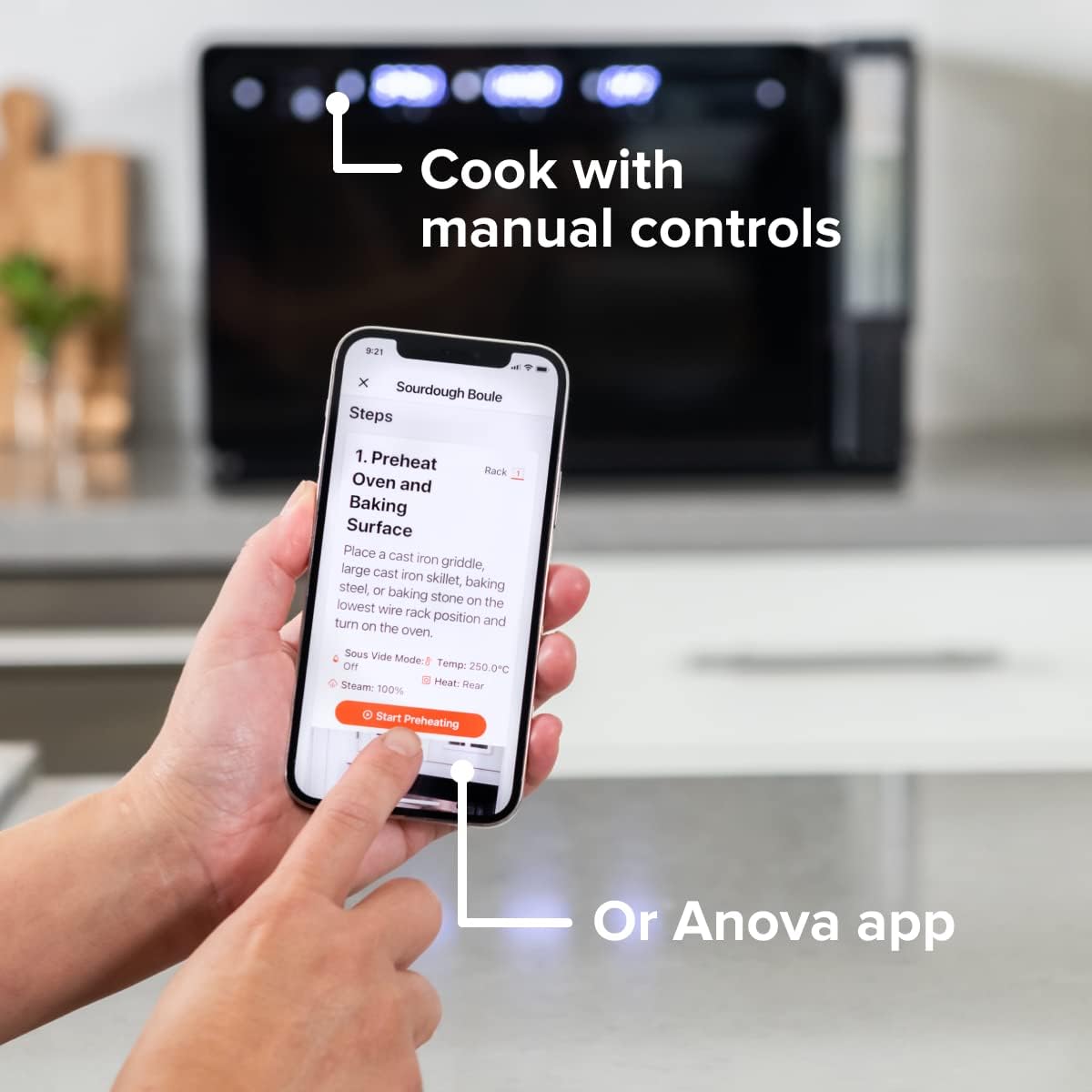
Figure 4: A user interacting with the Anova app on a smartphone, demonstrating remote control capabilities for the oven.
کھانا پکانے کے بنیادی طریقے
The oven offers several cooking modes:
- کنویکشن: Uses a fan to circulate hot air for even cooking and browning.
- بھاپ: Injects steam into the oven cavity, ideal for baking bread, steaming vegetables, or sous vide style cooking.
- Combi (Convection + Steam): Combines hot air and steam for moist interiors and crispy exteriors.
- پکانا/روسٹ: Standard oven functions for baking and roasting.
- برائل: High heat from the top element for searing and browning.
- پانی کی کمی: Low heat and fan circulation for drying foods.
Setting a Program (Manual Control)
- Turn the mode knob to select your desired cooking mode.
- Adjust the temperature using the temperature knob.
- ٹائم نوب کا استعمال کرتے ہوئے کھانا پکانے کا وقت مقرر کریں۔
- کھانا پکانا شروع کرنے کے لیے اسٹارٹ/پز بٹن دبائیں۔
- To use the food probe, insert it into the thickest part of your food before starting. The oven will cook until the target internal temperature is reached.
سوس ویڈیو موڈ
The Anova Precision Oven can achieve sous vide style results without a water bath. Use the steam function and the food probe to cook food to a precise internal temperature, ensuring tenderness and juiciness.
Steam Injection for Baking
For perfect breads with crispy crusts and soft interiors, utilize the steam injection feature. Ensure the water tank is filled before starting a steam-assisted baking program.

Figure 5: Two loaves of freshly baked bread, showcasing the results of steam injection for a perfect crust and crumb. The Anova Precision Smart Oven is visible in the background.
دیکھ بھال اور صفائی
Regular cleaning and maintenance will ensure the longevity and optimal performance of your Anova Precision Smart Oven.
روزانہ صفائی
- After each use, allow the oven to cool completely.
- اشتہار کے ساتھ اندرونی اور بیرونی سطحوں کو صاف کریں۔amp کپڑا اور ہلکا صابن. کھرچنے والے کلینر یا سکورنگ پیڈ سے پرہیز کریں۔
- Remove and clean the racks and baking pan with warm, soapy water.
- Empty and rinse the water tank after each use, especially if using steam functions. Allow it to air dry before reinserting.
Descaling (Steam Function Users)
If you frequently use the steam function, mineral buildup may occur. The oven may indicate when descaling is needed. Refer to the Anova app or online resources for detailed descaling instructions using a descaling solution.
ذخیرہ
When not in use for extended periods, ensure the oven is clean and dry. Store it in a cool, dry place.
خرابی کا سراغ لگانا
This section addresses common issues you might encounter with your Anova Precision Smart Oven.
| مسئلہ | ممکنہ وجہ | حل |
|---|---|---|
| Oven not turning on. | پلگ ان نہیں؛ طاقت آپtage سرکٹ بریکر پھٹ گیا۔ | یقینی بنائیں کہ اوون کو محفوظ طریقے سے ورکنگ آؤٹ لیٹ میں لگا ہوا ہے۔ گھریلو سرکٹ بریکر چیک کریں۔ |
| کوئی بھاپ پیدا نہیں ہوتی۔ | Water tank empty or not properly seated; mineral buildup. | Fill water tank with distilled water and ensure it is correctly inserted. Perform descaling if necessary. |
| کھانا یکساں طور پر نہیں پک رہا ہے۔ | Improper rack placement; overcrowding; fan obstruction. | Refer to recipe for recommended rack position. Avoid overcrowding the oven. Ensure nothing obstructs the convection fan. |
| وائی فائی کنکشن کے مسائل۔ | غلط وائی فائی پاس ورڈ؛ راؤٹر بہت دور؛ نیٹ ورک مداخلت. | Double-check Wi-Fi password. Move oven closer to router or use a Wi-Fi extender. Restart oven and router. |
If the problem persists after attempting these solutions, please contact Anova Customer Support.
وضاحتیں
- برانڈ: انووا کھانا
- ماڈل کا نام: صحت سے متعلق تندور
- آئٹم ماڈل نمبر: AN900-10۔
- مصنوعات کے طول و عرض: 18"D x 22"W x 14"H
- آئٹم کا وزن: 59 پاؤنڈ
- رنگ: سیاہ
- کنٹرول کی قسم: نوب
- طاقت کا منبع: الیکٹرک
- شامل اجزاء: Water tank, pan, temp probe
- خصوصی خصوصیت: قابل پروگرام
وارنٹی اور سپورٹ
The Anova Precision Smart Oven comes with a manufacturer's warranty. Please refer to the warranty card included with your product or visit the official Anova Culinary webتفصیلی وارنٹی شرائط و ضوابط کے لیے سائٹ۔
For technical support, troubleshooting assistance, or to inquire about replacement parts, please contact Anova Customer Support:
- آن لائن مدد: کا دورہ کریں۔ Anova Culinary Store on Amazon یا ان کے اہلکار؟ webسائٹ
- صارف گائیڈ (پی ڈی ایف): A comprehensive user guide is available for download at یہ لنک.

Figure 6: The Anova Precision Smart Oven integrated with a smart home assistant (Alexa), demonstrating its connectivity features.