
ANBERNIC RG351M
یوزر مینوئل: ANBERNIC RG351M ریٹرو گیم ہینڈ ہیلڈ کنسول
Model: RG351M
تعارف
The ANBERNIC RG351M is a portable retro game handheld console designed for an immersive gaming experience. Featuring a 3.5-inch IPS screen and powered by an RK3326 quad-core processor, it supports a wide range of classic game formats. This manual provides essential information for setting up, operating, maintaining, and troubleshooting your device.
حفاظتی معلومات
- ڈیوائس کو انتہائی درجہ حرارت، براہ راست سورج کی روشنی، یا زیادہ نمی کے سامنے نہ رکھیں۔
- آلے کو گرانے یا اسے سخت اثرات کے تابع کرنے سے گریز کریں۔
- Use only the provided USB charging cable and a compatible power adapter (maximum load 2A) for charging.
- آلہ کو خود سے جدا کرنے یا مرمت کرنے کی کوشش نہ کریں۔ اہل سروس اہلکاروں سے رجوع کریں۔
- آلے کو پانی اور دیگر مائعات سے دور رکھیں۔
- استعمال اور چارجنگ کے دوران مناسب وینٹیلیشن کو یقینی بنائیں۔
پیکیج کے مشمولات

Image: The ANBERNIC RG351M console, its retail packaging, and the included USB charging cable.
براہ کرم ان باکسنگ پر پیکیج کے مواد کو چیک کریں تاکہ یہ یقینی بنایا جا سکے کہ تمام اشیاء موجود ہیں:
- 1 x RG351M Game Console
- 1 ایکس USB کیبل
- 1 ایکس یوزر مینوئل (یہ دستاویز)
- 1 x 64GB TF Card (pre-installed with games)
پروڈکٹ ختمview
سامنے والا View

تصویر: سامنے view of the RG351M console, highlighting the 3.5-inch IPS screen, D-pad, dual analog joysticks, and action buttons (A, B, X, Y), along with SELECT and START buttons.
- 3.5 انچ آئی پی ایس اسکرین: واضح بصری کے لیے ہائی ڈیفینیشن ڈسپلے۔
- ڈی پیڈ: Directional pad for navigation and game control.
- اینالاگ جوائس اسٹکس: Dual 3D rocker sticks for precise movement.
- ایکشن بٹن (A, B, X, Y): معیاری گیمنگ ان پٹ بٹن۔
- منتخب بٹن: Used for various in-game functions and menu navigation.
- اسٹارٹ بٹن: Used for pausing games, confirming selections, and menu navigation.
اوپر اور نیچے Views (بندرگاہیں اور کنٹرولز)

Image: Top edge of the console, displaying the L1, L2, R1, R2 shoulder buttons, a Type-C OTG port, a 3.5mm earphone jack, and another Type-C port labeled OTG/DC for data transfer and charging.

Image: Bottom edge of the console, showing the TF card slot for expandable storage and the recessed Reset button.
- L1/L2/R1/R2 بٹن: Shoulder buttons for additional in-game controls.
- OTG 1 (Type-C): USB Type-C port for data transfer.
- 3.5 ملی میٹر ائرفون جیک: مربوط ہیڈ فون کے لئے۔
- OTG 2 (Type-C / Charging Port): USB Type-C port for data transfer and charging.
- TF کارڈ سلاٹ: For inserting the game TF card (supports up to 256GB).
- ری سیٹ بٹن: A small, recessed button to restart the device if it becomes unresponsive.
- مقررین: High-quality double horn stereo speakers.
پیچھے View

تصویر: پیچھے view of the RG351M console, displaying the ANBERNIC logo, model number (RG351M), and battery specifications (Li-Po 3500mAh).
سیٹ اپ
1. ابتدائی چارجنگ
Before first use, fully charge the console. Connect the provided USB Type-C cable to the OTG 2 (charging) port on the top of the device and the other end to a compatible USB power adapter (not included, recommended 5V/1.3A to 2A). The charging indicator light will illuminate. A full charge typically takes about 4 hours.
2 TF کارڈ داخل کرنا
The console comes with a 64GB TF card pre-installed with games. If you need to remove or insert the TF card, gently push it into the TF card slot on the bottom of the device until it clicks into place. To remove, push it again until it springs out.
آپریٹنگ ہدایات
پاور آن/آف
- پاور آن کرنے کے لیے: Press and hold the Power button (located on the left side) for a few seconds until the screen illuminates.
- پاور آف کرنا: Press and hold the Power button until a power-off menu appears on the screen. Select "Power Off" or "Shutdown". Alternatively, a quick press of the power button will put the device into sleep mode.
سسٹم کو نیویگیٹ کرنا
The RG351M runs on an open-source Linux system. Use the D-pad or analog joysticks to navigate through menus and game lists. The 'A' button typically confirms selections, and the 'B' button typically goes back.
کھیل کھیلنا
Select a game from the main menu. The console supports various game formats including PSP, N64, NDS, PS1, CPS1, CPS2, FBA, NEOGEO, GBA, GBC, GB, SFC, FC, MD, SMS, GG, MSX, PCE, WSC, and transplant games. Refer to specific emulator controls within the system for optimal gameplay.
وائی فائی کنیکٹیویٹی

Image: The RG351M console showing a game in progress, with an overlay graphic indicating fast Wi-Fi connectivity (2.4GHz 802.11b/g/n).
The RG351M supports 2.4GHz Wi-Fi (802.11b/g/n) for online features, such as game updates or online multiplayer (where supported by the game/emulator).
- Navigate to the system settings menu.
- "نیٹ ورک" یا "Wi-Fi ترتیبات" کو منتخب کریں۔
- Enable Wi-Fi and select your desired network from the list.
- اگر اشارہ کیا جائے تو پاس ورڈ درج کریں۔
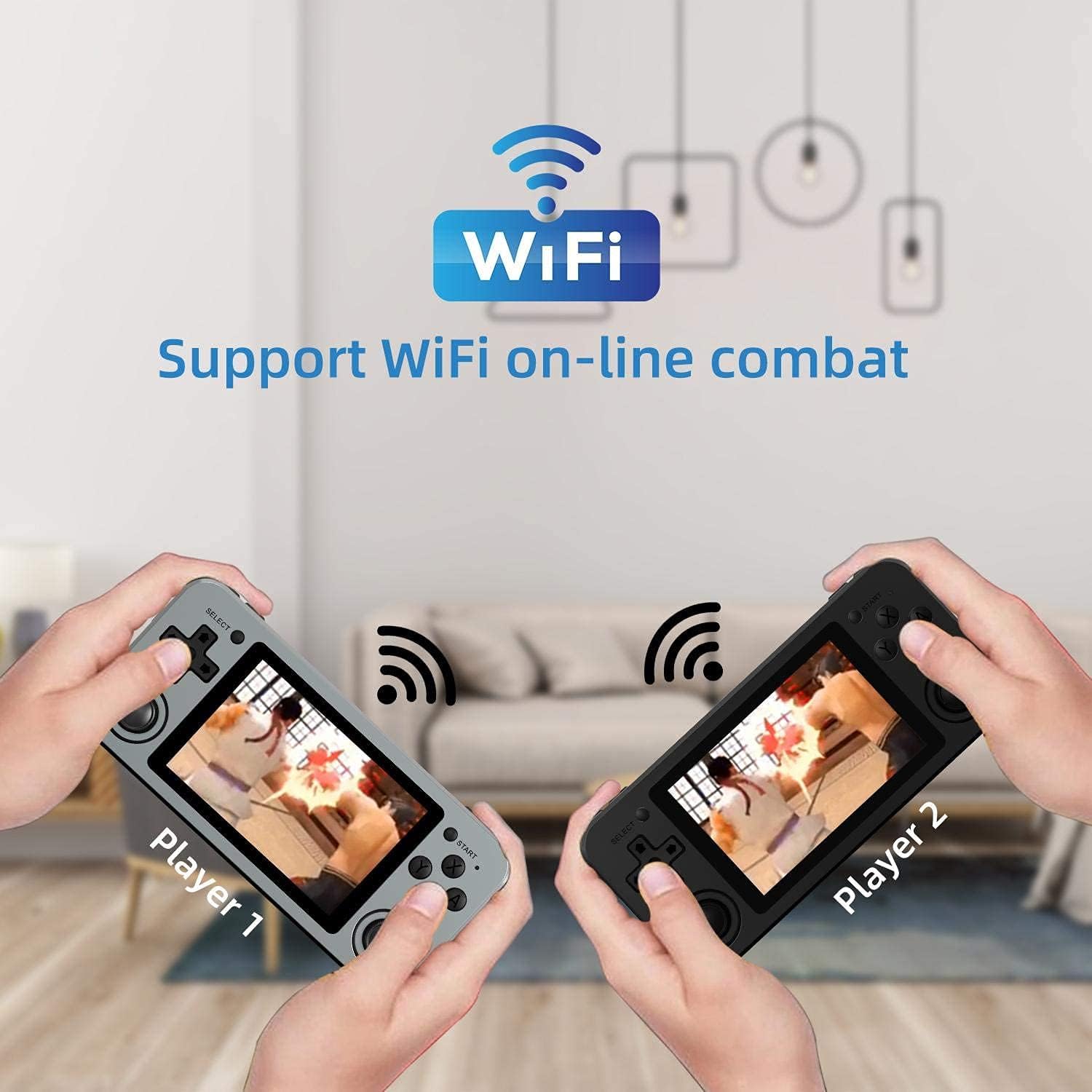
Image: Two RG351M consoles held by hands, illustrating the capability for Wi-Fi online combat between players.
دیکھ بھال
- صفائی: Use a soft, dry cloth to clean the console's exterior. For the screen, use a microfiber cloth specifically designed for electronics. Do not use liquid cleaners directly on the screen.
- ذخیرہ: When not in use for extended periods, store the console in a cool, dry place, away from direct sunlight.
- بیٹری کی دیکھ بھال: بیٹری کی زندگی کو طول دینے کے لیے، بار بار بیٹری کو مکمل طور پر خارج کرنے سے گریز کریں۔ بیٹری کی صحت کو برقرار رکھنے کے لیے آلہ کو باقاعدگی سے چارج کریں، چاہے استعمال میں نہ ہوں۔
- سافٹ ویئر اپ ڈیٹس: Periodically check for system updates (if available through the open-source community) to ensure optimal performance and compatibility.
خرابی کا سراغ لگانا
| مسئلہ | ممکنہ حل |
|---|---|
| ڈیوائس آن نہیں ہوتی ہے۔ | یقینی بنائیں کہ بیٹری چارج ہے۔ چارجر کو جوڑیں اور دوبارہ پاور آن کرنے کی کوشش کرنے سے پہلے چند منٹ انتظار کریں۔ |
| Screen is frozen or unresponsive. | Locate the recessed Reset button on the bottom of the device and press it gently with a thin, non-metallic object (e.g., a paperclip) to restart the console. |
| Games are not loading or running slowly. | Ensure the TF card is properly inserted. Some games may require specific emulator settings or may be too demanding for the hardware. Check online communities for compatibility lists or optimization tips. |
| اسپیکر یا ہیڈ فون سے کوئی آواز نہیں ہے۔ | Check the volume level using the volume buttons on the right side of the console. Ensure headphones are fully plugged in. Restart the device. |
| وائی فائی کنکشن کے مسائل۔ | Ensure you are within range of a 2.4GHz Wi-Fi network. Double-check the Wi-Fi password. Restart the console and your Wi-Fi router. |
وضاحتیں
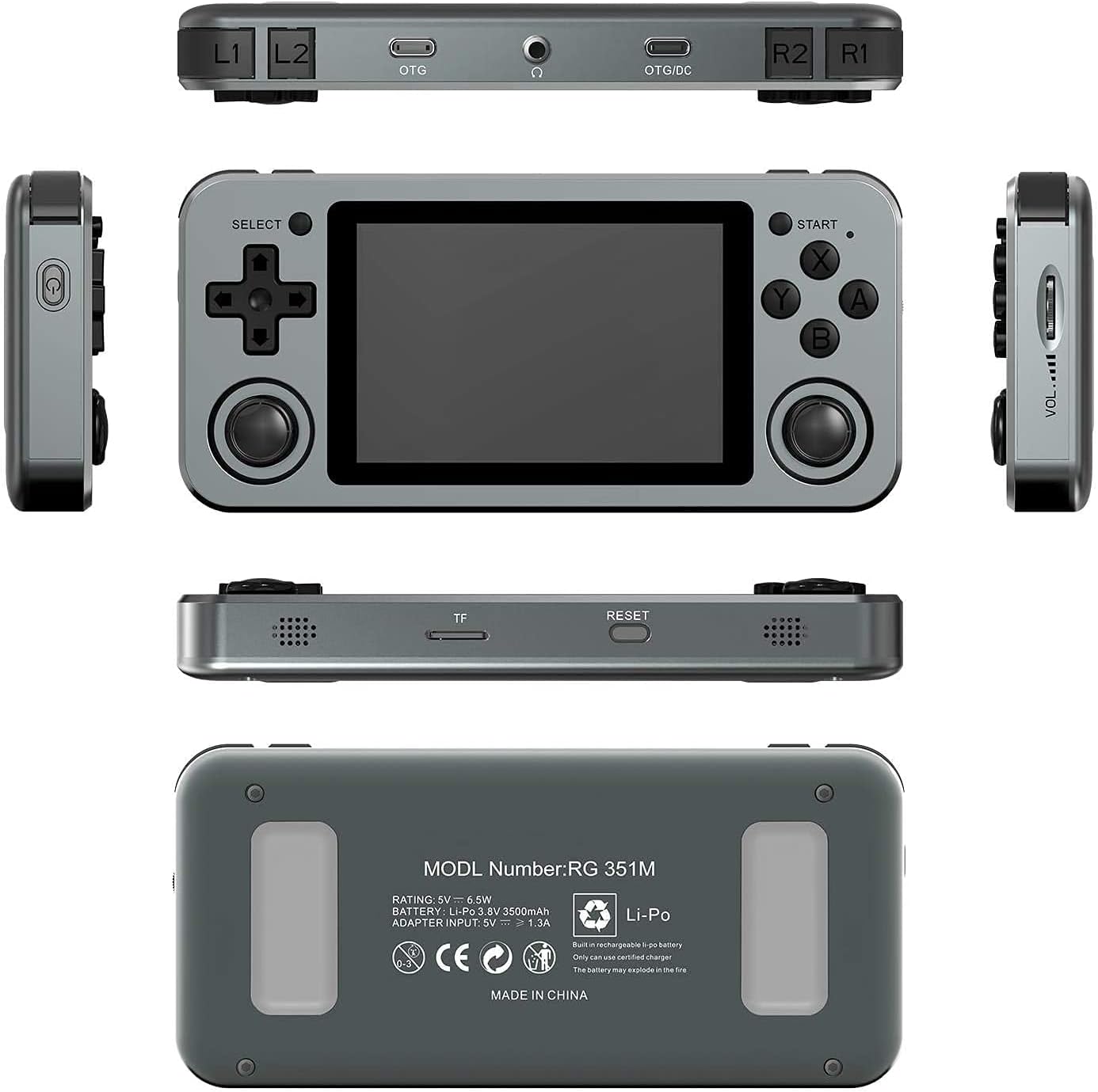
Image: A composite image showing the ANBERNIC RG351M from various angles, including front, top, bottom, sides, and back, providing a comprehensive view of its design and ports.
| فیچر | تفصیل |
|---|---|
| ماڈل | RG351M |
| سی پی یو | RK3326 quad core 1.5 GHz |
| جی پی یو | Mali-G31 MP2 |
| رام | DDR3L 1GB |
| یادداشت | 64GB (TF Card) |
| سکرین | 3.5 inch IPS, OCA full lamination, 320*480 resolution |
| سسٹم | Open source Linux system |
| بیٹری | Li-polymer 3500 mAh, up to 8 hours battery life |
| چارج ہو رہا ہے۔ | 1.3A charging, max 2A, USB Type-C, 4 hours full charge |
| TF کارڈ سپورٹ | زیادہ سے زیادہ 256 جی بی |
| انٹرفیس | TF Card Slot, 3.5mm Earphone, OTG 1 (Type-C), OTG 2 (Type-C Data/Charging) |
| طول و عرض (کنسول) | 15.2 سینٹی میٹر (ایل) x 7.1 سینٹی میٹر (ڈبلیو) ایکس 1.8 سینٹی میٹر (ایچ) |
| وزن (کنسول) | 0.19kg (approx. 6.7 oz) |
وارنٹی اور سپورٹ
For warranty information and technical support, please refer to the retailer or the official ANBERNIC website. Keep your proof of purchase for warranty claims. This manual provides general guidance; specific software-related issues may require consulting community forums or official support channels.
Ask a question about this manual
Ask about setup, troubleshooting, compatibility, parts, safety, or missing instructions. Manuals+ will review the question and use this page’s manual context to help answer it.