
1. تعارف
This manual provides instructions for the proper setup, operation, and maintenance of your Bytech TBMOMO119AC Foldable Tablet Stand. Please read this manual thoroughly before using the product to ensure optimal performance and longevity.
2 خصوصیات
The Bytech TBMOMO119AC Foldable Tablet Stand is designed to provide a stable and adjustable platform for your tablet or other compatible portable electronic devices. Key features include:
- تہ ڈیزائن: کمپیکٹ اسٹوریج اور آسان پورٹیبلٹی کی اجازت دیتا ہے۔
- سایڈست Viewزاویہ: Provides multiple height and angle settings for comfortable viewing
- وینٹیلیشن: Open design helps prevent device overheating.
- وسیع مطابقت: Suitable for tablets and other devices ranging from 7 to 15 inches.
- پائیدار تعمیر: دیرپا استعمال کے لیے مضبوط مواد سے بنایا گیا ہے۔
3. پیکیج کے مشمولات
براہ کرم تصدیق کریں کہ تمام اشیاء پیکیج میں موجود ہیں:
- 1 x Bytech TBMOMO119AC Foldable Tablet Stand
4. سیٹ اپ ہدایات
Follow these steps to set up your tablet stand:
- اسٹینڈ کو کھولیں: Gently pull the two main support arms outwards until the stand is fully extended and stable on a flat surface.
- اونچائی اور زاویہ کو ایڈجسٹ کریں: The stand features adjustable hinges. Carefully lift or lower the support arms to achieve your desired viewing height and angle. Ensure both sides are adjusted evenly for stability.
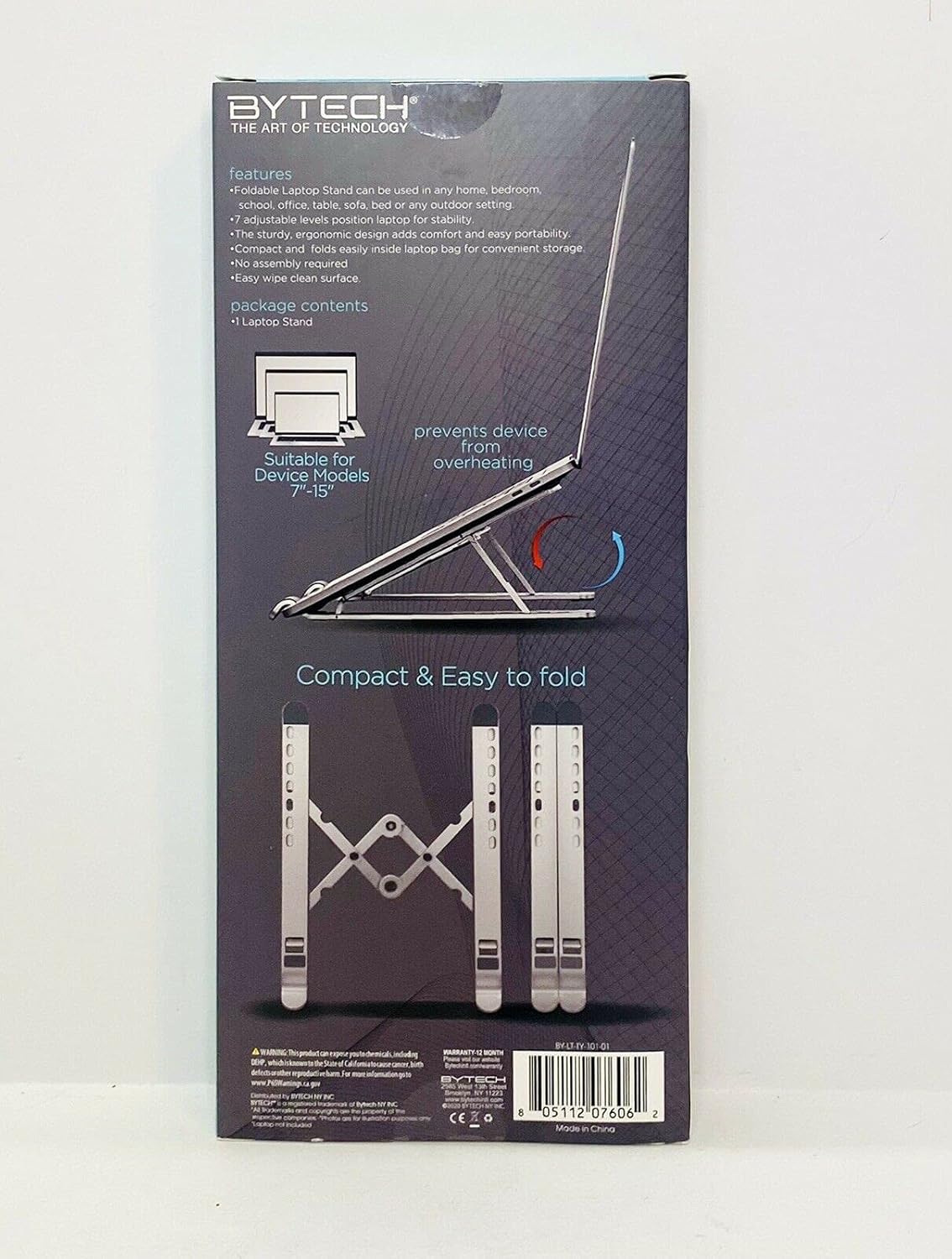
Image 1: The Bytech TBMOMO119AC Foldable Tablet Stand fully extended and ready for use. This image shows the stand's adjustable arms and base, designed to securely hold a tablet.

Image 2: The Bytech TBMOMO119AC Foldable Tablet Stand in its compact, folded state, illustrating its portability and ease of storage.
5. آپریٹنگ ہدایات
To use your tablet stand:
- اپنا آلہ رکھیں: Carefully place your tablet or compatible device onto the support hooks at the front of the stand. Ensure the device rests securely against the back support.
- حتمی ایڈجسٹمنٹ: Make any final adjustments to the stand's height and angle to achieve your preferred viewing position. Ensure the stand remains stable with your device in place.
6 دیکھ بھال
To maintain your Bytech TBMOMO119AC Foldable Tablet Stand:
- صفائی: اسٹینڈ کو نرم سے صاف کریں، ڈیamp cloth to remove dust and smudges. Avoid using harsh chemicals or abrasive cleaners.
- ذخیرہ: When not in use, fold the stand into its compact form and store it in a dry place away from direct sunlight.
7 خرابیوں کا سراغ لگانا
If you encounter issues with your tablet stand, consider the following:
- اسٹینڈ عدم استحکام: Ensure the stand is fully unfolded and placed on a flat, stable surface. Verify that both adjustable arms are set to the same height and angle.
- آلہ محفوظ نہیں ہے: Confirm that your device is properly seated on the support hooks and rests against the back support. The stand is designed for devices between 7 and 15 inches.
8. وضاحتیں
| برانڈ | بائیٹیک |
| ماڈل نمبر | TBMOMO119AC |
| رنگ | سیاہ |
| ہم آہنگ آلات | Tablets (7-15 inches) |
| چڑھنے کی قسم | تہ کرنے کے قابل |
| سایڈست لمبائی | جی ہاں |
| شے کا وزن | 0.17 کلوگرام |
| مواد | پلاسٹک |
| یو پی سی | 805112077328 |
9. وارنٹی اور سپورٹ
The Bytech TBMOMO119AC Foldable Tablet Stand comes with a 12 ماہ کی وارنٹی from the date of purchase. This warranty covers manufacturing defects under normal use. For warranty claims or technical support, please contact your retailer or the Bytech customer service department.