
1. تعارف
Thank you for choosing the A4tech FG1112 Fstyler Wireless Keyboard and Mouse Set. This compact and efficient combo provides a reliable 2.4GHz wireless connection, offering convenience and comfort for your daily computing needs. The keyboard features a Q Turkish layout with FN multimedia keys, while the mouse offers precise 1200 DPI optical tracking. This manual will guide you through the setup, operation, and maintenance of your new device.
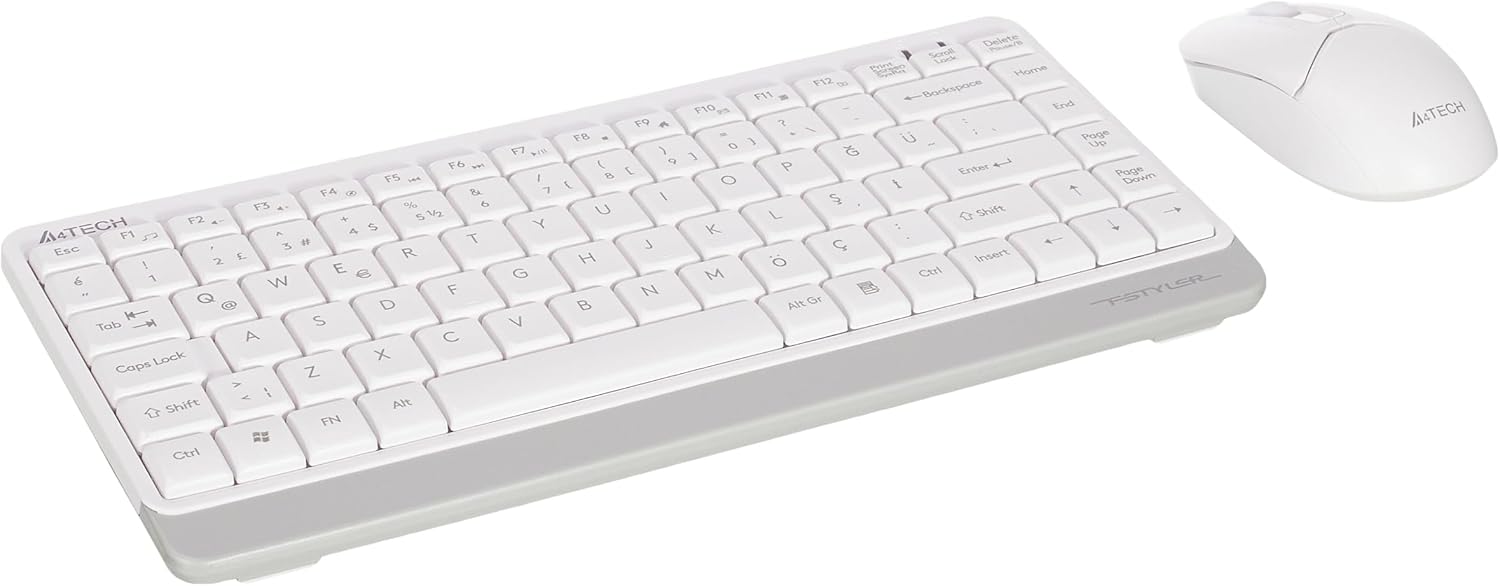
Image 1.1: A4tech FG1112 Fstyler Wireless Keyboard and Mouse Set (White)
2. پیکیج کے مشمولات
تمام اشیاء کی موجودگی کو یقینی بنانے کے لیے براہ کرم پیکیج کے مواد کو چیک کریں:
- 1 x A4tech FG1112 Wireless Keyboard
- 1 x A4tech Fstyler Wireless Mouse
- 1 ایکس USB نینو ریسیور
- 2 x AAA بیٹریاں (کی بورڈ کے لیے)
- 1 x AA Battery (for mouse, typically included)
- 1 ایکس یوزر مینوئل (یہ دستاویز)
3. سیٹ اپ ہدایات
- بیٹریاں داخل کریں:
- For the keyboard: Open the battery compartment cover on the underside of the keyboard. Insert two AAA batteries, ensuring correct polarity (+/-). Close the cover.
- For the mouse: Open the battery compartment cover on the underside of the mouse. Insert one AA battery, ensuring correct polarity (+/-). Close the cover.

Image 3.1: Mouse bottom view showing battery compartment and power switch.
- USB نینو وصول کنندہ کو مربوط کریں: Locate the USB Nano Receiver, typically stored inside the mouse's battery compartment or packaged separately. Plug the receiver into an available USB port on your computer.
- پاور آن:
- For the keyboard: Ensure the keyboard is powered on. There might be a power switch on the top right or underside.
- For the mouse: Slide the power switch on the underside of the mouse to the "ON" position.
- خودکار کنکشن: Your computer should automatically detect and install the necessary drivers for the keyboard and mouse. This process may take a few moments. Once complete, your devices are ready for use.
Video 3.1: A short demonstration of the A4tech Fstyler Wireless Keyboard and Mouse Set, showing its compact design and wireless connectivity. This video illustrates the product's features and ease of use.
4. آپریٹنگ ہدایات
4.1 کی بورڈ کا استعمال
The A4tech FG1112 keyboard features a compact design with a Q Turkish layout. It is designed for comfortable and quiet typing.

تصویر 4.1: اوپر view of the A4tech FG1112 Wireless Keyboard, highlighting its Q Turkish layout.
Multimedia and Function Keys:
The keyboard includes 12 multimedia and internet function keys integrated into the F1-F12 keys. To activate these functions, press the FN مطلوبہ F-key کے ساتھ ایک ساتھ کلید۔
- FN + F1: میڈیا پلیئر
- FN + F2: آواز کم
- FN + F3: اواز بڑھایں
- FN + F4: خاموش
- FN + F5: پچھلا ٹریک
- FN + F6: اگلا ٹریک
- FN + F7: چلائیں/روکیں۔
- FN + F8: رکو
- FN + F9: ہوم پیج
- FN + F10: ای میل
- FN + F11: میرے کمپیوٹر
- FN + F12: کیلکولیٹر

Image 4.2: Illustration of FN key functionality for multimedia controls.
4.2 ماؤس کا استعمال
The A4tech Fstyler mouse provides precise 1200 DPI optical tracking for smooth and accurate cursor movement.

تصویر 4.3: اوپر view of the A4tech Fstyler Wireless Mouse.
بنیادی افعال:
- بائیں کلک: Primary function, used for selecting items, opening files، وغیرہ
- دائیں کلک کریں: Secondary function, typically opens context menus.
- اسکرول وہیل: Used for scrolling documents and web pages vertically. Can also function as a middle click button.
5 دیکھ بھال
- صفائی: کی بورڈ اور ماؤس کو صاف کرنے کے لیے نرم، خشک کپڑا استعمال کریں۔ ضدی گندگی کے لیے، تھوڑا سا ڈیamp cloth can be used, but ensure no liquid enters the devices.
- بیٹری کی تبدیلی: When the keyboard or mouse becomes unresponsive or exhibits delayed input, it's time to replace the batteries. Follow the "Insert Batteries" steps in the Setup section.
- ذخیرہ: When not in use for extended periods, turn off the mouse to conserve battery life. Store the devices in a cool, dry place.
6 خرابیوں کا سراغ لگانا
| مسئلہ | ممکنہ حل |
|---|---|
| کی بورڈ/ماؤس جواب نہیں دے رہا ہے۔ |
|
| Delayed or intermittent response |
|
| ملٹی میڈیا کیز کام نہیں کر رہی ہیں۔ |
|
7. وضاحتیں
| فیچر | تفصیل |
|---|---|
| برانڈ | A4tech |
| ماڈل | ایف جی 1112 |
| کنیکٹوٹی ٹیکنالوجی | 2.4GHz وائرلیس |
| کی بورڈ لے آؤٹ | Q Turkish |
| کی بورڈ کی قسم | Multimedia Membrane |
| ماؤس ڈی پی آئی | 1200 DPI Optical |
| Keyboard Power Source | 2 ایکس اے اے اے بیٹریاں |
| Mouse Power Source | 1 x AA Battery (typical) |
| خصوصی خصوصیات | Wireless, Mini, Multimedia Keys, Optical Mouse, Laser Printed Keys, Water-resistant design (with drainage channels) |
| پروڈکٹ کا وزن | 0.62 Kilograms (Set) |
| طول و عرض (کی بورڈ) | Approx. 315mm (Width) x 146mm (Depth) x 25mm (Height) |
| طول و عرض (ماؤس) | Approx. 64mm (Width) x 108mm (Depth) x 35mm (Height) |

Image 7.1: Dimensions of the A4tech FG1112 Keyboard and Mouse.
8. وارنٹی اور سپورٹ
This A4tech FG1112 Fstyler Wireless Keyboard and Mouse Set comes with a 2 سال کی وارنٹی خریداری کی تاریخ سے. وارنٹی کے دعووں کے لیے براہ کرم اپنی خریداری کا ثبوت اپنے پاس رکھیں۔
For technical support, troubleshooting assistance, or warranty inquiries, please contact A4tech customer service through their official webسائٹ یا آپ کا مقامی ڈسٹریبیوٹر۔
آپ پر مزید معلومات اور معاون وسائل حاصل کر سکتے ہیں۔ A4tech Store on Amazon.