
تعارف
This manual provides detailed instructions for the setup, operation, and maintenance of your ABKO Hacker KN01 Electro-Capacitive RGB PBT Keyboard. Please read this manual thoroughly before using the product to ensure proper functionality and longevity.
The ABKO Hacker KN01 is a high-performance gaming keyboard featuring electro-capacitive non-contact switches, full RGB LED effects, and durable PBT dual-injection keycaps. It is designed for optimal gaming experience with features like full N-key rollover and a 1000Hz polling rate.

Image: The ABKO Hacker KN01 keyboard in white, showcasing its RGB lighting capabilities.
سیٹ اپ
- پیک کھولنا: Carefully remove the keyboard and all accessories from the packaging. Ensure all components are present.
- کنکشن: Connect the provided USB Type-C cable to the keyboard's port and the other end to an available USB port on your computer.
- ڈرائیور کی تنصیب: The keyboard is typically plug-and-play. For advanced customization and software features, download the official software from the ABKO webسائٹ
- ابتدائی ٹیسٹ: After connecting, the keyboard's RGB lighting should illuminate. Test basic key functions to ensure proper operation.
آپریٹنگ ہدایات
The KN01 keyboard offers various functions and customization options. Below are key operating instructions:
کلیدی خصوصیات ختمview
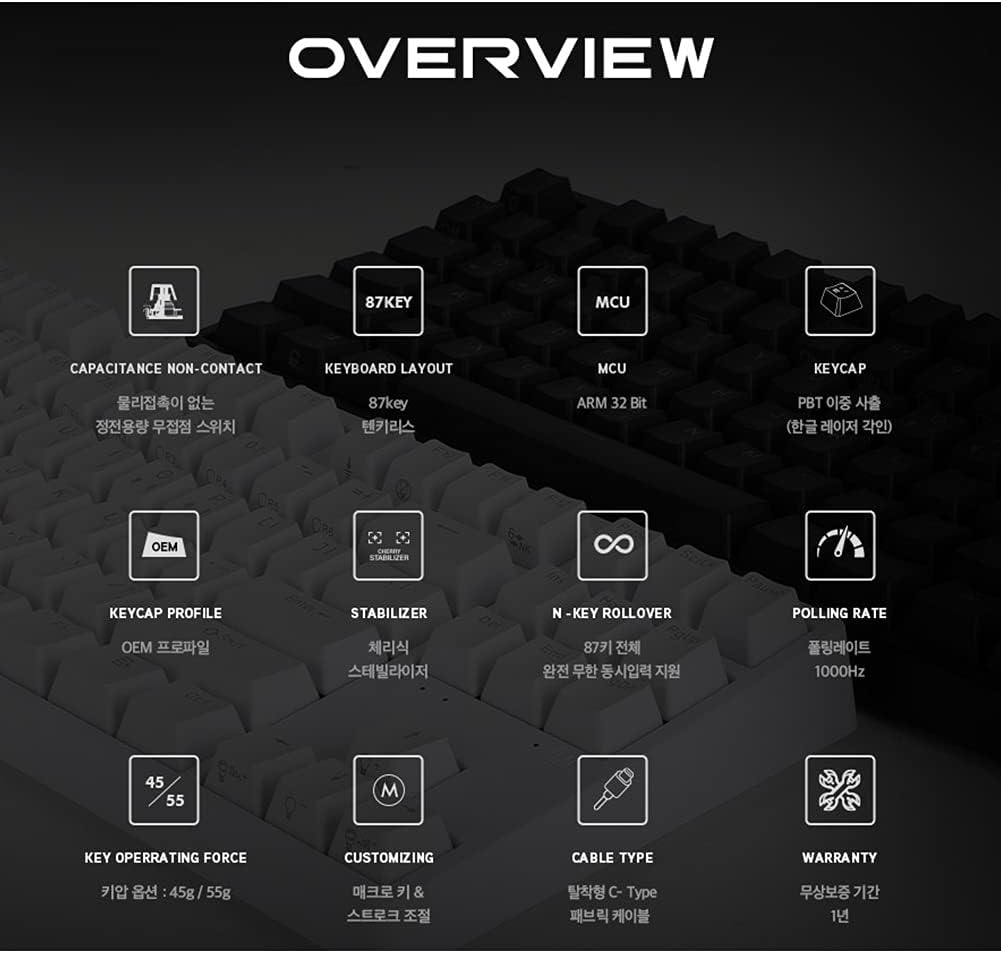
تصویر: ایک اوورview diagram detailing the technical specifications and features of the ABKO Hacker KN01 keyboard.
- Capacitance Non-Contact Switches: Provides a responsive and durable typing experience.
- 87-کلیدی ترتیب: A compact layout without a numeric keypad.
- ایم سی یو: Equipped with an ARM 32-bit Microcontroller Unit for efficient processing.
- PBT Dual Injection Keycaps: Durable keycaps with legends that won't fade.
- N-Key رول اوور: Supports full N-key rollover, allowing all keys to be registered simultaneously.
- 1000Hz پولنگ کی شرح: Ensures rapid response times for gaming.
- ڈی ٹیچ ایبل USB ٹائپ سی کیبل: For easy connectivity and portability.
RGB LED Effects
The keyboard features full RGB LED effects. Specific lighting modes and customization options can be accessed through the dedicated software or by using FN key combinations. Refer to the software interface for detailed control over lighting patterns, brightness, and speed.
Adjusting Key Stroke
The key stroke length can be adjusted to suit your preference. Press FN + F9 to cycle through different key stroke settings. This feature allows for fine-tuning the actuation point of the electro-capacitive switches.
کلیدی تالا فنکشن
The keyboard includes a key lock function to prevent accidental presses during critical moments, especially in gaming. Consult the software or specific FN key combinations for activating and deactivating this feature.
اشارے لائٹس

تصویر: ایک قریبی اپ view of the keyboard highlighting the Caps Lock, Scroll Lock, and Win Lock indicator lights, which are simple white LEDs.
The indicator lights for کیپس لاک, اسکرول لاک، اور ون لاک are located above the arrow keys. These indicators use simple white LEDs for a clean and minimalist design.
دیکھ بھال
- صفائی: The ABKO Hacker KN01 keyboard is IP68 certified for full waterproofing. To clean, you can gently rinse the keyboard under running water (ensure USB cable is disconnected) or wipe it with a damp cloth. Allow it to dry completely before reconnecting.
- عمومی دیکھ بھال: Avoid exposing the keyboard to extreme temperatures, direct sunlight, or harsh chemicals. Do not attempt to disassemble the keyboard, as this may void the warranty.
- کیبل مینجمنٹ: Ensure the USB cable is not bent or kinked excessively to prevent damage.
خرابی کا سراغ لگانا
- کی بورڈ جواب نہیں دے رہا ہے:
- یقینی بنائیں کہ USB کیبل کی بورڈ اور کمپیوٹر دونوں سے محفوظ طریقے سے جڑی ہوئی ہے۔
- کی بورڈ کو کسی دوسرے USB پورٹ سے جوڑنے کی کوشش کریں۔
- اپنے کمپیوٹر کو دوبارہ شروع کریں۔
- اگر USB ہب استعمال کر رہے ہیں، تو براہ راست کمپیوٹر سے جڑنے کی کوشش کریں۔
- LED Lights Not Working/Incorrect:
- Check the keyboard software for lighting settings.
- Ensure no FN key combinations have turned off or changed the lighting.
- Reinstall the keyboard software if necessary.
- کلیدیں رجسٹر نہیں ہو رہی ہیں:
- Clean the affected key area, as debris might be interfering with the switch.
- Ensure the key lock function is not active.
- Test the keyboard on another computer to rule out software or system issues.
If you continue to experience issues, please refer to the Warranty & Support section for further assistance.
وضاحتیں
| فیچر | تفصیل |
|---|---|
| ماڈل | KN01 |
| کی بورڈ کی قسم | گیمنگ |
| سوئچ کی قسم | Electro-Capacitive Non-Contact (45g actuation force) |
| کلیدی شمار | 104 |
| کیکیپس | PBT Dual Injection |
| پولنگ کی شرح | 1000Hz |
| ایم سی یو | اے آر ایم 32 بٹ |
| کنیکٹوٹی | ڈی ٹیچ ایبل USB ٹائپ-سی |
| واٹر پروف ریٹنگ | IP68 مصدقہ |
| رنگ | سفید |
| ہاتھ کی واقفیت | متضاد |
| مطابقت | CherryMX compatible (switches) |
وارنٹی اور سپورٹ
The ABKO Hacker KN01 keyboard comes with a 1 سال کی وارنٹی خریداری کی تاریخ سے، مینوفیکچرنگ نقائص کا احاطہ. وارنٹی کے دعووں کے لیے براہ کرم اپنی خریداری کا ثبوت اپنے پاس رکھیں۔
For technical support, warranty inquiries, or further assistance, please contact ABKO customer service through their official website or the retailer where the product was purchased. Provide your product model (KN01) and a detailed description of the issue when seeking support.
For the latest drivers and software, please visit the official ABKO webسائٹ