
تعارف
This manual provides detailed instructions for the installation, operation, and maintenance of your Podofo 7-inch 2-DIN Car Stereo. Please read this manual thoroughly before using the product to ensure proper function and to prevent damage. Keep this manual for future reference.
پروڈکٹ ختمview
فرنٹ پینل کنٹرولز
The front panel features a 7-inch HD capacitive touchscreen and various physical controls for easy operation.

تصویر: Front Panel Layout. This image displays the front panel of the car stereo, highlighting the microphone (MIC), previous track button (PREV), power/mode button (ON/OFF), next track button (NEXT), volume control (VOL+/-), TF card slot (TF), AUX input (AUX), reset button (RES), and USB port (USB).
- MIC: ہینڈز فری کالنگ کے لیے مربوط مائکروفون۔
- PREV (<<): Short press for previous track/station; long press for fast rewind.
- ON/OFF (O/M): Short press to change mode; long press to power on/off.
- NEXT (>>): Short press for next track/station; long press for fast forward.
- VOL +/-: Rotary knob to adjust volume. Press to mute/unmute.
- TF: میڈیا پلے بیک کے لیے مائیکرو ایس ڈی کارڈ سلاٹ۔
- AUX: بیرونی آڈیو آلات کے لیے 3.5 ملی میٹر معاون ان پٹ۔
- RES: Reset button (use a thin object to press).
- USB: USB port for media playback and Mirror Link connection.
مصنوعات کے طول و عرض
The unit is designed for standard 2-DIN installation slots. Please verify your vehicle's console dimensions before installation.

تصویر: Product Dimensions. This image shows the car stereo with its dimensions: 178mm (width), 103mm (height), and 63mm (depth).
- چوڑائی: 178 ملی میٹر
- اونچائی: 103 ملی میٹر
- گہرائی: 63 ملی میٹر
شامل اجزاء
The package includes the main car stereo unit and essential accessories for installation and operation.

تصویر: Included Components. This image displays the main car stereo unit, a remote control, two wiring harnesses, and a user manual.
- Podofo 7-inch 2-DIN Car Stereo Unit
- ریموٹ کنٹرول
- پاور وائرنگ ہارنس
- اسپیکر وائرنگ ہارنس
- Rear Camera (if included in package)
- صارف دستی
سیٹ اپ اور انسٹالیشن
Proper installation is crucial for the performance and safety of your car stereo. If you are unsure about any steps, consult a professional installer.
وائرنگ ڈایاگرام
Refer to the following diagram for correct wiring connections. Ensure all connections are secure to prevent electrical issues.

تصویر: Detailed Wiring Diagram. This diagram illustrates connections for speakers (front/rear, left/right), parking sensor control, reverse camera input (CVBSIN), 12V constant power (Yellow), ground (Black), 12V ignition switch (Red), small light line (Green), power antenna/amplifier turn-on (Blue), and steering wheel control line (Brown).
- بجلی کے رابطے:
- Yellow (B+): Connect to 12V constant power supply. This provides continuous power to retain settings.
- Red (ACC): Connect to 12V ignition switch power. This powers the unit on/off with the vehicle's ignition.
- سیاہ (زمین): گاڑی کے چیسس گراؤنڈ سے جڑیں۔
- اسپیکر کنکشن: Connect the corresponding speaker wires (Purple, Gray, White, Green) to your vehicle's speakers. Ensure correct polarity.
- Rear Camera Input (CVBSIN): Connect the video output from the rear camera to this input.
- Reverse Trigger (Pink): Connect to the vehicle's reverse light circuit. This automatically switches to the rear camera view جب پلٹتے ہیں.
- Steering Wheel Control (Brown): Connect to your vehicle's steering wheel control wires. Refer to the "Steering Wheel Control" section for programming.
- پاور اینٹینا/Amplifier Turn-on (Blue): Connect to the power antenna or external amplifier trigger wire.
اہم نوٹ: The yellow wire (B+) must be connected to a constant 12V power source to prevent loss of settings and radio presets when the vehicle is turned off. If settings are not saved, check this connection.
آپریٹنگ ہدایات
بنیادی آپریشنز
- پاور آن/آف: دیر تک دبائیں O/M سامنے والے پینل پر بٹن
- موڈ کا انتخاب: مختصر دبائیں O/M button to cycle through available modes (Radio, USB, TF, AUX, Bluetooth, Mirror Link).
- والیوم ایڈجسٹمنٹ: گھمائیں۔ VOL +/- knob. Press the knob to mute or unmute audio.
- ری سیٹ: If the unit malfunctions, gently press the RES button with a pointed object. This will restore factory settings.
بلوٹوت فنکشن
Connect your mobile device via Bluetooth for hands-free calling and audio streaming.

تصویر: Bluetooth Interface. This image shows the car stereo display in Bluetooth mode, with a dial pad for making calls and icons for music playback and phonebook access. A smartphone is also shown connecting to the stereo.
- اپنے موبائل ڈیوائس پر بلوٹوتھ کو فعال کریں۔
- On the car stereo, select the Bluetooth mode.
- تلاش کریں۔ available devices on your phone and select "PODOFO" or a similar name.
- Confirm pairing on both devices.
- Once connected, you can make/receive calls and play music wirelessly.
ایف ایم ریڈیو
Access your favorite radio stations with automatic search and preset storage.
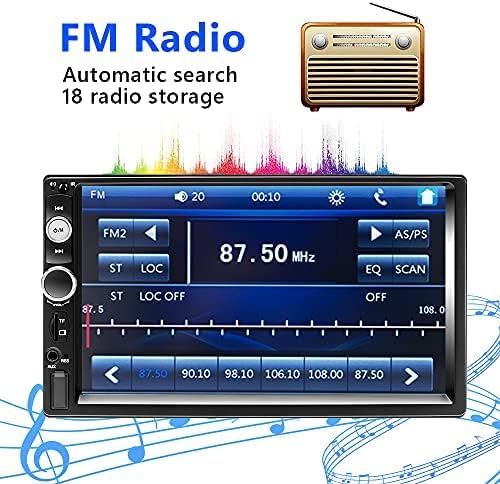
تصویر: FM Radio Screen. This image displays the car stereo's FM radio interface, showing frequency tuning, preset buttons (FM1, FM2, AS/PS), and station display (87.50 MHz).
- خودکار تلاش: دبائیں AS/PS button to automatically scan and save up to 18 stations.
- دستی ٹیوننگ: استعمال کریں۔ PREV or اگلا فریکوئنسی کو دستی طور پر ٹیون کرنے کے لیے بٹن۔
- پیش سیٹ اسٹیشنز: Touch the numbered buttons on the screen to select a saved station.
آئینہ لنک فنکشن
Display your smartphone screen directly on the car stereo's display.
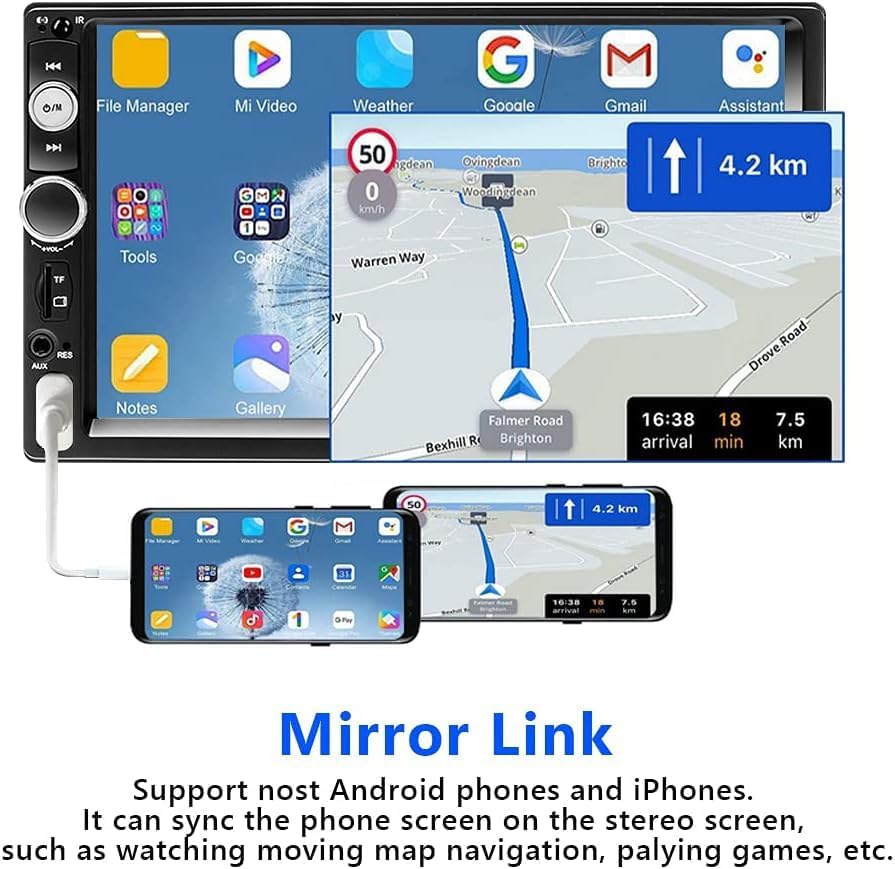
تصویر: Mirror Link Display. This image shows a smartphone connected via USB to the car stereo, with the phone's screen content (including navigation and app icons) mirrored onto the larger stereo display.
- Connect your Android phone (version 1.1 and earlier) or iPhone (series 5-8, iOS 13.4 and later) to the USB port using a high-quality USB cable.
- Select the "Mirror Link" mode on the car stereo.
- Follow the on-screen prompts on both your phone and the stereo to establish the connection.
- Once connected, your phone's screen will be mirrored, allowing you to view navigation, videos, or other apps.
اسٹیئرنگ وہیل کنٹرول (SWC)
Program your vehicle's steering wheel buttons to control the car stereo.

تصویر: Steering Wheel Control. This image shows a person's hands on a car steering wheel, with a remote control attached, demonstrating how to control the car stereo using steering wheel buttons.
- Ensure the steering wheel control wires are correctly connected to the stereo (refer to the wiring diagram).
- Access the "Steering Wheel Control Learning" menu in the stereo's settings.
- Follow the on-screen instructions to assign functions to your steering wheel buttons. Typically, this involves pressing a function on the stereo's screen and then pressing the corresponding button on your steering wheel.
Rear Camera Function
The included rear camera provides a clear view جب پلٹتے ہیں.
- When the vehicle is shifted into reverse gear, the stereo automatically displays the rear camera feed.
- The camera provides a 170-degree viewing angle and features 12 LED lights for improved visibility in low-light conditions.
ملٹی میڈیا پلے بیک
The unit supports various media sources for audio and video playback.

تصویر: Multimedia Playback Icons. This image shows icons representing various media input options: U Disk (USB), TF (MicroSD card), AUX, and BT (Bluetooth).
- USB: Insert a USB drive into the USB port for audio and video playback.
- TF کارڈ: Insert a MicroSD card into the TF slot for audio and video playback.
- AUX: Connect external audio devices (e.g., MP3 players) to the 3.5mm AUX input.
- Supported formats include AVI, WMV, MOV, MKV for video, and MP3, WAV, WMA for audio.
دیکھ بھال
- سکرین کی صفائی: Use a soft, dry cloth to wipe the touchscreen. Avoid abrasive cleaners or solvents.
- عمومی صفائی: یونٹ کو دھول اور ملبے سے پاک رکھیں۔ مشکل سے پہنچنے والے علاقوں کے لیے نرم برش یا کمپریسڈ ہوا کا استعمال کریں۔
- مائعات سے پرہیز کریں: یونٹ کو پانی یا دیگر مائعات کے سامنے نہ رکھیں۔
- درجہ حرارت: Operate the unit within recommended temperature ranges. Extreme temperatures can affect performance and lifespan.
خرابی کا سراغ لگانا
| مسئلہ | ممکنہ وجہ | حل |
|---|---|---|
| یونٹ آن نہیں ہوتا۔ | بجلی کی فراہمی نہیں؛ غلط وائرنگ. | Check the Yellow (B+) and Red (ACC) power wires for proper connection to 12V sources. Ensure the Black (Ground) wire is securely connected. |
| Settings and radio presets are lost after turning off the car. | Yellow (B+) wire not connected to constant 12V power. | Ensure the Yellow (B+) wire is connected to a constant 12V power source, not an ignition-switched source. |
| اسپیکر سے کوئی آواز نہیں ہے۔ | Speaker wires incorrectly connected; volume too low; unit muted. | Check all speaker wire connections for correct polarity. Increase volume. Press the volume knob to unmute. |
| بلوٹوتھ کنکشن ناکام ہو جاتا ہے یا غیر مستحکم ہے۔ | Device not in pairing mode; interference; outdated phone OS. | Ensure Bluetooth is enabled on both devices. Try re-pairing. Move closer to the unit. Update phone's operating system if necessary (especially for Mirror Link). |
| Mirror Link not working. | Incorrect USB cable; incompatible phone OS; app issues. | Use a high-quality USB cable. Ensure your phone's OS is compatible (Android 1.1 and earlier, iPhone iOS 13.4 and later). Try restarting both devices. |
| پیچھے والا کیمرہ ڈسپلے نہیں ہو رہا ہے۔ | Camera not connected; reverse trigger wire not connected. | Check the CVBSIN connection for the camera. Ensure the Pink (Reverse Trigger) wire is connected to the vehicle's reverse light circuit. |
| ٹچ اسکرین غیر جوابدہ۔ | سافٹ ویئر کی عارضی خرابی۔ | دبائیں RES یونٹ کو دوبارہ ترتیب دینے کے لیے بٹن۔ |
وضاحتیں
| فیچر | تفصیل |
|---|---|
| برانڈ | پوڈوفو |
| ماڈل نمبر | 1365669031 |
| ڈسپلے | 7-inch HD Capacitive Touchscreen |
| کنیکٹوٹی ٹیکنالوجی | AUX، بلوٹوتھ، USB |
| وائرلیس ٹیکنالوجی | بلوٹوتھ |
| ہم آہنگ آلات | اسمارٹ فون، ٹیبلٹ |
| کنٹرولر کی قسم | Android, iOS (for Mirror Link) |
| کنٹرول کا طریقہ | ایپ، ٹچ |
| آؤٹ پٹ پاور | 60 Watts (per channel, 4 channels) |
| آڈیو چینلز | 4.0 Surround Sound Configuration |
| سپورٹ شدہ آڈیو فارمیٹس | MP3 ، WAV ، WMA |
| تائید شدہ ویڈیو فارمیٹس | AVI, WMV, MOV, MKV |
| ابعاد (D x W x H) | 6.3 سینٹی میٹر x 17.8 سینٹی میٹر x 6.3 سینٹی میٹر |
| وزن | 797 گرام |
| Internet Applications | Browser, Netflix, YouTube (via Mirror Link) |
وارنٹی اور سپورٹ
For warranty information, please refer to the documentation provided at the time of purchase or contact your retailer. For technical support, please reach out to Podofo customer service through their official channels or the retailer where the product was purchased.
Always provide your product model number (1365669031) and purchase details when seeking support.