
1. تعارف
The waveshare FT232RL USB to TTL Adapter Board (Type C) is a communication module designed to convert USB signals to UART (TTL) serial signals. It features the original FT232RL chip, ensuring reliable performance and broad compatibility. This module supports various operating systems including Mac OS, Linux, Android, WinCE, and Windows 7/8/8.1/10/11. It is compatible with both 3.3V and 5V logic levels, making it versatile for different embedded system applications.
This manual provides detailed instructions for setting up, operating, and maintaining your FT232RL USB to TTL Adapter Board.

Figure 1: waveshare FT232RL USB to TTL Adapter Board (Type C)
2 خصوصیات
The FT232RL USB to TTL Adapter Board incorporates several key features for robust serial communication:
- Original FT232RL Chip: Utilizes the genuine FT232RL integrated circuit for stable and reliable USB to serial conversion.
- Wide OS Compatibility: Supports a broad range of operating systems including Mac OS, Linux, Android, WinCE, and Windows 7/8/8.1/10/11.
- Selectable VCCIO Power Mode: Offers three power output options via a jumper setting:
- VCCIO - 5V: Provides a 5V output.
- VCCIO - 3.3V: Provides a 3.3V output.
- Open Jumper: Allows the module to be powered from the target board (3.3V-5V).
- ایل ای ڈی اشارے: Equipped with three LED indicators for status monitoring:
- TXD LED: Indicates data transmission.
- RXD ایل ای ڈی: ڈیٹا کے استقبال کی نشاندہی کرتا ہے۔
- پی ڈبلیو آر ایل ای ڈی: طاقت کی حیثیت کی نشاندہی کرتا ہے۔
- Accessible Pins: Key communication pins (TXD, RXD, RTS#, CTS#) are readily accessible on standard pin headers. Other pins are available on drilled holes, compatible with universal prototype boards for custom applications.
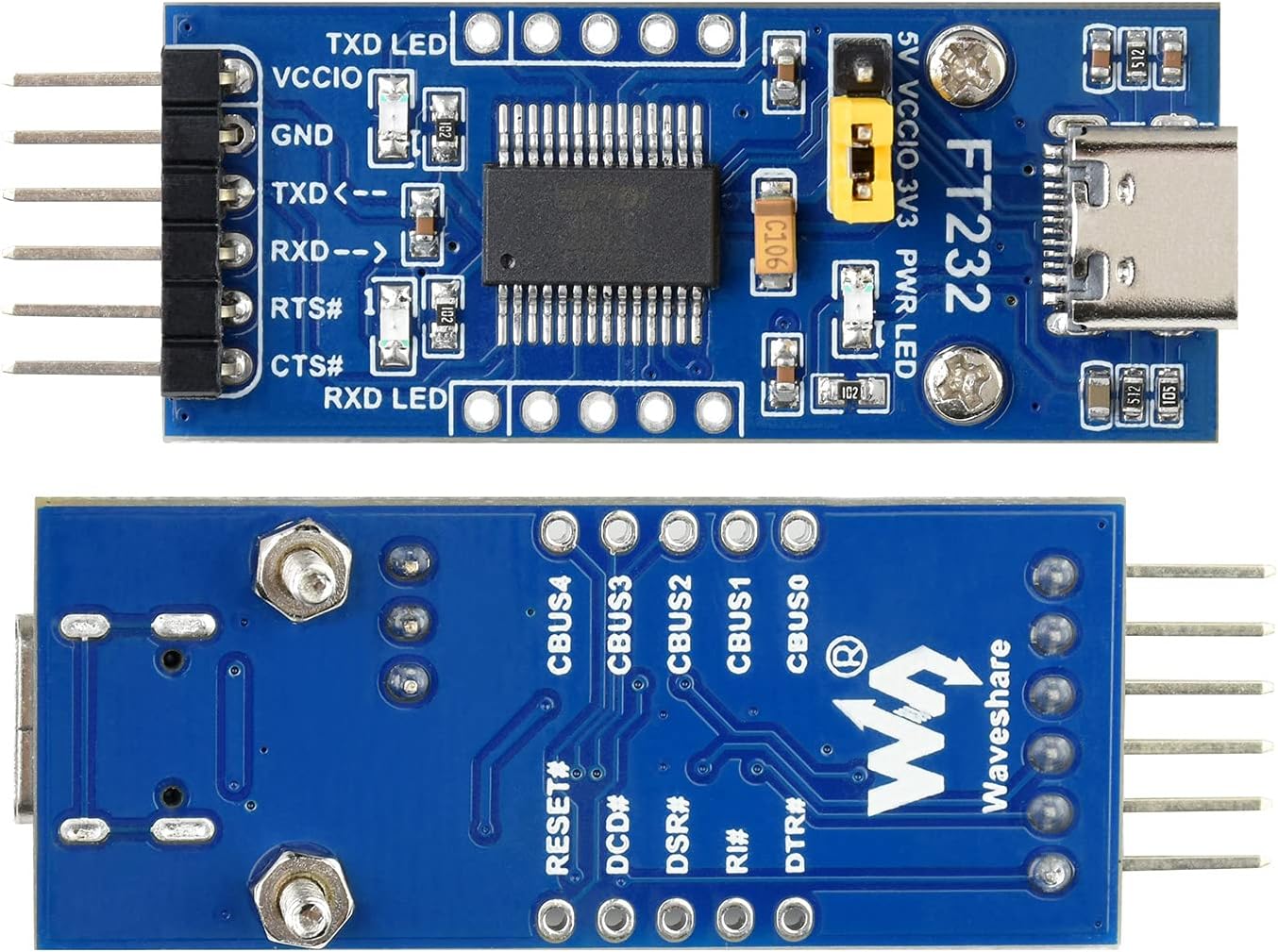
شکل 2: اوپر اور نیچے View of the Adapter Board
3. سیٹ اپ
3.1 ڈرائیور کی تنصیب
Before using the FT232RL module, you may need to install the appropriate drivers for your operating system. The FT232RL chip is manufactured by FTDI, and their official website provides the latest drivers. Typically, modern operating systems like Windows 10/11 and Linux distributions may automatically install the necessary drivers upon connection. For older OS versions or specific configurations, manual installation might be required.
- Connect the FT232RL module to your computer's USB port using a USB-C cable.
- If drivers are not automatically installed, visit the FTDI webسائٹ (www.ftdichip.com/Drivers/VCP.htm) to download the Virtual COM Port (VCP) drivers compatible with your operating system.
- Follow the installation instructions provided by FTDI.
- After successful installation, the device should appear as a COM port in your system's Device Manager (Windows) or `/dev/ttyUSBx` (Linux).
3.2 VCCIO Power Mode Configuration
The module's VCCIO power output can be configured using the onboard jumper. This setting determines the logic level (3.3V or 5V) for the communication pins (TXD, RXD, RTS#, CTS#) and the power supplied to the target board if the jumper is set to 3.3V or 5V output.
- For 5V Logic Level: Place the jumper cap on the pins labeled VCCIO - 5V. This will output 5V on the VCCIO pin and set the logic level to 5V.
- For 3.3V Logic Level: Place the jumper cap on the pins labeled VCCIO - 3.3V. This will output 3.3V on the VCCIO pin and set the logic level to 3.3V.
- Powered by Target Board: Remove the jumper cap entirely. In this configuration, the module's VCCIO pin should be connected to the target board's power supply (3.3V-5V). The module will then adapt its logic level to that of the target board.
CAUTION: Ensure the VCCIO setting matches the logic level of your target device to prevent damage.
4. آپریٹنگ ہدایات
4.1 پن آؤٹ تفصیل
The module provides standard UART communication pins:
- VCCIO: Power output (3.3V or 5V, depending on jumper setting) or power input from target board.
- GND: زمینی رابطہ۔
- TXD: Transmit Data. Connect to the RXD pin of your target device.
- RXD: Receive Data. Connect to the TXD pin of your target device.
- RTS#: Request To Send (active low).
- CTS#: Clear To Send (active low).
4.2 ہارڈ ویئر کنکشن
To establish serial communication with a microcontroller (MCU) or other serial device, follow these connection guidelines:
- وی سی سی آئی او ↔ 3.3V or 5V output (if the module is powered from USB and the onboard jumper is shorted to 3.3V or 5V).
- جی این ڈی ↔ GND.
- TXD ↔ MCU.RX (signal direction: MCU.RX ← FT232 ← PC.TX).
- آر ایکس ڈی ↔ MCU.TX (signal direction: MCU.TX ← FT232 ← PC.RX).
- RTS# ↔ MCU.CTS (signal direction: MCU.CTS ← FT232 ← PC.RTS).
- CTS# ↔ MCU.RTS (signal direction: MCU.RTS ← FT232 ← PC.CTS).
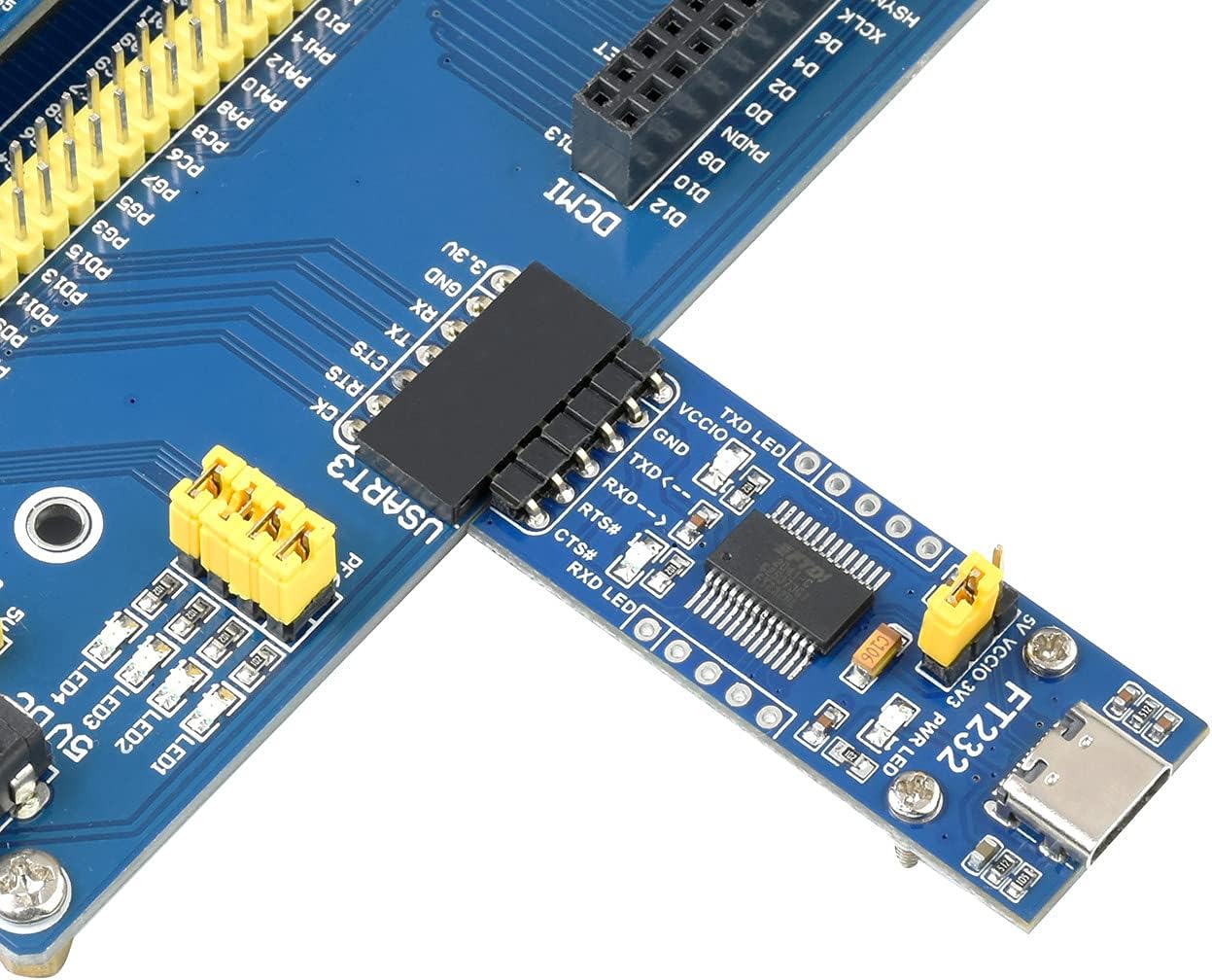
شکل 3: سابقample Hardware Connection with an MCU
CAUTION: The module is compatible with TTL level ONLY. To avoid damage, DO NOT directly connect it to RS232 circuits.
4.3 Using with a Terminal Program
Once the drivers are installed and the module is connected to your target device, you can use a serial terminal program (e.g., PuTTY, Tera Term, Arduino Serial Monitor) on your computer to communicate. Configure the terminal program with the correct COM port, baud rate, data bits, parity, and stop bits to match your target device's serial settings.
5. وضاحتیں
| پیرامیٹر | قدر |
|---|---|
| ماڈل نمبر | FT232RL |
| چپ | Original FT232RL |
| ان پٹ جلدtage | 5V (USB کے ذریعے) |
| منطق کی سطح | 3.3V / 5V (selectable via jumper) |
| کنیکٹر کی قسم | USB قسم C |
| تعاون یافتہ OS | Mac OS, Linux, Android, WinCE, Windows 7/8/8.1/10/11 |
| اشارے | TXD LED, RXD LED, PWR LED |
| طول و عرض (L x W) | 46.17mm x 19.11mm (تقریبا) |

Figure 4: Outline Dimensions of the Adapter Board
6 خرابیوں کا سراغ لگانا
If you encounter issues while using the FT232RL USB to TTL Adapter Board, consider the following troubleshooting steps:
- کوئی آلہ نہیں ملا: Ensure the USB-C cable is securely connected to both the module and your computer. Verify that the necessary FTDI drivers are installed correctly. Try a different USB port or cable.
- کوئی مواصلت نہیں:
- Check your wiring: Ensure TXD is connected to RXD and RXD to TXD between the module and your target device.
- Verify the VCCIO jumper setting matches the logic level of your target device.
- Confirm the baud rate, data bits, parity, and stop bits in your terminal program match the settings of your target device.
- Check the TXD and RXD LEDs on the module. They should blink when data is being transmitted or received. If they do not, there might be an issue with the connection or the data flow.
- بجلی کے مسائل: Ensure the PWR LED is illuminated when the module is connected to USB. If not, check the USB connection or try a different USB port. If powering from the target board (jumper removed), ensure the target board is supplying power to the VCCIO pin.
- Incorrect Logic Level: If your target device is not responding or behaving erratically, double-check that the VCCIO jumper is set to the correct voltage (3.3V or 5V) for your target device. Using an incorrect voltage اجزاء کو نقصان پہنچا سکتا ہے۔
7 دیکھ بھال
To ensure the longevity and proper functioning of your FT232RL USB to TTL Adapter Board, follow these maintenance guidelines:
- ذخیرہ: ماڈیول کو خشک، دھول سے پاک ماحول میں، براہ راست سورج کی روشنی اور انتہائی درجہ حرارت سے دور رکھیں۔
- ہینڈلنگ: Handle the board by its edges to avoid touching the electronic components, which can be sensitive to static discharge.
- صفائی: If necessary, gently clean the board with a soft, dry brush or a lint-free cloth. Avoid using liquids or harsh chemicals.
- بجلی بند: Disconnect the module from power sources when not in use or when making changes to connections.
8. وارنٹی اور سپورٹ
waveshare provides development resources and technical support for this product. If you encounter any problems or require assistance, please refer to the official waveshare website for documentation, forums, and contact information. For specific product inquiries or technical issues, please contact waveshare customer support directly.