
تعارف
This manual provides detailed instructions for the installation, operation, and maintenance of your Hama 00118498 Monitor Desk Mount. Designed to enhance your ergonomic workspace, this monitor arm allows for flexible positioning of your display, promoting a comfortable and productive environment. Please read these instructions carefully before beginning installation.
سیٹ اپ کی ہدایات
Follow these steps to correctly install your Hama 00118498 Monitor Desk Mount.
1. Attaching the Desk Clamp
- ڈیسک cl رکھیںamp assembly onto the edge of your desk. Ensure the desk surface is sturdy and can support the weight of the mount and your monitor.
- cl کو سخت کریں۔amp screw firmly until the mount is securely fastened to the desk. Do not overtighten.
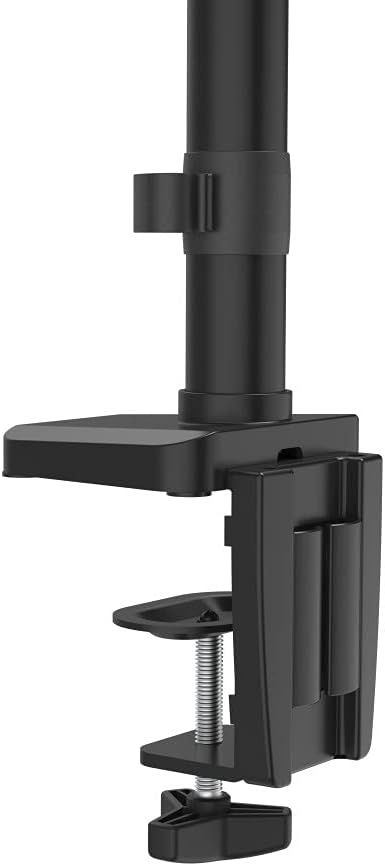
Image: The desk clamp mechanism, showing how it attaches to the desk edge for secure mounting.
2. مانیٹر کو منسلک کرنا
- Ensure your monitor is VESA compatible (100x100mm or 75x75mm).
- Carefully attach the VESA plate from the monitor arm to the back of your monitor using the provided screws. Make sure the screws are tightened securely.
- Slide the monitor (with the attached VESA plate) onto the arm's mounting head. Ensure it clicks into place or is secured with any locking mechanism provided.

Image: The monitor arm's VESA plate and adjustable joint, ready for monitor attachment.

تصویر: ایک طرف view of the assembled monitor arm, highlighting the VESA mount and integrated cable management channels.
3. کیبل کا انتظام
Utilize the integrated cable management system to route your monitor cables neatly along the arm. This helps maintain a tidy workspace and prevents cable clutter.
آپریٹنگ ہدایات
The Hama 00118498 Monitor Desk Mount offers various adjustment options for optimal viewآرام
- اونچائی ایڈجسٹمنٹ: The integrated pneumatic spring allows for smooth and effortless vertical height adjustment. Gently push or pull the monitor to your desired height.
- کنڈا: The arm can swivel horizontally, allowing you to rotate your monitor to share your screen or change your viewING زاویہ
- جھکاؤ: Adjust the monitor's tilt angle (up or down) to reduce glare and find the most comfortable viewپوزیشن.
- گردش: Rotate your monitor from landscape to portrait orientation as needed for different tasks.
Adjustments should be smooth. If the monitor does not hold its position, refer to the troubleshooting section for tension adjustments.
دیکھ بھال
باقاعدگی سے دیکھ بھال آپ کے مانیٹر بازو کی لمبی عمر اور بہترین کارکردگی کو یقینی بناتی ہے۔
- صفائی: Wipe the surface of the monitor arm with a soft, damp کپڑا کھرچنے والے کلینر یا سالوینٹس کے استعمال سے پرہیز کریں۔
- کنکشن چیک کریں: وقتاً فوقتاً تمام پیچ اور کنکشن چیک کریں تاکہ یہ یقینی بنایا جا سکے کہ وہ سخت اور محفوظ رہیں۔ اگر ضروری ہو تو دوبارہ سخت کریں۔
- چکنا: The pneumatic spring is maintenance-free. Do not attempt to lubricate internal components.
خرابی کا سراغ لگانا
If you encounter issues with your Hama 00118498 Monitor Desk Mount, refer to the following common problems and solutions:
- مانیٹر Sags یا پوزیشن پر نہیں رکھتا: The tension of the pneumatic spring may need adjustment. Locate the tension adjustment screw (usually found on the arm joint) and turn it clockwise to increase tension for heavier monitors, or counter-clockwise for lighter monitors. Adjust gradually until the monitor holds its position.
- Monitor is Difficult to Move: If the arm is too stiff, the tension may be too high. Turn the tension adjustment screw counter-clockwise to decrease tension.
- Arm Feels Loose on Desk: ڈیسک cl کو یقینی بنائیںamp is fully tightened. If the desk surface is too thin or fragile, consider adding a protective pad between the clamp and the desk.
- مانیٹر Wobbles: Check all mounting screws on the VESA plate and the arm joints to ensure they are securely fastened.
وضاحتیں
| فیچر | تفصیل |
|---|---|
| ماڈل نمبر | 00118498 |
| چڑھنے کی قسم | ڈیسک کل۔amp |
| حرکت کی قسم | Rotating, Swivel, Tilt, Height Adjustable (Pneumatic Spring) |
| برانڈ | ہما |
| مواد | ایلومینیم |
| رنگ | سیاہ |
| ہم آہنگ آلات | مانیٹر |
| کم سے کم ہم آہنگ سائز | 10 انچ |
| زیادہ سے زیادہ ہم آہنگ سائز | 32 انچ |
| شے کا وزن | 2.2 کلوگرام |
| اصل ملک | چین |
وارنٹی اور سپورٹ
For warranty information or technical support, please refer to the documentation included with your purchase or visit the official Hama webسائٹ آپ عام طور پر وہاں امدادی رابطے کی تفصیلات، اکثر پوچھے گئے سوالات اور اضافی وسائل تلاش کر سکتے ہیں۔
Official Hama Webسائٹ: www.hama.com