
طوطا انکل F6305
Parrot Uncle 52-Inch F6305 New York Chrome Crystal Chandelier Ceiling Fan User Manual
ماڈل: F6305
تعارف
Thank you for choosing the Parrot Uncle 52-Inch F6305 New York Chrome Crystal Chandelier Ceiling Fan. This manual provides essential information for the safe and efficient installation, operation, and maintenance of your new ceiling fan. Please read all instructions carefully before beginning installation and retain this manual for future reference.
سیٹ اپ اور انسٹالیشن
This ceiling fan is designed for indoor use in dry locations, suitable for rooms up to 18 ft. x 18 ft. Professional installation is recommended if you are unfamiliar with electrical wiring.
پیکیج کے مشمولات
- سیلنگ فین موٹر اسمبلی
- 5 Plywood Blades
- کرسٹل لائٹ فکسچر
- ریموٹ کنٹرول
- ڈاؤنروڈز (4 انچ اور 10 انچ)
- بڑھتے ہوئے بریکٹ اور ہارڈ ویئر
- ہدایت نامہ
تنصیب ختمview
Installation typically takes 40-60 minutes. Ensure all power is disconnected at the circuit breaker before beginning. The fan supports a 2-position dual mount, including downrod mount and angled mount (up to 15 degrees).

تصویر 1: Dimensions and Mounting Options. The fan measures 52 inches in diameter and 19 inches in height. It can be installed with a downrod or on an angled ceiling up to 15 degrees.
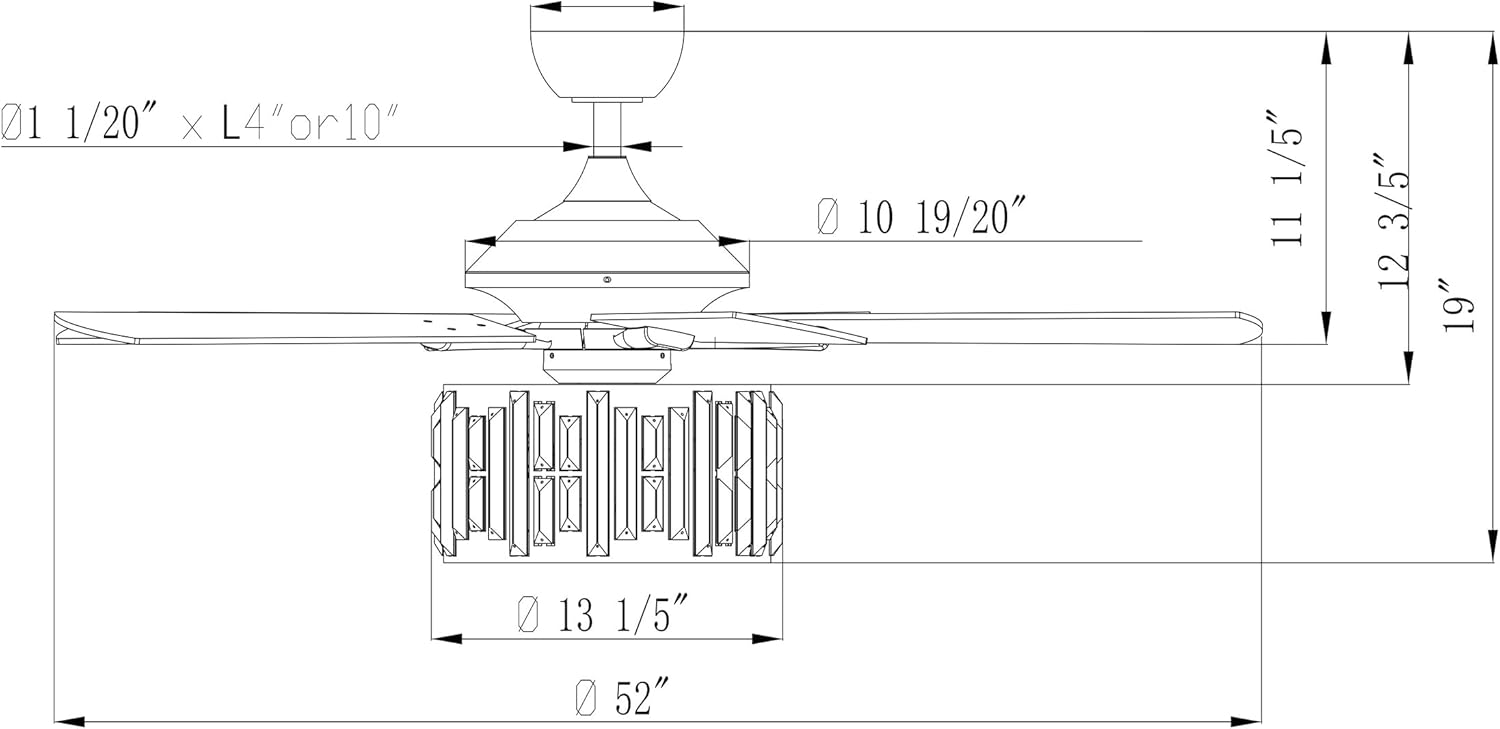
تصویر 2: Detailed technical drawing of the fan, showing specific measurements for installation planning.

تصویر 3: پھٹا view of fan components, highlighting the stable mounting bracket, 4-inch and 10-inch downrods, powerful motor, 5 plywood blades, and sparkling crystal decor.
انسٹالیشن ویڈیو
ویڈیو 1: A 3D animation demonstrating the installation process for the Parrot Uncle F6305 Ceiling Fan. This video provides a visual guide to assembling and mounting the fan components.
آپریٹنگ ہدایات
Your Parrot Uncle ceiling fan is equipped with a remote control for convenient operation of both the fan and light functions.
ریموٹ کنٹرول کے افعال
- پنکھے کی رفتار: 3-level fan speed adjustment.
- روشنی کنٹرول: لائٹ آن/آف کریں۔
- ٹائمر: Set the fan to automatically shut off after 2, 4, or 8 hours.
- ریورس ایبل موٹر: Change the direction of the fan blades for seasonal use.

تصویر 4: Remote control for the Parrot Uncle ceiling fan, featuring 3-speed settings, light control, and 2/4/8 hour timer options. The remote operates within a 20ft range.
ریورس ایبل موٹر فنکشن
The reversible motor allows you to optimize air circulation for different seasons:
- Summer Mode (Clockwise Rotation): نیچے کی طرف ہوا کا بہاؤ بناتا ہے، ٹھنڈک کا اثر فراہم کرتا ہے۔
- Winter Mode (Counter-Clockwise Rotation): Creates an upward airflow, circulating warm air near the ceiling throughout the room.

تصویر 5: Reversible motor function for year-round comfort. Clockwise rotation improves air flow for cooling, while counter-clockwise rotation circulates thermal warmth.
دیکھ بھال
باقاعدگی سے دیکھ بھال آپ کے چھت کے پنکھے کی لمبی عمر اور بہترین کارکردگی کو یقینی بناتی ہے۔
- صفائی: To prevent scratching the finish, clean the fan with a soft, damp کپڑا کھرچنے والے کلینر یا سالوینٹس کا استعمال نہ کریں۔
- بلیڈ کی دیکھ بھال: Periodically check the fan blades for dust accumulation and wipe them clean.
- پیچ کو سخت کرنا: Over time, screws may loosen. Check and tighten all screws on the motor housing and blade attachments annually.
- لائٹ بلب کی تبدیلی: The light fixture requires 2 E26 base bulbs, max 25 watts (bulbs not included). Ensure power is off before replacing bulbs.
خرابی کا سراغ لگانا
If you encounter issues with your fan, refer to the following common troubleshooting steps:
| مسئلہ | ممکنہ وجہ | حل |
|---|---|---|
| پنکھا شروع نہیں ہوتا | Loose wiring connection; no power to the fan; remote control battery dead. | Check all wiring connections; ensure power is on at the circuit breaker; replace remote control battery. |
| Fan makes humming or pulsating noise | ڈھیلا پیچ؛ موٹر مسئلہ. | Check and tighten all screws on the fan assembly. If noise persists, contact customer service. |
| Light flickers or does not turn on | Loose bulb; incorrect bulb type/wattage; wiring issue. | Ensure bulbs are securely tightened; verify bulbs are E26 base, max 25 watts; check light kit wiring. |
| ریموٹ کنٹرول کام نہیں کر رہا ہے۔ | Dead battery; remote not paired with receiver. | Replace remote battery; refer to remote pairing instructions in the full manual. |
وضاحتیں
| فیچر | تفصیل |
|---|---|
| برانڈ | طوطا انکل |
| ماڈل نمبر | F6305 |
| انداز | 6305 - New York |
| رنگ | کروم |
| مواد | Engineered Wood, Glass, Iron |
| آئٹم کے طول و عرض (L x W x H) | 52"L x 52"W x 19"H |
| شے کا وزن | 22.3 پاؤنڈز |
| انڈور / آؤٹ ڈور استعمال | Indoor (Dry Location) |
| طاقت کا منبع | AC |
| والیومtage | 120 وولٹ |
| روشنی کا ذریعہ | Incandescent (Bulbs Not Included) |
| روشنی کے ذرائع کی تعداد | 2 |
| بلب بیس | E26 |
| میکس واٹ۔tagای (فی بلب) | 25 واٹ |
| چمک | 1125 لیمن |
| کنٹرول کا طریقہ | ریموٹ کنٹرول |
| خصوصی خصوصیات | ریموٹ کنٹرول، ریورس ایبل موٹر، ٹائمر |
| شامل اجزاء | 4" & 10" Downrods, Remote Control |
وارنٹی
Parrot Uncle offers the following warranty for your ceiling fan:
- 30-Day Return & Replacement: Worry-free return and replacement service within 30 days of purchase.
- One-Year Free Replacement Parts: Free replacement parts service for one year from the date of purchase.
- لائف ٹائم پروفیشنل کسٹمر سروس: Ongoing customer support for the lifetime of the product.
حمایت
For any questions, concerns, or assistance with your Parrot Uncle ceiling fan, please do not hesitate to contact our professional customer service team. You can also visit the official Parrot Uncle store for more information and products.
Parrot Uncle Store: سٹور پر جائیں۔
Ask a question about this manual
Ask about setup, troubleshooting, compatibility, parts, safety, or missing instructions. Manuals+ will review the question and use this page’s manual context to help answer it.