
1. پروڈکٹ ختمview
The Waveshare RP2040-Zero is a compact, high-performance microcontroller unit (MCU) board designed around the Raspberry Pi RP2040 chip. This board is ideal for a wide range of embedded applications, offering a powerful dual-core Arm Cortex M0+ processor with flexible clock speeds up to 133 MHz. It integrates 264KB of SRAM and 2MB of on-board Flash memory, providing ample resources for complex projects. Its castellated module design allows for direct soldering onto carrier boards, making it suitable for SMD applications. The inclusion of a modern USB-C connector enhances ease of use and connectivity.

شکل 1: سامنے view of the Waveshare RP2040-Zero Microcontroller Board.
2. کلیدی خصوصیات
- RP2040 Microcontroller Chip: Designed by Raspberry Pi, featuring a dual-core Arm Cortex M0+ processor.
- Flexible Clock Speed: Operates up to 133 MHz.
- یادداشت: Equipped with 264KB of SRAM and 2MB of on-board Flash memory.
- USB-C رابط: Modern and reversible connector for power and data.
- Castellated Module: Enables direct soldering to custom carrier boards for integrated designs.
- USB 1.1 سپورٹ: Includes both device and host capabilities.
- پاور موڈز: Supports low-power sleep and dormant modes for energy efficiency.
- پروگرامنگ: Features drag-and-drop programming via mass storage over USB.
- GPIO پن: 29 multi-function GPIO pins (20 via edge pinout, others via solder points).
- پیری فیرلز: 2 × SPI, 2 × I2C, 2 × UART, 4 × 12-bit ADC, 16 × controllable PWM channels.
- اندرونی اجزاء: Accurate clock and timer on-chip, temperature sensor, accelerated floating-point libraries.
- PIO State Machines: 8 × Programmable I/O (PIO) state machines for custom peripheral support.
3. سیٹ اپ
3.1 جسمانی تعلق
To begin using your Waveshare RP2040-Zero, connect it to your computer using a standard USB-C cable. The board will typically appear as a mass storage device, allowing for easy firmware upload. Ensure the cable is securely connected to both the board's USB-C port and your computer's USB port.

Figure 2: The RP2040-Zero board, showing the USB-C port for connection.
3.2 پن آؤٹ ڈایاگرام
Understanding the pinout is crucial for connecting external components and utilizing the board's full capabilities. The RP2040-Zero provides various GPIO pins, power pins (5V, 3V3, GND), and dedicated peripheral pins (SPI, I2C, UART, ADC, PWM). Refer to the diagram below for a detailed layout.
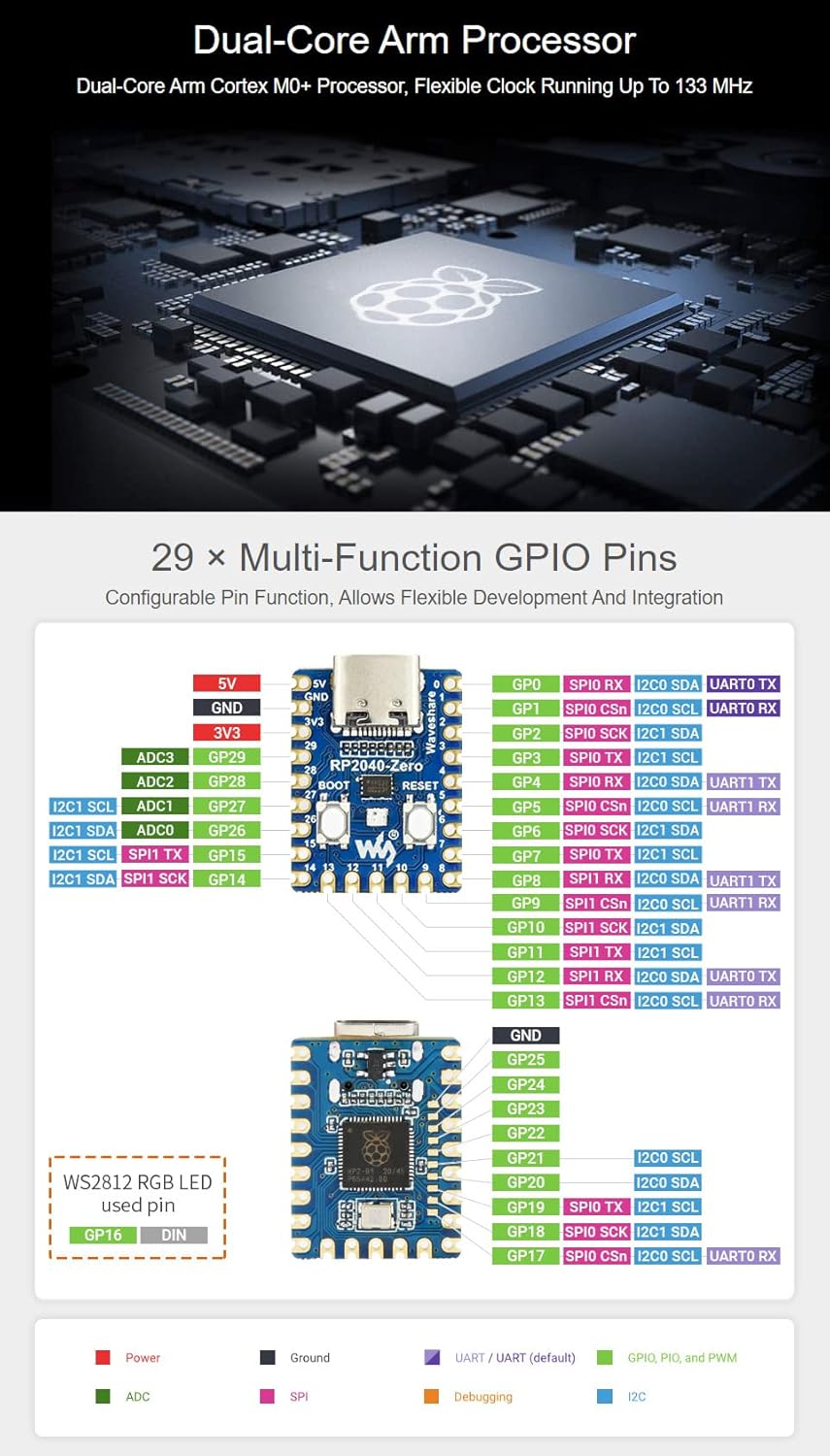
Figure 3: Detailed pinout diagram for the Waveshare RP2040-Zero, indicating multi-function GPIOs and power connections.
3.3 Programming Environment
The RP2040-Zero supports multiple programming environments, offering flexibility for developers:
- Pico C/C++ SDK: The official C SDK from Raspberry Pi, suitable for command-line development or integration with IDEs like Visual Studio Code and Eclipse.
- MicroPython: A full implementation of the Python 3 programming language optimized for embedded hardware like the Raspberry Pi Pico.
- Arduino IDE: Compatibility with the Arduino IDE allows for familiar development using Arduino sketches.
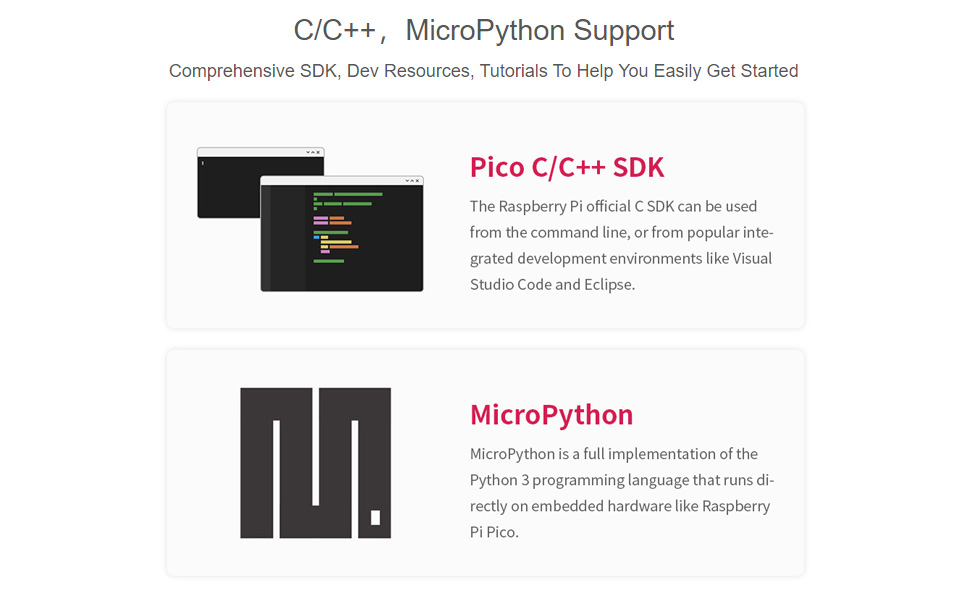
Figure 4: Illustration of C/C++ SDK and MicroPython support for the RP2040-Zero.
For a visual introduction to the RP2040-Tiny (a similar board from Waveshare), including its features and programming capabilities, please watch the video below:
ویڈیو 1: ختمview of the RP2040 Tiny Kit, demonstrating its features and programming support.
4. آپریشن
4.1 Boot and Reset Buttons
The RP2040-Zero features two tactile buttons: BOOT and RESET. These buttons are essential for controlling the board's state and uploading new firmware.
- بوٹ بٹن: Press and hold this button while connecting the USB-C cable to enter USB mass storage mode, which allows you to drag-and-drop firmware files onto the board.
- ری سیٹ بٹن: Press this button to restart the microcontroller. This is useful after uploading new code or if the board becomes unresponsive.
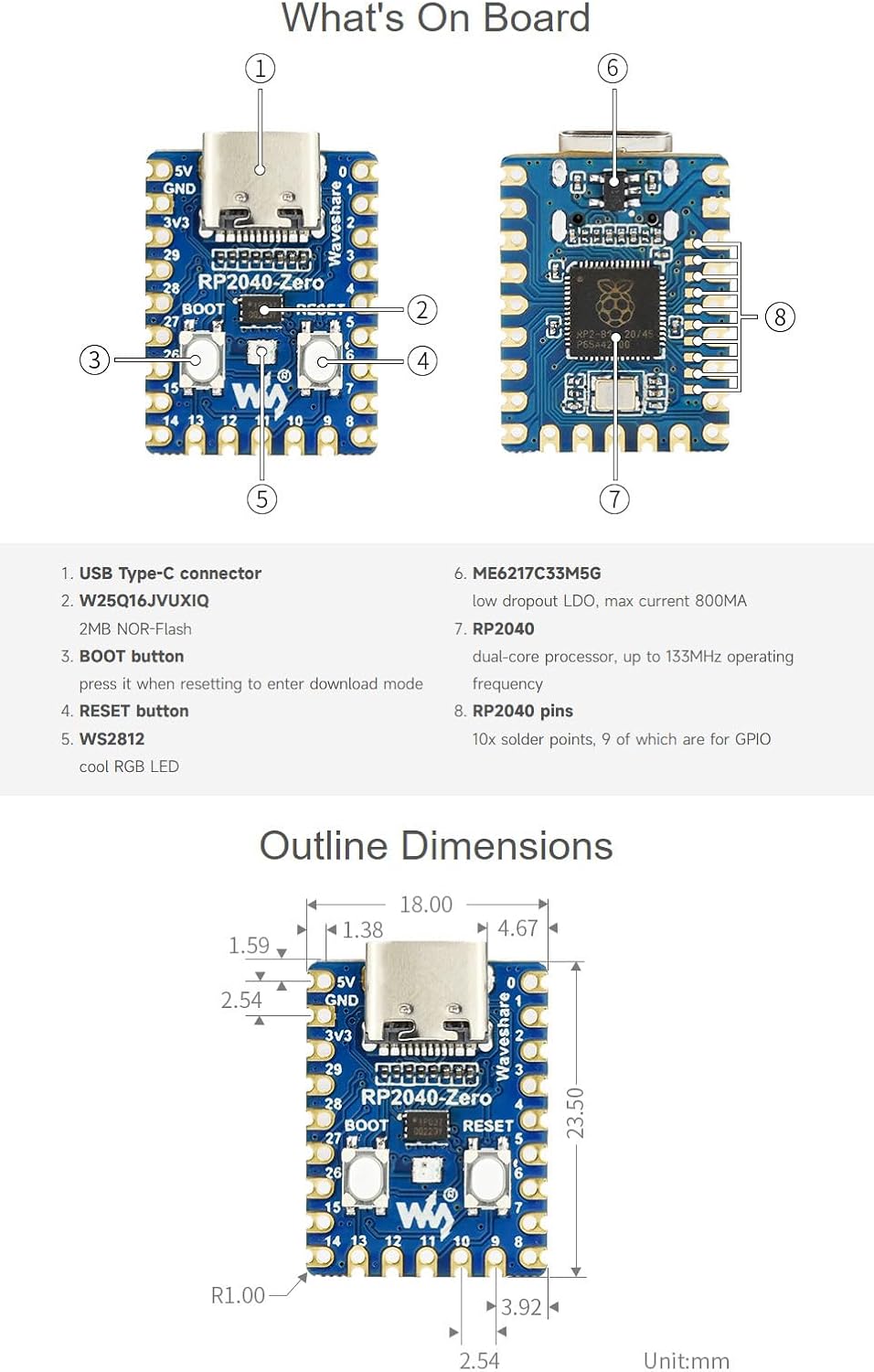
Figure 5: Labeled components of the RP2040-Zero board, highlighting the BOOT and RESET buttons.
4.2 Drag-and-Drop Programming
One of the most user-friendly features of the RP2040-Zero is its drag-and-drop programming capability. When the board is in bootloader mode (by holding the BOOT button during connection), it appears as a removable drive on your computer. You can then simply drag and drop a compiled firmware file (.uf2 format) onto this drive. The board will automatically flash the new firmware and reboot.
5 دیکھ بھال
To ensure the longevity and optimal performance of your Waveshare RP2040-Zero, follow these general maintenance guidelines:
- دیکھ بھال کے ساتھ ہینڈل: بورڈ کو گرانے یا اسے ضرورت سے زیادہ جسمانی دباؤ کا نشانہ بنانے سے گریز کریں۔
- جامد تحفظ: Always handle the board in an anti-static environment or use appropriate grounding measures to prevent electrostatic discharge (ESD) damage.
- خشک رکھیں: Protect the board from moisture and liquids, which can cause short circuits and corrosion.
- صفائی: بورڈ کو دھول اور ملبے سے پاک رکھیں۔ اگر ضروری ہو تو صفائی کے لیے نرم، خشک برش یا کمپریسڈ ہوا کا استعمال کریں۔
- مناسب ذخیرہ: When not in use, store the board in its original packaging or an anti-static bag in a cool, dry place.
6 خرابیوں کا سراغ لگانا
If you encounter issues with your RP2040-Zero, consider the following troubleshooting steps:
- بورڈ کو کمپیوٹر کے ذریعے تسلیم نہیں کیا گیا:
- Ensure the USB-C cable is fully inserted and functional. Try a different cable or USB port.
- Verify the board is in bootloader mode (hold BOOT button while connecting USB).
- Check if necessary drivers are installed for your operating system (though often not required for RP2040).
- فرم ویئر اپ لوڈ میں ناکامی:
- Confirm the firmware file is in the correct .uf2 format.
- Ensure the board is in bootloader mode before dragging the file.
- Check for sufficient free space on the board's flash memory (if applicable for your specific firmware).
- Code Not Running as Expected:
- Double-check your code for syntax errors or logical flaws.
- Verify that all external components are correctly wired according to the pinout diagram.
- Use serial debugging to output messages and identify where the code might be failing.
- بجلی کے مسائل:
- Ensure your USB power source provides adequate current.
- Inspect the board for any visible damage or short circuits.
7. تکنیکی تفصیلات
| فیچر | تفصیلات |
|---|---|
| پروسیسر | ڈوئل کور آرم کورٹیکس M0+ |
| سی پی یو کی رفتار | 133 میگاہرٹز تک |
| SRAM | 264 KB |
| فلیش میموری | 2 MB |
| USB کنیکٹر | USB-C |
| USB معیاری | USB 1.1 (Device and Host support) |
| GPIO پن | 29 (20 via edge pinout) |
| اے ڈی سی چینلز | 4 × 12-bit |
| پی ڈبلیو ایم چینلز | 16 × controllable |
| پی آئی او اسٹیٹ مشینیں | 8 |
| آپریٹنگ سسٹم سپورٹ | FreeRTOS (and others via SDKs) |
| طول و عرض | 23mm x 18mm (تقریباً 0.90 x 0.70 انچ) |
| شے کا وزن | 0.704 اونس |
8 سپورٹ اور وسائل
For further assistance, detailed documentation, and community support, please refer to the official Waveshare resources:
- Waveshare Wiki/Documentation: ویو شیئر آفیشل سے ملیں۔ website for comprehensive guides, tutorials, and technical specifications specific to the RP2040-Zero.
- Raspberry Pi Pico Documentation: As the RP2040-Zero is based on the RP2040 chip, much of the official Raspberry Pi Pico documentation and SDK information is directly applicable.
- کمیونٹی فورمز: Engage with the broader Raspberry Pi and embedded systems communities for project ideas, troubleshooting tips, and shared knowledge.