
Pipishell PILFK1
Pipishell فل موشن ٹی وی وال ماؤنٹ انسٹرکشن دستی
Model: PILFK1 | Brand: Pipishell
تعارف
Thank you for choosing the Pipishell Full Motion TV Wall Mount. This manual provides detailed instructions for safe installation, operation, and maintenance of your TV mount. Designed for most 37-75 inch TVs weighing up to 132lbs, this mount offers full motion adjustment for optimal viewing
اہم حفاظتی معلومات
Please read all instructions carefully before installation. Failure to do so may result in personal injury or property damage. Keep this manual for future reference.
- وزن کی صلاحیت: زیادہ سے زیادہ وزن کی گنجائش 132 پونڈ (60 کلوگرام) سے زیادہ نہ ہو۔
- ٹی وی سائز مطابقت: Suitable for TVs between 37 and 75 inches.
- VESA مطابقت: Compatible with VESA mounting patterns from 200x100mm to 600x400mm. Verify your TV's VESA pattern before installation.
- دیوار کی قسم: This mount is designed for installation on 12" or 16" wood studs, solid concrete, or brick walls. اکیلے ڈرائی وال میں انسٹال نہ کریں۔
- Ensure all screws are tightened securely but do not overtighten.
- لکڑی کے جڑوں کو درست طریقے سے تلاش کرنے کے لیے ہمیشہ سٹڈ فائنڈر کا استعمال کریں۔
باکس میں کیا ہے۔
پیکیج میں درج ذیل اجزاء شامل ہیں:
- ٹی وی وال ماؤنٹ اسمبلی
- بڑھتے ہوئے سانچہ
- ہدایت نامہ
- Standard Mounting Hardware (various TV bolts, lag screws, washers, spacers, wall anchors)
- چھوٹی سطح
- کیبل ٹائیز
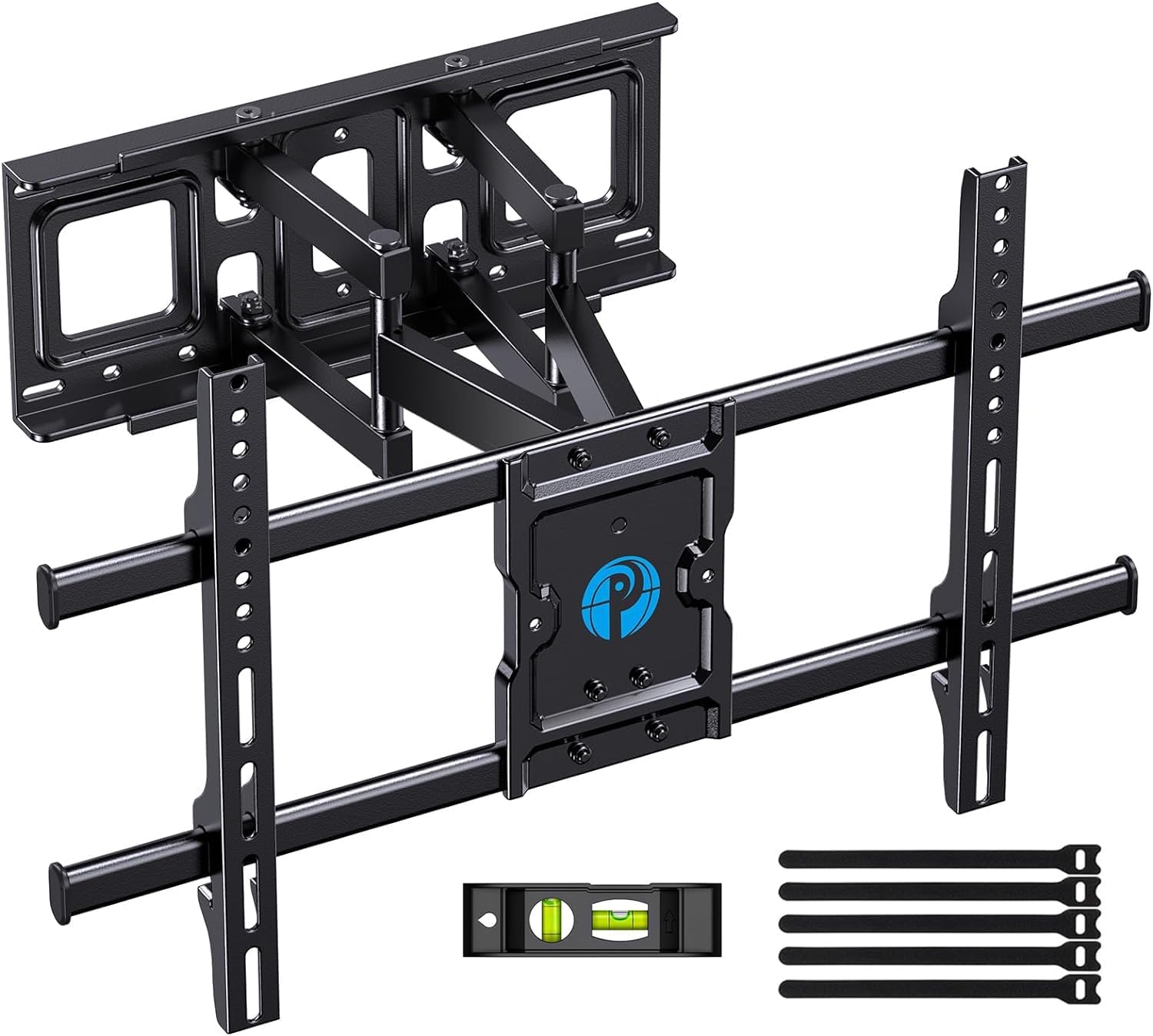
Image: All components included in the Pipishell TV Wall Mount package.
وضاحتیں
| تفصیلات | قدر |
|---|---|
| مصنوعات کے طول و عرض | 23.62 x 0.79 x 15.75 انچ |
| شے کا وزن | 10.56 پاؤنڈ |
| زیادہ سے زیادہ ہم آہنگ سائز | 75 انچ |
| کم سے کم ہم آہنگ سائز | 37 انچ |
| زیادہ سے زیادہ لوڈ کی گنجائش | 132 پونڈ (60 کلوگرام) |
| VESA مطابقت | 200x100 ملی میٹر سے 600x400 ملی میٹر |
| حرکت کی قسم | Swivel, Tilt, Extension |
| مواد | مرکب سٹیل |
| رنگ | سیاہ |
| ماڈل نمبر | PILFK1 |
سیٹ اپ اور انسٹالیشن
The installation process is designed to be straightforward. Always ensure you have the necessary tools and verify your wall construction before drilling.
1. Verify TV Compatibility
Before starting, ensure your TV's size, weight, and VESA pattern are compatible with the mount. The mount supports VESA patterns from 200x100mm to 600x400mm.

Image: How to measure your TV's VESA pattern.
2. Choose Wall Type and Location
Identify your wall type (wood studs, concrete, or brick). Use a stud finder for wood studs. The mount fits 12" and 16" wood studs. Do not install into drywall alone.

Image: Compatible wall types for installation.
3. TV کے ساتھ TV بریکٹ منسلک کریں۔
Select the appropriate TV bolts and spacers from the provided hardware kit based on your TV's specifications. Secure the vertical brackets to the back of your TV.

Image: TV mount attached to a TV, highlighting its 132 lbs max load capacity.
4. Secure Wall Plate to Wall
Use the provided drilling template to mark the pilot holes on your wall. Drill the holes and secure the wall plate using the appropriate lag screws and wall anchors for your wall type. Use the included level to ensure the mount is perfectly horizontal.

Image: Using the drilling template to mark the right location on the wall.
5. Hang TV on Wall Plate
Carefully lift the TV with the attached brackets and hook them onto the wall plate. Ensure the TV is securely seated on the mount. Tighten any safety screws to prevent accidental dislodgement.
آپریٹنگ اور ایڈجسٹمنٹ
The Pipishell Full Motion TV Wall Mount offers versatile adjustments to achieve your ideal viewING زاویہ
- جھکاؤ ایڈجسٹمنٹ: Tilt your TV +5°/-15° to reduce glare and optimize viewمختلف بلندیوں سے
- کنڈا ایڈجسٹمنٹ: Swivel the TV +/-45° (maximum swivel angle depends on TV size) to direct the screen towards your seating area.
- توسیع/ مراجعت: Extend the TV up to 14.84 inches from the wall for flexible viewing or collapse it to 3 inches to save space.
- سطح ایڈجسٹمنٹ: Fine-tune the TV's level by +/-3° after installation for a perfectly straight display.

Image: Demonstrating the mount's extension (up to 14.84 inches) and tilt range (+5°/-15°).

Image: The mount allows for a +/-45° swivel for optimum viewing from anywhere in the room.
دیکھ بھال
To ensure the longevity and safe operation of your TV mount, follow these maintenance tips:
- باقاعدہ چیکس: وقتاً فوقتاً تمام پیچ اور کنکشن چیک کریں تاکہ یہ یقینی بنایا جا سکے کہ وہ سخت اور محفوظ رہیں۔
- صفائی: مٹی کو دور کرنے کے لیے نرم، خشک کپڑے سے ماؤنٹ کو صاف کریں۔ کھرچنے والے کلینر یا سالوینٹس کے استعمال سے پرہیز کریں۔
- چکنا: If the articulating arms become stiff, apply a small amount of silicone-based lubricant to the moving joints.
خرابی کا سراغ لگانا
If you encounter any issues with your Pipishell TV Wall Mount, try the following solutions:
- ٹی وی نہیں لیول: Use the level adjustment feature (+/-3°) to correct the TV's horizontal alignment.
- پہاڑ ڈھیلا محسوس ہوتا ہے: Re-check all lag screws and TV bolts to ensure they are securely tightened into the wall studs/anchors and the TV.
- ایڈجسٹ کرنے میں دشواری: Ensure no cables are snagged or obstructing movement. Apply lubricant to joints if stiffness persists.
- TV Ports Blocked: If the mount blocks TV ports, use the provided spacers or adjust the TV's position on the vertical brackets if possible.
وارنٹی اور سپورٹ
Pipishell guarantees the quality of this TV mount to be free of defects in materials and workmanship. For any questions, assistance, or warranty claims, please contact our US-based product support team.
آپ اہلکار سے بھی رجوع کر سکتے ہیں۔ صارف گائیڈ (پی ڈی ایف) اضافی معلومات کے لیے۔