
1. تعارف
Thank you for choosing the iPega PG-P4008 Wireless Game Controller. This manual provides detailed instructions on how to set up, operate, and maintain your controller. The PG-P4008 offers broad compatibility with PS4, PS3, Android (10.0+), iOS (13.0+), and Windows PC, connecting wirelessly via Bluetooth for an enhanced gaming experience.
2. پروڈکٹ ختمview
The iPega PG-P4008 is designed for versatile gaming across multiple platforms. It features a comfortable ergonomic design, responsive controls, and several advanced functionalities to immerse you in your games.
اہم خصوصیات:
- Wireless Bluetooth connectivity (BT2.1+EDR) with up to 8 meters range.
- No driver installation required for connection.
- Integrated colored LED light indicator for operational status.
- Dual motors for realistic vibration feedback during gameplay.
- Built-in three-dimensional acceleration sensor and gyroscope sensor with six-axis induction.
- Integrated speaker and 3.5mm earphone jack for game audio.
- Dual-point capacitive touchpad for enhanced control.
- Compatible with PS4, PS3, Android (10.0+), iOS (13.0+), and Windows PC.
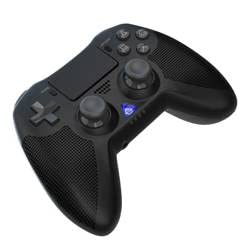
تصویر 1: سامنے والا view of the iPega PG-P4008 Wireless Game Controller. This image displays the controller's ergonomic design, dual analog sticks, D-pad, action buttons, touchpad, and the central LED indicator.
3. سیٹ اپ اور کنکشن
The PG-P4008 controller connects wirelessly via Bluetooth. Follow these steps to pair your controller with your device:
- پاور آن: Ensure the controller is charged. Press and hold the PS بٹن (or equivalent power button) to turn on the controller.
- جوڑا بنانے کا طریقہ:
- For PS4/PS3: Connect the controller to the console using a USB cable. Once recognized, you can disconnect the cable for wireless play. The connection method is similar to the official P4 controller.
- For Android/iOS: Activate Bluetooth on your mobile device. On the controller, press and hold the SHARE button + PS button simultaneously until the LED indicator flashes rapidly, indicating pairing mode. Select "PG-P4008" (or similar) from your device's Bluetooth list to connect.
- For Windows PC: Ensure your PC has Bluetooth capability. On the controller, press and hold the PS button + OPTIONS button simultaneously until the LED indicator flashes rapidly. On your PC, go to Bluetooth settings, add a new device, and select "PG-P4008" (or similar) to pair.
- کامیاب کنکشن: Once connected, the LED indicator on the controller will change to a solid color, indicating a successful pairing.
نوٹ: No additional driver software is required for operation. The controller supports a stable connection up to 8 meters.
4. آپریٹنگ ہدایات
ایل ای ڈی اشارے:
The built-in colored LED light indicates the controller's operational status and player assignment, similar to the official PS4 controller. Different colors will signify different stages or player numbers.
وائبریشن فیڈ بیک:
The controller features dual motors embedded in the handles, providing tactile vibration feedback to enhance your gaming immersion. This feedback will vary based on in-game events.
ٹچ پیڈ:
The dual-point capacitive touchpad allows for intuitive control in games that support touch input, offering an additional layer of interaction.
آڈیو فعالیت:
Connect your 3.5mm earphones to the integrated jack on the controller to experience game audio directly, providing a private and immersive sound experience.
5 دیکھ بھال
- Keep the controller dry and away from moisture to prevent damage to internal components.
- Clean the controller regularly with a soft, dry cloth. Avoid using harsh chemicals or abrasive materials.
- استعمال میں نہ ہونے پر کنٹرولر کو ٹھنڈی، خشک جگہ پر اسٹور کریں۔
- Avoid exposing the controller to extreme temperatures or direct sunlight.
- Do not attempt to disassemble or modify the controller, as this will void any potential warranty and may cause damage.
6 خرابیوں کا سراغ لگانا
- کنٹرولر منسلک نہیں ہو رہا ہے:
- یقینی بنائیں کہ کنٹرولر پوری طرح سے چارج ہے۔
- تصدیق کریں کہ آپ کے آلے پر بلوٹوتھ فعال ہے۔
- Make sure the controller is in the correct pairing mode for your device (refer to Section 3).
- کنٹرولر اور اپنے آلے دونوں کو دوبارہ شروع کرنے کی کوشش کریں۔
- اپنے آلے کی بلوٹوتھ فہرست سے پچھلی جوڑیوں کو ہٹائیں اور دوبارہ جوڑا بنانے کی کوشش کریں۔
- ان پٹ وقفہ یا منقطع:
- یقینی بنائیں کہ آپ 8 میٹر آپریٹنگ رینج کے اندر ہیں۔
- دوسرے وائرلیس آلات سے مداخلت کو کم سے کم کریں۔
- Check for any physical obstructions between the controller and the device.
- کمپن کام نہیں کر رہا ہے:
- Ensure the game you are playing supports vibration feedback.
- یہ یقینی بنانے کے لیے کہ وائبریشن فعال ہے درون گیم سیٹنگز چیک کریں۔
- Audio not working via 3.5mm jack:
- Ensure your earphones are properly plugged in.
- Check the volume settings on your device and in-game.
- Test with another pair of earphones to rule out earphone issues.
7. وضاحتیں
| ماڈل نمبر | پی جی-پی 4008۔ |
| برانڈ | iPega |
| کنیکٹوٹی | Bluetooth (BT2.1+EDR) |
| وائرلیس رینج | 8 میٹر تک |
| ہم آہنگ آلات | PS4, PS3, Android (10.0+), iOS (13.0+), Windows PC |
| خصوصی خصوصیات | Wireless, Touchpad, Vibration, 6-axis Gyroscope, Built-in Speaker, 3.5mm Audio Jack |
| بٹن کی مقدار | 17 |
| طاقت کا منبع | بیٹری سے چلنے والا |
8. وارنٹی اور سپورٹ
مصنوعات کی وارنٹی اور کسٹمر سپورٹ کے بارے میں معلومات اس مینول میں فراہم نہیں کی گئی ہیں۔ براہ کرم مصنوعات کی پیکیجنگ یا خوردہ فروش کا حوالہ دیں۔ webوارنٹی کوریج اور مدد کے لیے کسٹمر سپورٹ سے رابطہ کرنے کے طریقے کے بارے میں تفصیلات کے لیے سائٹ۔