
Dalton 2000VA/5-100A UPS
Dalton 2000VA Uninterruptible Power Supply User Manual
Model: 2000VA/5-100A UPS
1. تعارف
Thank you for choosing the Dalton 2000VA Uninterruptible Power Supply (UPS). This device is designed to provide reliable power backup and protection for your electronic equipment against power outages, surges, and fluctuations. Please read this manual thoroughly before installation and operation to ensure optimal performance and safety.
2. اہم حفاظتی ہدایات
آگ، برقی جھٹکا، اور چوٹ کے خطرے کو کم کرنے کے لیے ہمیشہ ان بنیادی حفاظتی احتیاطی تدابیر پر عمل کریں:
- UPS نہ کھولیں casing. There are no user-serviceable parts inside. Refer servicing to qualified service personnel.
- Do not use the UPS in environments with excessive dust, humidity, or extreme temperatures.
- یقینی بنائیں کہ UPS گراؤنڈ پاور آؤٹ لیٹ سے منسلک ہے۔
- Do not connect non-computer related items like medical equipment, life support equipment, or household appliances to the UPS.
- Position the UPS in a well-ventilated area, away from direct sunlight or heat sources.
- In case of emergency, press the power button to turn off the UPS and disconnect it from the AC power source.
3. پیکیج کے مشمولات
تصدیق کریں کہ تمام اشیاء آپ کے پیکیج میں موجود ہیں:
- Dalton 2000VA UPS Unit
- پاور کی ہڈی
- USB کمیونیکیشن کیبل (اگر قابل اطلاق ہو)
- صارف دستی (یہ دستاویز)

شکل 3.1: سامنے view of the Dalton 2000VA UPS unit, showing the display screen and power button.
4. سیٹ اپ اور انسٹالیشن
Follow these steps to set up your UPS:
- پیک کھولنا: UPS کو احتیاط سے اس کی پیکیجنگ سے ہٹا دیں۔ شپنگ کے کسی بھی نقصان کا معائنہ کریں۔
- جگہ کا تعین: Place the UPS on a flat, stable surface in a cool, dry, and well-ventilated area. Ensure there is adequate space around the unit for airflow.
- ابتدائی چارج: Before connecting any devices, plug the UPS power cord into a grounded wall outlet. Allow the unit to charge for at least 8 hours to ensure the battery is fully charged. The display will indicate charging status.
- منسلک آلات:
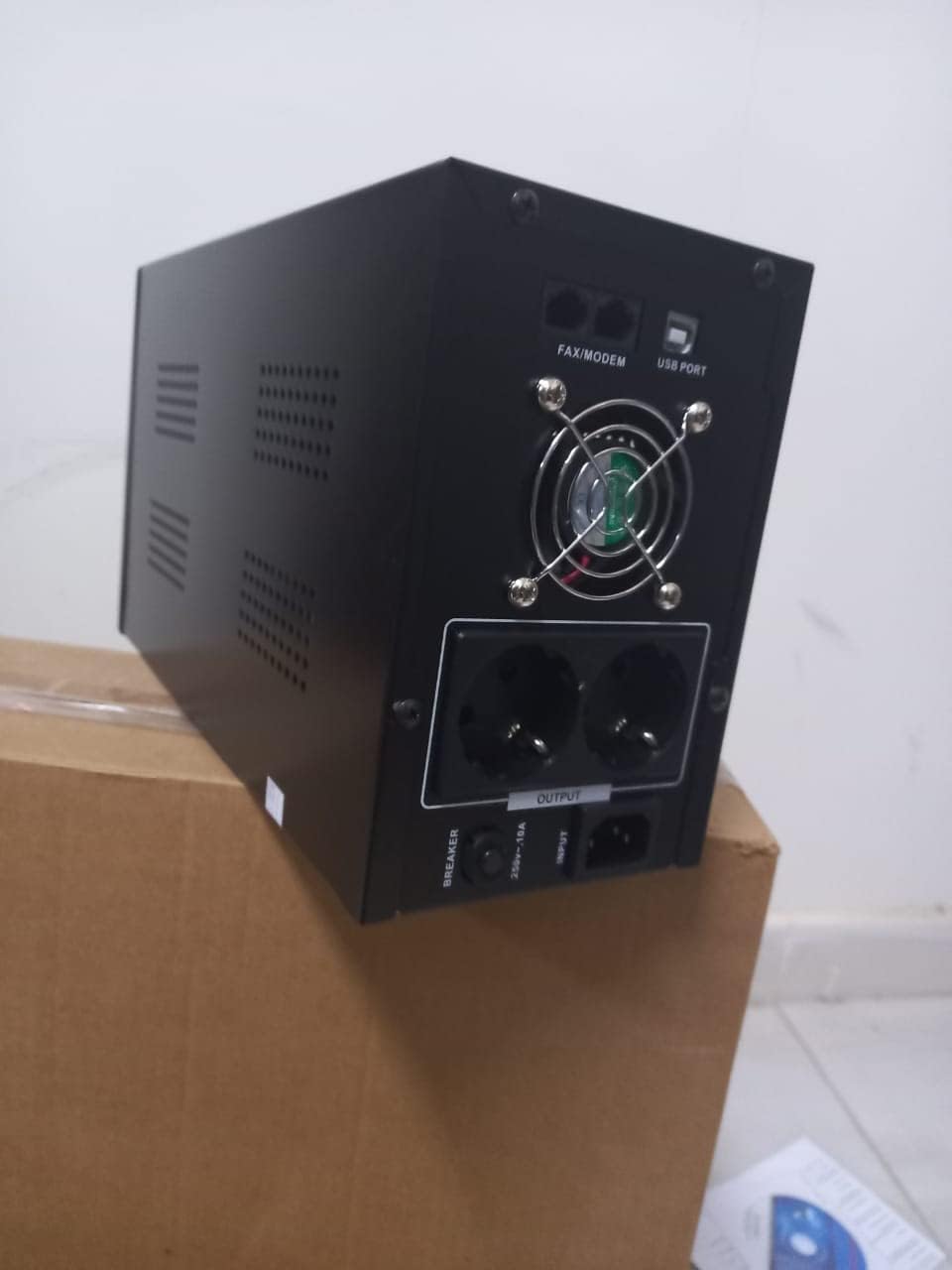
شکل 4.1: پیچھے view of the Dalton 2000VA UPS, highlighting the input power port, output sockets, and USB/Modem ports.
- Once the battery is charged, connect your computer, monitor, and other critical electronic devices to the UPS output sockets.
- Do not overload the UPS. Refer to the specifications section for maximum load capacity.
- If applicable, connect the USB communication cable from the UPS to your computer for monitoring software (software not included, check manufacturer's webسائٹ)۔
5. UPS کو چلانا
5.1 پاور آن/آف۔
- پاور آن کرنے کے لیے: After connecting to AC power and charging, press and hold the power button on the front panel for approximately 3 seconds until you hear a beep and the display illuminates.
- پاور آف کرنا: Press and hold the power button for approximately 3 seconds until you hear a beep and the display turns off. If the UPS is running on battery, it will shut down immediately. If connected to AC, it will switch to bypass mode before shutting down.
5.2 ڈسپلے کو سمجھنا
The front panel LCD display provides real-time status information:
- میں: ان پٹ والیوم کو دکھاتا ہے۔tage from the utility power.
- باہر: آؤٹ پٹ والیوم دکھاتا ہے۔tage provided by the UPS to connected devices.
- نارمل: Indicates the UPS is operating on utility power.
- چمگادڑ: موجودہ بیٹری چارج لیول دکھاتا ہے۔
- لوڈ: فیصد کی نشاندہی کرتا ہے۔tage of the UPS's capacity being used by connected devices.
- Battery Mode Icon: Appears when the UPS is running on battery power during an outage.

شکل 5.1: طرف view of the UPS, showing the illuminated display with power status indicators.
5.3 بیٹری بیک اپ فنکشن
ایک طاقت ou کی صورت میںtage, the UPS will automatically switch to battery power, providing continuous power to your connected devices. The duration of backup power depends on the load connected and the battery's charge level. The UPS will emit an audible alarm during battery operation.
When utility power returns, the UPS will automatically switch back to AC power and begin recharging its battery.
6 دیکھ بھال
- بیٹری کی دیکھ بھال: To maximize battery life, ensure the UPS is always connected to an AC outlet to keep the battery charged. If the UPS is stored for an extended period, recharge it every three months for at least 8 hours.
- صفائی: Disconnect the UPS from all power sources before cleaning. Use a soft, dry cloth to wipe the exterior. Do not use liquid or aerosol cleaners.
- وینٹیلیشن: Regularly check that the ventilation openings are not blocked by dust or debris to prevent overheating.
7 خرابیوں کا سراغ لگانا
عام مسائل اور ان کے حل کے لیے درج ذیل جدول کو دیکھیں:
| مسئلہ | ممکنہ وجہ | حل |
|---|---|---|
| UPS آن نہیں ہوتا ہے۔ | Battery not charged or power cord disconnected. | Ensure power cord is securely plugged in and allow battery to charge for 8 hours. |
| UPS beeps continuously in normal mode. | اوور لوڈ کی حالت۔ | Disconnect non-essential equipment until the alarm stops. Check total load. |
| Short backup time. | Battery not fully charged or battery nearing end of life. | Allow UPS to charge for 8 hours. If issue persists, battery may need replacement (contact service center). |
| UPS does not provide power during outage. | Battery discharged or internal fault. | Ensure UPS was fully charged. If problem persists, contact authorized service center. |
8. تکنیکی تفصیلات
| فیچر | تفصیل |
|---|---|
| مصنوعات کے طول و عرض | 12.5 x 22.5 x 38 سینٹی میٹر |
| کارخانہ دار | ڈالٹن |
| برانڈ کا نام | عام |
| رنگ | سیاہ |
| مواد | دھات |
| کرنٹ | 5 Ampپہلے |
| فارم فیکٹر | ریک |
| تعدد کی حد | 50-60 ہرٹج |
| آؤٹ پٹ والیمtage | 220 وولٹ |
| کنیکٹر کی قسم | AC |
9. وارنٹی اور سپورٹ
Dalton provides an authorized maintenance center for all Uninterruptible Power Supply units. For warranty claims, technical support, or service inquiries, please contact your local Dalton authorized distributor or service center. Keep your purchase receipt as proof of purchase for warranty validation.
For further assistance, please visit the official Dalton webسائٹ یا کسٹمر سپورٹ سے رابطہ کریں۔
Ask a question about this manual
Ask about setup, troubleshooting, compatibility, parts, safety, or missing instructions. Manuals+ will review the question and use this page’s manual context to help answer it.