
تعارف
This manual provides comprehensive instructions for the use and care of your new Remote brand compatible remote control. This remote is specifically designed to function seamlessly with Nordmende ND40S3000J SMART televisions, offering full functionality without the need for complex programming.
Please read this manual carefully to ensure proper setup and operation of your remote control.
سیٹ اپ
1. بیٹری کی تنصیب
The remote control requires alkaline batteries (not included). Follow these steps to install them:
- ریموٹ کنٹرول کے پیچھے بیٹری کے ٹوکری کا احاطہ تلاش کریں۔
- کور کو نیچے کی طرف سلائیڈ کریں یا اسے کھولنے کے لیے کنڈی کو دبائیں۔
- Insert two new alkaline batteries, ensuring the positive (+) and negative (-) terminals match the diagrams inside the compartment.
- بیٹری کے کمپارٹمنٹ کور کو تبدیل کریں، اسے واپس اپنی جگہ پر سلائیڈ کرتے ہوئے جب تک کہ یہ محفوظ طریقے سے کلک نہ کرے۔
اہم: Always use new alkaline batteries for optimal performance. Do not mix old and new batteries, or different types of batteries.
2. Initial Use (No Programming Required)
This compatible remote control is pre-programmed for the Nordmende ND40S3000J SMART TV model. No additional programming or setup steps are required. Once batteries are installed, the remote is ready for immediate use with your television.
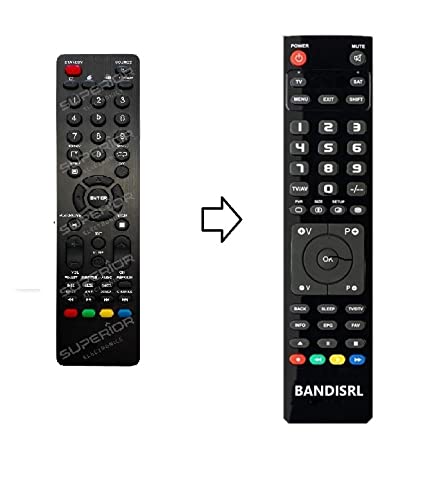
تصویر 1: The Remote compatible remote control. This image displays the layout of the buttons and the overall design of the remote, ready for use with your Nordmende TV.
آپریٹنگ ہدایات
To operate your Nordmende ND40S3000J SMART TV with this remote control, point the remote directly at the television's infrared receiver. Ensure there are no obstructions between the remote and the TV.
- پاور بٹن: ٹی وی کو آن یا آف کرنے کیلئے دبائیں۔
- والیوم اوپر/نیچے: آڈیو والیوم کو ایڈجسٹ کرتا ہے۔
- چینل اوپر/نیچے: ٹی وی چینلز کو ترتیب وار تبدیل کرتا ہے۔
- نمبر بٹن (0-9): براہ راست ٹی وی چینلز کو منتخب کریں۔
- نیویگیشن بٹن (تیر کی چابیاں، ٹھیک ہے): مینو کے ذریعے تشریف لے جائیں اور اختیارات کو منتخب کریں۔
- اسمارٹ ٹی وی کے بٹن: Access specific Smart TV functions or applications (e.g., Home, Apps, Netflix, YouTube, etc., depending on the remote's layout and TV's features).
- بٹن خاموش کریں: TV آڈیو کو خاموش کر دیتا ہے۔
- ماخذ/ان پٹ بٹن: دستیاب ان پٹ ذرائع (HDMI، AV، وغیرہ) کے ذریعے سائیکل۔
Refer to your Nordmende TV's original user manual for specific details on its menu structure and Smart TV functionalities.
دیکھ بھال
ریموٹ کنٹرول کی صفائی
اپنے ریموٹ کنٹرول کو صاف کرنے کے لیے، نرم، خشک کپڑا استعمال کریں۔ ضدی گندگی کے لیے، قدرے ڈیampen the cloth with water. Do not use abrasive cleaners, alcohol, or solvents, as these can damage the remote's surface and internal components.
بیٹری کی تبدیلی
Replace batteries when the remote control's response becomes sluggish or stops working. Always replace both batteries simultaneously with new alkaline batteries. Dispose of used batteries according to local regulations.
ذخیرہ
ریموٹ کنٹرول کو کسی ٹھنڈی، خشک جگہ پر براہ راست سورج کی روشنی اور انتہائی درجہ حرارت سے دور رکھیں۔ اگر ریموٹ ایک طویل مدت تک استعمال نہیں کیا جائے گا، تو یہ مشورہ دیا جاتا ہے کہ بیٹریوں کو خارج کر دیا جائے تاکہ رساو کو روکا جا سکے۔
خرابی کا سراغ لگانا
- ریموٹ کنٹرول کام نہیں کر رہا ہے:
- چیک کریں کہ آیا بیٹریاں درست قطبیت (+/-) کے ساتھ صحیح طریقے سے ڈالی گئی ہیں۔
- Replace the batteries with new alkaline batteries.
- یقینی بنائیں کہ ریموٹ کنٹرول اور ٹی وی کے انفراریڈ ریسیور کے درمیان کوئی رکاوٹ نہیں ہے۔
- یقینی بنائیں کہ آپ ریموٹ کو براہ راست ٹی وی کی طرف اشارہ کر رہے ہیں۔
- تصدیق کریں کہ TV آن ہے۔
- Some buttons are not responding:
- This remote is designed for the Nordmende ND40S3000J SMART TV. If you are using it with a different model, some advanced functions may not be compatible.
- Ensure the buttons are clean and free from debris.
- TV responds intermittently:
- بیٹریاں کم ہو سکتی ہیں۔ ان کی جگہ لے لو.
- Ensure a clear line of sight to the TV's infrared sensor.
- Avoid strong light sources (like direct sunlight) that might interfere with the infrared signal.
If troubleshooting steps do not resolve the issue, please refer to the Support section.
وضاحتیں
| برانڈ: | Remote (Manufacturer: Bandisrl) |
| ہم آہنگ آلات: | Nordmende ND40S3000J SMART Television |
| کنیکٹوٹی ٹیکنالوجی: | اورکت (IR) |
| خصوصی خصوصیت: | پروگرامنگ کی ضرورت نہیں ہے۔ |
| بیٹری کی قسم: | الکلین |
| بیٹریاں شامل ہیں: | نہیں |
| رنگ: | سیاہ |
| بٹنوں کی تعداد: | 25 |
| کنٹرولر کی قسم: | بٹن کنٹرول |
وارنٹی اور سپورٹ
وارنٹی کی معلومات
Specific warranty details for this compatible remote control are not provided in this manual. Please refer to the purchase documentation or contact the seller/manufacturer (Bandisrl) for information regarding warranty coverage and terms.
کسٹمر سپورٹ
For further assistance, technical support, or inquiries regarding compatibility with other TV models, please contact the manufacturer, Bandisrl. Contact information can typically be found on the product packaging or the seller's webسائٹ
If you own a different TV model than the Nordmende ND40S3000J SMART, it is recommended to contact Bandisrl to confirm compatibility before purchase or use.