
1. تعارف
Thank you for choosing the InFocus P120 INL412 Multimedia Projector. This manual provides essential information for the safe and efficient operation of your projector. Please read it thoroughly before using the device and retain it for future reference. The InFocus P120 INL412 is designed for versatile multimedia presentations, offering clear and vibrant images for various applications.
2. حفاظتی معلومات
To ensure safe operation and prevent damage to the projector, please observe the following safety precautions:
- وینٹیلیشن کے سوراخوں کو مسدود نہ کریں۔ زیادہ گرم ہونے سے بچنے کے لیے مناسب ہوا کے بہاؤ کے لیے پروجیکٹر کے ارد گرد مناسب جگہ کو یقینی بنائیں۔
- پروجیکٹر کے لینس میں براہ راست دیکھنے سے گریز کریں جب ایلamp آن ہے، کیونکہ تیز روشنی آنکھ کو نقصان پہنچا سکتی ہے۔
- Do not place the projector on an unstable cart, stand, or table. The projector may fall, causing serious injury to a child or adult, and serious damage to the unit.
- اگر پروجیکٹر طویل مدت تک استعمال نہیں کیا جائے گا تو دیوار کے آؤٹ لیٹ سے پاور کورڈ کو منقطع کریں۔
- Refer all servicing to qualified service personnel. Do not attempt to open or repair the projector yourself.
- Keep the projector away from water or moisture. Do not expose it to rain or immerse it in liquid.
- Use only the power cord supplied with the projector or an authorized replacement.
3. پیکیج کے مشمولات
تصدیق کریں کہ نیچے دی گئی تمام اشیاء آپ کے پروجیکٹر پیکج میں شامل ہیں:
- InFocus P120 INL412 Multimedia Projector
- پاور کی ہڈی
- بیٹریوں کے ساتھ ریموٹ کنٹرول
- وی جی اے کیبل
- صارف دستی (یہ دستاویز)
- کوئیک اسٹارٹ گائیڈ
4. پروڈکٹ ختمview
Familiarize yourself with the main components of your InFocus P120 INL412 projector.
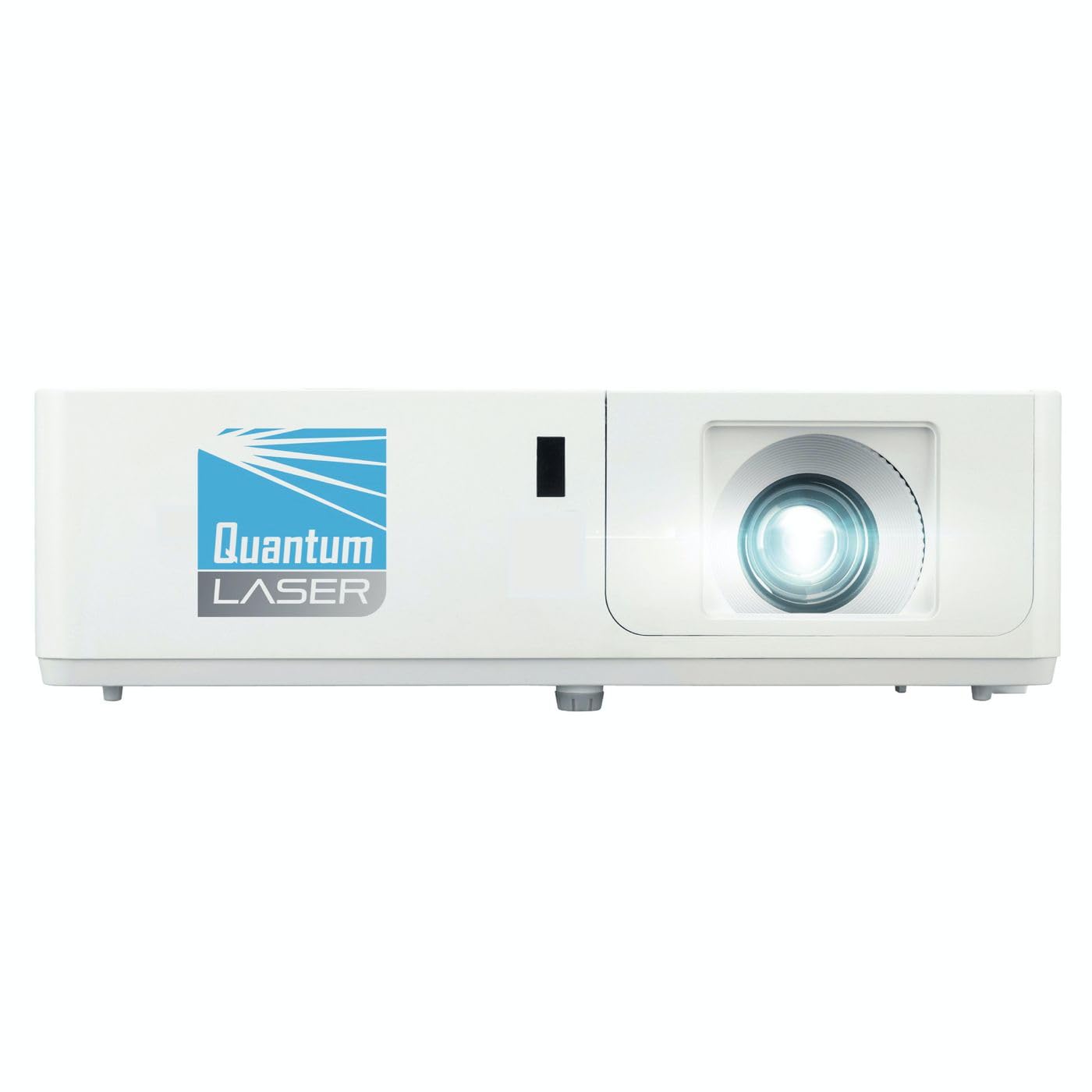
تصویر 1: سامنے view of the InFocus P120 INL412 Multimedia Projector, showing the lens and ventilation grilles.
4.1 فرنٹ پینل
- پروجیکشن لینس: تصویر کو اسکرین پر خارج کرتا ہے۔
- فوکس رنگ: متوقع تصویر کی وضاحت کو ایڈجسٹ کرتا ہے۔
- زوم رنگ: متوقع تصویر کے سائز کو ایڈجسٹ کرتا ہے۔
- IR وصول کنندہ: ریموٹ کنٹرول سے سگنل وصول کرتا ہے۔
4.2 ٹاپ پینل
- کنٹرول پینل: Buttons for power, menu navigation, source selection, and keystone correction.
- اشارے کی روشنی: Display the projector's status (e.g., power, lamp, temperature).
4.3 Rear Panel (Connectivity)
- HDMI ان پٹ: Connects to HDMI-enabled devices (laptops, Blu-ray players).
- VGA ان پٹ: Connects to computers with VGA output.
- USB پورٹ: For service or connecting USB devices (if supported by model).
- آڈیو ان/آؤٹ: For connecting external audio sources or speakers.
- پاور انلیٹ: بجلی کی ہڈی کو جوڑتا ہے۔
5. سیٹ اپ
اپنے پروجیکٹر کے ابتدائی سیٹ اپ کے لیے ان اقدامات پر عمل کریں:
- جگہ کا تعین: Place the projector on a stable, flat surface or mount it securely. Ensure the projector is positioned at an appropriate distance from the screen to achieve the desired image size.
- پاور کنکشن: پاور کی ہڈی کو پروجیکٹر کے پاور انلیٹ سے اور پھر گراؤنڈڈ برقی آؤٹ لیٹ سے جوڑیں۔
- ماخذ ڈیوائس کو جوڑیں: Connect your source device (e.g., laptop, DVD player) to the projector using an appropriate cable (HDMI, VGA, etc.). Ensure the cable is securely connected to both the source and the projector.
- پاور آن: Press the power button on the projector's control panel or the remote control to turn on the projector. The power indicator light will illuminate.
- Adjust Focus and Zoom: Once an image is projected, rotate the focus ring on the lens until the image is sharp and clear. Use the zoom ring to adjust the image size to fit your screen.
- کلیدی پتھر کی اصلاح: If the image appears trapezoidal, use the keystone correction function (either via buttons on the projector/remote or through the on-screen menu) to square the image.
6. آپریٹنگ ہدایات
6.1 پاور آن/آف
- پاور آن کرنے کے لیے: Press the power button once. The projector will go through a warm-up sequence.
- پاور آف کرنا: Press the power button twice. The first press will prompt a shutdown confirmation; the second press will initiate shutdown. Allow the projector to cool down completely before unplugging.
6.2 ماخذ کا انتخاب
Press the 'Source' button on the projector or remote control to cycle through available input sources (HDMI, VGA, etc.) until your desired source is displayed.
6.3 مینو نیویگیشن
Press the 'Menu' button to access the on-screen display (OSD) menu. Use the arrow buttons to navigate through options and 'Enter' or 'OK' to select. Use the 'Exit' or 'Menu' button to close the OSD.
- تصویر کی ترتیبات: چمک، کنٹراسٹ، رنگ، پہلو کا تناسب، اور تصویر کے موڈ کو ایڈجسٹ کریں۔
- ڈسپلے کی ترتیبات: Configure keystone, projection mode (front/rear, desktop/ceiling), and resolution.
- آڈیو کی ترتیبات: Control volume and audio output options.
- سسٹم کی ترتیبات: Manage language, timer, power-saving modes, and factory reset.
7 دیکھ بھال
باقاعدگی سے دیکھ بھال بہترین کارکردگی کو یقینی بناتی ہے اور آپ کے پروجیکٹر کی عمر میں توسیع کرتی ہے۔
- لینس کی صفائی: خاص طور پر آپٹیکل سطحوں کے لیے ڈیزائن کیے گئے نرم، لنٹ فری کپڑے سے پروجیکٹر کے لینس کو آہستہ سے صاف کریں۔ کھرچنے والے کلینر یا ضرورت سے زیادہ طاقت کا استعمال نہ کریں۔
- کابینہ کی صفائی: Use a soft, dry cloth to clean the projector's exterior. For stubborn marks, dampen the cloth slightly with water. Avoid using harsh chemicals.
- ایئر فلٹر کی صفائی/تبدیلی: Check the air filter periodically. If your model has a removable filter, clean it with a soft brush or vacuum cleaner. Replace the filter as recommended in the on-screen menu or when visibly dirty to maintain proper ventilation.
- Lamp متبادل: پروجیکٹر ایل۔amp ایک محدود عمر ہے. جب ایلamp life indicator appears, or the image brightness significantly decreases, replace the lamp according to the instructions provided in the full service manual or by a qualified technician. Always allow the projector to cool down completely before attempting lamp متبادل
8 خرابیوں کا سراغ لگانا
عام مسائل اور ان کے حل کے لیے درج ذیل جدول کو دیکھیں:
| مسئلہ | ممکنہ وجہ | حل |
|---|---|---|
| کوئی تصویر نہیں دکھائی گئی۔ | Power cord disconnected, incorrect input source, source device off. | Check power connections. Select correct input source. Ensure source device is powered on. |
| تصویر دھندلی ہے | Lens out of focus, incorrect projection distance. | Adjust the focus ring on the lens. Reposition the projector closer or further from the screen. |
| تصویر trapezoidal ہے۔ | پروجیکٹر اسکرین پر کھڑا نہیں ہے۔ | Use keystone correction (manual or automatic) to square the image. |
| پروجیکٹر زیادہ گرم اور بند ہو جاتا ہے۔ | Blocked ventilation, dirty air filter. | وینٹ کے ارد گرد صاف جگہ کو یقینی بنائیں۔ ایئر فلٹر کو صاف کریں یا تبدیل کریں۔ |
| ریموٹ کنٹرول کام نہیں کر رہا ہے۔ | Dead batteries, obstruction between remote and projector, incorrect angle. | Replace batteries. Ensure clear line of sight to IR receiver. Point remote directly at the projector. |
9. وضاحتیں
Key technical specifications for the InFocus P120 INL412 Multimedia Projector:
| فیچر | تفصیلات |
|---|---|
| ماڈل نمبر | P120 INL412 (Item model number: 7296144) |
| ڈسپلے کی قسم | ڈی ایل پی |
| مقامی قرارداد | 1280 x 800 |
| زیادہ سے زیادہ ڈسپلے ریزولوشن | 1280 x 800 |
| کنیکٹوٹی ٹیکنالوجی | USB (and other standard inputs like HDMI, VGA) |
| مصنوعات کے طول و عرض | 5.25 x 0.31 x 1.66 انچ |
| شے کا وزن | 6.6 پاؤنڈ |
| کارخانہ دار | فوکس میں |
10. وارنٹی اور سپورٹ
The InFocus P120 INL412 Multimedia Projector comes with a standard manufacturer's warranty. Please refer to the warranty card included in your package for specific terms and conditions, including warranty duration and coverage details. For technical support, service, or further inquiries, please visit the official InFocus support webسائٹ یا ان کے کسٹمر سروس ڈیپارٹمنٹ سے رابطہ کریں۔
سب سے تازہ ترین سپورٹ کی معلومات کے لیے، براہ کرم ملاحظہ کریں: www.infocus.com/support