
1. پروڈکٹ ختمview
The Lumenier QAV-PRO Whoop 5" Cinequads Edition Frame Kit is a versatile and durable FPV quadcopter frame designed for professional cinematic applications. This frame offers full propeller protection and is capable of carrying full-sized cinema cameras such as the Blackmagic Cinema Pocket 4K or RED KOMODO 6K. Developed in collaboration with Cinequads, this frame incorporates high-tech design with quality materials for optimal performance.
This kit includes the frame only. Camera isolation kits and other electronic components are sold separately.
کلیدی خصوصیات
- Optimized for Cinema Cameras
- Premium Quasi-Isotropic Japanese Carbon Fiber construction with a matte finish.
- Compatible with both HD and Analog FPV systems.
- Center Core Design for lightweight and rigid structure.
- Multiple mounting options for various cinema cameras.
- Pusher configuration for extended flight times and increased power efficiency.
- Versatile design supporting 30.5x30.5mm, 25.5x25.5mm, and 20x20mm stack sizes.
- Integrated mounting points for Caddx Vista digital HD system or Air Unit, with two SMA mounting holes for antennas.
- Additional mounting points for camera, receiver, and transmitter.
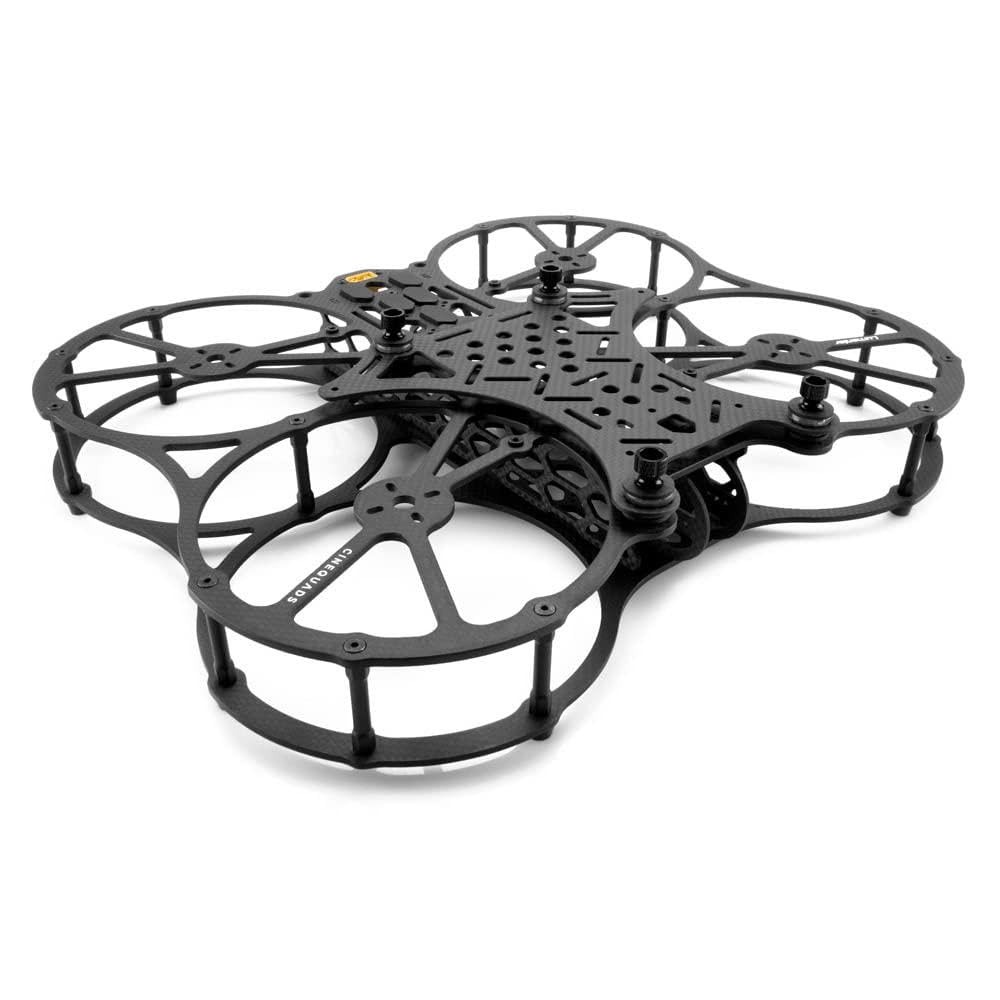
ایک اوور ہیڈ view of the Lumenier QAV-PRO Whoop 5 inch Cinequads Edition Frame Kit, showcasing its carbon fiber structure and propeller ducts.
2. پیکیج کے مشمولات
This package contains the Lumenier QAV-PRO Whoop 5" Cinequads Edition Frame Kit. Please note that propellers, transmitters, cameras, and other electronic components are not included and must be purchased separately.
- Lumenier QAV-PRO Whoop 5" Cinequads Edition Frame Components (Carbon Fiber Plates, Standoffs, Screws)
3. اسمبلی اور سیٹ اپ
Follow these steps to assemble your Lumenier QAV-PRO Whoop 5" Cinequads Edition Frame Kit. Ensure all components are present before beginning assembly.
مطلوبہ اوزار (شامل نہیں)
- چھوٹا فلپس ہیڈ سکریو ڈرایور
- Hex key set (various sizes)
- Tweezers (optional, for small components)
- Thread-locking compound (optional, for motor screws)
مرحلہ 1: بیس فریم اسمبلی
Begin by attaching the bottom plate to the main frame structure. Secure with the provided screws and standoffs.

This image displays the Lumenier QAV-PRO Whoop frame with its bottom carbon fiber plate and the initial set of standoffs installed, providing the base structure.
Step 2: Top Plate and Cage Installation
Install the top plate and the protective propeller cage elements. Ensure all screws are tightened securely but do not overtighten to avoid damaging the carbon fiber.

ایک اوپر سے نیچے view of the fully assembled Lumenier QAV-PRO Whoop frame, highlighting the integrated propeller ducts and the central mounting area for electronics.
Step 3: Electronic Component Mounting (Optional, for reference)
The frame is designed to accommodate various flight controllers, ESCs, and FPV systems. Mount your chosen components using appropriate hardware.
- Flight Controller/ESC Stack: Utilize the 30.5x30.5mm, 25.5x25.5mm, or 20x20mm mounting holes in the center.
- FPV Camera: Mount your FPV camera in the designated front camera slot.
- Digital HD System (e.g., Caddx Vista, DJI Air Unit): Mount in the central area, utilizing the SMA antenna mounting holes at the rear.
- Receiver: Secure your receiver in an appropriate location, ensuring antenna placement for optimal signal.

یہ تصویر فراہم کرتی ہے a view from the bottom of the Lumenier QAV-PRO Whoop frame, illustrating the various mounting patterns and cutouts designed for electronic components.
Step 4: Motor Installation
Attach your motors to the designated motor mounts on the propeller ducts. Use thread-locking compound on motor screws to prevent loosening during flight.

A detailed close-up shot of a standoff and screw assembly on the Lumenier QAV-PRO Whoop frame, demonstrating the secure fastening mechanism.
4. آپریٹنگ ہدایات
This section provides general guidelines for operating an FPV quadcopter built with the QAV-PRO Whoop frame. Actual flight characteristics will depend on your chosen motors, ESCs, flight controller, and propellers.
پری فلائٹ چیکس
- Ensure all screws are tight and no components are loose.
- Verify propeller direction and secure attachment.
- بیٹری چارج لیول چیک کریں۔
- Confirm radio control link and FPV video feed.
- Perform a visual inspection for any damage to the carbon fiber or electronics.
پرواز ماحول
- Operate in open areas, away from people, animals, and obstacles.
- Avoid flying near airports, restricted airspace, or sensitive locations.
- Be aware of local regulations regarding FPV drone operation.
Camera Payload Considerations
The QAV-PRO Whoop frame is designed to carry professional cinema cameras. When mounting a camera, ensure it is securely fastened and balanced to maintain optimal flight performance. Adjust PID tunes as necessary to compensate for the added weight and inertia.

A low-angle side view of the Lumenier QAV-PRO Whoop frame, showcasing its robust yet compact structure and the clearance for components.
5. دیکھ بھال اور دیکھ بھال
Regular maintenance ensures the longevity and safe operation of your QAV-PRO Whoop frame.
پرواز کے بعد معائنہ
- Inspect carbon fiber plates for cracks or delamination.
- سختی کے لئے تمام پیچ چیک کریں۔
- Examine propeller ducts for damage.
- Clean any dirt or debris from the frame and electronics.
صفائی
- Use a soft, dry cloth to wipe down the carbon fiber.
- ضدی گندگی کے لیے، تھوڑا سا ڈیamp cloth with mild soap can be used, ensuring no moisture enters electronics.
- سخت کیمیکلز یا سالوینٹس سے پرہیز کریں۔
ذخیرہ
- Store the frame in a cool, dry place, away from direct sunlight.
- Protect it from impacts or heavy objects.

This image presents a different side view of the Lumenier QAV-PRO Whoop frame, emphasizing the multi-layered carbon fiber design and the structural integrity.
6. Troubleshooting Common Issues (Frame Related)
This section addresses issues specifically related to the frame kit. For electronic component troubleshooting, refer to their respective manuals.
ڈھیلا پیچ
- علامات: Vibrations, rattling sounds, or components shifting.
- حل: Inspect all screws, especially those securing the main plates and motor mounts. Tighten as necessary. Consider using a small amount of non-permanent thread-locking compound on motor screws.
Damaged Carbon Fiber
- علامات: Visible cracks, delamination, or broken sections of the frame.
- حل: Minor cracks may be reinforced with CA glue. For significant damage, replace the affected carbon fiber part. Continued use of a severely damaged frame can lead to catastrophic failure.
Propeller Duct Deformation
- علامات: Propellers rubbing against the ducts, increased noise, or reduced efficiency.
- حل: Inspect for bent or broken duct sections. If minor, gentle reshaping might be possible. For significant deformation, replacement of the affected frame part is recommended.
7. تکنیکی تفصیلات
Below are the key specifications for the Lumenier QAV-PRO Whoop 5" Cinequads Edition Frame Kit.
| فیچر | تفصیلات |
|---|---|
| برانڈ | لومینیئر |
| ماڈل | QAV-PRO Whoop 5" Cinequads Edition Frame Kit |
| فریم کی قسم | 5-inch Caged FPV Quadcopter Frame |
| مواد | Quasi-Isotropic Japanese Carbon Fiber (Matte Finish) |
| Flight Controller Mounting | 30.5x30.5mm, 25.5x25.5mm, 20x20mm |
| FPV System Compatibility | HD (Caddx Vista, Air Unit) and Analog |
| انٹینا لگانا | 2x SMA holes |
| کنفیگریشن | دھکیلنے والا |
| شے کا وزن | Approximately 2 Pounds (Frame Kit only) |
| ASIN | B09QMMMMCQ |
| یو پی سی | 764613349832 |
8. وارنٹی معلومات اور معاونت
For warranty claims or technical support regarding your Lumenier QAV-PRO Whoop 5" Cinequads Edition Frame Kit, please contact Lumenier directly or the authorized reseller from whom you purchased the product.
- مینوفیکچرر: لومینیئر
- رابطہ: Refer to the Lumenier official website for the latest support contact information.
- واپسی: Please adhere to the return policy of your retailer (e.g., 30-day return policy).
Note: This frame kit is intended for experienced FPV enthusiasts. Improper assembly or use may void warranty.