
1. تعارف اور اوورview
The Wemo Smart Video Doorbell is designed for seamless integration with Apple HomeKit Secure Video, providing a convenient and secure method to monitor your home and communicate with visitors. This device offers a wide field of view and high-definition video quality, ensuring comprehensive coverage of your doorstep. It leverages your existing iCloud subscription for secure storage of motion-based recordings within the Apple Home App.
Key features include face recognition, dual-band Wi-Fi connectivity for reliable performance, and infrared technology for clear night vision. This doorbell is compatible exclusively with wired 16-24V AC doorbell systems.
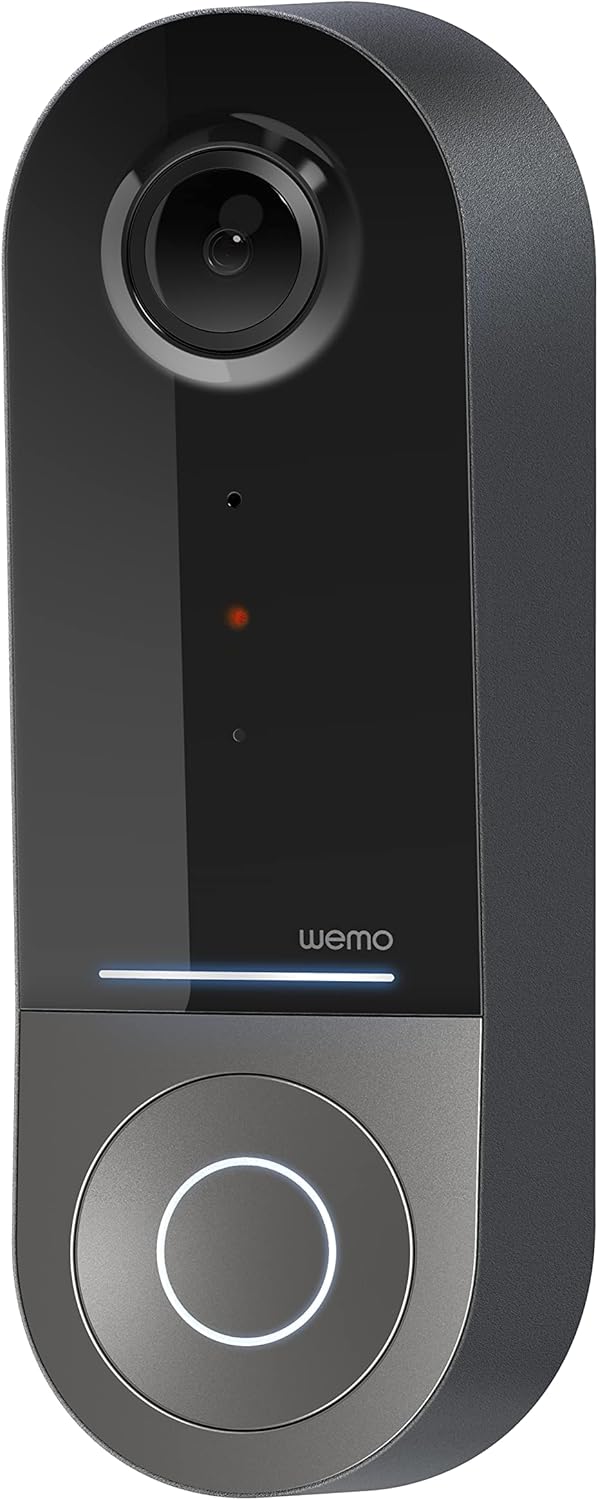
Figure 1: Wemo Smart Video Doorbell
2. سیٹ اپ اور انسٹالیشن
2.1 پری انسٹالیشن چیک لسٹ
- Ensure you have a wired doorbell system with 16-24V AC power.
- Download the Apple Home App on your iOS device.
- Confirm strong 2.4GHz and 5GHz Wi-Fi signal at your doorbell location.
2.2 جسمانی تنصیب
- پاور آف کریں: Before beginning installation, turn off power to your existing doorbell system at the circuit breaker.
- دروازے کی پرانی گھنٹی کو ہٹا دیں: Carefully remove your existing doorbell button.
- بڑھتے ہوئے بریکٹ انسٹال کریں: Use the provided screws and screwdriver to securely attach the mounting bracket to your wall. If needed, use the left/right wedges to adjust the viewING زاویہ
- Connect power kit: Follow the instructions in the included Setup Guide to properly install the Power Kit with Connectors into your existing chime box. This is crucial for correct operation.
- Wire the Wemo Doorbell: Connect the existing doorbell wires to the terminals on the back of the Wemo Smart Video Doorbell.
- دروازے کی گھنٹی لگائیں: Secure the Wemo Smart Video Doorbell onto the mounting bracket.
- بجلی کی بحالی: سرکٹ بریکر پر پاور کو دوبارہ آن کریں۔
2.3 ایپ سیٹ اپ
- Open the Apple Home App on your iOS device.
- Tap the '+' icon to add a new accessory.
- Scan the HomeKit setup code provided with your Wemo Smart Video Doorbell.
- Follow the on-screen prompts to name your doorbell, assign it to a room, and configure HomeKit Secure Video settings, including motion detection and face recognition preferences.
3. آپریٹنگ ہدایات
3.1 لائیو View اور اطلاعات
- Access live video feed directly from the Apple Home App on your iPhone, iPad, or HomePod.
- Receive instant notifications on your iOS device when motion is detected or the doorbell is pressed.
- Utilize face recognition to receive specific alerts for known individuals.

Figure 2: Face Recognition with HomeKit Secure Video
3.2 ویڈیو ریکارڈنگ اور اسٹوریج
- HomeKit Secure Video stores 10 days of motion-based recording history in your iCloud account.
- Review recorded events directly within the Apple Home App.

Figure 3: iCloud Recording via Apple Home App
3.3 دو طرفہ آڈیو
- Engage in real-time two-way conversations with visitors through the Apple Home App.
3.4 Advanced Video Features
- کا وسیع میدان View: The camera offers a 178° vertical, 140° horizontal, and 223° diagonal field of view for extensive coverage.
- HD Resolution with HDR: Enjoy crystal clear 1200x1600 resolution video with HDR for optimal image quality in varying light conditions.
- بہتر نائٹ ویژن: Infrared technology provides clear video even in low-light conditions.

Figure 4: Enhanced Night Vision
3.5 Dual-Band Wi-Fi Connectivity
- The doorbell utilizes both 2.4GHz and 5GHz Wi-Fi bands.
- The 2.4GHz band offers a longer range and better penetration through walls.
- The 5GHz band provides higher speeds for closer proximity connections.

Figure 5: Dual-Band Wi-Fi Connectivity
4. دیکھ بھال اور خرابیوں کا سراغ لگانا
4.1 عمومی نگہداشت
- باقاعدگی سے کیمرے کے لینس کو نرم سے صاف کریں، ڈیamp cloth to ensure clear video quality.
- Ensure the doorbell is free from obstructions that might block its field of view or microphone.
4.2 کی دشواری کا سراغ لگانا
- رابطے کے مسائل: If the doorbell frequently disconnects, ensure your Wi-Fi signal is strong at the installation location. Consider adjusting your router's band (2.4GHz for range, 5GHz for speed) or adding a Wi-Fi extender.
- بجلی کے مسائل: Verify that your wired doorbell system provides the required 16-24V AC. Insufficient voltage can lead to intermittent operation or device resets. Consult a qualified electrician if you suspect voltagای مسائل.
- ایپ کی ردعمل: If the Apple Home App is slow to connect or display the live feed, ensure your iOS device and HomeKit hub (e.g., Apple TV, HomePod) are updated and have a stable internet connection. Restarting the doorbell or your HomeKit hub may resolve temporary glitches.
5. وضاحتیں
| انڈور / آؤٹ ڈور استعمال | آؤٹ ڈور |
| ہم آہنگ آلات | HomePod, iPad, iPhone |
| طاقت کا منبع | تار والا الیکٹرک (16-24V AC) |
| کنیکٹیویٹی پروٹوکول | Wi-Fi (2.4GHz اور 5GHz) |
| کنٹرولر کی قسم | ایپل ہوم کٹ |
| چڑھنے کی قسم | وال ماؤنٹ |
| ویڈیو کیپچر ریزولوشن | 1200x1600 (HD, HDR-enabled) |
| رنگ | سیاہ |
| آئٹم کے طول و عرض L x W x H | 2.1 x 1.8 x 5 انچ |
| شے کا وزن | 13.7 اونس |
| خصوصی خصوصیات | HD Resolution, Image Sensor, Night Vision, HDR |
6. باکس میں کیا ہے۔
- سمارٹ ویڈیو ڈور بیل
- سیٹ اپ گائیڈ
- بڑھتے ہوئے بریکٹ
- Left/Right Wedge
- پیچ اور سکریو ڈرایور
- Power Kit with Connectors
7. سرکاری پروڈکٹ ویڈیو
Video 1: Official Wemo Video Doorbell overviewشوکasinجی خصوصیات اور ڈیزائن۔
8. وارنٹی اور سپورٹ
For warranty information and technical support, please refer to the official WeMo webسائٹ یا ان کی کسٹمر سروس سے براہ راست رابطہ کریں۔ وارنٹی کے دعووں کے لیے اپنی خریداری کی رسید اپنے پاس رکھیں۔