
tectake Zola
tectake Zola Electric Height-Adjustable Desk
ماڈل: 404316
1. پروڈکٹ ختمview
The tectake Zola Electric Height-Adjustable Desk is designed to provide a dynamic and ergonomic workspace. Featuring continuous electric height adjustment, a robust particle board tabletop, and a solid steel frame, this desk offers stability and comfort. Its powerful motor ensures smooth transitions between sitting and standing positions, while the flexible frame design maximizes legroom. The integrated touchpad allows for easy height adjustments and memory function for preferred settings. An anti-collision system enhances safety during operation.

Image 1.1: The tectake Zola Electric Height-Adjustable Desk, showcasing its sleek black design and sturdy construction.
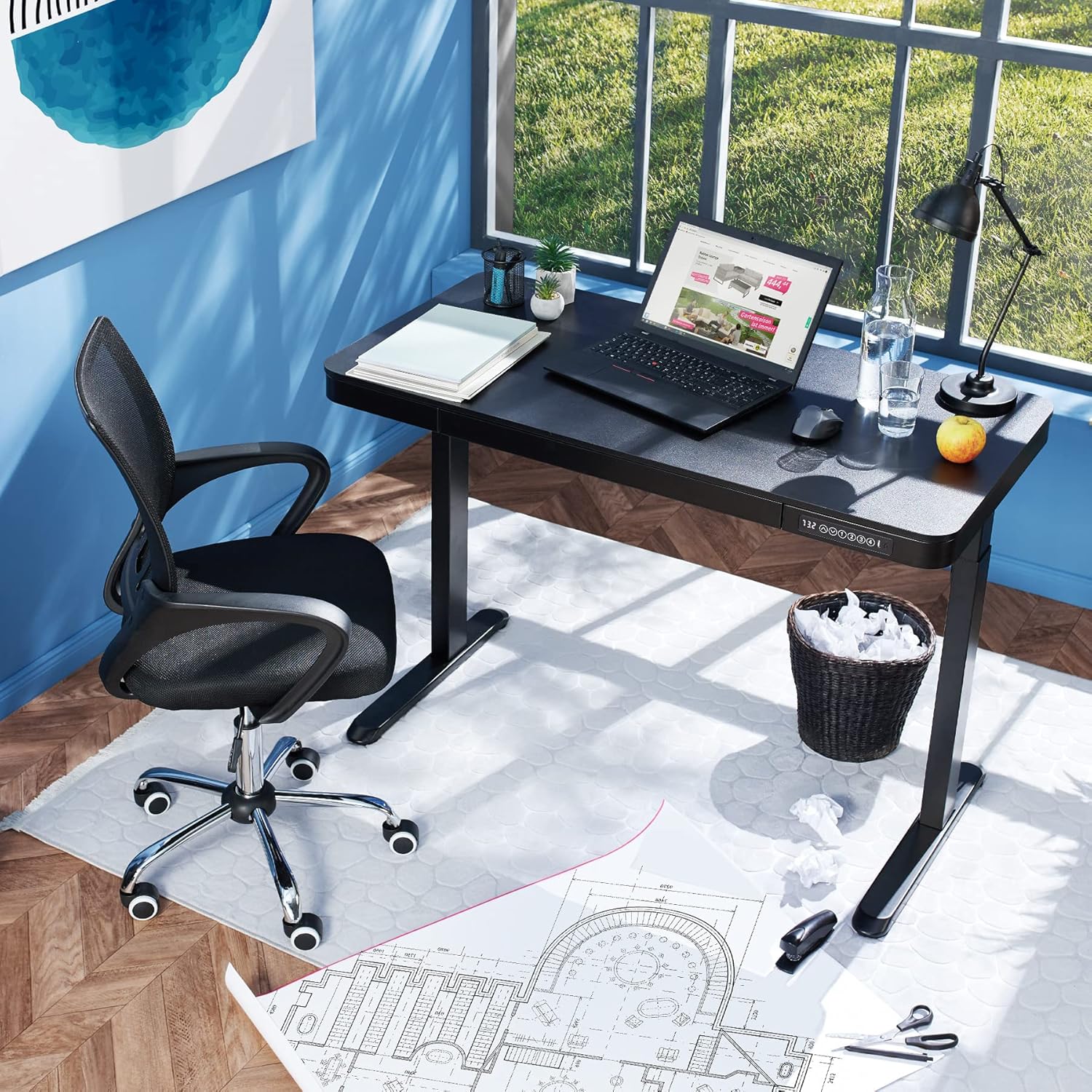
Image 1.2: The desk integrated into a modern office environment, demonstrating its practical use.
2. حفاظتی ہدایات
- اسمبلی اور استعمال سے پہلے تمام ہدایات کو احتیاط سے پڑھیں۔
- آپریشن کے دوران بچوں اور پالتو جانوروں کو میز سے دور رکھیں۔
- اس بات کو یقینی بنائیں کہ استعمال سے پہلے تمام پیچ اور بولٹ کو محفوظ طریقے سے سخت کیا گیا ہے۔ وقتا فوقتا چیک کریں اور ضرورت کے مطابق دوبارہ سخت کریں۔
- Do not overload the desk. The maximum load capacity is 45 kg.
- Keep hands and fingers clear of moving parts during height adjustment. The desk is equipped with an anti-collision system, but caution is still advised.
- صرف فراہم کردہ پاور اڈاپٹر استعمال کریں۔
- Do not disassemble or modify the motor or control unit. Contact qualified personnel for repairs.
- Place the desk on a level surface. Adjustable feet can compensate for minor unevenness.
3. پیکیج کے مشمولات
اسمبلی شروع کرنے سے پہلے اس بات کی تصدیق کریں کہ تمام اجزاء موجود ہیں اور بغیر کسی نقصان کے ہیں۔ اگر کوئی پرزہ غائب یا خراب ہو تو کسٹمر سپورٹ سے رابطہ کریں۔
- Tabletop with integrated drawer and control panel
- بائیں ٹانگ اسمبلی
- دائیں ٹانگ اسمبلی۔
- پاؤں (2x)
- پاور اڈاپٹر اور کیبل
- Assembly Hardware (screws, Allen key, etc.)
- ہدایات دستی (یہ دستاویز)
4. اسمبلی گائیڈ
Assembly is required for this product. It is recommended to have two people for easier and safer assembly. Clear a spacious area for assembly and lay out all components.
مرحلہ وار اسمبلی:
- Attach Leg Assemblies to Tabletop: Carefully place the tabletop upside down on a soft, clean surface to prevent scratches. Align the left and right leg assemblies with the pre-drilled holes on the underside of the tabletop. Secure them using the provided screws and Allen key. Ensure the motor cables are not pinched.
- Attach Feet to Leg Assemblies: Slide the feet onto the bottom of each leg assembly. Secure them with the appropriate screws.
- پاور کیبل کو جوڑیں: Locate the power input port on the control unit (usually on the underside of the tabletop near the control panel). Connect the power cable firmly.
- ڈیسک کی پوزیشن: With assistance, carefully flip the desk upright and move it to its desired location. Adjust the plastic feet at the bottom of the legs to ensure the desk is stable and level on uneven floors.
- ابتدائی پاور اپ: Plug the power adapter into a wall outlet. The control panel display should light up.

Image 4.1: Dimensional drawing of the desk, useful for planning space and assembly.

تصویر 4.2: سائیڈ view illustrating the robust leg structure and height adjustment mechanism.
5. آپریشن گائیڈ
The tectake Zola desk features an intuitive control panel for easy height adjustment and memory functions.
کنٹرول پینل کے افعال:

Image 5.1: The control panel, showing the digital height display and control buttons.
- ڈیجیٹل ڈسپلے: Shows the current height of the desk in centimeters.
- اوپر/نیچے تیر (↑ / ↓): Press and hold to continuously adjust the desk height upwards or downwards. Release the button to stop at the desired height.
- میموری بٹن (1, 2, 3, 4): These buttons allow you to save and recall up to four preferred height settings.
- اونچائی کو بچانے کے لیے: Adjust the desk to your desired height using the up/down arrows. Press and hold one of the memory buttons (1-4) until the display flashes or beeps, indicating the height has been saved.
- To Recall a Height: Simply press the corresponding memory button (1-4). The desk will automatically move to the saved height.
- اینٹی تصادم کا نظام: The desk is equipped with a sensitive anti-collision system. If the desk encounters an obstruction during height adjustment, it will stop and slightly reverse direction to prevent damage.
- USB-A اور USB-C پورٹس: Located on the control panel, these ports can be used to charge small electronic devices.

Image 5.2: Detail of the USB-A and USB-C charging ports for convenient device charging.

Image 5.3: Visual representation of the desk's adjustable height range.
Integrated Drawer:
The desk includes a convenient integrated drawer for storing small office supplies, helping to keep your workspace tidy.

Image 5.4: The desk's integrated drawer, providing discreet storage.

Image 5.5: Detail of the drawer's smooth-gliding mechanism.
6. دیکھ بھال اور دیکھ بھال
- صفائی: میز کی سطح اور ٹانگوں کو نرم سے صاف کریں، ڈیamp کپڑا سخت کیمیکلز یا کھرچنے والے کلینر استعمال کرنے سے گریز کریں، کیونکہ وہ ختم کو نقصان پہنچا سکتے ہیں۔
- باقاعدہ چیکس: وقتا فوقتا تمام پیچ اور کنکشن کا معائنہ کریں تاکہ یہ یقینی بنایا جا سکے کہ وہ سخت ہیں۔ اگر ضروری ہو تو دوبارہ سخت کریں۔
- کیبل مینجمنٹ: Ensure power cables are not tangled or pinched, which could lead to damage or malfunction.
7 خرابیوں کا سراغ لگانا
| مسئلہ | ممکنہ وجہ | حل |
|---|---|---|
| ڈیسک حرکت نہیں کرتا۔ | No power; cable disconnected; motor error. | Check power connection to wall outlet and desk. Ensure all cables are securely connected. Unplug and replug the power cable to reset the system. |
| ڈیسک غیر مساوی طور پر حرکت کرتا ہے یا غیر معمولی شور کرتا ہے۔ | Loose connections; obstruction; uneven load. | Check all assembly screws for tightness. Ensure there are no obstructions under or around the desk. Distribute weight evenly on the tabletop. |
| تصادم مخالف نظام اکثر چالو ہوتا ہے۔ | رکاوٹ; حساس ترتیب. | Ensure the path of movement is clear. If the issue persists without clear obstruction, consult customer support. |
| میموری فنکشن کام نہیں کر رہا ہے۔ | محفوظ کرنے کا طریقہ کار غلط ہے۔ | Refer to 'Operation Guide' section 5 for correct saving procedure (press and hold memory button until confirmation). |
8. تکنیکی تفصیلات
| فیچر | تفصیلات |
|---|---|
| ماڈل نمبر | 404316 |
| مجموعی ابعاد (L x W x H) | Approx. 1204 x 604 x 720 - 1220 mm |
| Tabletop Dimensions (L x W x H) | تقریبا. 1204 x 604 x 64.5 ملی میٹر |
| اندرونی دراز کے طول و عرض (L x W x H) | تقریبا. 60 x 29 x 5 سینٹی میٹر |
| Lifting Columns per Side | 2 main columns (approx. 4.5 x 7.5 cm) |
| Adjustable Feet Range | تقریبا 1.2 سینٹی میٹر |
| موٹر شور کی سطح | <50 ڈی بی |
| لفٹنگ کی رفتار | 25 ملی میٹر فی سیکنڈ |
| موٹر پاور | 52.2 ڈبلیو |
| ان پٹ جلدtage | 100-240 وی |
| کیبل کی لمبائی | تقریبا 310 سینٹی میٹر |
| لوڈ کی صلاحیت | 45 کلوگرام |
| پروڈکٹ کا وزن | تقریبا 32 کلوگرام |
| مواد | Powder-coated steel, particle board, polychloride, ABS plastic |
9. وارنٹی اور سپورٹ
For information regarding warranty terms and conditions, please refer to the purchase documentation or contact your retailer. For technical support or inquiries about replacement parts, please visit the official tectake webسائٹ یا ان کے کسٹمر سروس ڈیپارٹمنٹ سے رابطہ کریں۔ خریداری کے ثبوت کے طور پر اپنی خریداری کی رسید اپنے پاس رکھیں۔
مینوفیکچرر: tectake
برانڈ: ٹیک ٹیک