
1. تعارف
خریداری کے لیے آپ کا شکریہasing the Muse M-308 BT Bluetooth Speaker. This manual provides essential information for the safe and correct use of your device. Please read it thoroughly before use and keep it for future reference.
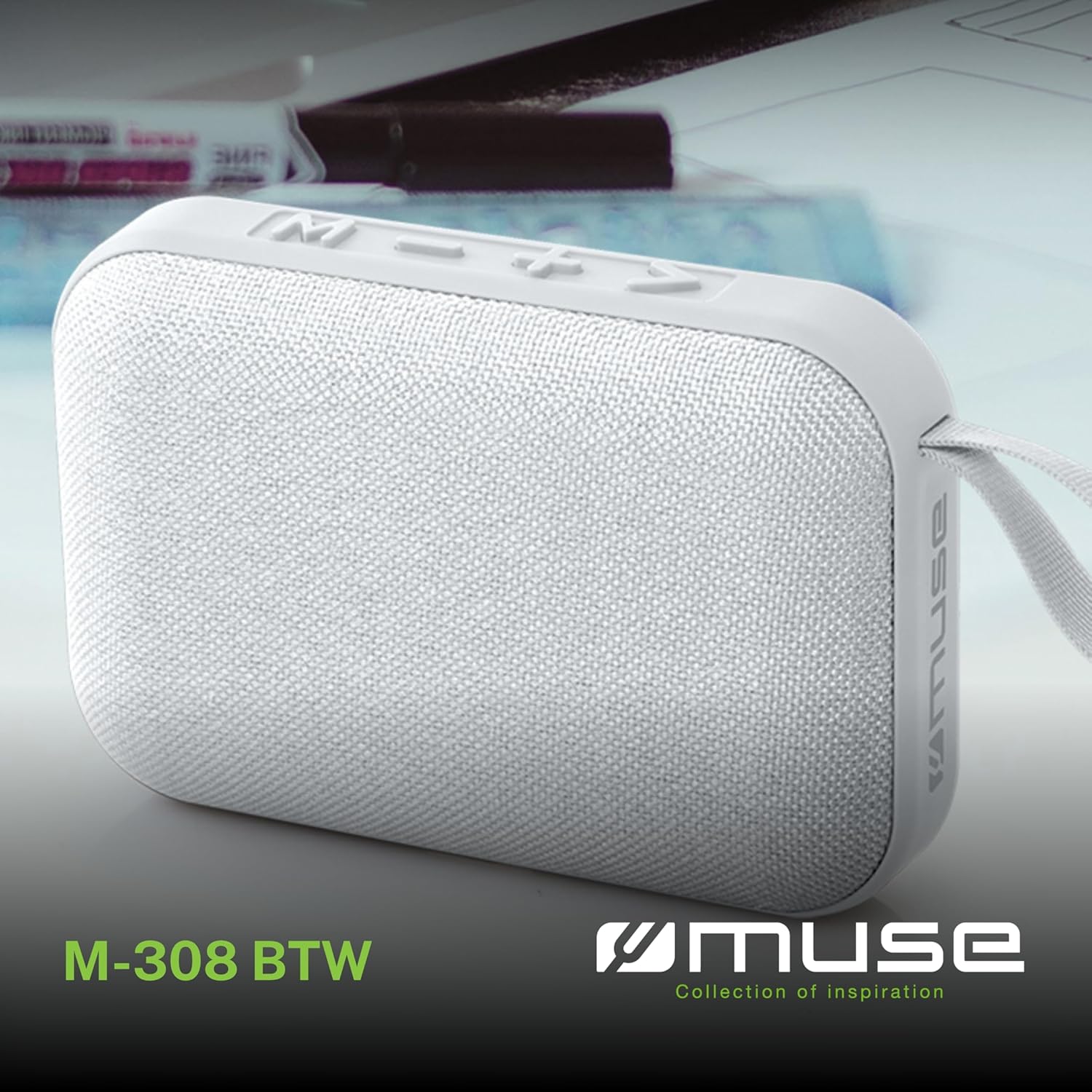
تصویر 1.1: سامنے view of the Muse M-308 BT Bluetooth Speaker.
2. مصنوعات کی خصوصیات
- بلوٹوتھ کنیکٹیویٹی: مطابقت پذیر آلات سے آڈیو کو وائرلیس طور پر سٹریم کریں۔
- ہینڈز فری فنکشن: Integrated microphone for taking calls.
- میڈیا پلے بیک: Supports music playback from USB and MicroSD (TF) cards.
- سٹیریو پیئرنگ: Connect two M-308 BT speakers for enhanced stereo sound.
- ایل ای ڈی اشارے: Provides visual feedback for Bluetooth pairing and charging status.
- کمپیکٹ اور ہلکا پھلکا: Designed for portability, weighing approximately 200g.
- بلٹ ان ریچارج ایبل بیٹری: 1200mAh capacity for up to 10 hours of playback.
- آؤٹ پٹ پاور: 5 Watts for clear audio.

Image 2.1: Key features of the Muse M-308 BT speaker.

Image 2.2: Additional functionalities of the Muse M-308 BT speaker.
3. پیکیج کے مشمولات
اس بات کو یقینی بنائیں کہ پیک کھولنے پر تمام اشیاء موجود ہیں:
- Muse M-308 BT Bluetooth Speaker
- USB چارجنگ کیبل
- صارف دستی (یہ دستاویز)
4. کنٹرول اور رابطے
اسپیکر کے کنٹرولز اور کنکشن پورٹس سے اپنے آپ کو واقف کریں:

Image 4.1: Top panel with various connections.
- USB پورٹ: USB فلیش ڈرائیو سے موسیقی چلانے کے لیے۔
- مائیکرو USB پورٹ: اسپیکر چارج کرنے کے لیے۔
- Micro SD (TF) Card Slot: مائیکرو ایس ڈی کارڈ سے موسیقی چلانے کے لیے۔
- آن/آف سوئچ: To power the speaker on or off.

Image 4.2: Side panel with control buttons.
- ایم بٹن (موڈ): بلوٹوتھ، USB، اور مائیکرو SD موڈز کے درمیان سوئچ کرنے کے لیے دبائیں۔
- - Button (Volume Down / Previous Track):
- مختصر دبائیں: والیوم کم کریں۔
- Long press: Go to the previous track.
- + Button (Volume Up / Next Track):
- مختصر دبائیں: والیوم بڑھائیں۔
- Long press: Go to the next track.
- > Button (Play / Pause / Call):
- Short press: Play or pause music.
- Short press (during incoming call): Answer call.
- Long press (during incoming call): Reject call.
- Short press (during call): End call.
5. سیٹ اپ
5.1 اسپیکر کو چارج کرنا
- Connect the supplied USB charging cable to the Micro-USB port on the speaker.
- USB کیبل کے دوسرے سرے کو USB پاور اڈاپٹر (شامل نہیں) یا کمپیوٹر کے USB پورٹ سے مربوط کریں۔
- ایل ای ڈی انڈیکیٹر چارجنگ سٹیٹس کو دکھانے کے لیے روشن ہوگا۔ مکمل چارج ہونے پر یہ بند ہو جائے گا یا رنگ بدل جائے گا۔
5.2 پاور آن/آف۔
- To power on, slide the ON/OFF switch to the 'ON' position. You will hear an audible prompt.
- پاور آف کرنے کے لیے، آن/آف سوئچ کو 'آف' پوزیشن پر سلائیڈ کریں۔
5.3 بلوٹوتھ جوڑی
- Ensure the speaker is powered on and in Bluetooth mode (indicated by a flashing LED). If not, press the 'M' button to switch to Bluetooth mode.
- اپنے اسمارٹ فون، ٹیبلیٹ، یا دیگر ہم آہنگ ڈیوائس پر بلوٹوتھ کو فعال کریں۔
- تلاش کریں۔ available Bluetooth devices and select "M-308 BT" from the list.
- جوڑا بننے کے بعد، LED اشارے چمکنا بند کر دے گا اور ٹھوس رہے گا، اور آپ کو ایک تصدیقی لہجہ سنائی دے گا۔
- The speaker will automatically connect to the last paired device when powered on, if it is within range.
5.4 Stereo Pairing (TWS Function)
To pair two M-308 BT speakers for true wireless stereo sound:
- Ensure both speakers are powered on and in Bluetooth pairing mode (LED flashing).
- On one of the speakers (this will be the primary speaker), double-press the 'M' button. The speaker will search for another M-308 BT speaker.
- Once connected, both speakers will emit a confirmation tone, and the LED on the primary speaker will flash slowly, while the LED on the secondary speaker will remain solid.
- اب، اپنے آلے کو بلوٹوتھ کے ذریعے پرائمری اسپیکر سے جوڑیں جیسا کہ سیکشن 5.3 میں بیان کیا گیا ہے۔
6. آپریٹنگ ہدایات
6.1 موسیقی بجانا
- بلوٹوت وضع: After successful pairing, start playing music on your connected device. The audio will stream through the speaker.
- USB/Micro SD موڈ: Insert a USB flash drive or Micro SD card into the respective port. The speaker will automatically switch to the corresponding mode and begin playing music. If it doesn't, press the 'M' button to cycle through modes.
6.2 والیوم کنٹرول
- حجم بڑھانے کے لیے '+' بٹن دبائیں۔
- حجم کو کم کرنے کے لیے '-' بٹن دبائیں۔
6.3 ٹریک نیویگیشن
- Long press the '+' button to skip to the next track.
- Long press the '-' button to go back to the previous track.
6.4 ہینڈز فری کالنگ۔
- When a call comes in, the music will pause. Press the '>' button to answer the call.
- To end a call, press the '>' button again.
- To reject an incoming call, long press the '>' button.
7 دیکھ بھال
- اسپیکر کو انتہائی درجہ حرارت، براہ راست سورج کی روشنی اور نمی سے دور رکھیں۔
- Do not expose the speaker to water or other liquids. This model is not water-resistant.
- اسپیکر کو نرم، خشک کپڑے سے صاف کریں۔ کھرچنے والے کلینر یا سالوینٹس کا استعمال نہ کریں۔
- خود اسپیکر کو الگ کرنے یا مرمت کرنے کی کوشش نہ کریں۔ اس سے وارنٹی ختم ہو جائے گی۔
- When not in use for extended periods, charge the battery at least once every three months to maintain battery health.
8 خرابیوں کا سراغ لگانا
| مسئلہ | ممکنہ وجہ | حل |
|---|---|---|
| سپیکر پاور آن نہیں کرتا۔ | بیٹری ختم ہو گئی ہے۔ | فراہم کردہ USB کیبل کا استعمال کرتے ہوئے اسپیکر کو چارج کریں۔ |
| بلوٹوتھ کے ذریعے جوڑا نہیں بنایا جا سکتا۔ | Bluetooth is not enabled on your device or speaker is not in pairing mode. Speaker is too far from the device. | Ensure Bluetooth is active on both devices. Make sure the speaker is in Bluetooth pairing mode (flashing LED). Move the speaker closer to your device (within 10 meters). |
| کوئی آواز نہیں۔ | Volume is too low. Speaker is not connected. Incorrect mode selected. | Increase the volume on both the speaker and your connected device. Re-pair the Bluetooth connection. Press the 'M' button to cycle through modes (Bluetooth, USB, Micro SD). |
| Music playback from Micro SD card is erratic or "screaming". | کرپٹ files on Micro SD card. Incompatible file فارمیٹ | آڈیو کو یقینی بنائیں files are in a compatible format (e.g., MP3). Try using a different Micro SD card or reformatting the current one and reloading files. |
| Speaker switches between modes (e.g., SD and BT) unexpectedly. | Interference or a temporary software glitch. | Power off the speaker, wait a few seconds, then power it back on. Ensure no other devices are causing interference. If the issue persists, try removing the Micro SD card if it's inserted. |
9. وضاحتیں
| ماڈل کا نام | M-308 BT |
| برانڈ | موسیقی |
| کنیکٹوٹی ٹیکنالوجی | بلوٹوتھ، وائرڈ |
| وائرلیس کمیونیکیشن ٹیکنالوجی | بلوٹوتھ |
| اسپیکر زیادہ سے زیادہ آؤٹ پٹ پاور | 5 واٹ |
| آڈیو آؤٹ پٹ وضع | سٹیریو |
| اسپیکر کی قسم | پورٹ ایبل بلوٹوتھ اسپیکر |
| خصوصی خصوصیات | بلوٹوتھ |
| ہم آہنگ آلات | اسمارٹ فون، ٹیبلٹ |
| طاقت کا منبع | بیٹری |
| بیٹری کی زندگی | 10 گھنٹے |
| بیٹری کی صلاحیت | 1200 ملی۔ampگھنٹہ |
| پروڈکٹ کے طول و عرض (D x W x H) | 118D x 30B x 76H millimeters (11.8 x 3 x 7.6 cm) |
| شے کا وزن | 200 گرام |
| مواد | Plastic rubber material |
| Is Water Resistant | نہیں |
| شامل اجزاء | USB چارجنگ کیبل |
Image 9.1: Dimensions of the Muse M-308 BT speaker.
10. وارنٹی اور سپورٹ
The Muse M-308 BT Bluetooth Speaker comes with a 2 سال کی وارنٹی خریداری کی تاریخ سے.
For technical support, warranty claims, or further assistance, please contact your retailer or visit the official MUSE webرابطے کی معلومات کے لیے سائٹ۔