
تعارف
This manual provides comprehensive instructions for the installation, setup, operation, and maintenance of your Refoss Smart Light Switch (Model MSS510). This smart switch is designed to integrate seamlessly with your smart home ecosystem, offering convenient control via Apple HomeKit, Amazon Alexa, and Google Home. Please read this manual thoroughly before installation and use to ensure proper functionality and safety.
تنصیب سے پہلے اہم نوٹس
- صرف 2.4GHz Wi-Fi: This device operates exclusively on a 2.4GHz Wi-Fi network. It does not support 5GHz Wi-Fi.
- غیر جانبدار تار کی ضرورت ہے: A neutral wire (typically white) is required for the installation of this smart switch. Please ensure your existing wiring includes a neutral wire before proceeding.
- Single Pole Switch Only: This smart switch is designed to replace single-pole switches only. It is not compatible with 3-way or 4-way switch configurations.
- Not for Smart Bulbs: Do not use this smart switch with existing smart bulbs. It is intended for use with traditional incandescent, LED, or CFL bulbs.
- زیادہ سے زیادہ واٹ۔tage: Supports up to 400W for Incandescent (INC) bulbs and 150W for LED and CFL bulbs.

Figure 1: Important compatibility and wiring requirements for the Refoss Smart Light Switch.

Figure 2: Compatibility details for the Refoss Smart Light Switch, including supported bulb types and wattage حدود.
پیکیج کے مشمولات
Your Refoss Smart Light Switch package includes:
- Refoss Smart Switches (4 units)
- Wallplates (4 units)
- Wiring Nuts (16 units)
- پیچ (8 یونٹ)
- Wire Label sheets (4 units)
- انسٹالیشن گائیڈ (یہ دستی)

Figure 3: Refoss Smart Light Switch 4-Pack packaging and contents.
سیٹ اپ اور انسٹالیشن
سب سے پہلے حفاظت: Before beginning any electrical work, always turn off the power at the circuit breaker to avoid electrical shock.
- وائرنگ کی تصدیق کریں: Confirm that your existing switch box has a neutral wire. The Refoss Smart Light Switch requires a neutral wire for operation.
- پرانا سوئچ منقطع کریں: Carefully disconnect the wires from your old switch. Use the provided wire labels to mark each wire (Live, Load, Neutral, Ground) for easy identification.
- نیا سوئچ جوڑیں: Connect the wires from your wall to the corresponding wires on the Refoss Smart Light Switch using the included wiring nuts. The switch has pre-stripped wires for easy connection. Ensure all connections are secure.

Figure 4: Wiring diagram for the Refoss Smart Light Switch.
- ماؤنٹ سوئچ: Secure the smart switch into the wall box using the provided screws.
- وال پلیٹ منسلک کریں: The Refoss Smart Light Switch comes with a screw-less wallplate that clips directly onto the switch for a clean finish.
- بجلی کی بحالی: Turn the power back on at the circuit breaker. The indicator light on the switch should begin to flash, indicating it's ready for pairing.
- ایپ کی تنصیب: Download the Refoss app or Apple Home app from your device's app store.
- جوڑا بنانا: Follow the in-app instructions to add your new smart switch. For Apple HomeKit, you may need to manually enter the 8-digit HomeKit setup code found on the switch body if the QR code scan fails.
- HomeKit Remote Control: To enable remote control via HomeKit when away from home, you will need a HomePod, an Apple TV 4K, or an Apple TV HD set up as a home hub. A home hub is not required for remote control via the Refoss app. For more information on setting up a HomeKit hub, visit ایپل سپورٹ.

Figure 5: Setting up Apple HomeKit for remote access.
آپریٹنگ ہدایات
دستی کنٹرول
The smart switch can be operated manually by pressing the bottom part of the switch paddle. Press once to turn on, press again to turn off. The switch will always return to its neutral position.
وائس کنٹرول
Once paired with your smart home assistant, you can control the light switch using voice commands:
- ایپل ہوم کٹ (سیری): "Hey Siri, turn on the living room light."
- ایمیزون الیکسا: "Alexa, turn off the kitchen light."
- گوگل ہوم: "Ok Google، بیڈروم کی روشنی کو 50% پر مدھم کر دو۔"

Figure 6: Hands-free voice control with smart assistants.
ایپ ریموٹ کنٹرول
Control your lights from anywhere using the Refoss app or Apple Home app on your smartphone or tablet. You can monitor the status of your lights and turn them on/off remotely, which is useful when you are away from home.

Figure 7: Remote control via the Refoss app.
Scheduling and Scenes
Utilize the Refoss or Home app to set schedules and create custom scenes:
- شیڈولز: Program your lights to turn on or off automatically at specific times, or based on sunrise/sunset. This can help optimize energy usage and create the illusion of occupancy when you're away.
- مناظر: Group multiple Refoss devices together and control them simultaneously with a single tap. Create scenes for different moods or activities, such as "Movie Time" or "Good Morning."
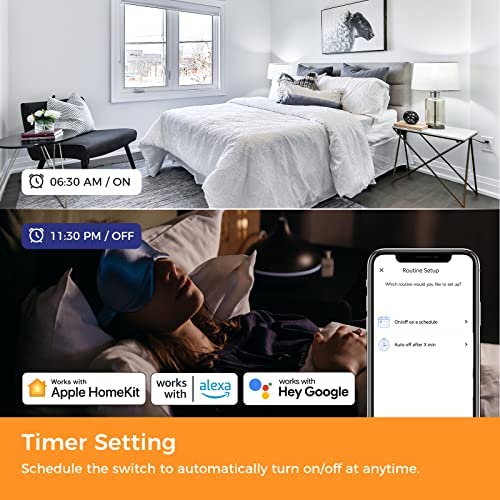
شکل 8: سابقample of timer settings for automated lighting.

Figure 9: Customizing scenes for various occasions.
اشارے کی روشنی
The smart switch features an indicator light. Its behavior can be configured within the Refoss app, including turning it off if desired.
دیکھ بھال
To maintain your Refoss Smart Light Switch:
- صفائی: Wipe the surface with a soft, dry cloth. Do not use harsh chemicals or abrasive cleaners.
- حفاظت: The switch housing is made of PC-ABS for heat resistance and impact resistance. The circuit design includes protection against electrical overload.

Figure 10: Secure design features of the Refoss Smart Light Switch.
خرابی کا سراغ لگانا
If you encounter issues with your Refoss Smart Light Switch, consider the following:
- رابطے کے مسائل: If the switch loses connection or is unresponsive, locate the small button at the bottom of the switch. Pressing this button can perform a soft reset on the power, often resolving connectivity problems.
- Wi-Fi نیٹ ورک: Ensure your Wi-Fi network is 2.4GHz. The switch will not connect to 5GHz networks.
- غیر جانبدار تار: Verify that the neutral wire is correctly connected. This is essential for the switch's operation.
- ایپ پیئرنگ: If initial pairing fails, try manually entering the HomeKit code instead of scanning the QR code.
وضاحتیں
| فیچر | تفصیل |
|---|---|
| ماڈل نمبر | MSS510-Refoss |
| مصنوعات کے طول و عرض | 2.8 x 1.5 x 4.7 انچ |
| وزن | 12.5 اونس |
| آپریشن موڈ | کبھی کبھی |
| موجودہ درجہ بندی | 4 Amps |
| آپریٹنگ والیومtage | 120 وولٹ (AC) |
| رابطہ کی قسم | عام طور پر کھولیں۔ |
| کنیکٹر کی قسم | Clamp |
| ٹرمینل | ایس پی ایس ٹی |
| سرکٹ کی قسم | 1 طرفہ |
| ایکچیویٹر کی قسم | قبضہ لیور |
ٹیکنیکل سپورٹ
If you have any questions regarding the switch type, installation, connection, or any other aspect of your Refoss Smart Light Switch, please do not hesitate to contact Refoss technical support. We are committed to providing solutions until you are satisfied.
For support, please refer to the contact information provided in your product packaging or visit the official Refoss webسائٹ