
1. تعارف
Thank you for choosing the Pantum BP5100DN Monochrome Laser Printer. This manual provides essential information for the safe and efficient use of your printer. Please read it thoroughly before operating the device and keep it for future reference.
The Pantum BP5100DN is designed for high-speed, high-quality monochrome printing, featuring automatic two-sided printing and versatile connectivity options including USB and Ethernet.
2. حفاظتی معلومات
- پرنٹر کو ہمیشہ ایک مستحکم سطح پر رکھیں۔
- زیادہ گرم ہونے سے بچنے کے لیے پرنٹر کے ارد گرد مناسب وینٹیلیشن کو یقینی بنائیں۔
- پرنٹر کو پانی یا ضرورت سے زیادہ نمی کے سامنے نہ رکھیں۔
- Use only the specified power supply and connect to a grounded outlet.
- آپریشن کے دوران ہاتھ اور ڈھیلے لباس کو حرکت پذیر حصوں سے دور رکھیں۔
- فیوزر یونٹ کو چھونے سے گریز کریں، کیونکہ یہ بہت گرم ہو سکتا ہے۔
- Do not attempt to service the printer yourself. Refer to qualified service personnel.
3. باکس میں کیا ہے۔
تصدیق کریں کہ نیچے دی گئی تمام اشیاء آپ کے پیکیج میں شامل ہیں:
- Pantum BP5100DN Monochrome Laser Printer
- بجلی کی ہڈی
- USB انٹرفیس کیبل
- فوری سیٹ اپ گائیڈ
- Starter cartridge (3000 pages)
- Starter drum (30000 pages)

Figure 3.1: Package Contents. This image displays the Pantum BP5100DN printer along with its accessories: power cord, USB interface cable, quick setup guide, starter toner cartridge, and starter drum unit.
4. پروڈکٹ ختمview
4.1. پرنٹر کے اجزاء
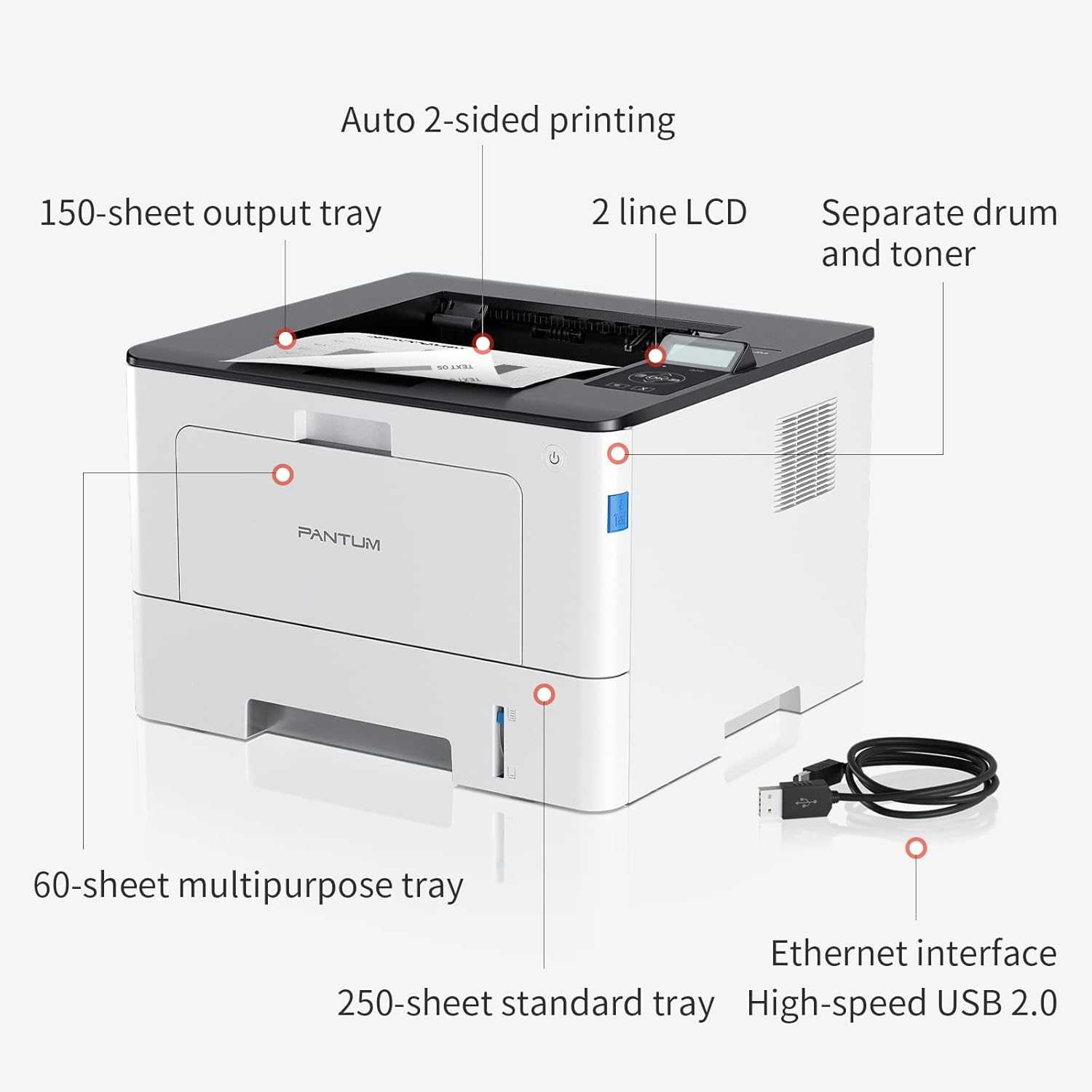
Figure 4.1: Printer Components. Key features include a 150-sheet output tray, a 2-line LCD display, separate drum and toner units, a 60-sheet multipurpose tray, a 250-sheet standard tray, an Ethernet interface, and a High-speed USB 2.0 port.
4.2. طول و عرض

Figure 4.2: Printer Dimensions. The printer measures approximately 14.33 inches (W) x 10.12 inches (H) x 13.54 inches (D).
4.3. کنٹرول پینل

Figure 4.3: Control Panel. The control panel includes a 2-line LCD display for status messages and menu navigation, along with buttons for OK, arrow controls, and cancel functions.
5. سیٹ اپ
5.1. پیک کھولنا اور جگہ کا تعین کرنا
- پرنٹر کو احتیاط سے اس کی پیکیجنگ سے ہٹا دیں۔
- پرنٹر سے تمام حفاظتی ٹیپس اور پیکنگ مواد کو ہٹا دیں۔
- Place the printer on a firm, level surface with adequate space for ventilation.
5.2. Toner and Drum Installation
- پرنٹر کا سامنے والا کور کھولیں۔
- Unpack the drum unit and toner cartridge.
- Insert the toner cartridge into the drum unit until it clicks into place.
- Insert the combined drum and toner unit into the printer.
- سامنے کا احاطہ بند کریں۔
5.3 کاغذ لوڈ ہو رہا ہے۔
- Pull out the standard paper tray or open the multipurpose tray.
- کاغذی گائیڈز کو اپنے کاغذ کے سائز میں ایڈجسٹ کریں۔
- Load paper into the tray, ensuring it is flat and not exceeding the maximum capacity (250 sheets for standard tray, 60 sheets for multipurpose tray).
- کاغذ کی ٹرے بند کریں۔
5.4. پاور اور کنیکٹیویٹی
- پاور کورڈ کو پرنٹر سے اور پھر گراؤنڈ برقی آؤٹ لیٹ سے جوڑیں۔
- For USB connection: Connect the provided USB 2.0 cable from the printer to your computer.
- For Ethernet connection: Connect an Ethernet cable from the printer to your network router or switch.
- پرنٹر کو آن کرنے کے لیے پاور بٹن دبائیں۔
6. آپریٹنگ ہدایات
6.1 ڈرائیور کی تنصیب
For optimal performance, install the printer drivers from the official Pantum website or the provided installation media. The printer supports easy one-step installation for quick setup.
6.2. ایک دستاویز پرنٹ کرنا
- وہ دستاویز کھولیں جسے آپ اپنے کمپیوٹر یا موبائل ڈیوائس پر پرنٹ کرنا چاہتے ہیں۔
- اپنی درخواست سے پرنٹ کا اختیار منتخب کریں۔
- Choose the Pantum BP5100DN from the list of available printers.
- ضرورت کے مطابق پرنٹ کی ترتیبات کو ایڈجسٹ کریں (مثال کے طور پر، کاپیوں کی تعداد، کاغذ کا سائز، ڈوپلیکس پرنٹنگ)
- 'پرنٹ' پر کلک کریں۔
The printer offers fast printing speeds of up to 40 pages per minute (A4) / 42 pages per minute (Letter) in black and white. It also supports automatic two-sided printing to save paper.
6.3. موبائل پرنٹنگ
The Pantum BP5100DN supports direct printing of office documents from mobile devices. Ensure your mobile device and printer are connected to the same network or via USB OTG (if supported by your device and printer).
7 دیکھ بھال
7.1. Replacing Toner Cartridge and Drum Unit
When the toner is low or the drum unit reaches its end of life, the printer's display will show a message. Refer to the instructions provided with the replacement consumables for proper installation. The starter toner cartridge yields approximately 3000 pages, and the starter drum unit yields approximately 30000 pages.
7.2 پرنٹر کی صفائی
- پرنٹر کو بند کریں اور صفائی سے پہلے بجلی کی ہڈی کو ان پلگ کریں۔
- پرنٹر کے بیرونی حصے کو نرم، لنٹ سے پاک کپڑے سے صاف کریں۔
- Use a dry cloth to clean the paper path and rollers if paper jams occur frequently.
- کھرچنے والے کلینر یا سالوینٹس کا استعمال نہ کریں۔
8 خرابیوں کا سراغ لگانا
If you encounter issues with your printer, refer to the following common solutions:
- پرنٹر جواب نہیں دے رہا ہے: بجلی کے کنکشنز، USB/ایتھرنیٹ کیبل کنکشن چیک کریں، اور یقینی بنائیں کہ پرنٹر آن ہے۔ پرنٹر اور کمپیوٹر دونوں کو دوبارہ شروع کریں۔
- کاغذی جام: Open all covers and carefully remove any jammed paper. Ensure paper is loaded correctly and not creased or damaged.
- ناقص پرنٹ کوالٹی: Check toner levels. If print quality is faded, especially with cut and paste text, ensure you are using the correct print settings and consider replacing the toner cartridge or drum unit if they are near end-of-life.
- رابطے کے مسائل: For Ethernet, verify network cable connection and IP address settings. For USB, try a different USB port or cable.
- خرابی کے پیغامات: Consult the printer's display for specific error codes and refer to the quick setup guide or online support for detailed solutions.
For persistent issues, please contact customer service for support.
9. وضاحتیں
| فیچر | تفصیلات |
|---|---|
| ماڈل کا نام | BP5100DN |
| پرنٹنگ ٹیکنالوجی | لیزر |
| پرنٹر آؤٹ پٹ | مونوکروم |
| زیادہ سے زیادہ پرنٹ کی رفتار (مونوکروم) | 40 ppm (A4) / 42 ppm (Letter) |
| زیادہ سے زیادہ پرنٹ ریزولوشن | 1200 x 1200 dpi |
| دو طرفہ پرنٹنگ | ہاں (خودکار) |
| کنیکٹوٹی ٹیکنالوجی | ایتھرنیٹ، USB 2.0 |
| زیادہ سے زیادہ ان پٹ شیٹ کی گنجائش | 250 sheets (Standard Tray), 60 sheets (Multipurpose Tray) |
| پرنٹ میڈیا | کاغذ (سادہ) |
| شیٹ کا سائز | A4, Letter, etc. |
| ہم آہنگ آلات | اسمارٹ فونز، پی سی |
| واٹtage | 650 واٹ |
| شے کا وزن | 9.07 کلوگرام (تقریباً 9 کلو 70 گرام) |
| کارخانہ دار | پینٹم |
10. وارنٹی اور سپورٹ
The Pantum BP5100DN Monochrome Laser Printer comes with a 1-year warranty from the date of purchase. For warranty claims, technical support, or any inquiries, please refer to the contact information provided in your quick setup guide or visit the official Pantum webسائٹ
For a better experience, please kindly refer to the user manual or contact customer service for support.