
1. تعارف
This manual provides essential information for the safe and efficient use of your Konka 32 Inch HD Standard TV, model KE32MS314. Please read these instructions thoroughly before operating the television and retain them for future reference.
2. حفاظتی معلومات
- بجلی کی فراہمی: Ensure the TV is connected to an AC 100-240V, 50/60Hz power supply.
- وینٹیلیشن: وینٹیلیشن کے سوراخوں کو مسدود نہ کریں۔ مناسب ہوا کے بہاؤ کے لیے ٹی وی کے ارد گرد مناسب جگہ کی اجازت دیں۔
- پانی اور نمی: ٹی وی کو بارش یا نمی کے سامنے نہ رکھیں۔ ٹی وی پر مائعات سے بھری اشیاء، جیسے گلدان، نہ رکھیں۔
- حرارت کے ذرائع: Keep the TV away from heat sources such as radiators, heat registers, stoves, or other apparatus (including amplifiers) جو گرمی پیدا کرتی ہے۔
- صفائی: صفائی سے پہلے ٹی وی کو وال آؤٹ لیٹ سے ان پلگ کریں۔ نرم، خشک کپڑا استعمال کریں۔ مائع کلینر یا ایروسول کلینر استعمال نہ کریں۔
- آسمانی بجلی: بجلی کے طوفان کے دوران یا طویل عرصے تک غیر استعمال ہونے پر ٹی وی کو ان پلگ کریں۔
- سروسنگ: اس پروڈکٹ کو خود پیش کرنے کی کوشش نہ کریں۔ تمام سروسز کو اہل سروس اہلکاروں کے حوالے کریں۔
3. پیکیج کے مشمولات
تصدیق کریں کہ تمام اشیاء پیکیج میں موجود ہیں:
- Konka KE32MS314 32-Inch HD LED TV
- ریموٹ کنٹرول
- پاور کی ہڈی
- صارف دستی (یہ دستاویز)
- Desktop Stand (if included)
4. سیٹ اپ
4.1 پیک کھولنا
Carefully remove the TV and all accessories from the packaging. Keep the packaging materials for future transport or storage.
4.2 اسٹینڈ انسٹالیشن (اختیاری)
If you are using the desktop stand, attach it securely to the bottom of the TV using the provided screws. Ensure the stand is stable before placing the TV on a flat surface.
4.3 وال ماؤنٹنگ (اختیاری)
If you plan to wall-mount the TV, refer to the instructions provided with your wall-mount bracket. Ensure the bracket is compatible with the TV's VESA mounting pattern and is installed by qualified personnel.
4.4 کنیکٹنگ ڈیوائسز
The TV offers various connection ports for external devices. Refer to the image below for port identification and connect your devices accordingly.
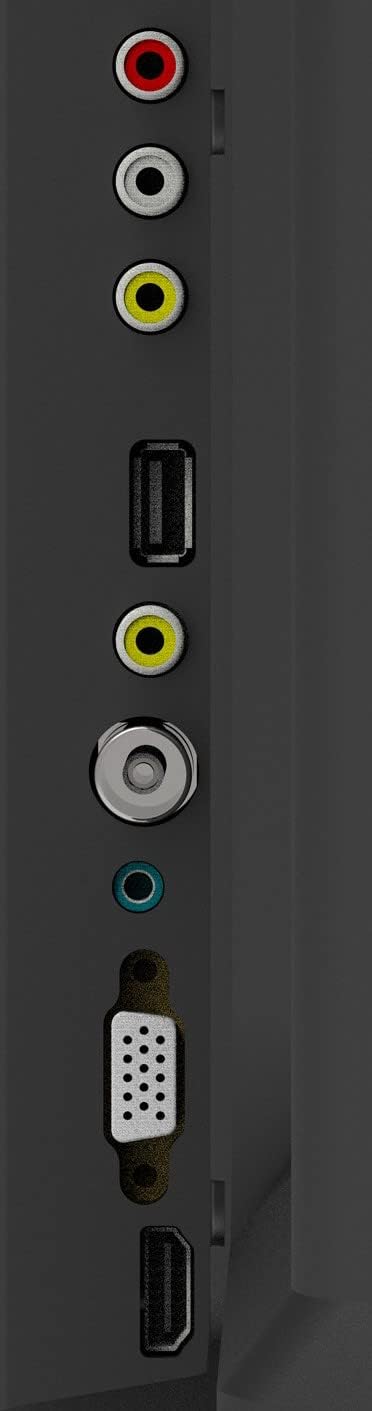
Figure 1: TV Connection Ports
- اینٹینا ان پٹ: Connect your aerial or cable TV signal to this port.
- HDMI ان پٹ (2): Connect devices such as Blu-ray players, game consoles, or set-top boxes. One HDMI input supports Audio Return Channel (ARC).
- VGA ان پٹ: مانیٹر کے طور پر استعمال کے لیے کمپیوٹر کو جوڑیں۔
- Mini Component / AV Input: Connect older devices using component (YPbPr) or composite (AV) cables.
- USB Inputs (2): میڈیا پلے بیک کے لیے USB اسٹوریج ڈیوائسز کو جوڑیں۔
- ہیڈ فون جیک: نجی سننے کے لیے ہیڈ فون جوڑیں۔
5. آپریٹنگ
5.1 ریموٹ کنٹرول
The included remote control allows you to operate all functions of your TV. Insert two AAA batteries (not included) into the battery compartment, ensuring correct polarity.

شکل 2: ریموٹ کنٹرول لے آؤٹ
- طاقت: ٹی وی کو آن یا آف کرتا ہے۔
- ان پٹ: Selects the input source (HDMI, AV, VGA, etc.).
- نمبر بٹن (0-9): براہ راست چینلز کو منتخب کریں۔
- VOL +/-: حجم کی سطح کو ایڈجسٹ کرتا ہے۔
- PROG +/-: چینلز بدلتے ہیں۔
- مینو: مین مینو تک رسائی حاصل کرتا ہے۔
- نیویگیشن بٹن (اوپر/نیچے/بائیں/دائیں): مینو کے اختیارات کے ذریعے تشریف لے جائیں۔
- داخل کریں: انتخاب کی تصدیق کرتا ہے۔
- باہر نکلیں: موجودہ مینو یا فنکشن سے باہر نکلتا ہے۔
- معلومات: Displays channel information.
- خاموش: آواز کو خاموش یا غیر خاموش کرتا ہے۔
5.2 ابتدائی سیٹ اپ
Upon first power-on, the TV will guide you through an initial setup process. This typically includes selecting your language, country, and performing an automatic channel scan for available broadcasts.
5.3 بنیادی افعال
- پاور آن/آف: Press the POWER button on the remote or the TV's control panel.
- ان پٹ ماخذ کا انتخاب: Press the INPUT button repeatedly to cycle through available input sources, or use the menu to select.
- والیوم ایڈجسٹمنٹ: VOL +/- بٹن استعمال کریں۔
- چینل کا انتخاب: Use the PROG +/- buttons or the number buttons.
5.4 مینو نیویگیشن
Press the MENU button to access the main menu. Use the navigation buttons to move between options and ENTER to select. Adjust settings such as picture mode, sound mode, and channel settings. Press EXIT to close the menu.
5.5 آڈیو موڈز
The TV features 5 audio modes to optimize sound for different content types:
- معیاری
- موسیقی
- فلم
- کھیل
- User (customizable settings)
6 دیکھ بھال
6.1 اسکرین کی صفائی
نرم، لنٹ فری کپڑے سے اسکرین کو آہستہ سے صاف کریں۔ ضدی نشانات کے لیے، تھوڑا سا ڈیampen the cloth with water or a specialized screen cleaner (ensure it's safe for LED screens) and wipe gently. Do not apply pressure or use abrasive materials.
6.2 کابینہ کی صفائی
Wipe the TV cabinet with a soft, dry cloth. Avoid using strong detergents or solvents, as they may damage the finish.
7 خرابیوں کا سراغ لگانا
اگر آپ کو اپنے ٹی وی کے ساتھ مسائل کا سامنا ہے، تو درج ذیل عام مسائل اور حل دیکھیں:
| مسئلہ | ممکنہ حل |
|---|---|
| کوئی طاقت نہیں۔ | Check if the power cord is securely plugged into the TV and the wall outlet. Ensure the outlet is functional. |
| کوئی تصویر نہیں، لیکن آواز موجود ہے۔ | تصدیق کریں کہ صحیح ان پٹ ذریعہ منتخب کیا گیا ہے۔ بیرونی آلات سے کیبل کنکشن چیک کریں۔ |
| کوئی آواز نہیں لیکن تصویر موجود ہے۔ | Check the volume level and ensure the TV is not muted. Verify audio settings in the menu. |
| ریموٹ کنٹرول کام نہیں کر رہا ہے۔ | بیٹریاں تبدیل کریں۔ یقینی بنائیں کہ ریموٹ اور ٹی وی کے IR سینسر کے درمیان کوئی رکاوٹ نہیں ہے۔ |
| ناقص تصویر کا معیار۔ | Check antenna connection or source device cables. Adjust picture settings in the TV menu. |
8. وضاحتیں
Detailed specifications for the Konka KE32MS314 TV:
| فیچر | تفصیل |
|---|---|
| ماڈل نمبر | KE32MS314 |
| اسکرین کا سائز | 32 انچ |
| ڈسپلے ٹیکنالوجی | ایل ای ڈی |
| قرارداد | 720p (HD) |
| ریفریش ریٹ | 60 Hz |
| Viewآئی اینگل | 178 ڈگری |
| آڈیو سسٹم | 2 x 8W Stereophonic |
| آڈیو موڈز | Standard, Music, Movie, Sport, User |
| کنیکٹوٹی | 2 HDMI (including ARC), 2 USB, VGA, Mini Component/AV, Antenna Input, Headphone Jack, Ethernet |
| خصوصی خصوصیات | Flat Display, D3 Image Noise Reduction, Automatic Volume Level Maintenance |
| تعاون یافتہ انٹرنیٹ سروسز | یو ٹیوب |
| پروڈکٹ کے طول و عرض (اسٹینڈ کے ساتھ) | 73.2W x 20.7D x 47.9H سینٹی میٹر (تقریباً) |
| پروڈکٹ کا وزن | 4.5 کلوگرام |
9. وارنٹی اور سپورٹ
For warranty information and technical support, please refer to the warranty card included with your product or contact Konka customer service. Keep your purchase receipt as proof of purchase for warranty claims.