
تعارف
The CAD Audio MXU2 is a versatile 2-channel (2 mic/line) analog mixer featuring a built-in USB interface. Designed for compact and efficient audio processing, it includes +48V phantom power and 16-bit/48 kHz audio resolution, making it suitable for live performance, broadcasting, podcasting, and home recording applications. Its bus-powered design simplifies setup by eliminating the need for an external power supply when connected to a computer.
پروڈکٹ ختمview
کلیدی خصوصیات
- 2 XLR combo inputs for microphone or instrument signals.
- Ideal compact option for live performance, broadcasting, podcasting, or home recording.
- USB output connects to a computer for easy recording or podcasting (16-bit/48kHz).
- Bus powered – no external power supply needed when using with a computer.
- +48V phantom power for use with condenser microphones.
کنٹرول اور کنیکٹر
The CAD Audio MXU2 features a straightforward layout for easy operation. Familiarize yourself with the following components:
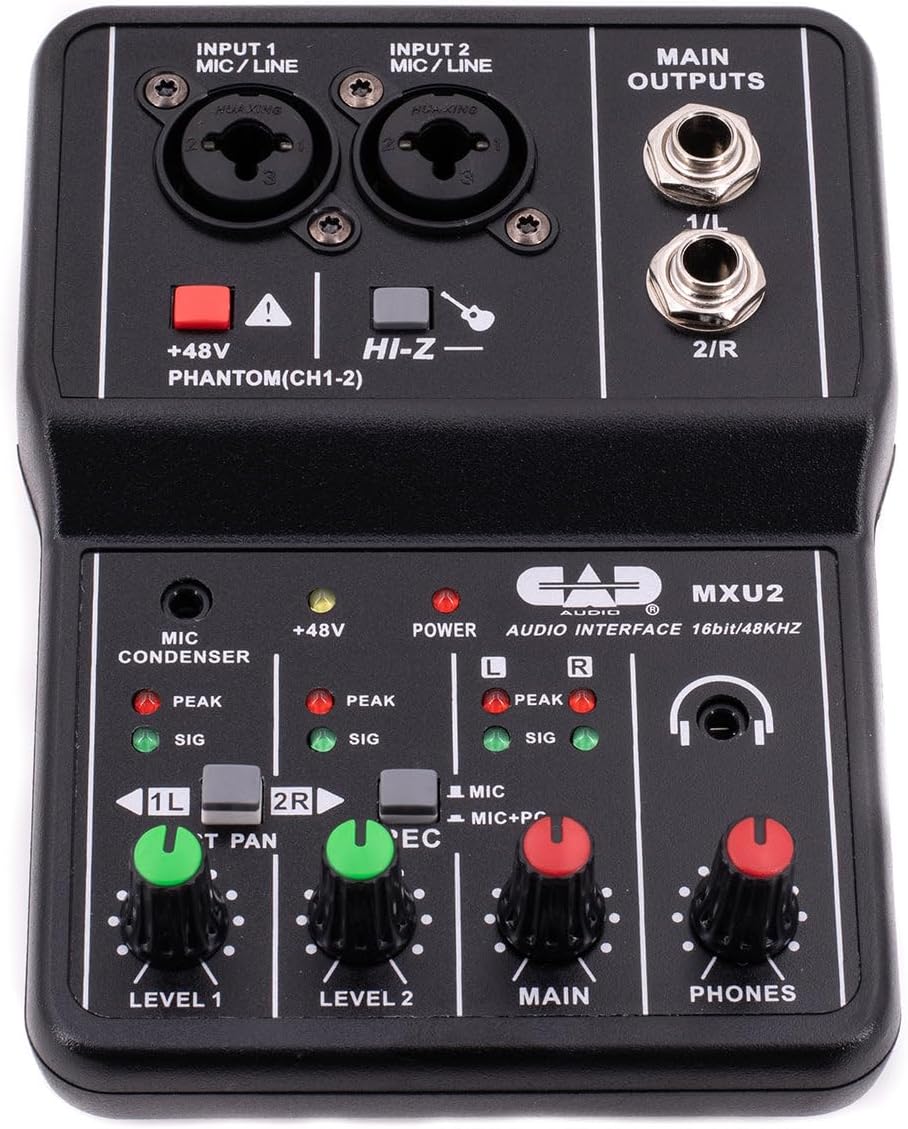
تصویر 1: اپر سے نیچے view of the CAD Audio MXU2 mixer, showing all controls and inputs/outputs.
- INPUT 1 / INPUT 2 (MIC/LINE): Combo jacks for connecting XLR microphones or 1/4-inch line/instrument cables.
- +48V PHANTOM (CH1-2): Red button to activate +48V phantom power for condenser microphones on both channels. An indicator LED illuminates when active.
- HI-Z: Switch for input 2 to optimize impedance for high-impedance instruments like electric guitars.
- LEVEL 1 / LEVEL 2: Rotary knobs to adjust the input gain for Channel 1 and Channel 2, respectively.
- ST PAN / 2R: Switch for Channel 2. In ST PAN mode, Channel 2 is panned to the right. In 2R mode, Channel 2 is routed to the right output.
- REC (MIC / MIC+PC): Switch to select the recording source for the USB output. MIC records only the mixer inputs. MIC+PC records mixer inputs mixed with audio from the computer.
- مین: Rotary knob to control the overall output level to the MAIN OUTPUTS.
- فونز: Rotary knob to control the volume of the headphone output.
- MAIN OUTPUTS (1/L, 2/R): 1/4-inch TRS jacks for connecting to studio monitors or other ampلیفیکیشن سسٹم
- USB پورٹ (پیچھے): Connects the mixer to a computer for audio interface functionality and bus power.
- POWER Switch (Rear): Selects between PC (USB bus power) and DC (external power, adapter not included).

تصویر 2: The MXU2 mixer with its USB cable connected, illustrating the compact design and connectivity.
سیٹ اپ
1 کمپیوٹر سے جڑنا
- Ensure the MXU2's rear POWER switch is set to PC.
- Connect the provided USB cable from the MXU2's USB port to an available USB port on your computer.
- The mixer is typically plug-and-play, requiring no special drivers for most operating systems (Windows, macOS). Your computer should automatically recognize it as an audio device.
- Select the MXU2 as your input/output audio device in your computer's sound settings and your Digital Audio Workstation (DAW) or recording software.
2. مائیکروفون اور آلات کو جوڑنا
- مائیکروفونز: Connect XLR microphones to the INPUT 1 or INPUT 2 combo jacks using XLR cables. For condenser microphones, press the +48V فینٹم button. The red LED will illuminate. Caution: Do not activate phantom power for dynamic microphones or ribbon microphones unless specified by the manufacturer, as it may cause damage.
- Instruments/Line-Level Devices: Connect instruments (e.g., guitar, bass) or line-level devices (e.g., keyboard, drum machine) to the INPUT 1 or INPUT 2 combo jacks using 1/4-inch TRS or TS cables. For high-impedance instruments like electric guitars, engage the HI-Z switch for Input 2.
3. آؤٹ پٹ ڈیوائسز کو جوڑنا
- Studio Monitors/Speakers: Connect your studio monitors or powered speakers to the MAIN OUTPUTS (1/L, 2/R) using 1/4-inch TRS cables.
- ہیڈ فون: Plug your headphones into the 1/4-inch PHONES jack.
آپریٹنگ
1. Input Level Adjustment
- Before playing or speaking, turn the لیول 1 اور لیول 2 knobs fully counter-clockwise.
- Begin playing your instrument or speaking into the microphone. Slowly turn the corresponding LEVEL knob clockwise until the SIG (signal) LED illuminates consistently.
- Adjust the level so that the PEAK LED only flashes occasionally during the loudest parts of your performance. If the PEAK LED stays lit, the signal is clipping, and you should reduce the input level.
2. Main Output and Monitoring
- کو ایڈجسٹ کریں۔ مین knob to control the overall volume sent to your studio monitors or speakers.
- استعمال کریں۔ فونز knob to set a comfortable listening volume for your headphones.
3. Recording Modes (REC Switch)
- MIC: In this mode, only the audio from the mixer's inputs (microphones/instruments) is sent to your computer via USB. This is ideal for recording new tracks.
- MIC+PC: This mode mixes the audio from the mixer's inputs with the audio playback from your computer. This is useful for monitoring your performance along with backing tracks or previously recorded material.
4. Stereo Panning (ST PAN / 2R Switch)
- دی ST PAN / 2R switch affects how Input 2 is routed. In ST PAN mode, Input 2 is panned to the right channel of the stereo output. In 2R mode, Input 2 is routed directly to the right output, bypassing the pan control.
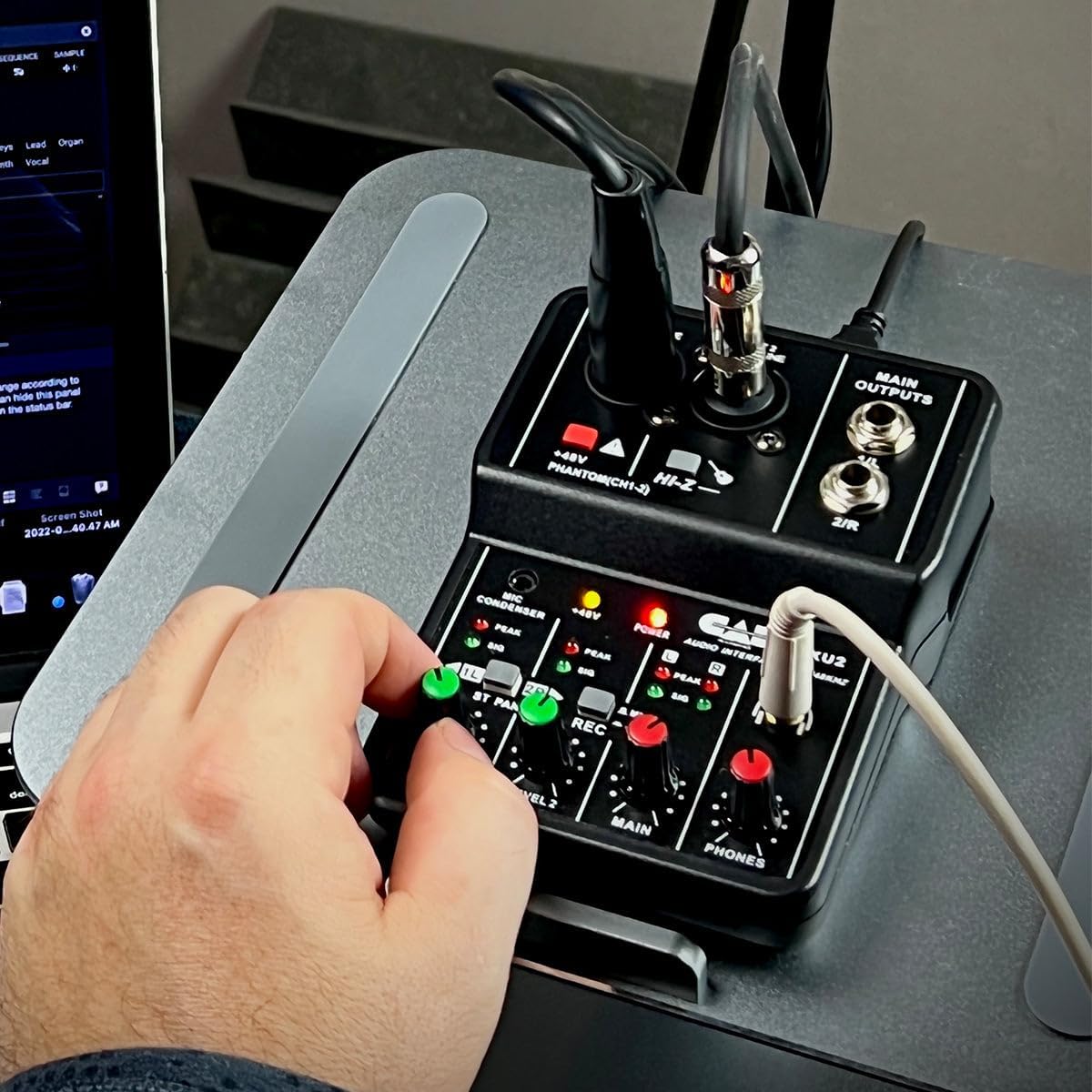
تصویر 3: A user's hand adjusting a level knob on the MXU2 mixer, demonstrating typical operation.
دیکھ بھال
صفائی
- Disconnect the mixer from all power sources and devices before cleaning.
- یونٹ کے بیرونی حصے کو صاف کرنے کے لیے نرم، خشک کپڑا استعمال کریں۔
- ضدی گندگی کے لیے، تھوڑا سا ڈیamp cloth can be used, followed by a dry cloth. Avoid using harsh chemicals, solvents, or abrasive cleaners.
- مائعات کو یونٹ میں داخل نہ ہونے دیں۔
ذخیرہ
- مکسر کو کسی ٹھنڈی، خشک جگہ پر براہ راست سورج کی روشنی اور انتہائی درجہ حرارت سے دور رکھیں۔
- Protect the unit from dust and moisture when not in use.
جنرل کیئر
- Avoid dropping or subjecting the mixer to strong impacts.
- Do not attempt to disassemble or modify the unit, as this will void the warranty.
- آپریشن کے دوران یونٹ کے ارد گرد مناسب وینٹیلیشن کو یقینی بنائیں۔
خرابی کا سراغ لگانا
No Power / Device Not Recognized
- USB کنکشن چیک کریں: Ensure the USB cable is securely connected to both the mixer and the computer. Try a different USB port on your computer.
- Power Switch Setting: Verify the rear POWER switch is set to PC for bus power. If using an external DC adapter (not included), ensure the switch is set to DC and the adapter is functioning.
- کیبل کی سالمیت: ناقص کیبل کو مسترد کرنے کے لیے ایک مختلف USB کیبل آزمائیں۔
- کمپیوٹر کی پہچان: Check your computer's Device Manager (Windows) or System Information (macOS) to see if the MXU2 is listed as an audio device. Restart your computer if necessary.
کوئی ساؤنڈ آؤٹ پٹ نہیں۔
- Level Knobs: یقینی بنائیں لیول 1, لیول 2, مین، اور فونز knobs are turned up sufficiently.
- آؤٹ پٹ رابطے: Verify that your studio monitors/speakers are properly connected to the مین آؤٹ پٹ and are powered on. Check headphone connection.
- Computer Audio Settings: Confirm that the MXU2 is selected as the output device in your computer's sound settings and your recording software.
- REC Switch: If you expect to hear computer audio, ensure the آر ای سی سوئچ سیٹ ہے۔ MIC+PC.
مسخ شدہ آواز / تراشنا
- ان پٹ لیولز: کو کم کریں۔ لیول 1 or لیول 2 knobs if the PEAK LED is constantly lit.
- آؤٹ پٹ لیولز: یقینی بنائیں مین اور فونز levels are not set too high, causing distortion in connected speakers or headphones.
- کیبل کا معیار: Use high-quality, shielded cables to minimize interference.
فینٹم پاور کے مسائل
- ایکٹیویشن: یقینی بنائیں +48V فینٹم button is pressed and its LED is illuminated when using condenser microphones.
- مائیکروفون مطابقت: Confirm your microphone requires phantom power.
وضاحتیں
| فیچر | تفصیلات |
|---|---|
| برانڈ | سی اے ڈی آڈیو |
| ماڈل | MXU2 |
| چینلز کی تعداد | 2 |
| کنیکٹوٹی ٹیکنالوجی | یو ایس بی |
| آڈیو ان پٹ | XLR Combo (Mic/Line) |
| آؤٹ پٹ کنیکٹر کی قسم | TRS (1/4-inch) |
| پریت پاور | +48V (سوئچ ایبل) |
| Sampلنگ ریٹ | 48 کلو ہرٹز |
| بٹ کی گہرائی | 16 بٹ |
| طاقت کا منبع | USB Bus-Powered (PC mode) / Corded Electric (DC mode, adapter not included) |
| شے کا وزن | 0.31 کلوگرام |
| یو پی سی | 631922109399 |
وارنٹی اور سپورٹ
وارنٹی کی معلومات
The CAD Audio MXU2 2-Channel USB Mixer is covered by a 2 سالہ صنعت کار کی وارنٹی. This warranty typically covers defects in materials and workmanship under normal use. Please retain your proof of purchase for warranty claims.
کسٹمر سپورٹ
For technical assistance, troubleshooting beyond this manual, or warranty service, please contact CAD Audio customer support directly. You can usually find contact information, FAQs, and additional resources on the official CAD Audio website. When contacting support, please have your product model (MXU2) and proof of purchase available.