
1. تعارف
Thank you for choosing the ULANZI MT-44 Extendable Phone and Camera Tripod. This manual provides detailed instructions for the proper setup, operation, and maintenance of your tripod. Please read this manual thoroughly before use to ensure safe and effective operation.
2. حفاظتی معلومات
- Do not exceed the maximum weight limit of 1.5 kg (3.3 lbs) to prevent damage to the tripod or attached devices.
- Ensure all locking mechanisms are securely tightened before use to prevent accidental collapse.
- Avoid exposing the tripod to extreme temperatures, direct sunlight for prolonged periods, or corrosive liquids.
- بچوں کی پہنچ سے دور رکھیں۔
3. پروڈکٹ ختمview
The ULANZI MT-44 is a versatile 2-in-1 integrated tripod designed for both phones and cameras. It features a telescopic design, a 360° panoramic ball head, and multiple expansion options for accessories.

Image: The ULANZI MT-44 tripod in its compact, folded state, showcasinجی اس کا پورٹیبل ڈیزائن۔
4. سیٹ اپ ہدایات
اپنے ULANZI MT-44 تپائی کو ترتیب دینے کے لیے ان اقدامات پر عمل کریں:
- Loosen the Knob: Locate the red locking knob at the base of the ball head. Rotate it counter-clockwise to loosen.
- تپائی ٹانگیں کھولیں: Gently push down on the central column to extend the tripod legs outwards until they are fully spread.
- Tighten the Knob: Rotate the red locking knob clockwise to secure the tripod legs in place.
- اونچائی کو ایڈجسٹ کریں: Rotate the red ring at the base of the main column counter-clockwise to unlock the telescopic sections. Pull the column upwards to extend to your desired height (up to 44 inches / 111.5 cm). Rotate the ring clockwise to lock the height.
- Open Phone Holder: If using a phone, gently pull the top clip upwards to open the phone holder.
- فون انسٹال کریں: Place your smartphone into the opened phone holder, ensuring it is securely gripped between 6-8 cm.

Image: Visual guide demonstrating the six steps for setting up and installing a phone on the ULANZI MT-44 tripod.
5. آپریٹنگ ہدایات
5.1 Extending the Tripod
The MT-44 features a 5-section telescopic design. To extend, unlock the red ring at the base of the main column by rotating it counter-clockwise. Pull the central column and subsequent sections to the desired length. Once extended, rotate the red ring clockwise to lock the sections firmly. The tripod can extend from a minimum height of 13 inches (34 cm) to a maximum of 44 inches (111.5 cm).
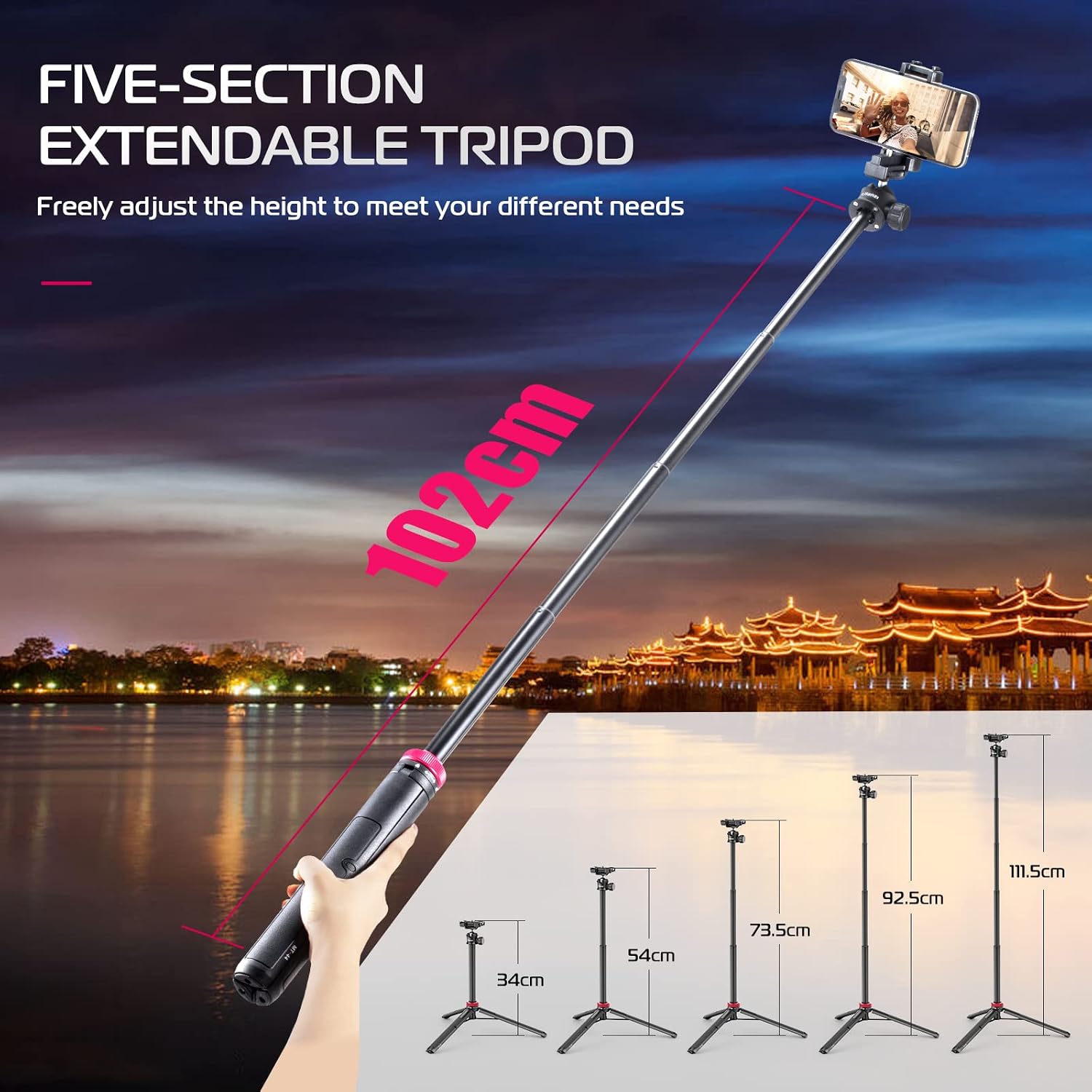
Image: The ULANZI MT-44 tripod illustrating its five-section extendable design, showing different height options from compact to fully extended.
5.2 Adjusting the 360° Panoramic Ball Head
The integrated ball head allows for flexible positioning of your device. Loosen the side knob on the ball head to adjust the angle for horizontal or vertical shooting. Once the desired angle is achieved, tighten the knob securely to lock the position.

Image: The tripod's ball head mechanism, highlighting its 360-degree rotation capability for both horizontal and vertical shooting orientations.
5.3 Mounting a Phone
The top clip expands to function as a universal phone holder, accommodating devices with widths between 60-80 mm. Simply pull the top section of the clip upwards, insert your phone, and release to secure it.
5.4 کیمرہ لگانا
For cameras, the phone clip can be folded down to reveal a standard 1/4" screw thread. Attach your camera directly to this screw thread. Ensure your camera's weight does not exceed 1.5 kg.
5.5 Using Cold Shoe and 1/4" Screw Thread for Expansion
The MT-44 includes a cold shoe mount on top of the phone clip and an additional 1/4" screw thread on the side of the main column. These allow for the attachment of external accessories such as microphones, LED video lights, or additional phone holders.

تصویر: تفصیلی view of the 2-in-1 integrated clip design, illustrating how it converts between a phone holder with a cold shoe mount and a 1/4-inch screw for camera attachment.
6. وضاحتیں

Image: A graphic displaying the key parameters and dimensions of the ULANZI MT-44 tripod.
| فیچر | تفصیل |
|---|---|
| ماڈل | MT-44 |
| مواد | Acrylonitrile Butadiene Styrene (ABS) |
| خالص وزن | 397 گرام (0.87 پونڈ) |
| وزن کی حد | 1.5 کلوگرام (3.3 پونڈ) |
| کم از کم اونچائی (جوڑ) | 13 انچ (32.5 سینٹی میٹر) |
| Maximum Height (Extended) | 44 انچ (111.5 سینٹی میٹر) |
| تپائی سر کی قسم | Ball Head (360° Panoramic) |
| Phone Clip Distance | 6-8 سینٹی میٹر |
| توسیع بندرگاہوں | Cold Shoe, 1/4" Screw Thread |
| مطابقت | Smartphones (iPhone, Samsung, Huawei), DSLR Cameras (Nikon, Canon, Sony, Fujifilm, Panasonic), GoPro, Micro-single cameras, Fill lights. |
7 دیکھ بھال
- صفائی: Wipe the tripod with a soft, dry cloth. For stubborn dirt, use a slightly damp cloth and mild soap, then dry thoroughly. Do not use harsh chemicals or abrasive cleaners.
- ذخیرہ: Store the tripod in a cool, dry place away from direct sunlight and excessive humidity. Ensure it is fully collapsed and all knobs are lightly tightened for compact storage.
- چکنا: Avoid applying lubricants to the telescopic sections or ball head unless specifically recommended by the manufacturer, as this can attract dust and impair function.
8 خرابیوں کا سراغ لگانا
- تپائی غیر مستحکم محسوس کرتا ہے: Ensure the legs are fully spread and the red locking knob at the base is securely tightened. Check that the telescopic sections are also locked at the desired height. Do not exceed the maximum weight limit.
- آلہ محفوظ طریقے سے نہیں پکڑ رہا ہے: For phones, ensure the phone clip is fully gripping the device. For cameras, verify the 1/4" screw is tightly fastened.
- Ball head movement is stiff or loose: Adjust the side knob on the ball head. Tighten for more resistance, loosen for freer movement. If it remains stiff, check for any debris. If it becomes loose over time, ensure the knob is fully tightened.
- Telescopic sections slide down: Ensure the red locking ring for the telescopic sections is rotated clockwise and fully tightened after extending to the desired height.
9. وارنٹی اور سپورٹ
ULANZI products are designed for reliability and performance. For specific warranty details, please refer to the warranty card included with your purchase or visit the official ULANZI website. If you encounter any issues or require technical assistance, please contact ULANZI customer support through their official channels.