
1. تعارف
Thank you for choosing the ASHATA 95 Keys Wired Mechanical Gaming Keyboard. This compact and versatile keyboard is designed for both gaming and office use, offering a comfortable typing experience with its durable mechanical switches and plug-and-play functionality. This manual provides essential information for setting up, operating, and maintaining your new keyboard.
2. مصنوعات کی خصوصیات
- 95-کلیدی ترتیب: Compact design with a full set of essential keys, available with English and Arabic keycaps.
- وائرڈ کنیکٹوٹی: Reliable USB-A connection for stable performance.
- مکینیکل سوئچز: Provides tactile feedback and durability for an enhanced typing and gaming experience.
- پلگ اینڈ پلے: No complex driver installation required; simply connect and use.
- پائیدار ڈیزائن: Features legible, fade-resistant key printing for long-lasting use.
- آرام دہ ٹائپنگ: Ergonomically designed for extended use in office or home environments.
- Ultra-compact Design: Approximately 60% size of a standard keyboard, saving desk space.
- اعلی استحکام: Rated for over 10 million keystrokes life.
- پتلا اور پورٹیبل: With a thickness of approximately 1 cm, it is easy to transport.
- خاموش ڈیزائن: Equipped with quality silicone keys for a quiet typing environment.
- Independent Multimedia Buttons: Dedicated buttons for quick access to media controls.

تصویر: ختمview of the ASHATA Wired Keyboard highlighting its features.

تصویر: کلوز اپ view of the comfortable 95-key layout.

تصویر: سائیڈ پروfile illustrating the thin and portable design.

Image: Detail of a keycap, demonstrating the silent design feature.
3. پیکیج کے مشمولات
یقینی بنائیں کہ تمام اشیاء پیکیج میں موجود ہیں:
- 1 ایکس وائرڈ کی بورڈ
4. سیٹ اپ ہدایات
The ASHATA 95 Keys Wired Mechanical Gaming Keyboard is designed for simple plug-and-play operation.
- کی بورڈ کھولیں: کی بورڈ کو اس کی پیکیجنگ سے احتیاط سے ہٹا دیں۔
- اپنے ڈیوائس سے جڑیں: Locate an available USB-A port on your computer (desktop, laptop, etc.). Insert the USB connector of the keyboard cable into the USB-A port.
- خودکار شناخت: آپ کا آپریٹنگ سسٹم (مثال کے طور پر، ونڈوز) خود بخود ضروری ڈرائیوروں کا پتہ لگا کر انسٹال کر لے گا۔ اس عمل میں عام طور پر چند سیکنڈ لگتے ہیں۔
- استعمال شروع کریں: Once recognized, the keyboard is ready for immediate use.

Image: The keyboard with its integrated USB cable, approximately 1.5m long.

Image: USB interface for plug and play functionality, with cable length of 1.5m.

Image: Keyboard connected and ready for use with a desktop computer.
5. آپریٹنگ ہدایات
This keyboard functions like a standard QWERTY keyboard with additional multimedia controls.
5.1 بنیادی ٹائپنگ
Simply press the desired keys to input characters. The keyboard supports both English and Arabic characters, depending on the specific model and your operating system's language settings.
5.2 ملٹی میڈیا کیز
The keyboard features dedicated multimedia buttons located above the function keys (F1-F12) for quick access to media controls. These buttons allow you to:
- Adjust Volume (Volume Up, Volume Down, Mute)
- Control Media Playback (Play/Pause, Previous Track, Next Track)
- Open Default Media Player
- Open Default Web براؤزر
- ای میل کلائنٹ کھولیں۔
- سرچ فنکشن

Image: Detail of the independent multimedia buttons for quick access to functions.
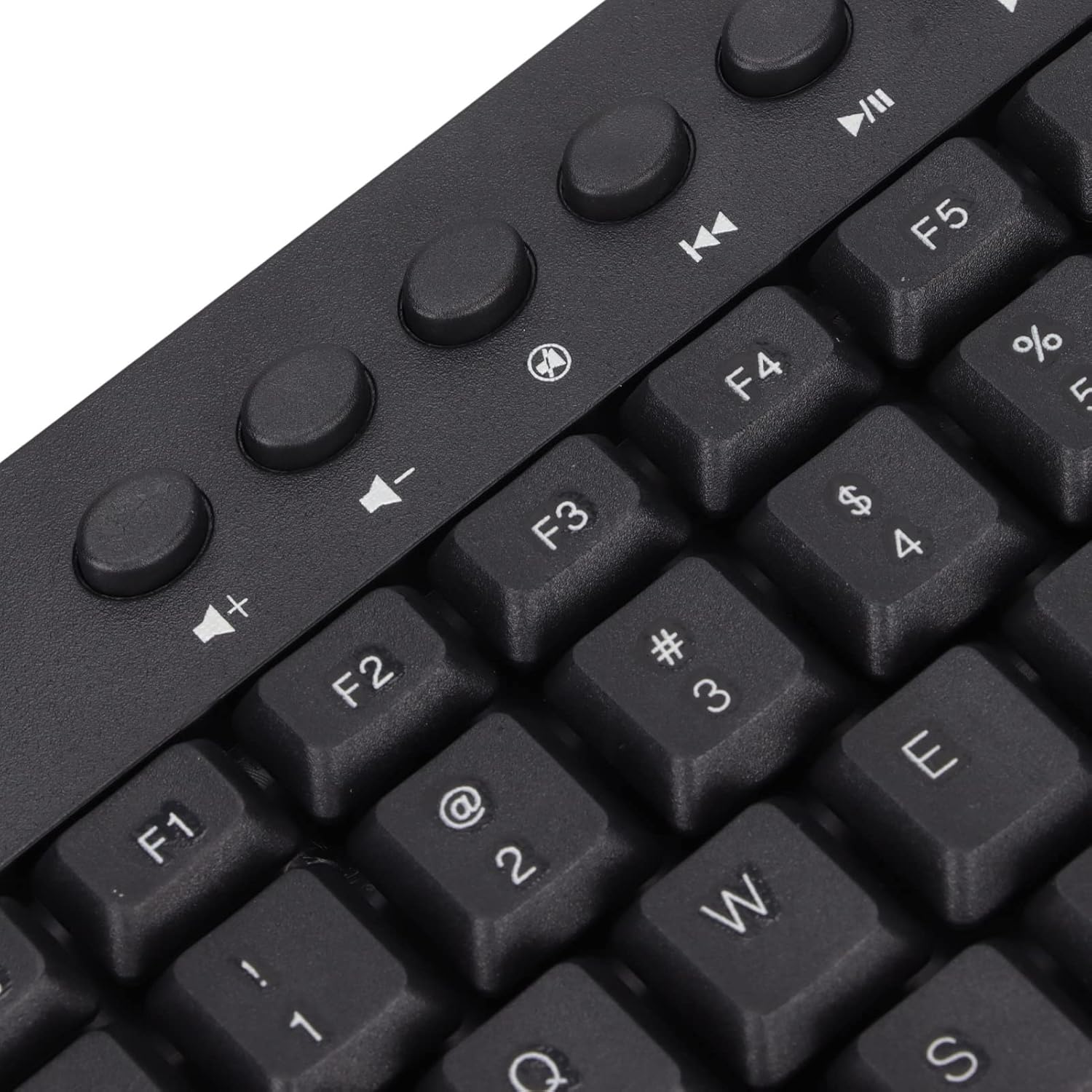
تصویر: کلوز اپ view of the dedicated multimedia control keys.

Image: Detail of the right-side keys, including navigation and control keys.
6 دیکھ بھال
To ensure the longevity and optimal performance of your ASHATA keyboard, follow these maintenance guidelines:
- صفائی: Use a soft, dry cloth to wipe the surface of the keyboard. For deeper cleaning, you may use a slightly damp cloth with a mild cleaning solution, ensuring no liquid enters the key switches or internal components.
- دھول ہٹانا: کی کیپس کے درمیان سے دھول اور ملبہ ہٹانے کے لیے کمپریسڈ ہوا کا استعمال کریں۔
- مائعات سے پرہیز کریں: کی بورڈ پر مائعات نہ پھیلائیں۔ اگر کوئی پھیل جائے تو فوری طور پر اپنے کمپیوٹر سے کی بورڈ کو منقطع کریں اور دوبارہ جڑنے سے پہلے اسے مکمل طور پر خشک ہونے دیں۔
- ذخیرہ: کی بورڈ کو براہ راست سورج کی روشنی اور انتہائی درجہ حرارت سے دور ٹھنڈی، خشک جگہ پر اسٹور کریں۔
7 خرابیوں کا سراغ لگانا
اگر آپ کو اپنے کی بورڈ کے ساتھ مسائل کا سامنا ہے، تو درج ذیل عام مسائل اور حل دیکھیں:
7.1 کی بورڈ جواب نہیں دے رہا ہے۔
- USB کنکشن چیک کریں: Ensure the USB cable is securely plugged into a working USB-A port on your computer. Try a different USB port.
- کمپیوٹر کو دوبارہ شروع کریں: کبھی کبھی، ایک سادہ کمپیوٹر ری اسٹارٹ کنیکٹیویٹی کے مسائل کو حل کر سکتا ہے۔
- کسی اور ڈیوائس پر ٹیسٹ: Connect the keyboard to another computer to determine if the issue is with the keyboard or your original device.
7.2 چابیاں درست طریقے سے کام نہیں کر رہی ہیں۔
- کلین کلین: Check for any debris or foreign objects lodged under the non-functioning keys. Use compressed air to clear them.
- سافٹ ویئر تنازعہ: یقینی بنائیں کہ کوئی متضاد سافٹ ویئر یا ڈرائیور انسٹال نہیں ہیں جو کی بورڈ ان پٹ میں مداخلت کر سکتے ہیں۔
7.3 ملٹی میڈیا کیز کام نہیں کر رہی ہیں۔
- آپریٹنگ سسٹم کی ترتیبات: Verify that your operating system's media key settings are configured correctly.
- درخواست کی مطابقت: Some applications may not fully support universal multimedia keys.
اگر ان اقدامات سے مسئلہ حل نہیں ہوتا ہے، تو مزید مدد کے لیے براہ کرم کسٹمر سپورٹ سے رابطہ کریں۔
8. وضاحتیں
| فیچر | تفصیل |
|---|---|
| برانڈ | آشاٹا |
| ماڈل نمبر | ASHATA8x4ni917wp552-12 |
| کنیکٹوٹی ٹیکنالوجی | USB-A (وائرڈ) |
| چابیاں کی تعداد | 95 |
| سوئچ کی قسم | مکینیکل |
| مواد | پلاسٹک |
| رنگ | Black (Arabic layout) |
| ہم آہنگ آلات | PC (Desktop, Laptop) |
| ہم آہنگ آپریٹنگ سسٹم فیملی | ونڈوز |
| کیبل کی لمبائی | Approx. 1.5m / 1.6yd |
| خصوصی خصوصیت | آزاد ملٹی میڈیا بٹن |

تصویر: نیچے view of the keyboard, displaying regulatory information and adjustable feet.
9. وارنٹی اور سپورٹ
For warranty information and customer support, please refer to the documentation included with your purchase or contact the retailer/manufacturer directly. Keep your proof of purchase for any warranty claims.