
Cubilux Cubilux
Cubilux USB A to TOSLINK Optical Audio Adapter Instruction Manual
Model: Cubilux
1. تعارف
The Cubilux USB A to TOSLINK Optical Audio Adapter is designed to connect your USB Type A enabled devices, such as laptops, desktop computers, or compatible gaming consoles, to S/PDIF optical audio input systems. This includes soundbars, home audio systems, external DACs, ampجان بچانے والے ، پہلےamps, or speakers. It facilitates the transmission of high-resolution digital audio for an enhanced listening experience.
اہم خصوصیات:
- ہائی ریزولوشن آڈیو: Supports crisp and clear sound at 48KHz/24-bit, 96KHz/24-bit, and 192KHz/24-bit.
- پلگ اینڈ پلے: No driver installation or external power supply is required for operation.
- وسیع مطابقت: Works with Windows and Mac OS computers, laptops, and PCs equipped with a USB Type A port.
- پائیدار ڈیزائن: Constructed with an aluminum alloy case and a braided cable for enhanced durability and effective isolation from electromagnetic (EM) and radio frequency (RF) interference.
- کمپیکٹ اور پورٹیبل: Measuring approximately 0.6in x 0.6in x 8in (including cable), it is designed for easy transport.
Important Note: This adapter is specifically designed for computers and compatible gaming consoles (e.g., PS4/PS5 for audio output). It does NOT support audio output from TVs, Xbox, or Nintendo Switch consoles.
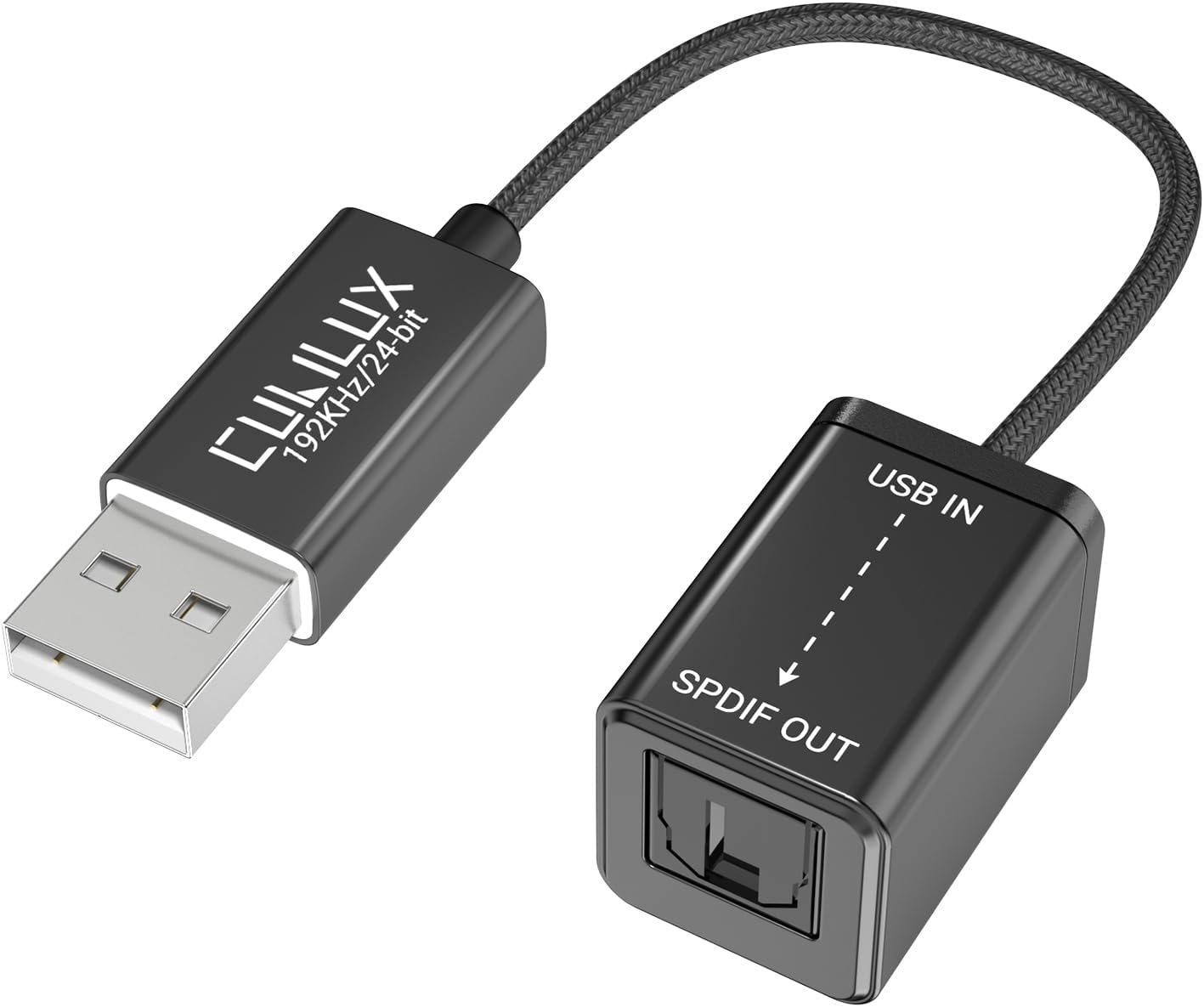
Image 1.1: The Cubilux USB A to TOSLINK Optical Audio Adapter, showing the USB-A connector and the S/PDIF optical output port.
2. سیٹ اپ ہدایات
Follow these steps to set up your Cubilux USB A to TOSLINK Optical Audio Adapter:
- اڈاپٹر کو جوڑیں: Plug the USB Type A end of the adapter into an available USB port on your computer, laptop, or compatible gaming console.
- آڈیو سسٹم سے جڑیں: Connect a TOSLINK optical cable (not included) from the S/PDIF OUT port on the adapter to the optical input port on your soundbar, amplifier, DAC, or speakers.
- آؤٹ پٹ ڈیوائس کو منتخب کریں: On your computer or device, navigate to the sound settings or audio output preferences. Select the "USB S/PDIF Adapter" or similar recognized device as your primary audio output.
- Match Sampلنگ ریٹس: اس بات کو یقینی بنائیں کہ ایسampling rate settings on your computer's audio output and your connected audio device (DAC/amplifier) are consistent for optimal performance. For example, if your audio device supports 192KHz/24-bit, set your computer's output to the same.

Image 2.1: Visual guide for connecting the adapter (Step 1), selecting it as the output device in system settings (Step 2), and ensuring consistent sampling rates (Step 3).

Image 2.2: Diagram illustrating compatible USB A source devices (computers) and S/PDIF output devices (amplifier, speaker, soundbar), and explicitly stating non-compatibility with gaming consoles, TVs, or other devices.
3. آپریٹنگ ہدایات
Once the adapter is set up, you can begin playing audio from your connected USB A device through your S/PDIF sound system.
- آڈیو پلے بیک: Start playing audio on your computer or gaming console. The digital audio signal will be transmitted via the adapter to your optical audio system.
- 5.1 آس پاس کی آواز: For 5.1 surround sound playback, ensure that your amplifier, the audio/video content, and the playback software all support 5.1 audio. The adapter transmits the digital signal as provided by the source.
- Unidirectional Transmission: This adapter is a transmitter and is designed for playing music and other audio signals only. It cannot record audio from an optical source device.

Image 3.1: A user enjoying high-resolution audio from a laptop connected via the Cubilux adapter to an audio system.
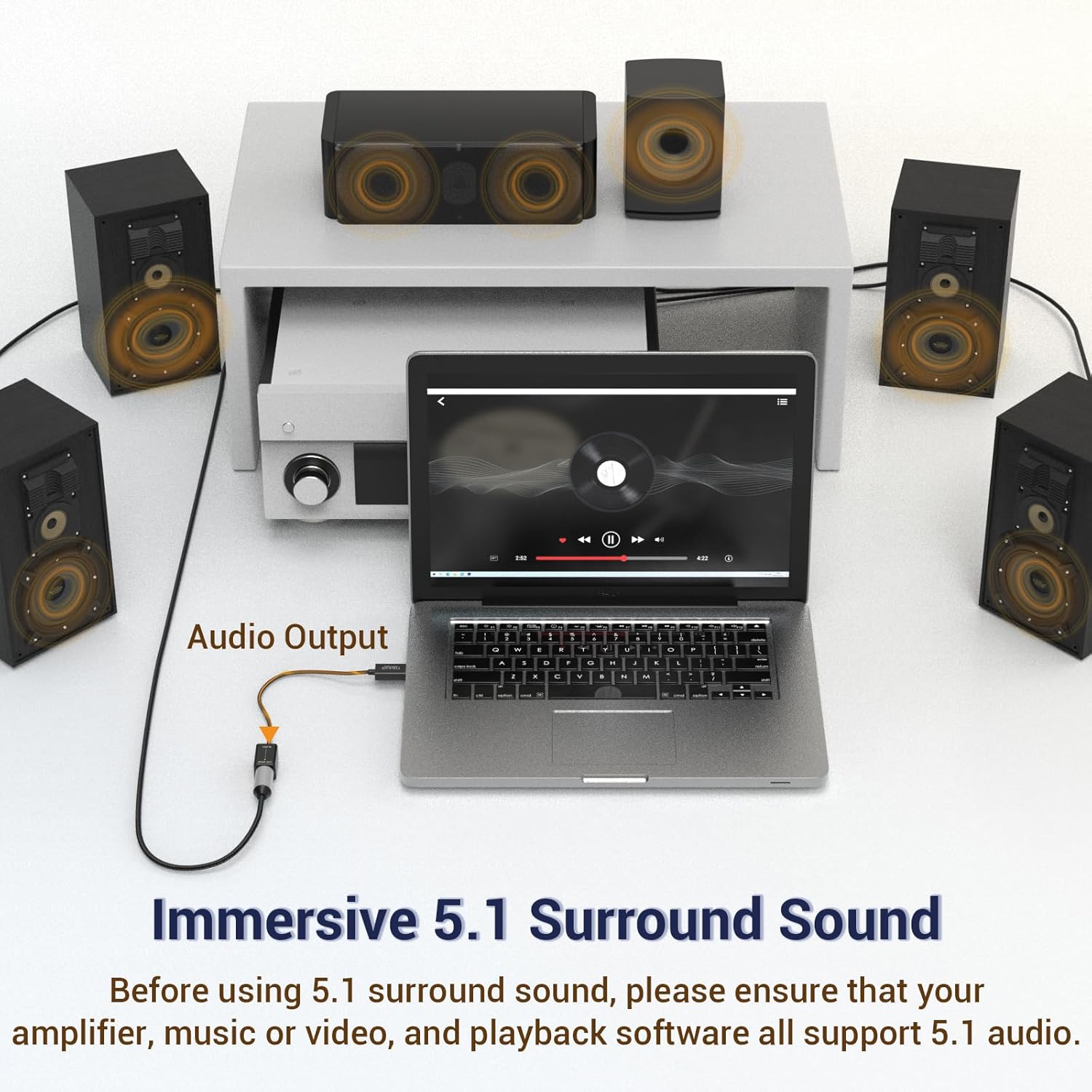
Image 3.2: A laptop connected to an audio system via the adapter, illustrating a potential 5.1 surround sound setup. Users must ensure all components support 5.1 audio.
4 دیکھ بھال
The Cubilux USB A to TOSLINK Optical Audio Adapter is designed for durability and requires minimal maintenance.
- صفائی: Use a soft, dry cloth to clean the adapter. Avoid using liquid cleaners or solvents.
- ذخیرہ: استعمال میں نہ ہونے پر، اڈاپٹر کو براہ راست سورج کی روشنی اور انتہائی درجہ حرارت سے دور، ٹھنڈی، خشک جگہ پر محفوظ کریں۔
- کیبل کی دیکھ بھال: اندرونی نقصان کو روکنے کے لیے کیبل پر تیز موڑ یا ضرورت سے زیادہ کھینچنے سے گریز کریں۔
5 خرابیوں کا سراغ لگانا
If you encounter issues with your Cubilux USB A to TOSLINK Optical Audio Adapter, refer to the following troubleshooting tips:
- کوئی آواز آؤٹ پٹ نہیں:
- Ensure the adapter is securely plugged into both the USB port of your source device and the optical input of your audio system.
- Verify that the "USB S/PDIF Adapter" is selected as the default audio output device in your computer's sound settings.
- Check the volume levels on both your computer and your audio system.
- Confirm that the optical cable is not damaged and is correctly inserted.
- Audio Quality Issues (e.g., static, dropouts):
- ایس کو یقینی بنائیںampling rates on your computer and audio system are consistent. Mismatched rates can cause issues.
- Try a different optical cable to rule out cable defects.
- یقینی بنائیں کہ اڈاپٹر مضبوط برقی مقناطیسی مداخلت کے ذرائع کے قریب نہیں ہے۔
- Adapter Disconnects or Turns Off (Mac OS specific):
- Some users have reported that on Mac OS, the adapter may power down if no continuous audio signal is being sent. If this occurs, the receiving audio gear may lose sync. Resuming audio playback should re-establish the connection, though a brief re-sync period may be necessary.
- Volume Range Appears Limited:
- If the system volume range seems compressed (e.g., full volume control occurs within a small portion of the slider), this can sometimes be a characteristic of digital audio output devices. Adjust volume primarily on your connected audio system (amplifier, soundbar) for finer control.
- Incompatibility with Devices:
- Remember, this adapter is designed for computers (Windows/Mac OS) and specific gaming consoles (PS4/PS5 for audio output). It is NOT compatible with TVs, Xbox, or Nintendo Switch for audio output.
6. وضاحتیں
| مصنوعات کے طول و عرض | 2.56 x 2.17 x 0.98 انچ |
| شے کا وزن | 0.704 اونس |
| ہم آہنگ آلات | Gaming Console (PS4/PS5 for audio output), Laptop, Personal Computer |
| ان پٹ کنیکٹر کی قسم | USB قسم A |
| آؤٹ پٹ کنیکٹر کی قسم | TOSLINK (S/PDIF Optical) |
| Supported Audio Resolution | 48KHz/24-bit, 96KHz/24-bit, 192KHz/24-bit |
| آپریٹنگ سسٹمز | ونڈوز، میک او ایس |
| کارخانہ دار | Cubilux |
7. حفاظتی معلومات
Please observe the following safety guidelines for safe use and handling of the product:
- دم گھٹنے کا خطرہ: This product contains small parts. Keep out of reach of children under 3 years old and individuals who may place inedible objects in their mouths.
- Heat and Fire: Keep the adapter away from fire sources and heat sources to prevent damage or hazards.
- پیکجنگ: To avoid the risk of suffocation, keep plastic bags away from babies and children. Do not use this bag in cribs, beds, carriages, or playpens. This plastic bag is not a toy.

Image 7.1: Warning symbol for choking hazard.

Image 7.2: Warning symbol for fire and heat sources.

Image 7.3: Warning symbol for suffocation hazard from plastic bags.
8. وارنٹی اور سپورٹ
For warranty information and customer support, please refer to the documentation included with your product or visit the official Cubilux webسائٹ وارنٹی کے دعووں کے لیے اپنی خریداری کی رسید اپنے پاس رکھیں۔