
پروڈکٹ ختمview
This document provides instructions for the ZdalaMit 0212-62622-00R replacement remote control. This remote is designed to function with various Polaroid TV/DVD Combo models, offering a direct replacement without requiring complex programming. Simply install batteries, and the remote is ready for use.

سامنے والا view of the ZdalaMit 0212-62622-00R replacement remote control, showing all buttons and layout.
سیٹ اپ
1. بیٹریاں نصب کرنا
The remote control requires two (2) 1.5V AAA Alkaline batteries (not included). Ensure correct polarity when inserting the batteries.
- ریموٹ کنٹرول کے پیچھے بیٹری کے ٹوکرے کو تلاش کریں۔
- بیٹری کے کمپارٹمنٹ کور کو نیچے کی طرف یا اس سمت میں سلائیڈ کریں جو اسے کھولنے کے لیے تیر سے اشارہ کیا گیا ہے۔
- Insert two AAA batteries, matching the positive (+) and negative (-) terminals as shown inside the compartment.
- بیٹری کے کمپارٹمنٹ کور کو تبدیل کریں، اس بات کو یقینی بناتے ہوئے کہ یہ محفوظ طریقے سے اپنی جگہ پر کلک کرتا ہے۔
نوٹ: No programming is required for this replacement remote. Once batteries are installed, it is ready for use with compatible Polaroid TV/DVD Combo models.
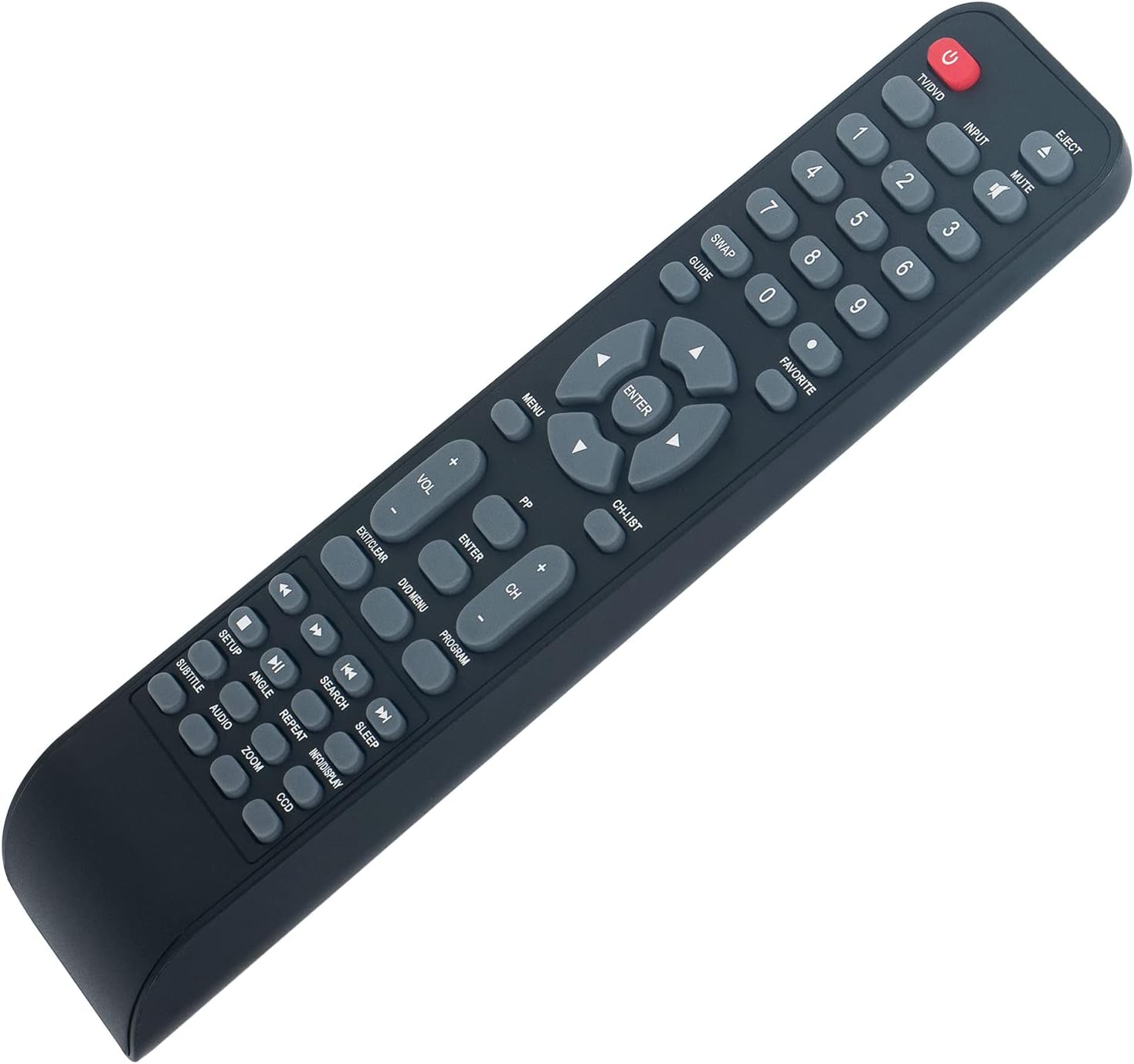
زاویہ دار view of the remote control, illustrating its ergonomic design and button layout for easy handling during battery installation.
آپریٹنگ ہدایات
Point the remote control directly at the infrared sensor on your Polaroid TV/DVD Combo unit for optimal performance. Ensure there are no obstructions between the remote and the unit.
بنیادی افعال
- TV/DVD (Power): Press to turn the TV/DVD Combo unit on or off.
- ان پٹ: Selects the input source (e.g., TV, DVD, HDMI if applicable).
- خاموش: آڈیو کو خاموش یا چالو کریں۔
- نمبر بٹن (0-9): Used for direct channel selection or entering numerical values.
- VOL +/-: حجم کی سطح کو ایڈجسٹ کرتا ہے۔
- CH +/-: ٹیلی ویژن چینل کو اوپر یا نیچے تبدیل کرتا ہے۔
- مینو: Accesses the main menu of the TV or DVD player.
- Arrow Buttons (Up, Down, Left, Right): مینو کے اختیارات کے ذریعے نیویگیٹ کرتا ہے۔
- داخل کریں: Confirms a selection in the menu.
- EXIT/CLEAR: Exits a menu or clears an entry.
DVD/Media Playback Functions
- EJECT: Ejects the DVD from the player.
- DVD مینو: Accesses the DVD disc menu.
- PLAY/PAUSE (►/❚❚): پلے بیک شروع ہوتا ہے یا موقوف ہے۔
- روکیں (■): پلے بیک کو روکتا ہے۔
- ریوائنڈ (◀◀): پلے بیک کو ریوائنڈ کرتا ہے۔
- فاسٹ فارورڈ (►►): فاسٹ فارورڈز پلے بیک۔
- PREVIOUS (◀❚): Skips to the beginning of the current track/chapter or the previous one.
- NEXT (❚►): اگلے ٹریک/باب پر جاتا ہے۔
- دہرائیں: Repeats a track, chapter, or entire disc.
- تلاش کریں: Initiates a search function within media.
- عنوان: Toggles subtitle display.
- آڈیو: Changes audio tracks or languages.
- زاویہ: ہم آہنگ DVDs پر کیمرے کا زاویہ تبدیل کرتا ہے۔
- زوم: Zooms in or out on the picture.
- INFO/DISPLAY: موجودہ پروگرام یا میڈیا کے بارے میں معلومات دکھاتا ہے۔
دیکھ بھال
- صفائی: To clean the remote control, wipe it with a soft, dry cloth. Do not use liquid cleaners or abrasive materials, as these can damage the surface or internal components.
- بیٹری کی تبدیلی: Replace batteries when the remote's response becomes sluggish or stops working. Always replace both batteries at the same time with new AAA Alkaline batteries. Do not mix old and new batteries, or different types of batteries.
- ذخیرہ: If the remote control will not be used for an extended period, remove the batteries to prevent leakage, which can cause damage to the remote. Store the remote in a cool, dry place away from direct sunlight and extreme temperatures.
خرابی کا سراغ لگانا
| مسئلہ | ممکنہ وجہ | حل |
|---|---|---|
| ریموٹ جواب نہیں دے رہا ہے۔ | Dead or incorrectly installed batteries. Obstruction between remote and TV/DVD Combo. Remote is too far from the unit. | Replace batteries with new AAA Alkaline batteries, ensuring correct polarity. Remove any objects blocking the line of sight to the TV/DVD Combo's IR sensor. Move closer to the unit (within 33 feet). |
| کچھ افعال کام نہیں کرتے | The specific function may not be supported by your particular Polaroid TV/DVD Combo model. | This remote is a replacement designed for a range of Polaroid TV/DVD Combo models. While it offers broad compatibility, some advanced or model-specific functions may not be fully supported on all units. Refer to your original TV/DVD Combo manual for specific feature compatibility. |
| بٹن چپچپا یا غیر جوابی ہوتے ہیں۔ | بٹنوں کے نیچے گندگی یا ملبہ۔ | Gently clean the remote control surface with a soft, dry cloth. Avoid pressing buttons excessively hard. |
وضاحتیں
- ماڈل: 0212-62622-00 آر۔
- برانڈ: ZdalaMit
- مطابقت: Polaroid TV/DVD Combo models (TDAC-01933, TDAC-02212, TLAC-03212, 4641-TLXB, TDAC-03212B, TDAC-03212W, TLAC-02255, TDAC01933, TDAC02212, TLAC02255, TDAC03212B, TDAC03212W, TLAC03212, 4641TLXB)
- بجلی کی فراہمی: 2 x 1.5V AAA الکلائن بیٹریاں (شامل نہیں)
- کنیکٹوٹی ٹیکنالوجی: اورکت (IR)
- زیادہ سے زیادہ رینج: تقریباً 33 فٹ (10 میٹر)
- Button Quantity: 18
- رنگ: سیاہ
- طول و عرض (L x W x H): 8.34" x 1.99" x 0.55" (21.18 سینٹی میٹر x 5.05 سینٹی میٹر x 1.4 سینٹی میٹر)
- آئٹم کا وزن: 40 گرام (بغیر بیٹری کے)
وارنٹی اور سپورٹ
This ZdalaMit remote control comes with a 1 سال کی وارنٹی from the date of purchase. This warranty covers manufacturing defects under normal use. It does not cover damage caused by misuse, accidents, unauthorized modifications, or battery leakage.
For technical support, warranty claims, or any questions regarding your remote control, please contact the seller directly through the platform where the purchase was made. Please have your order number ready when contacting support.