
1. تعارف
Thank you for choosing the ICON Morpheus GX 66 Wired Gaming Mouse. This manual provides essential information for setting up, operating, and maintaining your new gaming mouse. Please read this guide thoroughly to ensure optimal performance and longevity of your device.
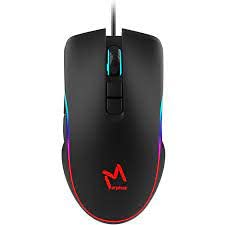
The ICON Morpheus GX 66 is a high-performance wired gaming mouse featuring customizable LED lighting and a precise 7200 DPI optical sensor, designed for an optimal gaming experience. It offers a modern style and ambidextrous design, compatible with Windows 7, Windows XP, and Linux operating systems.
2. مصنوعات کی خصوصیات
- اعلی صحت سے متعلق سینسر: Equipped with a 7200 DPI optical sensor for accurate tracking and responsiveness.
- مرضی کے مطابق ایل ای ڈی لائٹنگ: Dynamic LED illumination enhances your gaming setup.
- 7 قابل پروگرام بٹن: Offers extensive customization for various gaming commands.
- وائرڈ کنیکٹوٹی: Ensures a stable and lag-free connection.
- محیطی ڈیزائن: بائیں اور دائیں ہاتھ استعمال کرنے والوں کے لیے آرام دہ۔
- پائیدار تعمیر: Designed for long-lasting use in intense gaming sessions.
- وسیع مطابقت: Supports Windows 7, Windows XP, and Linux operating systems.

3. سیٹ اپ
- ماؤس کو کھولیں: Carefully remove the ICON Morpheus GX 66 mouse from its packaging.
- کمپیوٹر سے جڑیں: Locate an available USB port on your computer. Plug the USB connector of the mouse firmly into the USB port.
- ڈرائیور کی تنصیب: The mouse is plug-and-play. Your operating system (Windows 7, Windows XP, or Linux) should automatically detect and install the necessary drivers. This process may take a few moments.
- ٹیسٹ کی فعالیت: Once installed, move the mouse and click the buttons to ensure it is working correctly.
4. آپریٹنگ ہدایات
4.1 بنیادی افعال
- بائیں کلک: بنیادی کارروائی، انتخاب، ایکٹیویشن۔
- دائیں کلک کریں: سیاق و سباق کا مینو، ثانوی کارروائیاں۔
- اسکرول وہیل: Scroll up/down, middle click for specific functions.
4.2 ڈی پی آئی ایڈجسٹمنٹ
The mouse features a dedicated DPI button (often located behind the scroll wheel) to cycle through different sensitivity levels. Press this button to adjust the DPI (Dots Per Inch) to your preferred setting for various tasks or games. The LED lighting may change color to indicate the current DPI level.
4.3 ایل ای ڈی لائٹنگ
The ICON Morpheus GX 66 features dynamic LED lighting. The lighting patterns and colors are typically pre-programmed and may change based on the selected DPI setting or cycle automatically. There are no user-configurable software controls for the LED lighting on this model.

5 دیکھ بھال
- صفائی: ماؤس کی سطح کو صاف کرنے کے لیے نرم، خشک کپڑا استعمال کریں۔ ضدی گندگی کے لیے، قدرے ڈیampپانی کے ساتھ کپڑے. سخت کیمیکلز یا کھرچنے والے مواد کے استعمال سے پرہیز کریں۔
- سینسر کی صفائی: Occasionally, dust or debris may accumulate around the optical sensor. Use a cotton swab or compressed air to gently clean the sensor area on the underside of the mouse.
- کیبل کی دیکھ بھال: Avoid sharp bends or excessive pulling on the mouse cable to prevent damage. Store the cable neatly when not in use.
- ذخیرہ: جب طویل عرصے تک استعمال نہ ہو تو ماؤس کو صاف، خشک ماحول میں براہ راست سورج کی روشنی اور انتہائی درجہ حرارت سے دور رکھیں۔

6 خرابیوں کا سراغ لگانا
- ماؤس جواب نہیں دے رہا ہے:
- یقینی بنائیں کہ USB کیبل محفوظ طریقے سے کمپیوٹر کے USB پورٹ میں لگا ہوا ہے۔
- ماؤس کو ایک مختلف USB پورٹ میں لگانے کی کوشش کریں۔
- اپنے کمپیوٹر کو دوبارہ شروع کریں۔
- بے ترتیب کرسر کی حرکت:
- ماؤس کے نیچے والے آپٹیکل سینسر کو صاف کریں۔
- یقینی بنائیں کہ آپ ماؤس کو صاف، غیر عکاس اور یکساں سطح پر استعمال کر رہے ہیں۔ شیشے یا انتہائی عکاس سطحوں سے پرہیز کریں۔
- LED Lighting Not Working:
- USB کنکشن چیک کریں۔
- The LED lighting is typically powered directly via USB. If the mouse functions but LEDs do not, contact support.
- بٹن کام نہیں کر رہے:
- یقینی بنائیں کہ ماؤس مناسب طریقے سے جڑا ہوا ہے۔
- سافٹ ویئر کے مسائل کو مسترد کرنے کے لیے دوسرے کمپیوٹر پر ماؤس کی جانچ کریں۔
7. وضاحتیں
| کارخانہ دار | ICON |
| ماڈل | Morpheus GX 66 |
| ASIN | B0B5PLWQXC |
| خصوصی خصوصیات | ایل ای ڈی لائٹنگ |
| موومنٹ ڈیٹیکشن ٹکنالوجی | آپٹیکل |
| ڈی پی آئی | 7200 |
| ہاتھ کی واقفیت | متضاد |
| تجویز کردہ استعمال | گیمنگ |
| آپریٹنگ سسٹم کی مطابقت | لینکس، ونڈوز 7، ونڈوز ایکس پی |
| انداز | جدید |
| ختم کی قسم | میٹ |
| طاقت کا منبع | کورڈڈ الیکٹرک (USB) |
| رنگ | کثیر رنگ |
8. وارنٹی اور سپورٹ
The ICON Morpheus GX 66 Wired Gaming Mouse comes with a standard manufacturer's warranty. For specific warranty terms and conditions, please refer to the warranty card included with your product or visit the official ICON webسائٹ
For technical support, troubleshooting assistance, or to inquire about replacement parts, please contact ICON customer service through their official support channels. Keep your purchase receipt and product model information (GX 66) handy when contacting support.