
1. پروڈکٹ ختمview
The Point Wired Mini Keyboard Pt-350 is a compact and versatile keyboard designed for both gaming and general typing. It features a high-quality build and a modern design, adhering to industry standards for reliable performance. This keyboard is an ideal choice for users seeking a durable and efficient input device.
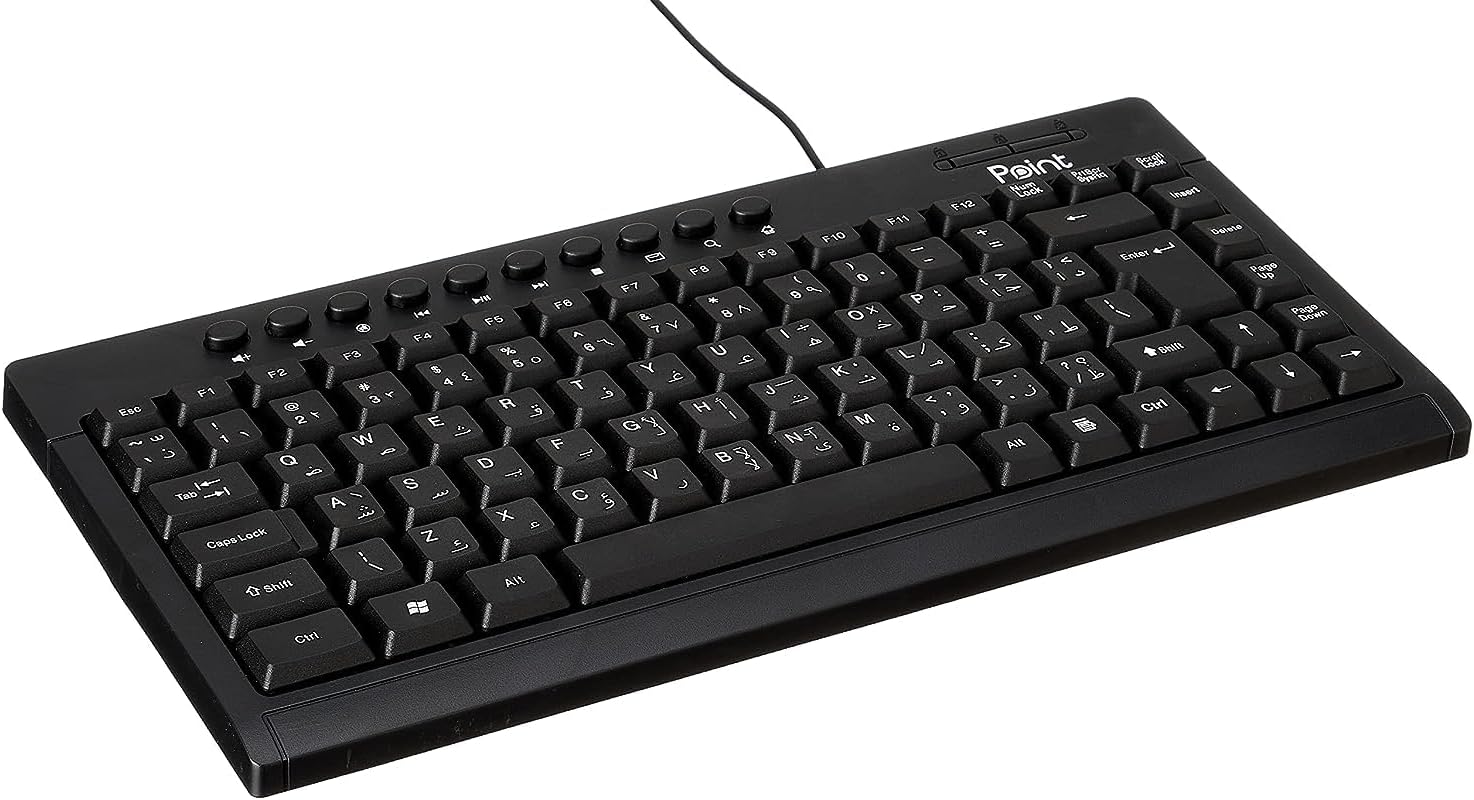
شکل 1.1: زاویہ دار view of the Point Wired Mini Keyboard Pt-350, showcasing اس کا کمپیکٹ ڈیزائن اور کلیدی ترتیب۔
اہم خصوصیات:
- Wired connectivity for stable performance.
- Compact design suitable for various setups.
- Durable construction from high-quality plastic materials.
- Designed for both gaming and typing applications.
2. پیکیج کے مشمولات
تمام اشیاء کی موجودگی کو یقینی بنانے کے لیے براہ کرم پیکج کو احتیاط سے چیک کریں:
- Point Wired Mini Keyboard Pt-350
- صارف دستی (یہ دستاویز)
3. سیٹ اپ
Follow these steps to set up your Point Wired Mini Keyboard Pt-350:
- کی بورڈ کھولیں: کی بورڈ کو اس کی پیکیجنگ سے احتیاط سے ہٹا دیں۔
- USB کنیکٹر کی شناخت کریں: The keyboard comes with an integrated USB cable.
- اپنے کمپیوٹر سے جڑیں: Locate an available USB port on your computer (desktop PC, laptop, etc.). Insert the keyboard's USB connector firmly into the USB port.
- ڈرائیور کی تنصیب (پلگ اینڈ پلے): The keyboard is plug-and-play compatible. Your operating system (Windows, macOS, Linux) should automatically detect and install the necessary drivers. This process usually takes a few seconds.
- فعالیت کی تصدیق کریں: Once connected, open a text editor or any application that accepts text input and test the keys to ensure proper operation.

شکل 3.1: اوپر سے نیچے view of the keyboard, illustrating the key layout and integrated cable for connection.
4. آپریٹنگ ہدایات
The Point Wired Mini Keyboard Pt-350 operates like a standard computer keyboard. Below are general instructions and tips for use:
بنیادی ٹائپنگ:
- Simply press the desired keys to input characters, numbers, and symbols into your active application.
- استعمال کریں۔ شفٹ key for uppercase letters and alternative symbols on keys.
- دی کیپس لاک key toggles permanent uppercase typing.
- دی بیک اسپیس key deletes characters to the left of the cursor.
- دی داخل کریں۔ key confirms input or moves to the next line.
فنکشن کیز (F1-F12):
The function keys (F1 through F12) perform various tasks depending on the active program or operating system. Some common uses include:
- F1: Often opens help for the active program.
- F2: Renames a selected item.
- F5: تازگی a web page or document.
- F11: Toggles full-screen mode in many browsers.
ملٹی میڈیا کیز:
The keyboard may include dedicated multimedia keys or secondary functions on the F-keys (accessed via the Fn key, if present). These typically control:
- Volume control (Mute, Volume Up, Volume Down)
- Media playback (Play/Pause, Stop, Previous Track, Next Track)
5 دیکھ بھال
Proper maintenance ensures the longevity and optimal performance of your keyboard:
- صفائی: دھول اور ملبہ جمع ہونے سے بچنے کے لیے کی بورڈ کو باقاعدگی سے صاف کریں۔ تھوڑا سا نرم، لنٹ سے پاک کپڑا استعمال کریں۔ampپانی یا ہلکے صفائی کے حل کے ساتھ ختم کریں۔ سخت کیمیکلز یا کھرچنے والے مواد سے پرہیز کریں۔
- دھول ہٹانا: Use compressed air to blow out dust and crumbs from between the keys.
- پھسلنے سے بچیں: Keep liquids away from the keyboard to prevent damage to internal components. In case of a spill, immediately disconnect the keyboard and allow it to dry completely before reconnecting.
- ذخیرہ: When not in use, store the keyboard in a clean, dry environment away from extreme temperatures.
6 خرابیوں کا سراغ لگانا
If you encounter issues with your Point Wired Mini Keyboard Pt-350, refer to the following common problems and solutions:
کی بورڈ جواب نہیں دے رہا ہے:
- USB کنکشن چیک کریں: یقینی بنائیں کہ USB کیبل آپ کے کمپیوٹر پر کام کرنے والے USB پورٹ میں محفوظ طریقے سے پلگ ان ہے۔ ایک مختلف USB پورٹ آزمائیں۔
- کمپیوٹر کو دوبارہ شروع کریں: ایک سادہ ری اسٹارٹ اکثر رابطے کے مسائل کو حل کر سکتا ہے۔
- دوسرے کمپیوٹر پر ٹیسٹ: Connect the keyboard to another computer to determine if the issue is with the keyboard or your computer's setup.
- ڈیوائس مینیجر (ونڈوز) کو چیک کریں: In Windows, go to Device Manager and check if the keyboard is listed under 'Keyboards' and if there are any error symbols. You might need to update or reinstall the driver.
Keys Not Working or Sticky:
- کلین کلین: Dust, crumbs, or liquid residue can cause keys to stick or malfunction. Refer to the Maintenance section for cleaning instructions.
- جسمانی نقصان: Inspect the keys for any visible physical damage.
Incorrect Character Output:
- Check Language Settings: Ensure your operating system's keyboard language settings match the physical layout of your keyboard.
- Driver Issue: Reinstalling the keyboard driver might resolve this.
اگر ان اقدامات کو آزمانے کے بعد بھی مسئلہ برقرار رہتا ہے، تو براہ کرم کسٹمر سپورٹ سے رابطہ کریں۔
7. وضاحتیں
Technical specifications for the Point Wired Mini Keyboard Pt-350:

شکل 7.1: طرف view of the keyboard, highlighting its profile and compact form factor.
| فیچر | تفصیل |
|---|---|
| برانڈ کا نام | نقطہ |
| ماڈل | Pt-350 |
| کنیکٹوٹی ٹیکنالوجی | وائرڈ |
| ہم آہنگ آلات | کمپیوٹر |
| کی بورڈ کی تفصیل | ملٹی فنکشنل |
| تجویز کردہ استعمال | پی سی گیمنگ |
| خصوصی خصوصیات | گیمنگ |
| رنگ | سیاہ |
| انداز | جدید |
| مواد | پلاسٹک |
| شپنگ کے طول و عرض | 34.5 x 26.4 x 3 سینٹی میٹر |
| وزن | 800 گرام |
| پہلی دستیاب تاریخ | 4 ستمبر 2022 |
| ASIN | B0BD2DM9ZJ |
8. وارنٹی اور سپورٹ
This product is covered by a standard manufacturer's warranty. Please refer to the warranty card included with your purchase for specific terms and conditions, including the warranty period and coverage details.
For technical support, troubleshooting assistance, or warranty claims, please contact Point customer service through the contact information provided on the product packaging or the official Point website. When contacting support, please have your product model (Pt-350) and purchase details ready.