
1. تعارف
The Deity TC-1 KIT Wireless Timecode Box is a professional solution for synchronizing audio and video across multiple devices. This kit includes three TC-1 units, offering advanced features such as long-range wireless control, frame-accurate timecode generation, and versatile mounting options. Designed for filmmakers and audio professionals, the TC-1 simplifies post-production workflows by ensuring precise timecode synchronization.

Image: The Deity TC-1 KIT, showcasing three timecode boxes and various cables and mounting accessories.
2. باکس میں کیا ہے۔
تصدیق کریں کہ تمام اشیاء آپ کے پیکیج میں موجود ہیں:
- 3x Deity TC-1 Wireless Timecode Boxes
- 3x Deity C15 TRS to BNC Cables (for timecode output)
- 1x Deity C13 TRS to TRS Cable
- 1x USB-C to USB-A Charging Cable (3-way splitter for simultaneous charging)
- 1x USB-C سے USB-A اڈاپٹر
- 3x Cold Shoe Mounts
- Hook-n-loop pads
- صارف دستی (یہ دستاویز)

Image: A visual representation of all components included in the Deity TC-1 KIT.
3. پروڈکٹ کے اجزاء اور کنٹرول
Familiarize yourself with the key parts and controls of the Deity TC-1 unit:

Image: Labeled diagram illustrating the various ports, buttons, and indicators on the Deity TC-1 timecode box.
- OLED ڈسپلے: Shows timecode, battery status, and operational modes.
- فنکشن وہیل: مینوز کو نیویگیٹ کرنے اور ترتیبات کو ایڈجسٹ کرنے کے لیے استعمال کیا جاتا ہے۔
- Power / Back Button: Powers the unit on/off and navigates back in menus.
- USB-C چارجنگ پورٹ: اندرونی بیٹری چارج کرنے کے لیے۔
- Locking 3.5mm Timecode Port (I/O): Connects to cameras or audio recorders for timecode input/output.
- بلٹ ان مائیکروفون: Scratch microphone for reference audio.
- Removable Cold Shoe Mount: For attaching to cameras or rigs.
- ایل ای ڈی اشارے: Power, Sync, and Bluetooth status.
4. سیٹ اپ گائیڈ
4.1 Charging the TC-1
Before initial use, fully charge all TC-1 units. Connect the provided USB-C charging cable to the USB-C port on each TC-1 unit and to a USB power source. The Power LED will indicate charging status.

Image: The USB-C charging port and 3.5mm timecode port on the Deity TC-1.
4.2 Mounting the TC-1
The TC-1 offers multiple mounting options:
- کولڈ شو ماؤنٹ: Attach the removable cold shoe mount to the bottom of the TC-1, then slide it onto a camera's cold shoe or a rig.
- 1/4" or 3/8" Threaded Mount: Beneath the cold shoe mount, there are standard threaded mounts for direct attachment to tripods, arms, or other accessories.
- Hook-n-loop Pads: Use the included hook-n-loop pads for flexible attachment to various surfaces.

Image: The removable cold shoe mount and threaded attachment point on the Deity TC-1.
4.3 ابتدائی پاور آن اور بنیادی ترتیبات
- دبائیں اور تھامیں۔ پاور / بیک بٹن to turn on the TC-1.
- The OLED display will show the current timecode and battery status.
- استعمال کریں۔ Function Wheel to navigate through the menu options.
- Adjust settings such as frame rate, timecode mode (e.g., Free Run, Record Run), and output level as required for your production.
5. آپریٹنگ ہدایات
5.1 Timecode Synchronization
The TC-1 offers multiple methods for precise timecode synchronization:
- Bit Connectify™ Wireless Control: Control up to 20 TC-1 units from a master unit up to 250 feet away. This proprietary technology ensures robust and long-range synchronization.
- Secondary RF Chip: For closer range synchronization (up to 30 feet) between TC-1 devices, a secondary RF chip provides reliable connectivity.
- Bluetooth 5.0 & Sidus Audio™ App: Connect your TC-1 units to a smartphone or laptop via Bluetooth and use the Sidus Audio™ app for comprehensive control, monitoring, and simultaneous syncing of all units.

Image: The Sidus Audio app controlling Deity TC-1 units, showing settings for timecode and frame rate.
To sync, designate one TC-1 as the master and the others as slaves. Initiate the sync process via the master unit's menu or the Sidus Audio™ app. The Sync LED will confirm successful synchronization.
5.2 Connecting to Devices (Cameras/Recorders)
Use the provided C15 TRS to BNC cables or other compatible 3.5mm TC cables to connect the TC-1 to your recording equipment. The locking 3.5mm port ensures a secure connection during operation.

Image: A Deity TC-1 connected to a recording device, displaying active timecode.
5.3 Using the Built-In Scratch Microphone
For cameras or action cameras that only feature a stereo mic input, the TC-1's built-in scratch microphone can provide a reference audio track. This is useful for quickly aligning audio in post-production, especially when a dedicated audio recorder is not used.
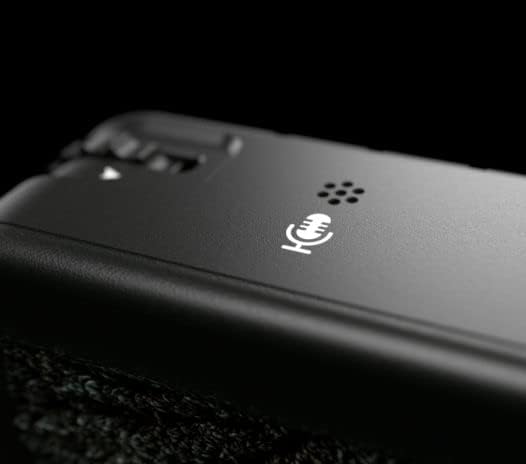
Image: The built-in scratch microphone on the Deity TC-1 unit.
6 دیکھ بھال
- صفائی: Use a soft, dry cloth to clean the exterior of the TC-1 units. Avoid using harsh chemicals or abrasive materials.
- ذخیرہ: یونٹس کو براہ راست سورج کی روشنی اور انتہائی درجہ حرارت سے دور ٹھنڈی، خشک جگہ پر اسٹور کریں۔
- بیٹری کی دیکھ بھال: For optimal battery life, avoid fully discharging the units frequently. If storing for extended periods, charge the batteries to approximately 50%.
- فرم ویئر اپ ڈیٹس: Periodically check the Deity website or the Sidus Audio™ app for firmware updates to ensure optimal performance and access to new features.
7 خرابیوں کا سراغ لگانا
| مسئلہ | ممکنہ وجہ | حل |
|---|---|---|
| یونٹ آن نہیں ہوتا۔ | کم یا ختم ہونے والی بیٹری۔ | Charge the unit using the provided USB-C cable. |
| Timecode not syncing. | Units out of range; incorrect master/slave setup; interference. | Ensure units are within range (250ft for Bit Connectify, 30ft for RF). Verify master/slave settings. Check for sources of wireless interference. |
| Timecode drift. | Prolonged operation without re-sync; extreme temperature changes. | Re-sync units periodically, especially after long takes or significant environmental changes. The TC-1 is designed for minimal drift (less than 1 frame in 72 hours). |
| ایپ کنٹرول کام نہیں کر رہا ہے۔ | Bluetooth not enabled; app not updated; unit not discoverable. | Ensure Bluetooth is active on your device and the TC-1. Update the Sidus Audio™ app. Restart the TC-1 unit. |
| No timecode output to camera/recorder. | Incorrect cable; incorrect output settings on TC-1; camera input misconfigured. | Verify cable connection and type. Check TC-1 output settings. Ensure camera/recorder is set to receive external timecode. |
8. وضاحتیں
| فیچر | تفصیل |
|---|---|
| ماڈل | Deity TC-1 |
| ٹائم کوڈ کی درستگی | ±0.5ppm (less than 1 frame drift in 72 hours) |
| Wireless Control Range (Bit Connectify™) | 250 فٹ (76 میٹر) تک |
| Wireless Sync Range (TC-1 to TC-1 RF) | 30 فٹ (9 میٹر) تک |
| بلوٹوتھ ورژن | 5.0 |
| چینلز | 8 |
| Timecode Connection | Locking 3.5mm TRS (I/O) |
| چارجنگ پورٹ | USB-C |
| بڑھتے ہوئے اختیارات | Removable Cold Shoe, 1/4" and 3/8" Threaded Mounts, Hook-n-loop |
| بلٹ ان مائیکروفون | Yes (Scratch Mic) |
| پیکیج کے طول و عرض | 9.49 x 7.68 x 2.64 انچ |
| شے کا وزن (فی یونٹ) | Approximately 0.43 pounds (1.3 pounds / 3 units) |
| کارخانہ دار | دیوتا |
9. وارنٹی اور سپورٹ
For detailed warranty information, technical support, and service inquiries, please refer to the official Deity webسائٹ یا ان کے کسٹمر سپورٹ سے براہ راست رابطہ کریں۔ وارنٹی کے دعووں کے لیے اپنی خریداری کا ثبوت رکھیں۔
Deity Official Webسائٹ: www.deitymic.com