
OOYCYOO P 60A
OOYCYOO MPPT 60A Solar Charge Controller User Manual
Model: P 60A
1. تعارف
This manual provides detailed instructions for the installation, operation, and maintenance of your OOYCYOO MPPT 60A Solar Charge Controller. This device is designed to efficiently manage power flow from your solar panels to your battery bank, ensuring optimal charging and system protection. It supports automatic 12V/24V system voltage identification and is compatible with various battery types.
Key features include a backlit LCD display, a 4-stage battery charging algorithm, and comprehensive protection functions.
2. حفاظتی ہدایات
- Always connect the battery first, then the solar panel, and finally the load. Disconnect in reverse order.
- Ensure all wiring is correctly polarized to prevent damage.
- Do not connect inverters or inductive loads directly to the controller's load terminals.
- Install the controller in a well-ventilated area, away from flammable materials.
- The controller generates heat during operation; ensure adequate airflow. The integrated cooling fan activates when the temperature exceeds 45°C and turns off below 40°C.
- Use appropriate circuit breakers and fuses for all connections.
- This device is for indoor use only. Protect it from water and moisture.
3. پروڈکٹ ختمview
The OOYCYOO MPPT 60A Solar Charge Controller is designed for efficient solar power management. It features an LCD display for real-time data, multiple protection functions, and support for various battery types.
3.1 پیکیج کے مشمولات
- 1 x OOYCYOO MPPT 60A Solar Charge Controller
- 1 ایکس درجہ حرارت سینسر
- 1 ایکس یوزر مینوئل (انگریزی)
3.2 اجزاء کی شناخت

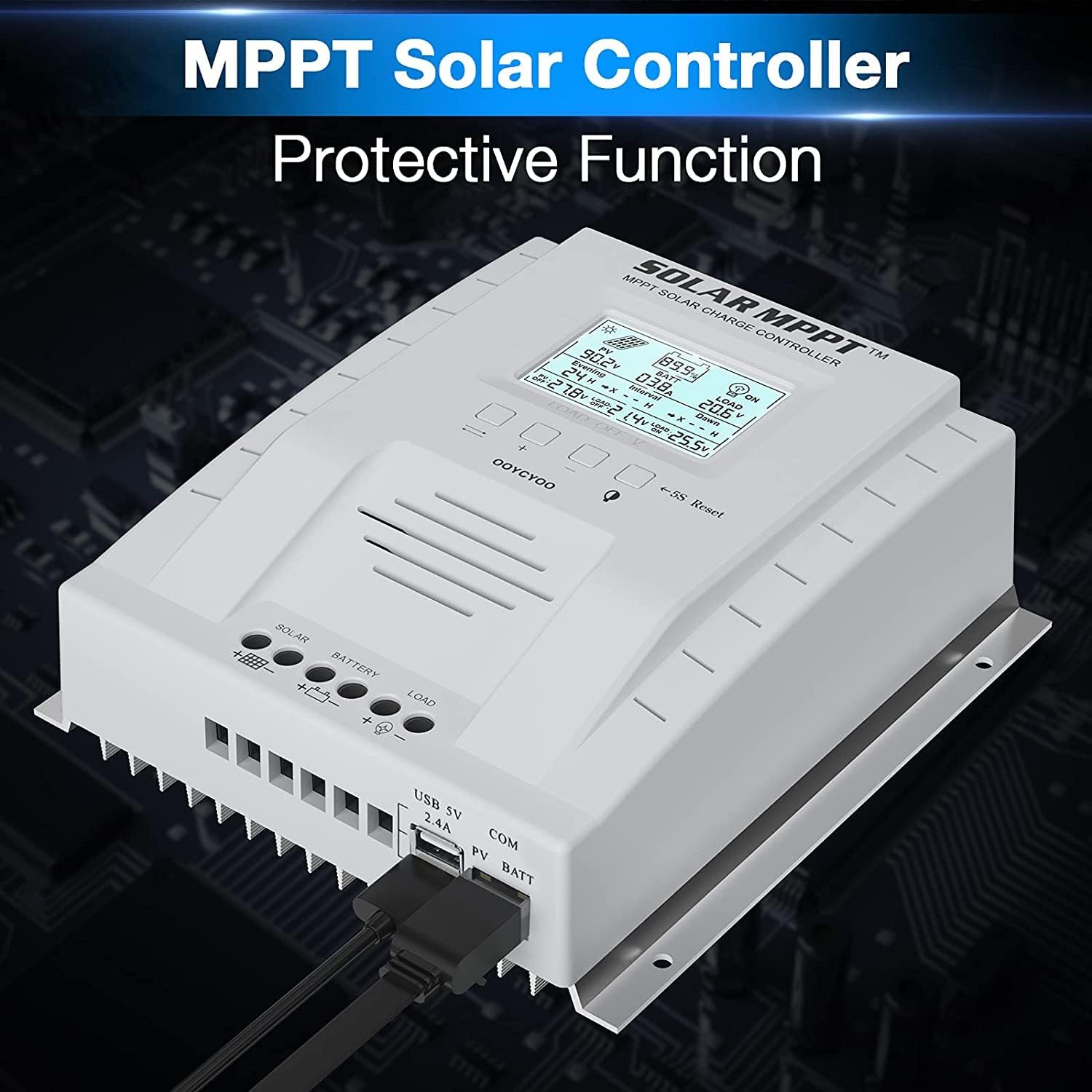
The controller features a clear LCD display on the front for monitoring system status. Below the display are control buttons for navigation and settings. Connection terminals for solar panels, battery, and load are located at the bottom. USB ports and an RS485 communication port are on the side.
4. سیٹ اپ اور انسٹالیشن
آپ کے سولر چارج کنٹرولر کے محفوظ اور موثر آپریشن کے لیے مناسب تنصیب بہت ضروری ہے۔ ان اقدامات پر احتیاط سے عمل کریں۔
4.1 کنٹرولر لگانا
- Choose a dry, well-ventilated location, protected from direct sunlight, high temperatures, and water.
- Ensure there is sufficient space around the controller for heat dissipation.
- Mount the controller vertically on a wall or stable surface using the provided mounting holes.
4.2 وائرنگ رابطے
Follow the connection order precisely to avoid damage to the controller or other components.
- بیٹری کو جوڑیں: Connect the positive and negative terminals of the battery to the corresponding battery terminals on the controller. Ensure correct polarity. The controller will automatically detect the system voltage (12V یا 24V)۔
- سولر پینلز کو جوڑیں: Connect the positive and negative leads from your solar panel array to the corresponding PV terminals on the controller. Ensure correct polarity. Do not exceed the maximum PV input voltag100V DC کا ای۔
- لوڈ کو جوڑیں (اختیاری): Connect your DC loads to the load terminals on the controller. Note that the load output is for DC loads only. Do not connect inverters or inductive loads directly to these terminals.
- Connect the Remote Temperature Sensor: Plug the temperature sensor into its dedicated port. This sensor helps the controller optimize charging based on battery temperature.

اہم نوٹ: Always connect the battery first and disconnect the solar panel last. Incorrect connection order can damage the controller.
5. آپریٹنگ ہدایات
Once installed, the controller will begin operation automatically. The LCD display provides real-time system information.
5.1 LCD ڈسپلے اور بٹن

The backlit LCD displays critical system parameters such as PV voltage، بیٹری والیومtage, charging current, load current, and accumulated energy (KWH). The four buttons below the display are used for navigation and settings adjustment:
- ٹوگل کلید: Used to cycle through display screens or confirm selections.
- '+' (Plus) Key: Increases values or moves forward in menus.
- '-' (Minus) Key: Decreases values or moves backward in menus.
- Manual Switch Load Key: Toggles the load output on/off manually.
- 5S Reset: فیکٹری سیٹنگز کو بحال کرنے کے لیے 5 سیکنڈ تک دبائے رکھیں۔
5.2 Battery Charging Algorithm
The controller utilizes a 4-stagبیٹری کی زندگی اور کارکردگی کو بہتر بنانے کے لیے ای چارجنگ الگورتھم:
- بلک چارج: Charges the battery at maximum current until the voltage فروغ والیوم تک پہنچتا ہے۔tage.
- چارج بڑھاو: ایک مستقل والیوم پر چارجزtage for a set period to ensure full charge.
- فلوٹ چارج: بیٹری کو کم والیوم پر برقرار رکھتا ہے۔tage to prevent self-discharge and overcharging.
- Equalization (for specific battery types): Periodically overcharges the battery to balance cell voltages اور سلفیشن کو روکتا ہے۔
5.3 معاون بیٹری کی اقسام
The controller is compatible with various battery types, including:
- Lead-Acid (Sealed, Gel, Flooded)
- لتیم (LFP)
- User-defined parameters for other battery types.
Pre-set charging parameters are available for Sealed, Gel, Flooded, and LI (LFP) batteries. Users can customize parameters for other battery types as needed.
6. حفاظتی افعال
The OOYCYOO MPPT 60A Solar Charge Controller incorporates multiple protection mechanisms to ensure system safety and longevity:
- PV Overcurrent/Overpower Protection
- PV Short Circuit Protection
- PV ریورس پولرٹی پروٹیکشن
- Reverse Charging at Night Protection
- بیٹری ریورس پولرٹی پروٹیکشن
- بیٹری اوور وولtage تحفظ
- Battery Over-discharge Protection
- Battery Overtemperature Protection
- Controller Overtemperature Protection
- Lithium Battery Low Temperature Protection
- لوڈ شارٹ سرکٹ تحفظ
- اوورلوڈ تحفظ
- TVS ہائی والیومtagای عارضی تحفظ
7 دیکھ بھال
Regular maintenance ensures optimal performance and extends the lifespan of your solar charge controller.
- کنکشن چیک کریں: Periodically inspect all wiring connections for tightness and corrosion. Tighten any loose connections.
- کنٹرولر کو صاف کریں: Keep the controller clean and free of dust. Use a dry cloth to wipe the exterior. Ensure ventilation openings are not obstructed.
- نقصان کا معائنہ کریں: Check for any signs of physical damage, overheating, or unusual odors.
- بیٹری معائنہ: اپنی مخصوص بیٹری کی قسم کے لیے مینوفیکچرر کی دیکھ بھال کے رہنما خطوط پر عمل کریں۔
8 خرابیوں کا سراغ لگانا
یہ سیکشن عام مسائل کو حل کرتا ہے جن کا آپ کو اپنے سولر چارج کنٹرولر کے ساتھ سامنا ہو سکتا ہے۔
| مسئلہ | ممکنہ وجہ | حل |
|---|---|---|
| Controller not powering on / LCD blank | کوئی بیٹری منسلک نہیں ہے یا بیٹری والیومtage too low. Reverse polarity connection. | یقینی بنائیں کہ بیٹری پہلے منسلک ہے اور کافی والیوم ہے۔tage. Check battery polarity. |
| سولر پینلز سے کوئی چارجنگ نہیں۔ | Solar panels not connected or reverse polarity. Insufficient sunlight. PV voltage بہت کم یا بہت زیادہ۔ | Check solar panel connections and polarity. Ensure adequate sunlight. Verify PV voltage is within operating range (e.g., 18V-96V for 12V system, 36V-96V for 24V system). |
| لوڈ کام نہیں کر رہا ہے۔ | Load output disabled. Load short circuit or overload. Battery voltagای بہت کم | Check load output status on LCD. Disconnect load and check for short circuit. Ensure battery is sufficiently charged. |
| کنٹرولر اوور ہیٹنگ | Poor ventilation. Excessive load or charging current. | کنٹرولر کے ارد گرد مناسب ہوا کے بہاؤ کو یقینی بنائیں۔ اگر ممکن ہو تو لوڈ یا چارجنگ کرنٹ کو کم کریں۔ |
| غلط جلدtagای ریڈنگز | Loose connections. Faulty temperature sensor. | Check all wiring connections. Ensure temperature sensor is properly connected. |
9. وضاحتیں
Technical specifications for the OOYCYOO MPPT 60A Solar Charge Controller.
| پیرامیٹر | قدر |
|---|---|
| ریٹیڈ چارج کرنٹ | 60A |
| نظام جلد۔tage | 12V/24V Auto Identification |
| زیادہ سے زیادہ پی وی اوپن سرکٹ والیومtage | 100V DC |
| زیادہ سے زیادہ PV ان پٹ پاور (12V سسٹم) | 750W |
| زیادہ سے زیادہ PV ان پٹ پاور (24V سسٹم) | 1500W |
| DC/DC Transfer Efficiency | 98.7% تک |
| آپریٹنگ درجہ حرارت | -20℃ سے +55℃ |
| ٹرمینل سائز | 10 AWG |
| طول و عرض (L*W*H) | 8.3 x 8.4 x 3.4 انچ (21.2 x 20.8 x 8.4 سینٹی میٹر) |
| وزن | 3 پونڈ (1.28 کلوگرام) |
| ڈسپلے کی قسم | LCD بیک لائٹ |
| یو پی سی | 768461886785 |
| ماڈل نمبر | پی 60 اے |


10. وارنٹی اور سپورٹ
For warranty information or technical support, please contact your retailer or the manufacturer directly. Refer to the product packaging or purchase documentation for specific contact details.
Ask a question about this manual
Ask about setup, troubleshooting, compatibility, parts, safety, or missing instructions. Manuals+ will review the question and use this page’s manual context to help answer it.