
1. تعارف
This manual provides detailed instructions for the safe and efficient use of your Intenso Video Scooter BT MP3 Player. Please read this manual thoroughly before operating the device and retain it for future reference. This device allows you to play music (MP3), videos (MP4), and view images on its 1.8-inch color display, with the added convenience of Bluetooth connectivity.
2. پروڈکٹ ختمview
The Intenso Video Scooter BT is a compact and portable media player designed for on-the-go entertainment. It features a 1.8-inch color display, 16 GB of internal storage, and Bluetooth for wireless audio streaming.

تصویر 2.1: The Intenso Video Scooter BT MP3 Player in blue, shown with the included headphones connected. The microUSB port for charging and data transfer, and the microSD card slot for expandable storage, are visible on the side.
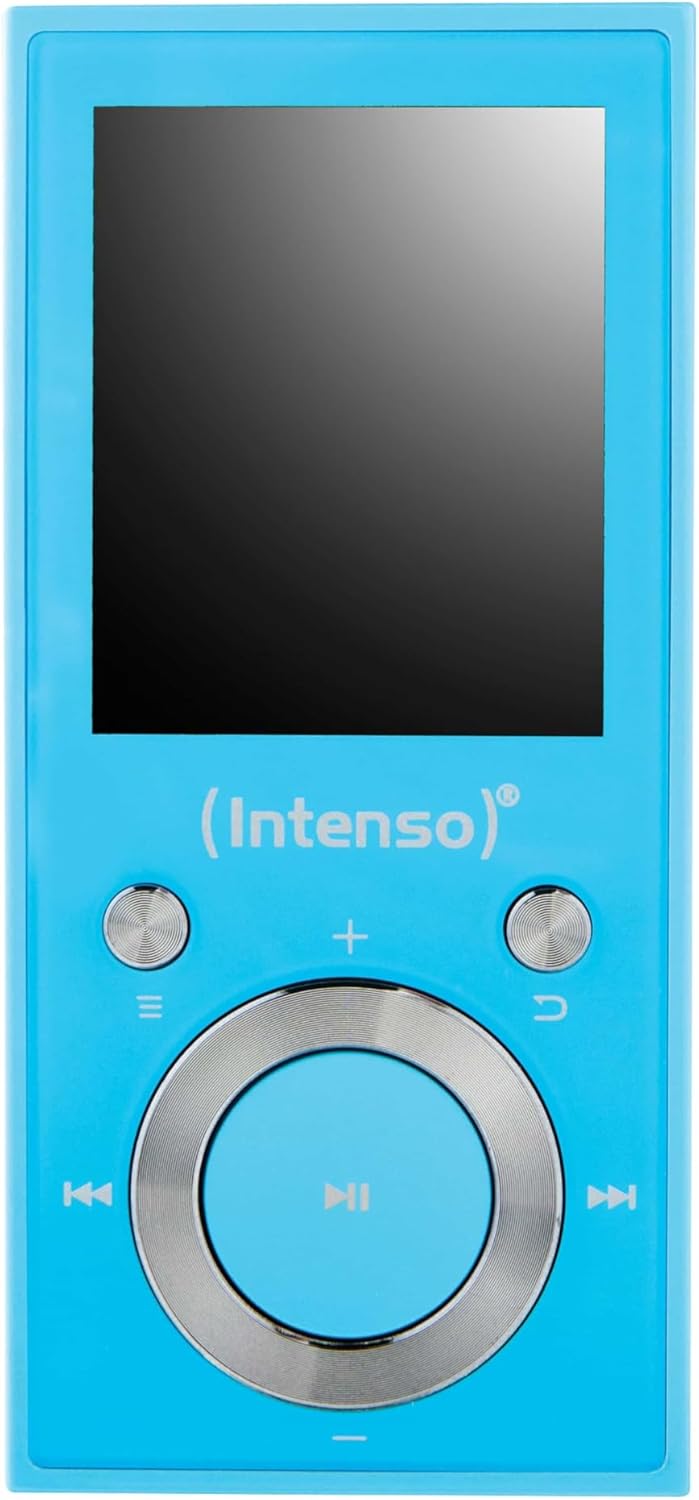
تصویر 2.2: ایک قریبی اپ view of the Intenso Video Scooter BT MP3 Player's front panel, displaying the 1.8-inch screen and the navigation buttons. The central button is for play/pause/confirm, surrounded by directional controls, and dedicated buttons for menu, back, and volume.
پیکیج کا مواد:
- Intenso Video Scooter BT MP3 Player
- ہیڈ فون
- USB کیبل
- صارف دستی (یہ دستاویز)
3. سیٹ اپ
3.1 ڈیوائس کو چارج کرنا
- Connect the small end of the included USB cable to the microUSB port on the player.
- Connect the large end of the USB cable to a powered USB port on a computer or a compatible USB wall adapter (not included).
- اسکرین پر بیٹری کا اشارے چارج ہونے کی حالت دکھائے گا۔ مکمل چارج ہونے میں عام طور پر تقریباً 2-3 گھنٹے لگتے ہیں۔
3.2 مائیکرو ایس ڈی کارڈ داخل کرنا
The device supports microSDHC cards for expanded storage. To insert a card:
- پلیئر کے سائیڈ پر مائیکرو ایس ڈی کارڈ سلاٹ تلاش کریں۔
- مائیکرو ایس ڈی کارڈ کو آہستہ سے سلاٹ میں داخل کریں جب تک کہ یہ اپنی جگہ پر کلک نہ کر دے۔
- ہٹانے کے لیے، کارڈ کو تھوڑا سا اندر کی طرف دھکیلیں جب تک کہ یہ باہر نہ نکل جائے۔
3.3 Connecting to a Computer and Transferring Files
- یقینی بنائیں کہ پلیئر آن ہے۔
- Connect the player to your computer using the supplied USB cable.
- پلیئر آپ کے کمپیوٹر پر ہٹنے کے قابل ڈسک ڈرائیو کے طور پر ظاہر ہوگا۔
- Drag and drop your desired MP3 music, MP4 videos, or image files into the appropriate folders on the player or inserted microSD card.
- USB کیبل کو منقطع کرنے سے پہلے آلہ کو اپنے کمپیوٹر سے محفوظ طریقے سے نکال دیں۔
4. آپریٹنگ ہدایات
4.1 پاور آن/آف
- پاور آن کرنے کے لیے: Press and hold the power button (often integrated with the play/pause button or a dedicated side button) for a few seconds until the screen illuminates.
- پاور آف کرنا: پاور بٹن کو دوبارہ دبائیں اور دبائے رکھیں جب تک کہ آلہ بند نہ ہو جائے۔
4.2 مینو نیویگیشن
Use the directional buttons around the central 'Play/Pause/Confirm' button to navigate through menus. The 'Menu' button (often represented by three horizontal lines) typically brings up options or returns to the main menu. The 'Back' button (often a curved arrow) returns to the previous screen.
4.3 میوزک پلے بیک
- مین مینو سے، 'موسیقی' کو منتخب کریں۔
- Browse through your music library by artist, album, genre, or all songs.
- Select a song and press the central 'Play/Pause' button to begin playback.
- Use the left/right directional buttons to skip tracks.
- Use the volume buttons (often '+' and '-') to adjust the audio level.
- پلے بیک کو روکنے یا دوبارہ شروع کرنے کے لیے 'پلے/پاز' بٹن دبائیں۔
4.4 ویڈیو پلے بیک
- مین مینو سے، 'ویڈیو' کو منتخب کریں۔
- Browse and select the desired video file.
- Press the central 'Play/Pause' button to start playback.
4.5 بلوٹوتھ کنیکٹیویٹی
To pair your Intenso Video Scooter BT with Bluetooth headphones or speakers:
- From the main menu, navigate to 'Bluetooth'.
- یقینی بنائیں کہ آپ کا بلوٹوتھ آڈیو ڈیوائس پیئرنگ موڈ میں ہے۔
- منتخب کریں 'تلاش کریں۔ Devices' on the player.
- فہرست میں آپ کا آلہ ظاہر ہونے کے بعد، اسے جوڑا بنانے کے لیے منتخب کریں۔
- After successful pairing, audio will be routed to the connected Bluetooth device.
5 دیکھ بھال
- صفائی: آلے کو صاف کرنے کے لیے نرم، خشک کپڑا استعمال کریں۔ مائع کلینر یا سالوینٹس استعمال نہ کریں۔
- ذخیرہ: پلیئر کو براہ راست سورج کی روشنی اور انتہائی درجہ حرارت سے دور ٹھنڈی، خشک جگہ پر اسٹور کریں۔
- بیٹری کی دیکھ بھال: بیٹری کی زندگی کو طول دینے کے لیے، بار بار بیٹری کو مکمل طور پر خارج کرنے سے گریز کریں۔ آلہ کو باقاعدگی سے چارج کریں، چاہے وہ طویل عرصے تک استعمال میں نہ ہوں۔
- سافٹ ویئر اپ ڈیٹس: Check the official Intenso webبہترین کارکردگی کو یقینی بنانے کے لیے کسی بھی دستیاب فرم ویئر اپ ڈیٹس کے لیے وقتاً فوقتاً سائٹ۔
6 خرابیوں کا سراغ لگانا
ڈیوائس آن نہیں ہوتی ہے:
- یقینی بنائیں کہ بیٹری چارج ہے۔ پلیئر کو پاور سورس سے جوڑیں اور دوبارہ پاور آن کرنے کی کوشش کرنے سے پہلے اسے کم از کم 30 منٹ تک چارج ہونے دیں۔
- If the device is unresponsive, locate the 'RESET' pinhole (if present, often on the side or back) and gently press it with a thin object (e.g., a paperclip) to restart the device.
کوئی آواز نہیں:
- حجم کی سطح کو چیک کریں۔
- Ensure headphones are properly connected or that Bluetooth headphones/speakers are paired and connected.
- Test with different headphones to rule out a faulty pair.
بلوٹوتھ کنکشن کے مسائل:
- Ensure both the player and the Bluetooth audio device are sufficiently charged.
- Make sure both devices are within close proximity (typically within 10 meters) and free from obstructions.
- آلات کا جوڑا ختم کرنے اور دوبارہ جوڑا بنانے کی کوشش کریں۔
- Restart both the player and the Bluetooth audio device.
Files Not Appearing or Playing:
- تصدیق کریں کہ files are in a supported format (MP3 for audio, MP4 for video).
- یقینی بنائیں files were transferred correctly to the device's internal storage or the microSD card.
- If using a microSD card, ensure it is properly inserted and not corrupted.
7. وضاحتیں
| ماڈل کا نام | ویڈیو سکوٹر بی ٹی |
| آئٹم ماڈل نمبر | 3717474 |
| برانڈ | انٹینسو |
| میموری ذخیرہ کرنے کی صلاحیت | 16 جی بی |
| اسکرین کا سائز | 1.8 انچ |
| کنیکٹوٹی ٹیکنالوجی | یو ایس بی، بلوٹوتھ |
| ہم آہنگ آلات | بلوٹوتھ ڈیوائسز |
| میڈیا کی قسم | MP3، MP4 |
| خصوصی خصوصیت | MP3 Playback, Video Playback |
| مصنوعات کے طول و عرض | 6.3 x 3.54 x 1.97 انچ |
| شے کا وزن | 0.917 اونس |
| بیٹریاں | 1 لتیم پولیمر بیٹری (شامل) |
8. وارنٹی اور سپورٹ
For warranty information and technical support, please refer to the documentation included with your product or visit the official Intenso webسائٹ وارنٹی کے دعووں کے لیے اپنی خریداری کا ثبوت رکھیں۔