
TENVIS IP602W
TENVIS IP602W Outdoor IP Camera User Manual
Model: IP602W
برانڈ: TENVIS
تعارف
The TENVIS IP602W is a robust outdoor IP camera designed for reliable surveillance. It offers broad compatibility, supporting not only Windows OS but also Mac OS and other platforms accessible via an internet browser. Its design facilitates easy installation, allowing for wall mounting and wireless connectivity.
Equipped with a 1/4 CMOS image sensor and a 6mm lens, the IP602W delivers video at a maximum frame rate of 30 frames per second, with a resolution of up to 640 x 480 pixels. For low-light and nighttime environments, the camera features 30 infrared LEDs, providing high levels of invisible light for clear visibility. Mobile viewing is supported across multiple platforms via 3G networks, including iPhone, Android, Windows Mobile, and Java phones, enabling remote monitoring from any location with internet access.
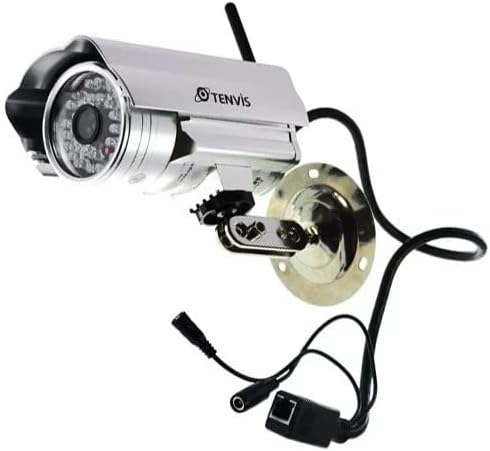
Image: The TENVIS IP602W Outdoor IP Camera, showcasing its durable build, integrated mounting bracket, and connectivity cables.
باکس میں کیا ہے۔
پیکیج کھولنے پر، تصدیق کریں کہ درج ذیل تمام اجزاء شامل ہیں:
- 1 x IP602W WiFi IP Camera
- 1 x Power Adaptor (AU Plug)
- 1 ایکس وائی فائی اینٹینا
- 1 X بڑھتے ہوئے بریکٹ
- 1 x CD (containing software/drivers)
- 1 x Screw Set for mounting
- 1 ایکس صارف دستی

Image: All components included in the TENVIS IP602W package, laid out for verification.
مصنوعات کی خصوصیات
The TENVIS IP602W camera is equipped with several key features to enhance its performance and usability:
- Night Version: Integrated infrared LEDs provide clear visibility in low-light and complete darkness.
- وائرلیس سپورٹ: Connects to your network via Wi-Fi for flexible placement.
- Metal and Waterproof Shell: Designed for outdoor use with a durable, weather-resistant casing.
- حرکت کا پتہ لگانا: Configurable motion detection alerts for security monitoring.
- کراس پلیٹ فارم مطابقت: حمایت کرتا ہے۔ viewing and control from various operating systems and browsers, including Windows, Mac OS, Firefox, Chrome, and Safari.
- موبائل View: Access live feeds and controls from mobile devices via 3G network, supporting iPhone, Android, Windows Mobile, and Java phones.

Image: Visual representation of the TENVIS IP602W camera, emphasizing its key features such as night vision and wireless capabilities.
سیٹ اپ اور انسٹالیشن
اجزاء کی شناخت
Familiarize yourself with the camera's ports and components before installation:
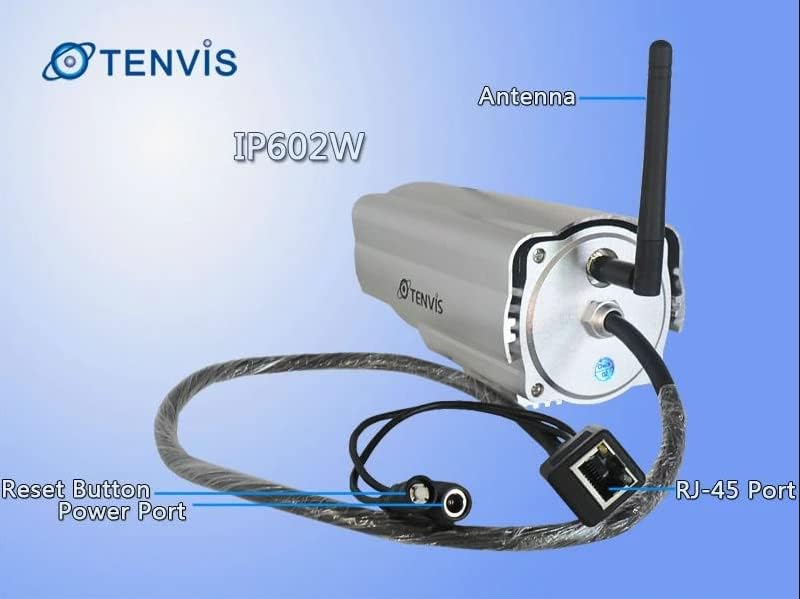
تصویر: تفصیلی view of the TENVIS IP602W camera's rear, showing the antenna, RJ-45 Ethernet port, power input, and reset button.
- اینٹینا: وائرلیس نیٹ ورک کنیکٹیویٹی کے لیے۔
- RJ-45 پورٹ: For wired Ethernet connection to your router.
- پاور پورٹ: شامل پاور اڈاپٹر کو یہاں مربوط کریں۔
- ری سیٹ بٹن: فیکٹری ڈیفالٹ سیٹنگز کو بحال کرنے کے لیے استعمال کیا جاتا ہے۔
نیٹ ورک کنکشن
The IP602W can connect to your network wirelessly or via an Ethernet cable. For initial setup, a wired connection is often recommended for stability.

Image: Network diagram showing how the IP602W camera connects to a router, allowing access from a LAN PC, Internet PC, and 3G phone.
- Connect the camera to your router using an Ethernet cable (if using wired setup).
- Connect the power adapter to the camera and plug it into an electrical outlet.
- Allow the camera a few minutes to power on and initialize.
- Refer to the included CD or the TENVIS website for software installation and detailed network configuration instructions, especially for wireless setup.
چڑھنا
The camera comes with a mounting bracket for easy installation on a wall or other suitable surface. Ensure the mounting location provides a clear view and is within range of your Wi-Fi signal or Ethernet cable.
- Choose a suitable outdoor location for mounting.
- ڈرل ہولز کو نشان زد کرنے کے لیے بڑھتے ہوئے بریکٹ کو بطور ٹیمپلیٹ استعمال کریں۔
- ضروری سوراخ کریں اور اگر ضرورت ہو تو دیوار کے اینکرز ڈالیں۔
- فراہم کردہ پیچ کا استعمال کرتے ہوئے بڑھتے ہوئے بریکٹ کو سطح پر محفوظ کریں۔
- Attach the camera to the mounting bracket and adjust its angle for optimal viewing
آپریشن
Once the camera is set up and connected to your network, you can begin monitoring. The IP602W supports various viewing methods:
- PC/Mac Access: Use the provided software or a compatible web browser (Firefox, Chrome, Safari) to access the camera's live feed and settings from your computer.
- Mobile Device Access: Download the TENVIS mobile application (if available) or use a compatible mobile browser on your iPhone, Android, Windows Mobile, or Java phone to view the camera remotely via a 3G network connection.
- ویڈیو کا معیار: The camera streams video at up to 640x480 resolution with a frame rate of 30fps, providing clear and smooth surveillance footage.
- حرکت کا پتہ لگانا: Configure motion detection settings through the camera's interface to receive alerts when movement is detected in the monitored area.
دیکھ بھال
Regular maintenance helps ensure the longevity and optimal performance of your TENVIS IP602W camera:
- صفائی: وقتاً فوقتاً کیمرے کے لینس اور ہاؤسنگ کو نرم، ڈی سے صاف کریں۔amp کپڑا کھرچنے والے کلینر یا سالوینٹس سے پرہیز کریں۔
- کیبل معائنہ: Check all cables (power, Ethernet) for any signs of wear, damage, or loose connections.
- فرم ویئر اپ ڈیٹس: Check the TENVIS official website periodically for any available firmware updates. Keeping the firmware updated can improve performance and security.
- ماحولیاتی جانچ: Ensure the camera's mounting remains secure and that no obstructions are blocking its field of view.
خرابی کا سراغ لگانا
If you encounter issues with your IP602W camera, try the following steps:
- کوئی طاقت نہیں: یقینی بنائیں کہ پاور اڈاپٹر محفوظ طریقے سے کیمرے اور کام کرنے والے الیکٹریکل آؤٹ لیٹ دونوں سے جڑا ہوا ہے۔
- کوئی نیٹ ورک کنکشن نہیں:
- وائرڈ کنکشن کے لیے، ایتھرنیٹ کیبل اور روٹر کی حیثیت چیک کریں۔
- For wireless connection, ensure the Wi-Fi antenna is properly attached and the camera is within range of your router. Verify Wi-Fi settings in the camera's configuration.
- Cannot Access Camera: Verify the camera's IP address. Ensure your computer or mobile device is on the same network or has proper internet access for remote viewing. Check firewall settings on your computer.
- خراب ویڈیو کوالٹی: Ensure the lens is clean. Check network bandwidth and signal strength.
- کیمرے کو دوبارہ ترتیب دینا: If issues persist, use the reset button (refer to Component Identification) to restore factory default settings. You will need to reconfigure the camera after a reset.
وضاحتیں
| فیچر | تفصیل |
|---|---|
| ماڈل کا نام | IP602W |
| برانڈ | TENVIS |
| انڈور / آؤٹ ڈور استعمال | آؤٹ ڈور |
| کنیکٹوٹی ٹیکنالوجی | وائرلیس (وائی فائی) |
| کنٹرولر کی قسم | Android (and other platforms) |
| چڑھنے کی قسم | وال ماؤنٹ |
| ویڈیو کیپچر ریزولوشن | 480p (640 x 480) |
| فریم ریٹ | 30 ایف پی ایس |
| فوٹو سینسر ٹیکنالوجی | CMOS (1/4 inch) |
| لینس | 6 ملی میٹر |
| کم روشنی والی ٹیکنالوجی | Night Color (Infrared LEDs) |
| انتباہ کی قسم | صرف موشن |
| مصنوعات کے طول و عرض | 10 x 9.5 x 4 انچ |
| جی ٹی آئی این | 06928446299816 |
وارنٹی اور سپورٹ
For warranty information, technical support, or further inquiries regarding your TENVIS IP602W camera, please refer to the official TENVIS website or contact their customer service directly. The included CD may also contain support contact details.
You can visit the official TENVIS store for more information: TENVIS Store on Amazon
Ask a question about this manual
Ask about setup, troubleshooting, compatibility, parts, safety, or missing instructions. Manuals+ will review the question and use this page’s manual context to help answer it.