
Contixo E9
Contixo E9 Smart Floodlight Security Camera User Manual
ماڈل: E9
1. تعارف
The Contixo E9 Smart Floodlight Security Camera is designed to provide comprehensive outdoor surveillance with advanced features. This manual will guide you through the installation, setup, and operation of your new security camera, ensuring optimal performance and security for your property.
اہم خصوصیات:
- 2.5K (3MP) Full HD Video: High-resolution live streaming and recording.
- Adjustable Bright Floodlight: Up to 1000 Lumens for enhanced visibility and deterrence.
- Colored & Infrared Night Vision: Clear surveillance even in low-light conditions.
- دو طرفہ آڈیو: Communicate with visitors or deter intruders remotely.
- پیر تحریک کا پتہ لگانے: Accurate detection with customizable sensitivity.
- سائرن الارم: Deter unwanted activity with an audible alarm.
- IP65 ویدر پروف: مختلف موسمی حالات میں بیرونی استعمال کے لیے پائیدار ڈیزائن۔
- Cloud/SD Card Storage: Flexible options for video footagای اسٹوریج.
- اسمارٹ ایپ کنٹرول: Manage settings and view feeds via the Xodo Smart App.
- وائس اسسٹنٹ انٹیگریشن: ایمیزون الیکسا اور گوگل اسسٹنٹ کے ساتھ ہم آہنگ۔
2. باکس میں کیا ہے۔
براہ کرم اپنے پیکیج کے مواد کو چیک کریں تاکہ یہ یقینی بنایا جا سکے کہ تمام اشیاء موجود ہیں اور اچھی حالت میں ہیں۔
- 1x Contixo E9 Smart Floodlight Security Camera
- 1x یوزر مینوئل (یہ دستاویز)
- 4x بڑھتے ہوئے پیچ
- 1x USB کیبل
- 1x پاور اڈاپٹر
3. سیٹ اپ اور انسٹالیشن
Follow these steps to install and set up your Contixo E9 camera.
3.1 قبل از تنصیب چیک لسٹ۔
- Ensure you have a 2.4GHz Wi-Fi network available at the installation location. The camera does not support 5GHz Wi-Fi.
- Identify a suitable outdoor location with access to a power outlet. The camera requires a wired power connection and is not battery-operated.
- ڈاؤن لوڈ کریں۔ Xodo Smart App آپ کے اسمارٹ فون کے ایپ اسٹور (iOS یا Android) سے۔
3.2 جسمانی تنصیب
- بڑھتے ہوئے مقام کا انتخاب کریں: مطلوبہ جگہ کا انتخاب کریں۔ viewing angle and is within reach of a power outlet. The camera is IP65 weatherproof, suitable for outdoor environments.
- کیمرہ لگائیں: Use the provided screws to securely mount the camera to a wall or suitable surface. Ensure the mounting is stable.
- پاور سے رابطہ کریں: Plug the USB cable into the camera and connect the power adapter to a nearby electrical outlet. The camera will power on.

Image: The Contixo E9 camera showing its USB power cable and plug adapter, highlighting the easy DIY installation process. A power socket is required for operation.
3.3 ایپ سیٹ اپ اور پیئرنگ
- Open Xodo Smart App: Launch the Xodo Smart App on your smartphone. If you are a new user, register an account.
- ڈیوائس شامل کریں: Tap the "+" icon or "Add Device" to begin the pairing process. Select "Security Camera" or "Smart Floodlight Camera" from the device list.
- آن اسکرین پرامپٹس پر عمل کریں: The app will guide you through connecting the camera to your 2.4GHz Wi-Fi network. This typically involves scanning a QR code displayed on your phone with the camera lens.
- اپنے کیمرے کو نام دیں: Once connected, assign a name to your camera (e.g., "Front Yard Camera," "Back Door Floodlight").

Image: A smartphone screen showing the Xodo Smart App, illustrating the various controls available for the camera, including live view, dimming, siren activation, and real-time notifications.
4. آپریٹنگ ہدایات
Learn how to use the various functions of your Contixo E9 camera.
4.1 لائیو View اور ریکارڈنگ
- Access Live Feed: Open the Xodo Smart App and select your camera to view the live 2.5K HD video stream.
- Manual Recording/Snapshots: Use the controls within the app to manually record video or take still images from the live feed.
- پلے بیک: ریکارڈ شدہ foo تک رسائی حاصل کریں۔tage from the cloud storage (subscription required) or a locally inserted Micro SD card (not included).

Image: The Contixo E9 camera mounted on a building, with a smartphone showing its live 2.5K Full HD video feed, demonstrating real-time monitoring.
4.2 دو طرفہ آڈیو
The camera features a built-in microphone and speaker for two-way communication.
- Initiate Talk: جبکہ viewلائیو فیڈ پر، کیمرے کے اسپیکر کے ذریعے بولنے کے لیے ایپ میں موجود مائیکروفون آئیکن کو تھپتھپائیں۔
- سنو: The camera's microphone will pick up audio from its surroundings, allowing you to hear what's happening.
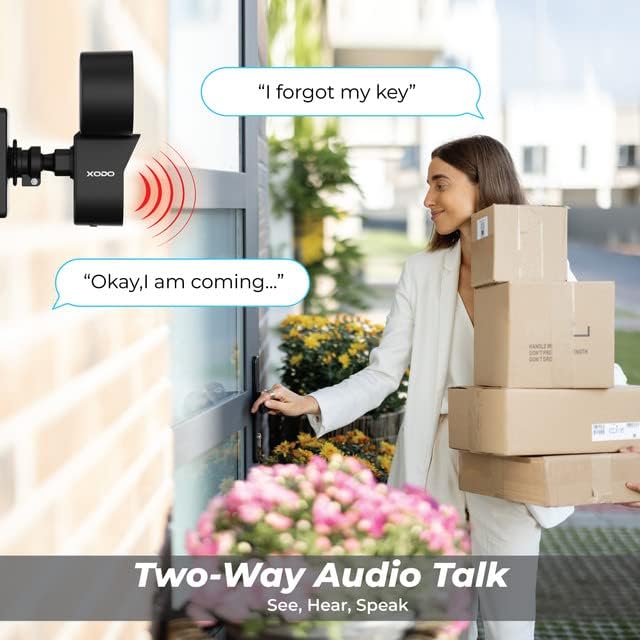
Image: A visual representation of the two-way audio feature, showing a user communicating with a delivery person via the camera.
4.3 حرکت کا پتہ لگانا اور الرٹس
The E9 camera uses PIR motion detection to identify activity and send alerts.
- فعال/غیر فعال کریں: Adjust motion detection settings within the Xodo Smart App.
- حساسیت: Customize the PIR sensitivity to reduce false alarms (e.g., from passing cars or small animals).
- اطلاعات: حرکت کا پتہ چلنے پر اپنے اسمارٹ فون پر فوری پش اطلاعات موصول کریں۔
- سائرن الارم: Activate the built-in siren manually or set it to trigger automatically upon motion detection via the app.

Image: The Contixo E9 camera detecting a figure at night, with icons indicating flashlight alarm, siren alert, and motion detection notifications, highlighting its security capabilities.
4.4 Night Vision and Floodlight Control
The E9 camera offers versatile night vision options and an adjustable floodlight.
- Colored Night Vision: The floodlight can illuminate the area to provide full-color video at night.
- انفراریڈ نائٹ ویژن: For discreet monitoring, the camera can use infrared LEDs for black and white night vision without the floodlight.
- فلڈ لائٹ کی چمک: Adjust the floodlight brightness (800lm-1000lm) and schedule its operation through the Xodo Smart App.

Image: Comparison of Smart Mode, Color Light Mode, and Infrared Mode for night vision, illustrating the camera's ability to provide clear footage روشنی کے مختلف حالات میں۔
4.5 اسمارٹ اسسٹنٹ انٹیگریشن
Integrate your Contixo E9 camera with Amazon Alexa or Google Assistant for voice control.
- Connect Accounts: Link your Xodo Smart account to your Alexa or Google Home app.
- وائس کمانڈز: Use commands like "Alexa, show me the backyard" or "Hey Google, show the front door camera" to view your live feed on compatible smart displays.

Image: A user interacting with a smart assistant to view the camera feed, highlighting compatibility with Amazon Alexa and Google Assistant.
5 دیکھ بھال
مناسب دیکھ بھال آپ کے کیمرے کی لمبی عمر اور بہترین کارکردگی کو یقینی بناتی ہے۔
- صفائی: Periodically clean the camera lens and floodlight cover with a soft, damp دھول اور ملبے کو دور کرنے کے لیے کپڑا۔ سخت کیمیکل استعمال نہ کریں۔
- فرم ویئر اپ ڈیٹس: Regularly check the Xodo Smart App for available firmware updates. Updates often include performance improvements and security enhancements.
- پاور کنکشن: Ensure the power cable remains securely connected and free from damage.
6 خرابیوں کا سراغ لگانا
If you encounter issues with your Contixo E9 camera, refer to the following common solutions.
| مسئلہ | ممکنہ حل |
|---|---|
| کیمرہ Wi-Fi سے منسلک نہیں ہے۔ |
|
| زندہ نہیں۔ view یا ریکارڈنگ. |
|
| Motion detection is too sensitive/not sensitive enough. |
|
| Two-way audio is unclear or not working. |
|
If these solutions do not resolve your issue, please contact Contixo customer support.
7. وضاحتیں
| فیچر | تفصیل |
|---|---|
| ماڈل کا نام | E9 |
| ویڈیو ریزولوشن | 2.5K (3MP), 2304 pixels |
| کنیکٹوٹی | Wired Power, Wi-Fi (2.4GHz only) |
| نائٹ ویژن | Colored & Infrared Night Vision |
| فلڈ لائٹ کی چمک | 800lm-1000lm (Adjustable) |
| آڈیو | 2-Way Audio (Microphone & Speaker) |
| حرکت کا پتہ لگانا | پیر موشن سینسر |
| اسٹوریج کے اختیارات | Cloud Storage (subscription), Micro SD Card (not included) |
| ویدر پروف ریٹنگ | آئی پی 65 |
| ہم آہنگ آلات | Smartphone (iOS/Android), Amazon Alexa, Google Assistant |
| طاقت کا منبع | کورڈڈ الیکٹرک |
| آئٹم کے طول و عرض | 7.1 x 4.7 x 5.5 انچ |
| شے کا وزن | 1.4 پاؤنڈز |
8. وارنٹی اور سپورٹ
8.1 وارنٹی کی معلومات
Contixo products are covered by a limited warranty. For specific details regarding your product's warranty period and terms, please refer to the warranty card included in your product packaging or visit the official Contixo webسائٹ
8.2 کسٹمر سپورٹ
If you require further assistance, technical support, or have questions not covered in this manual, please contact Contixo customer support:
- آن لائن مدد: کا دورہ کریں۔ Contixo Store on Amazon یا ان کے اہلکار؟ webاکثر پوچھے گئے سوالات اور معاون وسائل کے لیے سائٹ۔
- رابطہ کی معلومات: Refer to your product packaging or the Contixo webحالیہ رابطے کی تفصیلات (فون، ای میل) کے لیے سائٹ۔
Ask a question about this manual
Ask about setup, troubleshooting, compatibility, parts, safety, or missing instructions. Manuals+ will review the question and use this page’s manual context to help answer it.