
1. پروڈکٹ ختمview
The UMIDIGI C1 Max is an unlocked Android smartphone designed for daily use. It features a large display, a high-capacity battery, and a versatile camera system.
اہم خصوصیات:
- ڈسپلے: 6.5-inch HD+ Full Screen for an immersive viewتجربہ ہے.
- بیٹری: 5150mAh long-lasting battery with fast charging support.
- کیمرہ: 50MP Main Camera, 2MP Depth Sensor, and 8MP Front Camera.
- کارکردگی: Unisoc T610 Octa-core Processor with 6GB RAM and 128GB internal storage (expandable up to 256GB).
- آپریٹنگ سسٹم: Android 12 for a smooth and secure user experience.
- سیکورٹی: Side-mounted fingerprint sensor and AI Face Unlock.
- کنیکٹوٹی: Dual SIM support, Global Bands, Bluetooth 5.0, GPS (Glonass, Galileo, Beidou).

تصویر: سامنے اور پیچھے view of the UMIDIGI C1 Max smartphone.
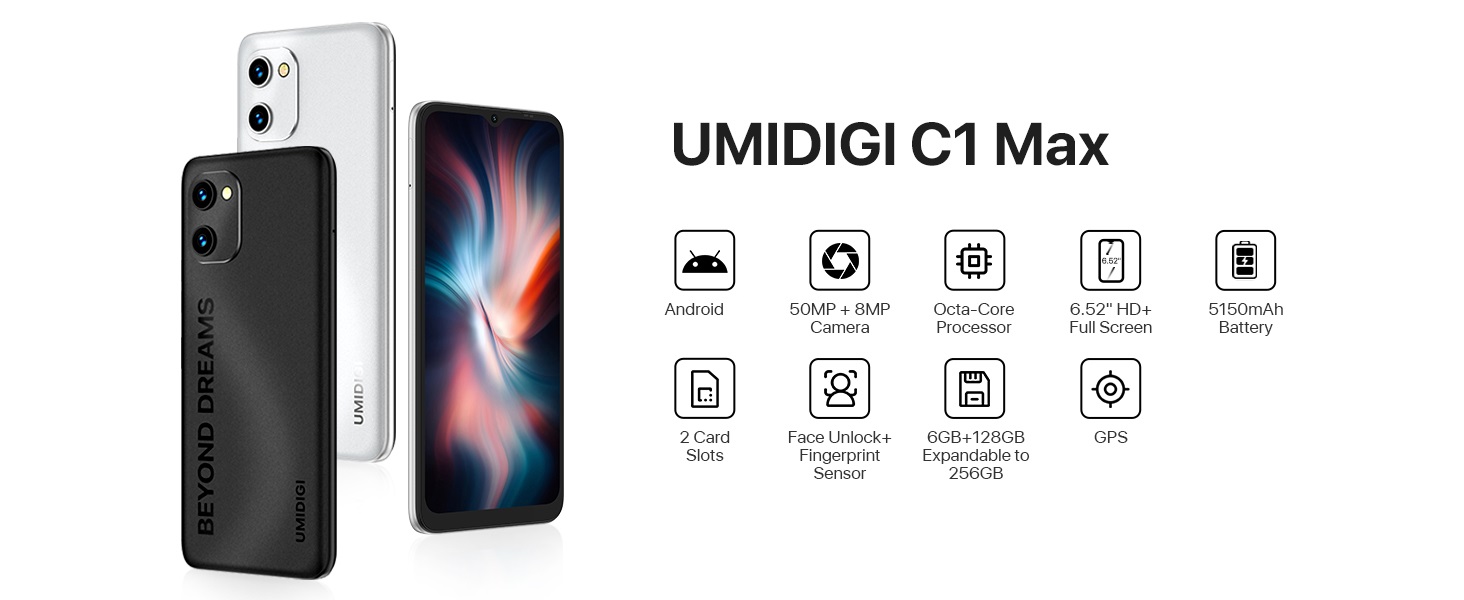
تصویر: ختمview of UMIDIGI C1 Max key features.
پروڈکٹ ویڈیوز:
Video: UMIDIGI C1 Max Smartphone Features. This video highlights the main features of the C1 Max smartphone, including its design, camera capabilities, and performance.
Video: UMIDIGI C1 Max Cell Phone Overview. یہ ویڈیو ایک جنرل اوور فراہم کرتا ہے۔view of the C1 Max cell phone, showcasing its design and user interface.
2. پیکیج کے مشمولات
تصدیق کریں کہ تمام اشیاء آپ کے پروڈکٹ پیکج میں موجود ہیں:
- UMIDIGI C1 Max Smartphone
- USB کیبل
- Power Adapter (if included in your region)
- سم نکالنے کا آلہ
- کوئیک اسٹارٹ گائیڈ
- حفاظتی کیس (علاقے کے لحاظ سے مختلف ہو سکتا ہے)
- اسکرین پروٹیکٹر (پہلے سے لاگو یا شامل)
3. ابتدائی سیٹ اپ
3.1. سم کارڈ اور مائیکرو ایس ڈی کارڈ داخل کرنا
- اپنے فون کے سائیڈ پر سم ٹرے کا پتہ لگائیں۔
- سم نکالنے کے آلے کو ٹرے کے آگے چھوٹے سوراخ میں داخل کریں اور ٹرے کے باہر آنے تک مضبوطی سے دبائیں
- اپنے نینو سم کارڈ (ز) اور/یا مائیکرو ایس ڈی کارڈ کو ٹرے پر مقرر کردہ سلاٹس میں رکھیں۔ یقینی بنائیں کہ سونے کے رابطے نیچے کی طرف ہوں۔
- ٹرے کو احتیاط سے فون میں واپس دھکیلیں جب تک کہ یہ سائیڈ سے فلش نہ ہوجائے۔
3.2. پر / آف پاور
- پاور آن کرنے کے لیے: Press and hold the Power button (usually on the right side) until the UMIDIGI logo appears.
- پاور آف کرنا: پاور مینو ظاہر ہونے تک پاور بٹن کو دبائیں اور تھامیں، پھر "پاور آف" کو منتخب کریں۔
- دوبارہ شروع کرنے کے لیے: پاور مینو ظاہر ہونے تک پاور بٹن کو دبائیں اور تھامیں، پھر "دوبارہ شروع کریں" کو منتخب کریں۔
3.3. ابتدائی سیٹ اپ وزرڈ
Upon first power-on, the phone will guide you through the initial setup process. Follow the on-screen instructions to:
- اپنی زبان منتخب کریں۔
- Wi-Fi نیٹ ورک سے جڑیں۔
- Copy data from another device (optional).
- اپنے گوگل اکاؤنٹ سے سائن ان کریں۔
- اسکرین لاک سیٹ اپ کریں (پن، پیٹرن، پاس ورڈ، فنگر پرنٹ، فیس انلاک)۔
- Review اور شرائط و ضوابط کو قبول کریں۔
4. اپنے اسمارٹ فون کو آپریٹ کرنا
4.1 بنیادی نیویگیشن (Android 12)
Your UMIDIGI C1 Max runs on Android 12, offering an intuitive user interface.
- ہوم اسکرین: مختلف ہوم اسکرین پینلز تک رسائی کے لیے بائیں یا دائیں سوائپ کریں۔
- ایپ ڈراور: ہوم اسکرین کے نیچے سے اوپر تک سوائپ کریں۔ view تمام انسٹال کردہ ایپلیکیشنز۔
- اطلاعات اور فوری ترتیبات: اطلاعات اور فوری سیٹنگز ٹوگلز (وائی فائی، بلوٹوتھ وغیرہ) تک رسائی کے لیے اسکرین کے اوپری حصے سے نیچے کی طرف سوائپ کریں۔
- حالیہ ایپس: حال ہی میں استعمال شدہ ایپلیکیشنز کو دیکھنے کے لیے نیچے سے اوپر کی طرف سوائپ کریں اور دبائے رکھیں (یا اسکوائر نیویگیشن بٹن پر ٹیپ کریں)۔

تصویر: سابقamples of the Android 12 user interface.
4.2. کیمرے کا استعمال
The UMIDIGI C1 Max features a triple camera system:
- 50MP مین کیمرہ: ہائی ریزولوشن فوٹوز کے لیے۔
- 2MP گہرائی کا سینسر: Enhances portrait mode with background blur.
- 8MP فرنٹ کیمرہ: سیلفیز اور ویڈیو کالز کے لیے۔
کیمرہ استعمال کرنے کے لیے:
- کیمرہ ایپ کھولیں۔
- اپنا مطلوبہ موڈ منتخب کریں (تصویر، ویڈیو، پورٹریٹ، وغیرہ)۔
- تصویر کیپچر کرنے یا ریکارڈنگ شروع/روکنے کے لیے شٹر بٹن کو تھپتھپائیں۔
- کیمرہ سوئچ آئیکن کا استعمال کرتے ہوئے سامنے اور پیچھے والے کیمروں کے درمیان سوئچ کریں۔

Image: UMIDIGI C1 Max camera specifications and examples
4.3. بیٹری کا انتظام
The 5150mAh battery provides extended usage time. To optimize battery life:
- اسکرین کی چمک کو ایڈجسٹ کریں۔
- ضرورت پڑنے پر بیٹری سیور موڈ کو فعال کریں۔
- پس منظر میں چلنے والی غیر استعمال شدہ ایپس کو بند کریں۔
- استعمال میں نہ ہونے پر Wi-Fi، بلوٹوتھ اور GPS کو غیر فعال کریں۔
- چارج کرنے کی بہترین رفتار کے لیے فراہم کردہ چارجر کا استعمال کریں۔

Image: UMIDIGI C1 Max 5150mAh battery capacity and estimated usage.
4.4 اسٹوریج اور میموری
Your device comes with 6GB of RAM for smooth multitasking and 128GB of internal storage for your apps, photos, and files. Storage can be expanded up to 256GB using a MicroSD card.

Image: UMIDIGI C1 Max memory and storage details.
5. دیکھ بھال اور دیکھ بھال
To ensure the longevity and optimal performance of your UMIDIGI C1 Max, follow these maintenance guidelines:
- صفائی: اسکرین اور جسم کو صاف کرنے کے لیے نرم، لنٹ سے پاک کپڑا استعمال کریں۔ کھرچنے والے مواد یا سخت کیمیکل سے پرہیز کریں۔
- درجہ حرارت: فون کو لمبے عرصے تک انتہائی درجہ حرارت (گرم یا ٹھنڈا) یا براہ راست سورج کی روشنی کے سامنے نہ رکھیں۔
- پانی کی نمائش: The device is not water-resistant. Avoid contact with water or excessive moisture.
- اثر: Protect your phone from drops and impacts. Use a protective case and screen protector.
- سافٹ ویئر اپ ڈیٹس: Regularly check for and install system updates to ensure your device has the latest security patches and performance improvements.
6 خرابیوں کا سراغ لگانا
If you encounter issues with your UMIDIGI C1 Max, refer to the following common solutions:
| مسئلہ | ممکنہ حل |
|---|---|
| فون آن نہیں ہو رہا ہے۔ | Ensure the battery is charged. Connect to a charger for at least 10 minutes, then try powering on. If unresponsive, press and hold the Power button for 10-15 seconds to force a restart. |
| ناقص نیٹ ورک سگنل | Check if the SIM card is correctly inserted. Try restarting the phone. Verify your location has network coverage. Contact your carrier if the issue persists. |
| بیٹری تیزی سے ختم ہو رہی ہے۔ | Reduce screen brightness, close background apps, disable unused connectivity features (Wi-Fi, Bluetooth, GPS). Check battery usage in Settings to identify power-hungry apps. |
| ایپس منجمد ہو رہی ہیں یا کریش ہو رہی ہیں۔ | Clear the cache and data of the problematic app in Settings > Apps. Update the app to the latest version. If the issue continues, uninstall and reinstall the app. |
| وائی فائی سے منسلک ہونے سے قاصر ہے۔ | Ensure Wi-Fi is enabled on your phone. Restart your router. Forget the network in your phone's Wi-Fi settings and reconnect. |
For more complex issues, consider performing a factory reset (back up your data first) or contacting customer support.
7. تکنیکی تفصیلات
| فیچر | تفصیلات |
|---|---|
| برانڈ | UMIDIGI |
| ماڈل کا نام | C1 MAX |
| آپریٹنگ سسٹم | اینڈرائیڈ 12.0 |
| RAM میموری انسٹال شدہ سائز | 6 جی بی |
| میموری ذخیرہ کرنے کی صلاحیت | 128 جی بی (256 جی بی تک قابل توسیع) |
| سی پی یو ماڈل | Unisoc T610 Octa-core |
| اسکرین کا سائز | 6.52 انچ |
| قرارداد | 1650 x 720 (HD+) |
| ڈسپلے کی قسم | OLED/AMOLED |
| ریفریش ریٹ | 60 Hz |
| Rear Facing Camera Photo Sensor Resolution | 50 MP (Main) |
| Number of Rear Facing Cameras | 3 (50MP Main, 2MP Depth, 2MP Macro - 2MP Macro inferred from common triple camera setups, not explicitly listed as 3rd in JSON but 'Number of Rear Facing Cameras: 3' is present) |
| Front Photo Sensor Resolution | 8 MP |
| بیٹری کی صلاحیت | 5150 ملی۔amp گھنٹے |
| سم کارڈ سلاٹ کاؤنٹ | ڈوئل سم |
| Biometric Security Feature | Face Recognition, Fingerprint Sensor |
| کنیکٹوٹی ٹیکنالوجی | USB Type C, Wi-Fi, Bluetooth 5.0, LTE |
| آئٹم کے طول و عرض | 6.46 x 3.01 x 0.34 انچ |
| شے کا وزن | 192 گرام |
ڈیوائس کی شناخت:
The IMEI (International Mobile Equipment Identity) is a unique number for your device. It can be found on the product packaging, in the phone's settings (Settings > About phone > IMEI), or on a label on the back of the phone.
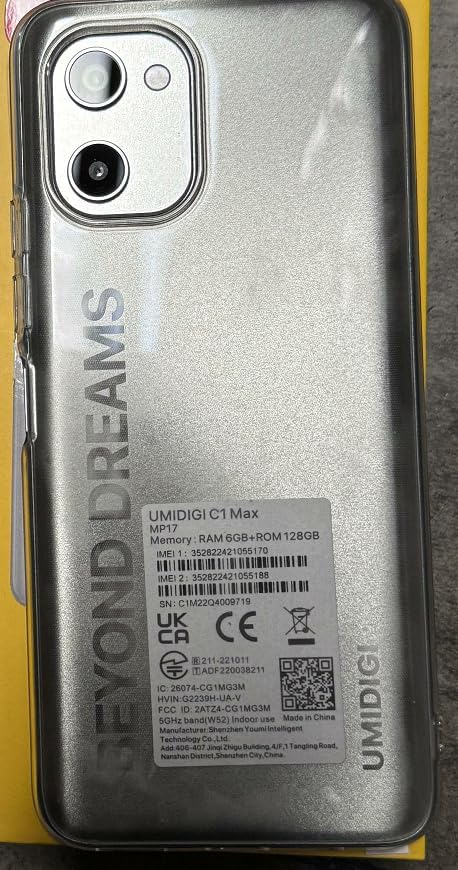
Image: IMEI and regulatory label on the back of the UMIDIGI C1 Max.

Image: Close-up of the IMEI label.
8. وارنٹی اور سپورٹ
8.1. مصنوعات کی وارنٹی
Your UMIDIGI C1 Max smartphone is covered by a limited manufacturer's warranty. The specific terms and duration of the warranty may vary by region and retailer. Please refer to the warranty card included in your package or visit the official UMIDIGI webتفصیلی معلومات کے لیے سائٹ۔
8.2. کسٹمر سپورٹ
تکنیکی مدد، ٹربل شوٹنگ، یا وارنٹی کے دعووں کے لیے، براہ کرم UMIDIGI کسٹمر سپورٹ سے ان کے آفیشل کے ذریعے رابطہ کریں۔ website or the contact information provided in your product documentation. Ensure you have your device's model number and IMEI readily available when seeking support.
آفیشل UMIDIGI اسٹور: Visit UMIDIGI Store on Amazon