
1. تعارف
This manual provides essential information for the proper use and care of your ZdalaMit AH81-11699A Replacement Remote Control. This remote is designed as a direct replacement for specific Samsung Soundbar models, requiring no programming for immediate use.
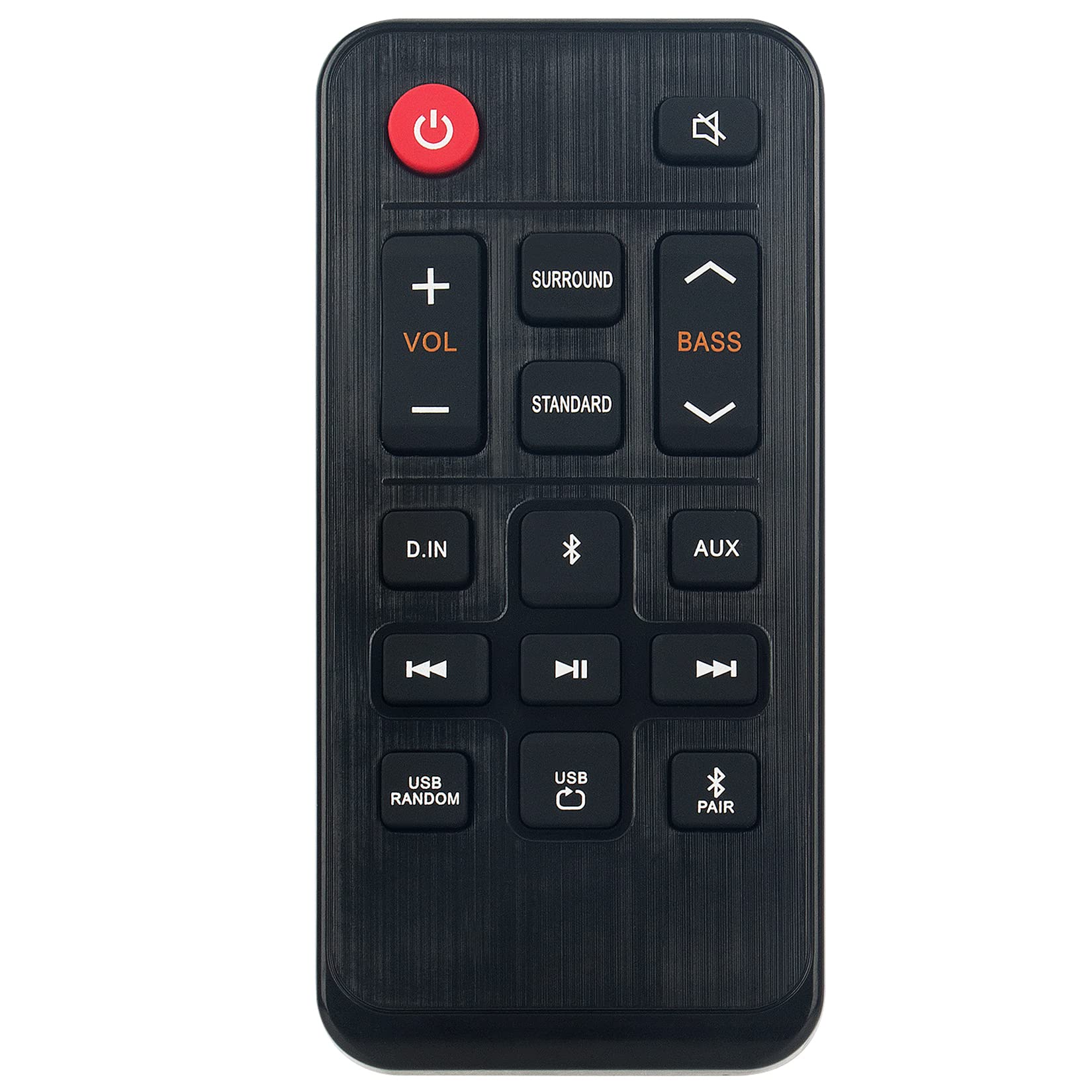
تصویر 1.1: The ZdalaMit AH81-11699A Replacement Remote Control. This image displays the front view of the black remote control, featuring various buttons for power, volume, mute, and other soundbar functions.
2 مطابقت
The AH81-11699A Replacement Remote Control is compatible with the following Samsung Soundbar models:
- HW-T400
- HW-T400/ZA
- HW-T400/XU
- HWT400
- HWT400/ZA
No programming is required for these models. Simply insert the battery, and the remote is ready for use.
3. سیٹ اپ
To begin using your replacement remote control, follow these simple steps for battery installation:
- بیٹری ٹوکری کا پتہ لگائیں: On the back of the remote control, identify the battery compartment cover.
- کمپارٹمنٹ کھولیں: Gently slide or press the latch to open the battery compartment cover.
- بیٹری داخل کریں: Insert one CR2032 coin cell battery into the compartment. Ensure the positive (+) side of the battery is facing upwards, as indicated by the diagram inside the compartment.
- کمپارٹمنٹ بند کریں: بیٹری کے کمپارٹمنٹ کور کو تبدیل کریں، اس بات کو یقینی بناتے ہوئے کہ یہ محفوظ طریقے سے اپنی جگہ پر کلک کرتا ہے۔
The remote control is now ready for operation. No additional pairing or programming is necessary for compatible Samsung Soundbar models.
4. آپریٹنگ ہدایات
The AH81-11699A remote control features 18 buttons designed for intuitive control of your Samsung Soundbar. Point the remote directly at your soundbar for optimal performance.
- پاور بٹن: ساؤنڈ بار کو آن یا آف کرنے کے لیے دبائیں۔
- والیوم اوپر/نیچے: Use the '+' and '-' buttons to adjust the soundbar's volume level.
- بٹن خاموش کریں: Press to temporarily silence the soundbar's audio. Press again to restore sound.
- ماخذ بٹن: Cycle through available input sources (e.g., Bluetooth, Optical, HDMI).
- ساؤنڈ موڈ بٹن: Change the sound effect mode (e.g., Standard, Surround, Game).
- باس/ٹریبل کنٹرول: Adjust bass and treble levels (if supported by your soundbar model).
- Other Function Buttons: Additional buttons may control specific soundbar features. Refer to your soundbar's original manual for detailed functionality.
Ensure there are no obstructions between the remote control and the soundbar's infrared receiver for proper signal transmission. The maximum effective range is approximately 33 feet (10 meters).
5 دیکھ بھال
مناسب دیکھ بھال آپ کے ریموٹ کنٹرول کی لمبی عمر اور بہترین کارکردگی کو یقینی بناتی ہے۔
- صفائی: Wipe the remote control with a soft, dry cloth. Do not use liquid cleaners, solvents, or abrasive materials, as these can damage the surface or internal components.
- بیٹری کی تبدیلی: Replace the CR2032 battery when the remote's responsiveness decreases or it stops functioning. Always use a fresh, high-quality CR2032 alkaline battery.
- ذخیرہ: Store the remote control in a cool, dry place away from direct sunlight, extreme temperatures, and high humidity.
- قطروں سے بچیں: ریموٹ کو جسمانی اثرات سے بچائیں، کیونکہ قطرے اندرونی سرکٹری کو نقصان پہنچا سکتے ہیں۔
6 خرابیوں کا سراغ لگانا
اگر آپ کو اپنے ریموٹ کنٹرول کے ساتھ مسائل کا سامنا ہے، تو درج ذیل عام حل سے رجوع کریں:
| مسئلہ | ممکنہ وجہ | حل |
|---|---|---|
| ریموٹ جواب نہیں دے رہا ہے۔ | ڈیڈ یا غلط طریقے سے انسٹال شدہ بیٹری۔ | Replace the CR2032 battery, ensuring correct polarity (+ side up). |
| ریموٹ میں مختصر رینج یا وقفے وقفے سے ردعمل ہوتا ہے۔ | Weak battery; Obstruction between remote and soundbar; Remote not pointed correctly. | Replace battery. Remove any objects blocking the signal path. Ensure the remote is pointed directly at the soundbar's IR receiver. |
| مخصوص بٹن کام نہیں کر رہے ہیں۔ | Button malfunction; Soundbar does not support the function. | Test other buttons. If only specific buttons fail, the remote may be faulty. Verify if your soundbar model supports the intended function. |
| Remote works but soundbar functions incorrectly. | Issue with the soundbar itself. | Refer to your Samsung Soundbar's original user manual for troubleshooting soundbar-specific issues. |
اگر ان اقدامات سے مسئلہ حل نہیں ہوتا ہے، تو براہ کرم کسٹمر سپورٹ سے رابطہ کریں۔
7. وضاحتیں
- ماڈل کا نام: AH81-11699A
- برانڈ: ZdalaMit
- کنیکٹوٹی ٹیکنالوجی: اورکت
- ہم آہنگ آلات: Samsung Soundbar (HW-T400 series)
- بیٹری کی قسم: 1 x CR2032 Coin Cell (Alkaline recommended)
- زیادہ سے زیادہ رینج: Approximately 33 Feet (10 meters)
- Button Quantity: 18
- کنٹرولر کی قسم: بٹن کنٹرول
- طول و عرض (L x W x H): 4.76" x 2.18" x 0.55" (12.09 سینٹی میٹر x 5.54 سینٹی میٹر x 1.40 سینٹی میٹر)
- رنگ: سیاہ
- خصوصی خصوصیت: ایرگونومک ڈیزائن
8. وارنٹی اور سپورٹ
This ZdalaMit AH81-11699A Replacement Remote Control comes with a 1 سال کی وارنٹی خریداری کی تاریخ سے، مینوفیکچرنگ نقائص کا احاطہ.
For warranty claims, technical assistance, or any other inquiries, please contact our customer support. We are available to assist you with any questions or concerns you may have regarding your product.
Contact information for support is typically provided at the point of purchase or on the product packaging.