
تعارف
This manual provides essential instructions for the safe and efficient use of your Olympia 2298 foldable 4G mobile phone. Please read it thoroughly before operating the device and keep it for future reference.
1. سیٹ اپ
1.1 پیکیج کے مشمولات
- Olympia 2298 Mobile Phone
- بیٹری (لتیم آئن)
- USB-C چارجنگ کیبل
- Charging Cradle (if included)
- صارف دستی
1.2 Inserting the Battery and SIM Card
- Open the phone: Gently open the phone to access the battery compartment.
- پیچھے کا احاطہ ہٹا دیں: فون کے پچھلے کور کو احتیاط سے ہٹا دیں۔
- سم کارڈ داخل کریں: Locate the SIM card slot(s). Insert your 4G compatible SIM card(s) into the designated slot(s) with the gold contacts facing down, ensuring it clicks into place.
- بیٹری ڈالیں: Place the Lithium-ion battery into the battery compartment, aligning the contacts.
- Replace back cover: Securely attach the back cover until it clicks.
 تصویر: سامنے view of the Olympia 2298 foldable phone, showing the main display with time and date.
1.3 بیٹری چارج کرنا
پہلے استعمال سے پہلے، فون کی بیٹری کو مکمل طور پر چارج کریں۔
- Connect charger: Plug the USB-C cable into the phone's USB-C port or place the phone in the charging cradle. Connect the other end of the cable to a suitable power adapter.
- چارجنگ اشارے: The phone will display a charging indicator on the screen.
- مکمل چارج: Allow the phone to charge until the battery indicator shows a full charge. This may take several hours for the initial charge.
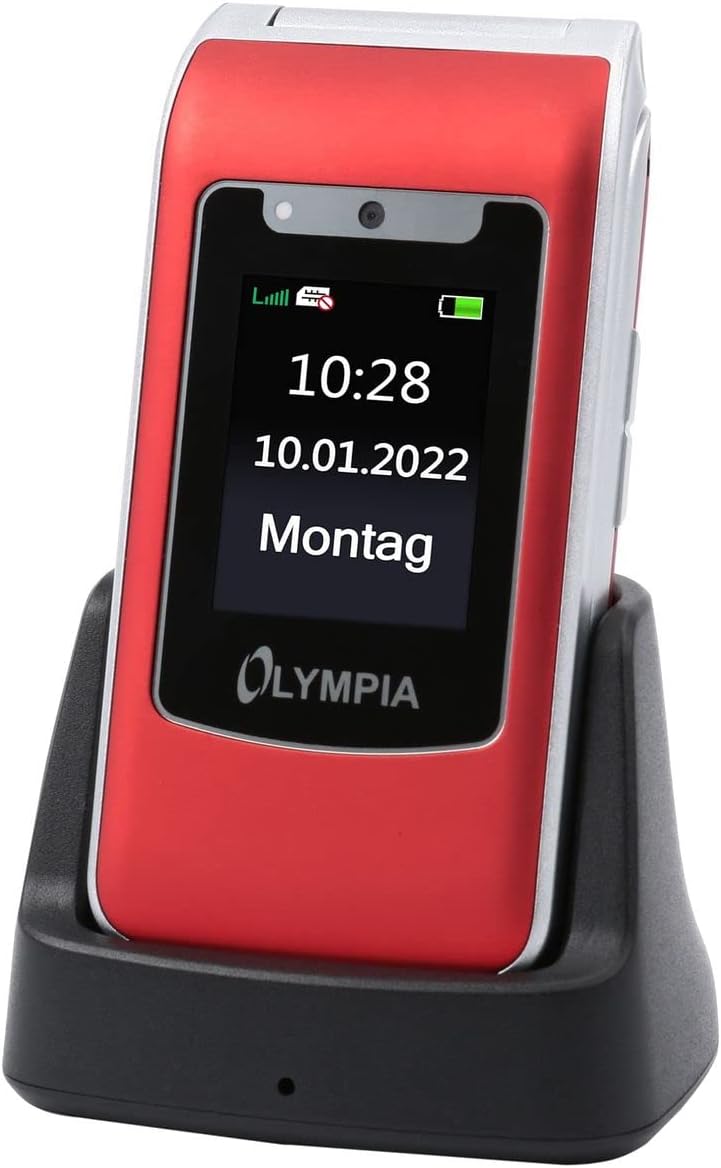 Image: The Olympia 2298 phone placed in its charging cradle, indicating ease of charging.
1.4 پاور آن/آف۔
- پاور آن کرنے کے لیے: پاور/اینڈ کال بٹن کو دبائے رکھیں جب تک کہ اسکرین روشن نہ ہو۔
- پاور آف کرنا: پاور/اینڈ کال کے بٹن کو دبائیں اور تھامیں، پھر اسکرین پر موجود اختیارات میں سے "پاور آف" کو منتخب کریں۔
2. آپریٹنگ ہدایات
2.1 بنیادی کال کے افعال
- کال کرنا: Dial the number using the keypad and press the Green Call button.
- کال کا جواب دینا: When the phone rings, press the Green Call button.
- کال ختم کرنا: ریڈ اینڈ کال بٹن کو دبائیں۔
- حجم کو ایڈجسٹ کرنا: Use the volume buttons on the side of the phone during a call.
2.2 Emergency Call Button (SOS)
The Olympia 2298 features a dedicated SOS button for emergencies.
 تصویر: پیچھے view of the Olympia 2298 phone, highlighting the prominent SOS emergency call button.
- Setup Emergency Contacts: Before using, configure up to 5 emergency contacts in the phone's settings. Refer to the "Settings" section in the menu for details.
- SOS کو چالو کرنا: In an emergency, press and hold the SOS button on the back of the phone for several seconds.
- Automatic Dialing: The phone will automatically dial the pre-set emergency contacts one by one until a connection is made. It will also send an emergency SMS message to these contacts.
اہم: Ensure emergency contacts are regularly updated and aware they are listed as such.
2.3 مینو نیویگیشن
Use the navigation keys (up, down, left, right) and the central "OK" button to browse the phone's menu. The "Back" button typically returns to the previous screen.
- رابطے: Store and manage phone numbers.
- پیغامات: SMS پیغامات بھیجیں اور وصول کریں۔
- کال کی فہرست: View missed, dialed, and received calls.
- ترتیبات: Customize phone preferences, including sound, display, and emergency contacts.
- کیمرہ: Access the integrated camera.
- اوزار: Includes features like alarm, calendar, and calculator.
2.4 پیغامات بھیجنا اور وصول کرنا
- To Send: Go to "Messages" -> "Write Message". Enter the recipient's number or select from contacts, type your message, and send.
- وصول کرنا: New messages will appear as a notification. Go to "Messages" -> "Inbox" to read them.
3 دیکھ بھال
3.1 صفائی
- Use a soft, dry cloth to clean the phone's exterior.
- Avoid using liquid cleaners, aerosols, or harsh chemicals.
- Keep the USB-C port free from dust and debris.
3.2 بیٹری کی دیکھ بھال
- بیٹری کو انتہائی درجہ حرارت کے سامنے نہ رکھیں۔
- بیٹری کی عمر کو طول دینے کے لیے اسے بار بار مکمل طور پر ڈسچارج کرنے سے گریز کریں۔
- اگر فون ایک طویل مدت تک استعمال نہیں کیا جائے گا، تو اسے ذخیرہ کرنے سے پہلے تقریباً 50% تک چارج کریں۔
4 خرابیوں کا سراغ لگانا
| مسئلہ | ممکنہ وجہ | حل |
|---|---|---|
| فون آن نہیں ہوتا۔ | بیٹری ڈسچارج ہو گئی ہے یا صحیح طریقے سے نہیں ڈالی گئی ہے۔ | بیٹری چارج کریں۔ یقینی بنائیں کہ بیٹری صحیح طریقے سے ڈالی گئی ہے۔ |
| کالز نہیں کر سکتے یا وصول نہیں کر سکتے۔ | No network signal, SIM card not inserted, or SIM card issue. | Check network signal strength. Reinsert SIM card. Contact your service provider. |
| SOS بٹن کام نہیں کر رہا ہے۔ | ہنگامی رابطے سیٹ اپ نہیں ہیں یا غلط ہیں۔ | Verify and update emergency contacts in settings. |
| ناقص کال کا معیار۔ | Weak network signal or interference. | بہتر سگنل والے علاقے میں جائیں۔ رکاوٹوں سے بچیں۔ |
5. وضاحتیں
- ماڈل نمبر: 2298
- برانڈ: اولمپیا
- سکرین کا سائز: 2.4 انچ
- سیلولر ٹیکنالوجی: 4G (LTE)
- کنیکٹوٹی ٹیکنالوجی: USB (USB Type C)
- وائرلیس کیریئر: All carriers
- بیٹری: 1 لتیم آئن (شامل)
- آئٹم کا وزن: 105 گرام
- گفتگو کا وقت: 6 گھنٹے
- طول و عرض: 5.3 x 2.1 x 10.5 سینٹی میٹر
6. وارنٹی اور سپورٹ
For warranty information and technical support, please refer to the documentation provided with your purchase or visit the official OLYMPIA webسائٹ وارنٹی کے دعووں کے لیے اپنی خریداری کا ثبوت رکھیں۔
نوٹ: Spare parts availability and software update guarantees are not specified in the product information provided.