
1. تعارف
Thank you for choosing the Goshyda Portable Multimedia 1080P Projector. This compact and versatile device is designed to provide a personal cinema experience, supporting various multimedia inputs for entertainment, presentations, and more. Please read this manual carefully before using the projector to ensure proper operation and to maximize its lifespan.

Image 1.1: The Goshyda YG300 Mini Portable Projector in a home entertainment setting.
2. حفاظتی معلومات
- بجلی کی فراہمی: Use only the specified 5V 2A power adapter or a compatible power bank. Incorrect voltage آلہ کو نقصان پہنچا سکتا ہے۔
- وینٹیلیشن: وینٹیلیشن کے سوراخوں کو مسدود نہ کریں۔ زیادہ گرم ہونے سے بچنے کے لیے پروجیکٹر کے ارد گرد مناسب ہوا کا بہاؤ یقینی بنائیں۔
- ماحولیات: Avoid exposing the projector to water, moisture, dust, or extreme temperatures. Operate in a clean, dry environment.
- صفائی: صفائی سے پہلے بجلی منقطع کریں۔ نرم، خشک کپڑا استعمال کریں۔ مائع یا ایروسول کلینر استعمال نہ کریں۔
- بے ترکیبی: پروجیکٹر کو خود سے جدا کرنے یا مرمت کرنے کی کوشش نہ کریں۔ تمام خدمات کو اہل اہلکاروں سے رجوع کریں۔
- آنکھوں کی حفاظت: براہ راست پروجیکٹر کے لینس میں مت دیکھیں جب ایلamp پر ہے
3. پیکیج کے مشمولات
براہ کرم ان باکسنگ پر پیکیج کے مواد کو چیک کریں۔ اگر کوئی چیز غائب یا خراب ہو تو اپنے خوردہ فروش سے رابطہ کریں۔
- Goshyda Portable Projector
- ریموٹ کنٹرول
- اے وی کیبل
- پاور اڈاپٹر
- صارف دستی (یہ دستاویز)

Image 3.1: Included accessories with the Goshyda Portable Projector.
4. پروڈکٹ ختمview
4.1 پروجیکٹر کی خصوصیات
- 1080P Resolution Support: واضح اور تفصیلی تصاویر فراہم کرتا ہے۔
- کمپیکٹ اور پورٹیبل ڈیزائن: Weighing approximately 290g, it is easy to carry.
- Multi-Port Connectivity: Includes USB, HDMI, AV, memory card slot, and audio output.
- بلٹ ان اسپیکر: سہولت کے لیے مربوط آڈیو فراہم کرتا ہے۔
- لچکدار طاقت: Can be powered by a 5V 2A wall charger or power bank.

Image 4.1: Visual representation of the projector's main features.
4.2. Projector Ports and Controls
Familiarize yourself with the various ports and controls on your projector.
- لینس: Front-facing projection lens.
- فوکس رنگ: تصویر کی وضاحت کو ایڈجسٹ کرتا ہے۔
- پاور ان پٹ (DC IN): Connects to the 5V 2A power adapter.
- HDMI پورٹ: For connecting devices via HDMI cable.
- USB پورٹ: USB اسٹوریج ڈیوائسز کو جوڑنے کے لیے۔
- اے وی پورٹ: For connecting devices via AV cable.
- مائیکرو ایس ڈی کارڈ سلاٹ: میموری کارڈ ڈالنے کے لیے۔
- آڈیو آؤٹ پٹ: بیرونی اسپیکر یا ہیڈ فون کو جوڑنے کے لیے۔
- کنٹرول بٹن: On the top panel for basic navigation and selection.

تصویر 4.2: سائیڈ view of the projector highlighting its connectivity ports.

Image 4.3: Close-up of the projector lens.
5. سیٹ اپ
5.1. پاور کنکشن
- فراہم کردہ پاور اڈاپٹر کو پروجیکٹر پر DC IN پورٹ سے جوڑیں۔
- پاور اڈاپٹر کو معیاری الیکٹریکل آؤٹ لیٹ میں لگائیں۔
- Alternatively, for portable use, connect a 5V 2A power bank to the DC IN port.

Image 5.1: Powering the projector via wall adapter or power bank.
5.2 پلیسمنٹ اور پروجیکشن
Place the projector on a stable, flat surface. The optimal projection distance is between 1 to 2.5 meters, allowing for a screen size of up to 60 inches.
- For a 24-inch screen, place the projector approximately 0.8 meters away.
- For a 47-inch screen, place the projector approximately 1.2 meters away.
- For a 60-inch screen, place the projector approximately 1.6 meters away.
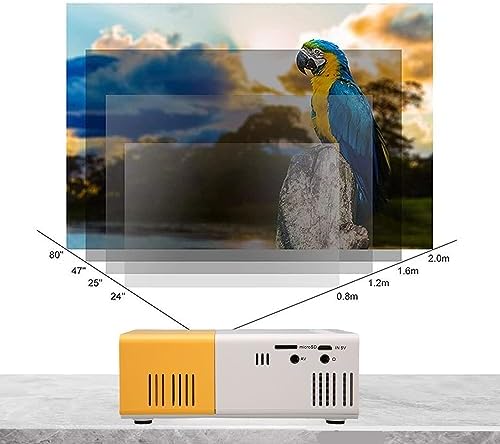
Image 5.2: Projection distance guidelines for various screen sizes. Note: Maximum recommended projection size is 60 inches.
5.3. فوکس ایڈجسٹمنٹ
After placing the projector and powering it on, rotate the focus ring located around the lens until the projected image appears clear and sharp.
6. آپریٹنگ ہدایات
6.1. پاور آن/آف
- پاور آن: پروجیکٹر یا ریموٹ کنٹرول پر پاور بٹن دبائیں۔
- بجلی بند: Press the power button again. The projector will shut down.
6.2. ان پٹ ماخذ کا انتخاب
Use the 'Source' button on the remote control or the projector's control panel to cycle through available input sources (HDMI, USB, AV, MicroSD).
6.3۔ مینو نیویگیشن
Use the arrow buttons on the remote control or projector to navigate through menus. Press 'OK' or 'Enter' to confirm selections. Use the 'Return' or 'Back' button to go back to the previous menu.
7. کنیکٹیویٹی
The projector offers multiple connectivity options for various devices.

Image 7.1: Connectivity options for the Goshyda projector.
7.1. HDMI کنکشن
Connect devices such as laptops, TV Sticks, game consoles (e.g., for Xbox One), or Blu-ray players using an HDMI cable. Select 'HDMI' as the input source.
7.2. USB کنکشن
میڈیا چلانے کے لیے USB پورٹ میں USB فلیش ڈرائیو داخل کریں۔ files directly. Select 'USB' as the input source and navigate through your files.
7.3. AV Connection
Use the provided AV cable to connect older devices like DVD players. Select 'AV' as the input source.
7.4. Smartphone/Tablet Connection
To connect directly to your smartphone or tablet, you will need an appropriate adapter (e.g., Micro USB to HDMI, Type-C to HDMI, or a dedicated HD multimedia interface device), depending on your device's operating system (OS X or Android) and available ports. These adapters are sold separately.
7.5. آڈیو آؤٹ پٹ۔
Connect external speakers or headphones to the audio output port for enhanced sound.
8 دیکھ بھال
- لینس کی صفائی: Use a soft, lint-free cloth specifically designed for optical lenses to gently wipe the projector lens. Do not use abrasive materials or harsh chemicals.
- بیرونی صفائی: پروجیکٹر کے بیرونی حصے کو نرم، خشک کپڑے سے صاف کریں۔
- ذخیرہ: When not in use for extended periods, store the projector in a cool, dry place, away from direct sunlight and dust.
9 خرابیوں کا سراغ لگانا
| مسئلہ | ممکنہ وجہ | حل |
|---|---|---|
| کوئی طاقت نہیں۔ | Power adapter not connected or faulty; insufficient power supply. | Ensure the 5V 2A power adapter is securely connected and plugged into a working outlet. Try a different power source or power bank. |
| کوئی تصویر نہیں۔ | Incorrect input source selected; cable not connected properly; device not outputting signal. | Select the correct input source (HDMI, USB, AV). Check all cable connections. Ensure the connected device is powered on and outputting a signal. |
| تصویر دھندلی ہے | فوکس ایڈجسٹ نہیں ہوا؛ پروجیکٹر اسکرین سے بہت قریب/دور۔ | Rotate the focus ring to sharpen the image. Adjust the projection distance within the recommended range (1-2.5m). |
| کوئی آواز نہیں۔ | Volume too low or muted; external speakers not connected; audio format not supported. | Increase the volume on the projector and the source device. Check if external speakers are properly connected. Ensure the audio format is supported. |
10. وضاحتیں
| فیچر | تفصیل |
|---|---|
| برانڈ | گوشیدہ |
| ماڈل نمبر | Goshyda89pkbg17g0 |
| ڈسپلے ریزولوشن | 1920 x 1080 (1080P Support) |
| چمک | 200 Lumens |
| پہلو کا تناسب | 4:3 |
| پروجیکشن فاصلہ | 1 - 2.5 میٹر |
| پروجیکشن سائز | 60 انچ تک |
| کنیکٹوٹی ٹیکنالوجی | HDMI, USB, AV, MicroSD, Audio Out |
| پاور ان پٹ | 5V 2A |
| ڈسپلے کی قسم | LCD |
| مصنوعات کے طول و عرض | 12L x 8.5W x 4.6H cm (Approx. 4.7 x 3.3 x 1.8 inches) |
| فارم فیکٹر | پورٹیبل |
| چڑھنے کی قسم | ٹیبل ماؤنٹ |
11. وارنٹی اور سپورٹ
For warranty information and customer support, please refer to the documentation provided with your purchase or contact your retailer directly. Keep your proof of purchase for warranty claims.