
تعارف
This manual provides essential information for the safe and efficient use of your ONN 42-Inch Full HD LED Smart TV, Model 100018254. Please read these instructions thoroughly before operating your television and retain them for future reference.
باکس میں کیا ہے۔
سیٹ اپ کے ساتھ آگے بڑھنے سے پہلے تصدیق کریں کہ تمام اجزاء موجود ہیں۔
- ONN 42-Inch Full HD LED Smart TV
- ریموٹ کنٹرول
- ٹی وی اسٹینڈ (2 ٹکڑے)
- ٹی وی اسٹینڈ کے لیے پیچ
- پاور کی ہڈی
- کوئیک اسٹارٹ گائیڈ (اس دستی میں شامل نہیں)

تصویر: سامنے view of the ONN 42-inch Smart TV displaying the Roku TV home screen with various streaming app icons like Netflix, Disney+, Apple TV, Hulu, Peacock, and Roku Channel. The TV is black with slim bezels and two stand feet.
سیٹ اپ
1. ٹی وی اسٹینڈ کو منسلک کرنا
- نقصان سے بچنے کے لیے ٹی وی اسکرین کو احتیاط سے نرم، صاف سطح پر رکھیں۔
- ہر اسٹینڈ کے ٹکڑے کو ٹی وی کے نچلے حصے میں متعلقہ اسکرو ہولز کے ساتھ سیدھ میں کریں۔
- فراہم کردہ پیچ کے ساتھ ہر اسٹینڈ کے ٹکڑے کو محفوظ کریں۔ یقینی بنائیں کہ وہ مضبوطی سے سخت ہیں۔

Image: A diagram illustrating the dimensions of the ONN 42-inch TV, showing its width as 43 inches and height as 37 inches when placed on its stand.
2 وال ماؤنٹنگ (اختیاری)
This TV is compatible with VESA standard wall mounts. Refer to your wall mount's instructions for proper installation. Ensure the wall mount can support the weight of the television.

تصویر: پیچھے view of the ONN 42-inch TV, highlighting the VESA mounting screw holes in a square pattern and various input ports on the side and bottom right.
3. منسلک آلات
Connect your external devices such as cable boxes, gaming consoles, or Blu-ray players to the TV's input ports.
- HDMI: For high-definition audio and video. Use an HDMI cable to connect devices like set-top boxes, game consoles, or streaming sticks.
- USB: میڈیا چلانے کے لیے USB سٹوریج کے آلات کو جوڑنے کے لیے files.
- وائی فائی: For internet connectivity to access smart TV features and streaming services.
4. ابتدائی پاور آن اور سیٹ اپ وزرڈ
- پاور کی ہڈی کو ٹی وی میں اور پھر دیوار کے آؤٹ لیٹ میں لگائیں۔
- ریموٹ کنٹرول پر یا ٹی وی پر ہی پاور بٹن دبائیں۔
- Follow the on-screen instructions to complete the initial setup, including language selection, network connection (Wi-Fi), channel scanning, and linking to your Roku account (if applicable).
ٹی وی آپریٹ کر رہا ہے۔
1. ریموٹ کنٹرول اوورview
ریموٹ کنٹرول آپ کو ٹی وی کے انٹرفیس کو نیویگیٹ کرنے اور مختلف افعال کو کنٹرول کرنے کی اجازت دیتا ہے۔
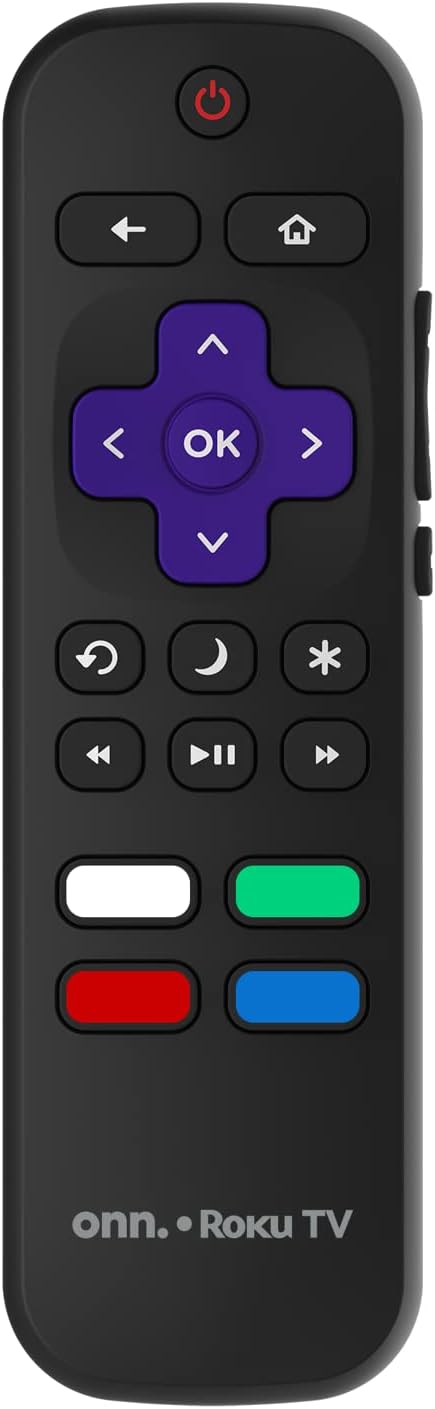
Image: The ONN Roku TV remote control, featuring a power button, directional pad, OK button, home button, back button, volume controls, and dedicated buttons for popular streaming services.
- پاور بٹن: ٹی وی کو آن یا آف کرتا ہے۔
- Directional Pad (D-Pad) & OK: مینو کو نیویگیٹ کرتا ہے اور انتخاب کی تصدیق کرتا ہے۔
- ہوم بٹن: Roku TV ہوم اسکرین پر واپس آجاتا ہے۔
- پیچھے کا بٹن: پچھلی اسکرین یا مینو پر واپس آجاتا ہے۔
- والیوم اوپر/نیچے: آڈیو والیوم کو ایڈجسٹ کرتا ہے۔
- بٹن خاموش کریں: آڈیو کو خاموش یا چالو کریں۔
- چینل اوپر/نیچے: چینلز کو تبدیل کرتا ہے (اینٹینا/کیبل ان پٹ کے لیے)۔
- وقف کردہ ایپ بٹن: Quick access to popular streaming services like Netflix, Hulu, etc.
2. سمارٹ ٹی وی کی خصوصیات
Your ONN Smart TV provides access to a wide range of streaming content and smart functionalities.
- سلسلہ بندی کی خدمات: Access pre-installed apps like Netflix, YouTube, and many more through the Roku Channel Store.
- وائس کنٹرول: Compatible with Alexa and Google Assistant for hands-free control (requires a separate compatible voice assistant device).
- Automatic Software Updates: The TV will automatically update its software when connected to the internet, ensuring you have the latest features and security.
3. ان پٹ سلیکشن
To switch between connected devices (e.g., cable box, game console), use the ان پٹ button on your remote or select the desired input from the Roku TV home screen.
4. تصویر اور آواز کی ترتیبات
Access the TV's settings menu to customize picture and sound preferences. Navigate to Settings > TV picture settings or ترتیبات> آڈیو۔ to adjust options like brightness, contrast, color, sound mode, and equalizer settings.
دیکھ بھال
1. سکرین کی صفائی
- Always turn off the TV and unplug it before cleaning.
- نرم، لنٹ فری کپڑا استعمال کریں، تھوڑا سا ڈیampپانی یا ایک خصوصی سکرین کلینر کے ساتھ ened.
- کلینر کو براہ راست اسکرین پر نہ چھڑکیں۔ اسے پہلے کپڑے پر لگائیں۔
- کھرچنے والے کلینر، الکحل، بینزین، یا پتلا استعمال کرنے سے گریز کریں، کیونکہ یہ اسکرین کو نقصان پہنچا سکتے ہیں۔
2. سافٹ ویئر اپڈیٹس
Ensure your TV is connected to the internet to receive automatic software updates. These updates improve performance, add features, and enhance security. You can manually check for updates in the ترتیبات > سسٹم > سسٹم اپ ڈیٹ مینو
خرابی کا سراغ لگانا
اگر آپ کو اپنے ٹی وی کے ساتھ مسائل درپیش ہیں، تو درج ذیل عام حل سے رجوع کریں:
کوئی طاقت نہیں۔
- چیک کریں کہ آیا بجلی کی ہڈی محفوظ طریقے سے TV اور وال آؤٹ لیٹ دونوں میں لگی ہوئی ہے۔
- دوسرے ڈیوائس میں پلگ لگا کر تصدیق کریں کہ وال آؤٹ لیٹ کام کر رہا ہے۔
- ٹی وی پر ہی پاور بٹن دبانے کی کوشش کریں، نہ صرف ریموٹ پر۔
کوئی تصویر / مسخ شدہ تصویر نہیں۔
- Ensure the correct input source is selected (e.g., HDMI 1, HDMI 2).
- TV اور بیرونی آلات کے درمیان تمام کیبل کنکشن چیک کریں۔
- Try a different HDMI cable if possible.
- Adjust picture settings (brightness, contrast) in the TV menu.
کوئی آواز نہیں / کم آواز
- Check if the TV is muted or if the volume is turned down.
- Ensure external audio devices (soundbars, receivers) are properly connected and powered on.
- TV مینو میں آڈیو سیٹنگز چیک کریں۔
نیٹ ورک کنکشن کے مسائل
- تصدیق کریں کہ آپ کا Wi-Fi روٹر آن ہے اور کام کر رہا ہے۔
- اپنا روٹر اور موڈیم دوبارہ شروع کریں۔
- پر جائیں۔ Settings > Network > Check connection مسئلہ کی تشخیص کے لیے اپنے TV پر۔
- یقینی بنائیں کہ آپ درست وائی فائی پاس ورڈ درج کر رہے ہیں۔
وضاحتیں
| فیچر | تفصیل |
|---|---|
| ماڈل نمبر | 100018254 |
| اسکرین کا سائز | 42 انچ |
| ڈسپلے ٹیکنالوجی | ایل ای ڈی |
| قرارداد | 1080p (مکمل HD) |
| ریفریش ریٹ | 60 Hz |
| کنیکٹوٹی | USB، Wi-Fi |
| تعاون یافتہ انٹرنیٹ سروسز | Netflix, YouTube (and others via Roku platform) |
| کنٹرول کا طریقہ | Voice (via Alexa & Google Assistant compatible devices), Remote Control |
| چڑھنے کی قسم | وال ماؤنٹ (VESA ہم آہنگ) |
| رنگ | سیاہ |
| یو پی سی | 671227025567 |

Image: Energy Guide label for Television Model 100018254, indicating an estimated yearly energy cost of $11 based on 12 cents per kWh and 5 hours use per day.
وارنٹی اور سپورٹ
For warranty information and technical support, please refer to the documentation included with your purchase or visit the official ONN support webسائٹ وارنٹی کے دعووں کے لیے اپنی خریداری کی رسید اپنے پاس رکھیں۔