
1. تعارف
The ZCMMF K18 Anti Spy Detector is a versatile device designed to detect and locate various hidden surveillance equipment. It features capabilities for detecting wireless RF signals, magnetic fields, and hidden camera lenses. This manual provides detailed instructions for the proper setup, operation, and maintenance of your detector to ensure effective use.
The detector operates within a frequency range of 1MHz to 6.5GHz for wireless signals and utilizes laser scanning for hidden camera lenses. It incorporates an upgraded smart chip for enhanced sensitivity and anti-interference, offering multiple detection modes including laser, vibration (mute), beep, and LED display.
2. پیکیج کے مشمولات
- 1 x ZCMMF K18 Anti Spy Detector
- 1 ایکس چارجنگ کیبل
- 1 ایکس صارف دستی
3. وضاحتیں
| فیچر | تفصیلات |
|---|---|
| مواد | ABS پلاسٹک |
| رنگ | سیاہ |
| وائرلیس سویپ فریکوئینسی رینج | 1MHz - 6.5GHz |
| Laser Detection Camera Distance | 10cm - 10m (سرخ چمکنے کی بصری شناخت) |
| Radio Detection Range (RF Device Dependent) | 5cm - 10m |
| بجلی کی فراہمی | بلٹ ان لتیم پولیمر بیٹری 450mAH |
| موجودہ کھپت | 8mA |
| سیلف شوٹ ڈیٹیکٹنگ ویو لینتھ | 920nm |
| فریکوئینسی رینج وصول کریں۔ | 1MHz - 6500MHz |
| خصوصی خصوصیات | Optical lens filters, Auto-detecting function, Adjustable sensitivity, Low voltage indication, Built-in compass |
4. سیٹ اپ
4.1 ڈیوائس کو چارج کرنا
Before first use, fully charge the ZCMMF K18 detector. Connect the provided charging cable to the device's charging port and a compatible USB power source (5-6V DC). The charging indicator light will show the charging status. Once fully charged, disconnect the cable.
4.2 Attaching Antennas and Probes
The detector comes with an RF antenna and a GS probe for magnetic field detection. Attach the RF antenna to the designated port for wireless signal detection. For magnetic field detection, connect the GS probe to its specific port. Ensure both are securely fastened.
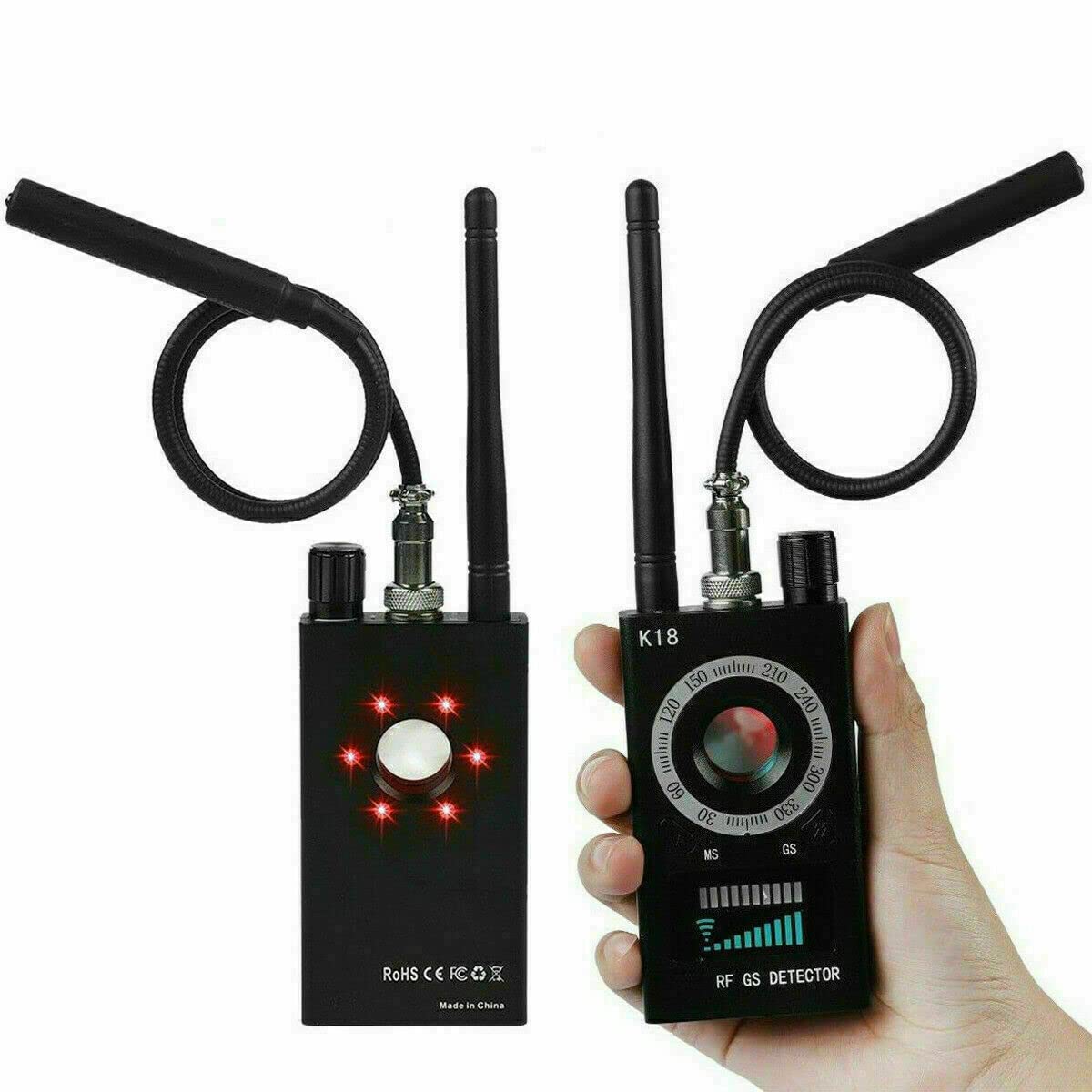
ZCMMF K18 Anti Spy Detector with labeled components including RF antenna, GS probe, power/sensitivity tuner, azimuth dial, detection mode toggle, LED light switch, and signal strength indicators.
A detailed video guide on setting up and operating the ZCMMF K18+ Anti Spy Detector, covering initial steps and usage.
5. آپریٹنگ ہدایات
5.1 Power On/Off and Sensitivity Adjustment
To power on the device, rotate the Power ON/OFF & Sensitivity Tuner knob clockwise. The device will activate. To adjust sensitivity, continue rotating this knob. Increasing sensitivity widens the detection range, while decreasing it reduces the range, allowing for more precise localization of signals. Rotate counter-clockwise to power off.
5.2 آر ایف سگنل کا پتہ لگانا
For detecting wireless signals (e.g., from hidden cameras, GPS trackers, GSM bugs), ensure the RF antenna is attached. Turn on the device and adjust the sensitivity. Move the detector around the area of concern. The RF Signal Detection Indicator and Signal Strength Indicator will illuminate, and the device may vibrate or beep, indicating the presence and strength of a wireless signal. A stronger signal indicates closer proximity to the source.

ZCMMF K18 Anti Spy Detector's upgraded smart chip features, including beep detection, LED detection, wider detection range, ultra-high sensitivity, and strong anti-interference, shown detecting various devices like invisible headsets, SIM card bugs, wireless cameras, watch trackers, and radio signals.
This video illustrates the RF signal detection function of a similar detector, providing insight into how the ZCMMF K18 detects wireless signals.
5.3 مقناطیسی فیلڈ کا پتہ لگانا
To detect magnetic GPS trackers or other magnetic devices, attach the GS probe. Activate the magnetic detection mode using the Detection Mode Toggle. Sweep the probe over surfaces where magnetic devices might be hidden, such as under vehicles or furniture. The Magnet Detection Indicator will activate upon detecting a magnetic field.
5.4 Hidden Camera Lens Detection (Laser Scanning)
To find hidden camera lenses, activate the laser detection mode. Look through the View Finder on the detector while sweeping the area with the device. Hidden camera lenses will appear as bright red reflection points due to the detector's LED laser technology and special optical lens filters. Adjust the LED Light Switch to control the flashing speed of the infrared light for better visibility.

ZCMMF K18 Anti Spy Detector in use, illustrating how it accurately locates hidden cameras using LED laser technology and special filters, with red laser beams pointing to a camera in a room.
This video demonstrates the professional features of the ZCMMF K18 Anti Spy Detector, focusing on its hidden camera detection capabilities.
5.5 پتہ لگانے کے طریقے
The ZCMMF K18 offers several alert modes, selectable via the Detection Mode Toggle & Alert Mode Toggle button:
- لیزر کا پتہ لگانا: For identifying hidden camera lenses.
- کمپن (خاموش) کا پتہ لگانا: Provides discreet alerts through vibration.
- بیپ کا پتہ لگانا: Audible alerts for signal detection.
- ایل ای ڈی ڈسپلے کا پتہ لگانا: Visual indication of signal strength on the LED panel.
- ہیڈسیٹ موڈ: Allows for private audio alerts using a headset (not included).
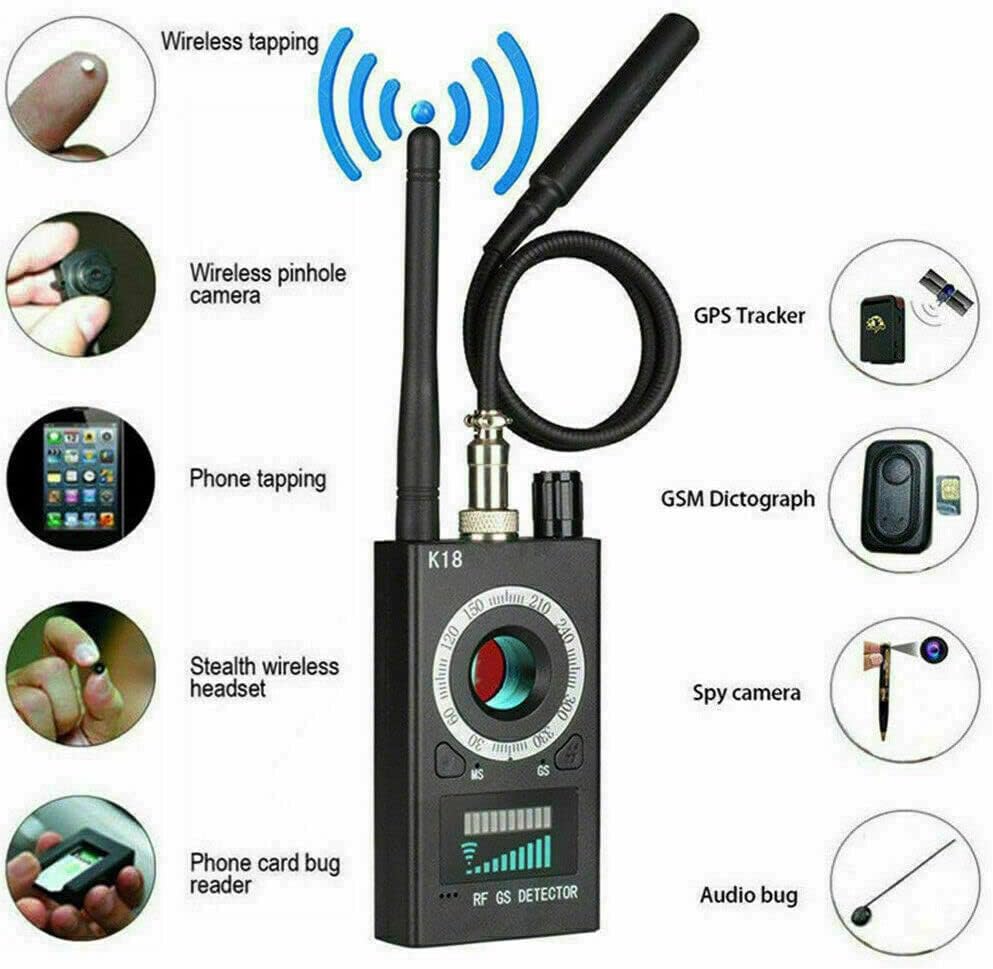
ZCMMF K18 Anti Spy Detector identifying various types of hidden devices it can detect, including wireless tapping, wireless pinhole cameras, phone tapping, GPS trackers, GSM dictographs, stealth wireless headsets, phone card bug readers, spy cameras, and audio bugs.
یہ ویڈیو ایک جنرل اوور فراہم کرتا ہے۔view of the ZCMMF K18 Anti Spy Detector, demonstrating its basic functions and appearance.
This video demonstrates the anti-spy detection features of a similar model (K68+), showcasing its capabilities in identifying various surveillance devices.
6 دیکھ بھال
- صفائی: Use a soft, dry cloth to clean the detector's exterior. Avoid using harsh chemicals or abrasive materials.
- ذخیرہ: آلے کو براہ راست سورج کی روشنی اور انتہائی درجہ حرارت سے دور ٹھنڈی، خشک جگہ پر اسٹور کریں۔
- بیٹری کی دیکھ بھال: بیٹری کی زندگی کو طول دینے کے لیے، بار بار بیٹری کو مکمل طور پر خارج کرنے سے گریز کریں۔ آلہ کو باقاعدگی سے ری چارج کریں، چاہے وہ طویل عرصے تک استعمال میں نہ ہوں۔
- ہینڈلنگ: Handle the detector with care to prevent damage from drops or impacts.
7 خرابیوں کا سراغ لگانا
- ڈیوائس آن نہیں ہو رہی ہے: یقینی بنائیں کہ بیٹری چارج ہے۔ چارجنگ کیبل کو جوڑیں اور دوبارہ کوشش کریں۔
- کوئی سگنل کا پتہ نہیں لگانا: Check if the correct antenna/probe is attached for the desired detection mode. Adjust sensitivity to a higher level. Ensure there are no strong interfering signals nearby.
- غلط الارم: Reduce the sensitivity to narrow the detection range. Move away from common electronic devices that emit RF signals (e.g., Wi-Fi routers, mobile phones).
- Laser detection not working: Ensure the LED Light Switch is on and the area is sufficiently dark for reflections to be visible.
8. وارنٹی اور سپورٹ
For warranty information or technical support, please refer to the contact details provided with your purchase or visit the official ZCMMF webسائٹ کسی بھی وارنٹی دعووں کے لیے اپنی خریداری کا ثبوت رکھیں۔