
1. تعارف
خریداری کے لیے آپ کا شکریہasing the eppfun SK001 USB Speakerphone. This device is designed to provide clear and efficient audio conferencing for home offices, remote work, and small to medium-sized meeting rooms. It features 360° voice pickup, smart voice enhancement, and broad compatibility with popular conferencing platforms.
2. پیکیج کے مشمولات
براہ کرم تصدیق کریں کہ تمام اشیاء آپ کے پیکیج میں موجود ہیں:
- eppfun SK001 USB Speakerphone
- USB-C سے USB-C کیبل
- USB-A سے USB-C کیبل
- ہدایات دستی (یہ دستاویز)
3. پروڈکٹ ختمview
The eppfun SK001 features intuitive controls for managing your calls and audio settings.

تصویر: اوپر view of the eppfun SK001 speakerphone showing its control buttons. The buttons include microphone mute, microphone volume up/down, and speaker volume up/down.
کنٹرول بٹن:
- مائیکروفون خاموش بٹن: Press to mute or unmute the microphone. An indicator light will show the mute status.
- Microphone Volume Up/Down: Adjusts the microphone input sensitivity.
- Speaker Volume Up/Down: Adjusts the speaker output volume.
بندرگاہیں:
- USB-C پورٹ: For connecting to your computer using the provided USB cables.
4. سیٹ اپ
The eppfun SK001 is a plug-and-play device, requiring no driver installation for most operating systems.
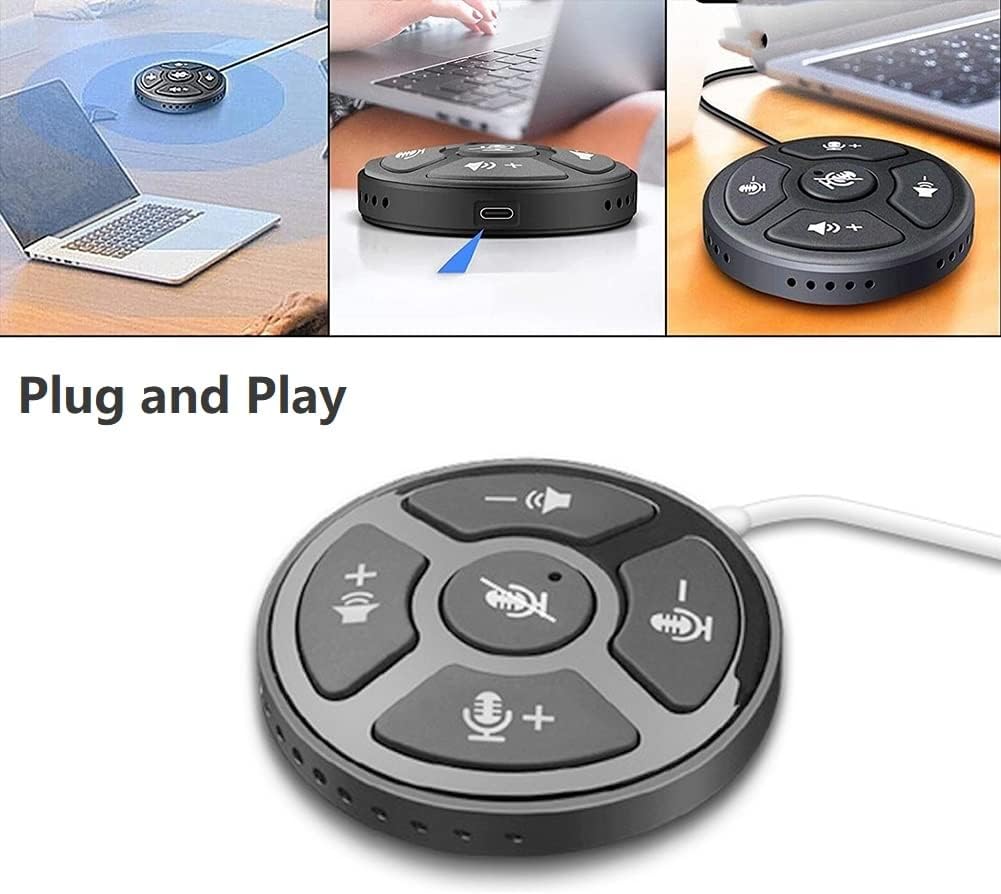
Image: A collage showing the eppfun SK001 speakerphone connected to a laptop via USB, highlighting its plug-and-play functionality.
- اسپیکر فون کو جوڑیں:
- Use the provided USB-C to USB-C cable or USB-A to USB-C cable.
- Connect one end of the cable to the USB-C port on the SK001 speakerphone.
- Connect the other end of the cable to an available USB port (USB-A or USB-C) on your computer (PC, laptop, or Mac).
- سسٹم کی شناخت: آپ کے کمپیوٹر کو خود بخود ضروری ڈرائیوروں کا پتہ لگانا اور انسٹال کرنا چاہئے۔ اس عمل میں چند لمحے لگ سکتے ہیں۔
- آڈیو ڈیوائس کے بطور منتخب کریں:
- Open your operating system's sound settings (e.g., Windows Sound Settings, macOS System Preferences > Sound).
- Select "eppfun SK001" as your default input (microphone) and output (speaker) device.
- In your conferencing software (e.g., Zoom, Microsoft Teams, Skype), navigate to its audio settings and select "eppfun SK001" for both microphone and speaker.
5. آپریٹنگ ہدایات
Basic Call Management:
- والیوم ایڈجسٹمنٹ: Use the speaker volume up (+) and down (-) buttons on the device to control the playback volume.
- مائیکروفون خاموش: Press the central microphone mute button to toggle the microphone on or off. A red indicator light typically signifies that the microphone is muted. This mute function is linked with Zoom Meeting certification.
- مائیکروفون کی حساسیت: Use the microphone volume up (+) and down (-) buttons to adjust the microphone's input sensitivity.
اہم خصوصیات:
- 360° Omnidirectional Voice Pickup: The SK001 is equipped with high-performance microphones capable of capturing voices from all directions within a 5-meter radius, ideal for small to medium-sized conference rooms.
- سمارٹ آواز میں اضافہ: Features echo cancellation, reverberation suppression, and noise reduction to ensure clear audio during calls.
- Zoom Meeting Certified: Guarantees high-quality calls and seamless integration with Zoom, including synchronized mute status.
6 دیکھ بھال
- صفائی: Use a soft, dry cloth to clean the surface of the speakerphone. Do not use liquid cleaners or aerosols.
- ذخیرہ: استعمال میں نہ ہونے پر آلہ کو ٹھنڈی، خشک جگہ پر اسٹور کریں۔
- ہینڈلنگ: Avoid dropping the device or exposing it to extreme temperatures or humidity.
7 خرابیوں کا سراغ لگانا
- No Sound / Microphone Not Working:
- Ensure the USB cable is securely connected to both the speakerphone and your computer.
- Verify that "eppfun SK001" is selected as the default audio input and output device in your computer's sound settings and within your conferencing application.
- Check if the microphone is muted on the device (red indicator light) or within your software.
- اسپیکر فون اور اپنے کمپیوٹر دونوں پر والیوم کی سطح کو ایڈجسٹ کریں۔
- Try connecting the speakerphone to a different USB port or a different computer to rule out port or system issues.
- خراب آڈیو کوالٹی:
- Ensure the speakerphone is placed on a stable surface, away from obstructions.
- Confirm that the microphone sensitivity is appropriately set.
- Check for background noise in your environment. The device has noise reduction, but extreme noise can still affect quality.
- Verify your internet connection stability if experiencing issues during online calls.
- ڈیوائس کی شناخت نہیں ہوئی:
- USB کیبل کو منقطع اور دوبارہ رابطہ کریں۔
- اپنے کمپیوٹر کو دوبارہ شروع کریں۔
- اپنے کمپیوٹر پر ایک مختلف USB پورٹ آزمائیں۔
- یقینی بنائیں کہ آپ کا آپریٹنگ سسٹم اپ ٹو ڈیٹ ہے۔
8. وضاحتیں
| فیچر | تفصیل |
|---|---|
| ماڈل نمبر | SK001 |
| برانڈ | ایپفن |
| کنیکٹوٹی ٹیکنالوجی | USB (USB-C, USB-A) |
| مائیکروفون فارم فیکٹر | منی |
| پولر پیٹرن | Omnidirectional (360°) |
| آڈیو حساسیت | 30 ڈیسیبل |
| Sound Pickup Range | 5 میٹر تک |
| ہارڈ ویئر پلیٹ فارم | لیپ ٹاپ، پی سی |
| ہم آہنگ آپریٹنگ سسٹمز | Windows XP/Vista/7/8/10/11, Mac OS |
| شے کا وزن | 80 گرام (2.82 اونس) |
| پیکیج کے طول و عرض | 6.1 x 4.72 x 1.3 انچ |
9. وارنٹی اور سپورٹ
The eppfun SK001 comes with a 12 ماہ کی وارنٹی خریداری کی تاریخ سے. یہ وارنٹی عام استعمال کے تحت مینوفیکچرنگ کے نقائص اور خرابیوں کا احاطہ کرتی ہے۔
For technical support, warranty claims, or any questions regarding your eppfun SK001 speakerphone, please contact eppfun customer service. Refer to the contact information provided on the eppfun official webسائٹ یا آپ کی خریداری کی دستاویزات۔
وارنٹی مقاصد کے لیے براہ کرم اپنی خریداری کا ثبوت اپنے پاس رکھیں۔