
1. تعارف
This manual provides detailed instructions for the setup, operation, maintenance, and troubleshooting of your Cosmic Byte ARES Wired Controller for PC. Designed for an enhanced gaming experience, this controller features Hall Effect joysticks and triggers, dual vibration, and customizable Turbo functions.
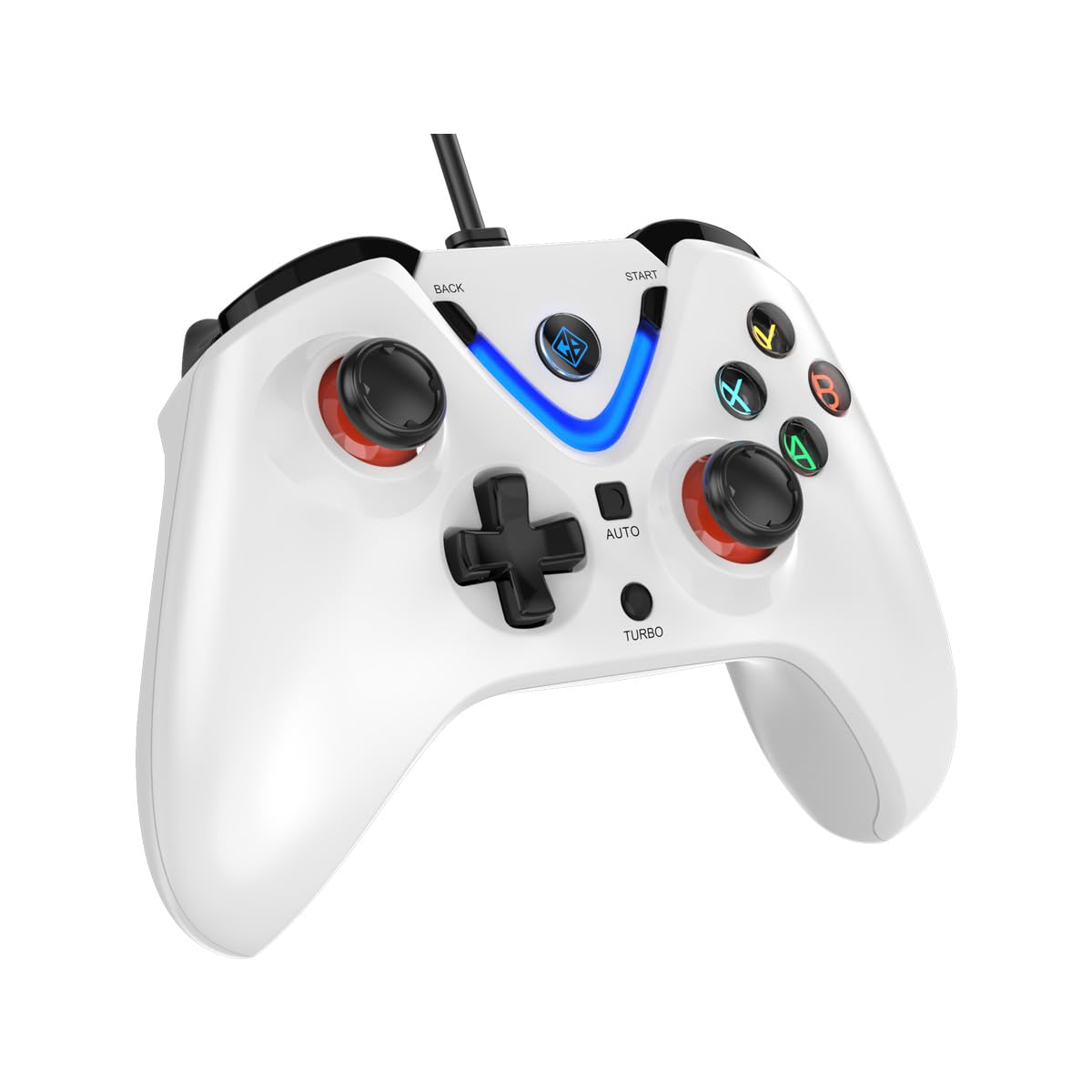
Image 1: The Cosmic Byte ARES Wired Controller in white, showcasinجی اس کا ایرگونومک ڈیزائن۔
2. سیٹ اپ ہدایات
2.1 پی سی سے جڑ رہا ہے۔
- یقینی بنائیں کہ آپ کا پی سی آن ہے۔
- اپنے کمپیوٹر پر دستیاب USB پورٹ تلاش کریں۔
- Plug the USB connector of the Cosmic Byte ARES Wired Controller into the USB port.
- آپریٹنگ سسٹم خود بخود ضروری ڈرائیوروں کا پتہ لگا کر انسٹال کر لے گا۔ اس عمل میں چند لمحے لگ سکتے ہیں۔
- Once installation is complete, the controller is ready for use.

Image 2: The controller connected via its wired USB connection, ensuring fast response.
3. آپریٹنگ ہدایات
3.1 بنیادی کنٹرولز
The Cosmic Byte ARES controller features standard gamepad layouts, including:
- Left and Right Analog Joysticks: عین مطابق حرکت اور کیمرے کے کنٹرول کے لیے۔
- ڈی پیڈ: For directional input, often used in menus or for specific game actions.
- ایکشن بٹن (A, B, X, Y): For primary game interactions.
- Shoulder Buttons (L1, R1) and Triggers (L2, R2): For various in-game functions like shooting, aiming, or accelerating.
- Start and Back Buttons: For pausing games, accessing menus, or specific in-game commands.
- ٹربو بٹن: For activating rapid-fire functions.
- آٹو بٹن: For activating automatic rapid-fire functions.
3.2 Hall Effect Joysticks and Triggers
The controller is equipped with Hall Effect joysticks and triggers, which use magnetic sensors instead of physical contacts. This technology provides:
- بہتر صحت سے متعلق: More accurate and responsive input.
- پائیداری میں اضافہ: Reduces wear and tear, preventing stick drift over time.
- ہموار آپریشن: Consistent and linear response for triggers, allowing for nuanced control in games.

تصویر 3: ایک دھماکہ ہوا۔ view illustrating the Hall Effect joystick mechanism and the Hall Effect triggers.
3.3 Dual Vibration Feedback
The controller features dual vibration motors that provide tactile feedback during gameplay, enhancing immersion by simulating in-game events such as impacts, explosions, or engine rumbling.
3.4 Backlit LED Buttons
The action buttons (A, B, X, Y) and the central V-shaped indicator feature LED backlighting, providing visibility in low-light conditions and adding to the controller's aesthetic.

Image 4: The controller with its LED buttons illuminated and visual representation of vibration effects.
3.5 Turbo and Auto Turbo Functions
The Turbo and Auto Turbo functions allow for rapid, repeated input of a button press without continuously pressing the button.
- ٹربو کو چالو کرنا: Press and hold the desired action button (e.g., A) and then press the ٹربو button. The button will now rapidly repeat its input as long as you hold it down.
- Activating Auto Turbo: Press and hold the desired action button (e.g., A) and then press the آٹو button. The button will now rapidly repeat its input automatically without needing to be held down.
- Deactivating Turbo/Auto Turbo: To deactivate, repeat the activation steps for the specific button, or press the صاف button (if available) or disconnect and reconnect the controller.

Image 5: Close-up of the controller showing the Turbo and Auto function buttons.
4 دیکھ بھال
- صفائی: کنٹرولر کو صاف کرنے کے لیے نرم، خشک کپڑا استعمال کریں۔ ضدی گندگی کے لیے، تھوڑا سا ڈیamp cloth can be used, ensuring no liquid enters the controller. Avoid harsh chemicals or abrasive cleaners.
- ذخیرہ: کنٹرولر کو کسی ٹھنڈی، خشک جگہ پر براہ راست سورج کی روشنی اور انتہائی درجہ حرارت سے دور رکھیں۔ کنٹرولر پر بھاری اشیاء رکھنے سے گریز کریں۔
- کیبل کی دیکھ بھال: Do not sharply bend or pull the USB cable. Always grasp the plug when disconnecting from the PC.
5 خرابیوں کا سراغ لگانا
- کنٹرولر کی شناخت نہیں ہوئی:
- Ensure the USB cable is securely connected to both the controller and the PC.
- Try plugging the controller into a different USB port.
- اپنے کمپیوٹر کو دوبارہ شروع کریں۔
- Check Device Manager on Windows to see if the controller is listed and if there are any driver issues.
- بٹن/جواسٹکس جواب نہیں دے رہے ہیں:
- Verify the controller is recognized by your PC (see above).
- Test the controller in a different game or a controller testing utility to rule out game-specific issues.
- اس بات کو یقینی بنائیں کہ کوئی دوسرا ان پٹ ڈیوائس مداخلت نہیں کر رہا ہے۔
- کمپن کام نہیں کر رہا ہے:
- اس بات کو یقینی بنانے کے لیے کہ وائبریشن فیڈ بیک فعال ہے درون گیم سیٹنگز چیک کریں۔
- Some games may not support vibration or may have limited vibration effects.
6. وضاحتیں
| فیچر | تفصیل |
|---|---|
| برانڈ | کاسمک بائٹ |
| ماڈل کا نام | آریس |
| ہم آہنگ آلات | PC |
| کنٹرولر کی قسم | گیم پیڈ |
| کنیکٹوٹی ٹیکنالوجی | یو ایس بی |
| مصنوعات کی خصوصیات | ایرگونومک |
| بٹن کی مقدار | 16 |
| ہارڈ ویئر پلیٹ فارم | PC |
| پاور ماخذ کی قسم | کورڈڈ الیکٹرک، USB کیبل |
| شے کا وزن | 220 گرام |
| آئٹم کے طول و عرض | 6 x 10 x 4 سینٹی میٹر |
| رنگ | سفید |
| اصل ملک | چین |

Image 6: A comparison table highlighting features of different ARES controller models.
7. وارنٹی اور سپورٹ
7.1 وارنٹی کی معلومات
The Cosmic Byte ARES Wired Controller comes with a مینوفیکچرنگ نقائص کے خلاف 1 سال کی وارنٹی خریداری کی تاریخ سے. وارنٹی کے دعووں کے لیے براہ کرم اپنی خریداری کا ثبوت اپنے پاس رکھیں۔
7.2 مینوفیکچرر سے رابطہ کی معلومات
For support, service, or warranty inquiries, please contact:
کاسمک بائٹPrakash Warehousing, S. No.163, Hissa No 1-2-3-4-5A-5B/2/1,
Phursungi, Pune 412308, Maharashtra, India
For further assistance, please visit the official Cosmic Byte webسائٹ یا ان کی کسٹمر سروس سے رابطہ کریں۔