
1. تعارف
This manual provides detailed instructions for the installation, operation, and maintenance of the PeakDo Wireless HDMI Transmitter and Receiver P3 S. This device is designed to wirelessly transmit uncompressed 1080P Full HD video and digital audio with zero latency, making it ideal for various applications including gaming, home entertainment, and professional presentations. The P3 S model features a USB-C port on the receiver for compatibility with AR smart glasses and portable monitors, in addition to standard HDMI output.

Figure 1: PeakDo Wireless HDMI Transmitter (left) and Receiver (right).
2. پروڈکٹ ختمview
2.1 کلیدی خصوصیات
- Wireless AR Smart Glasses Setup: Features a Type-C port on the Receiver for direct connection to AR smart glasses (e.g., XREAL Air, Rokid Max/Air, RayNeo, VITURE One) and portable monitors, enabling cable-free AR experiences.
- Uncompressed FHD Video & Digital Audio: Transmits 1080P Full HD video and digital audio without compression, ensuring high-quality output.
- Zero Latency Transmission: Provides 0 latency for real-time applications such as live sports, synchronized gaming, and interactive meetings.
- پلگ اینڈ پلے آپریشن: Requires no Wi-Fi connection or app installation for setup.
- وسیع مطابقت: Transmitter (TX) connects to PC, Laptop, Xbox, PlayStation, Nintendo Switch, TV Box. Receiver (RX) connects to TVs, monitors, projectors via HDMI, and AR smart glasses/portable monitors via USB-C.
- ٹرانسمیشن رینج: Effective wireless transmission up to 100 feet (approximately 30 meters).
2.2 پیکیج کے مشمولات
براہ کرم تصدیق کریں کہ تمام اشیاء پیکیج میں موجود ہیں:
- PeakDo Wireless HDMI Transmitter (TX)
- PeakDo Wireless HDMI Receiver (RX)
- USB پاور کیبل
- صارف دستی (یہ دستاویز)
3. سیٹ اپ ہدایات
3.1 ٹرانسمیٹر کو جوڑنا (TX)
- Connect the HDMI end of the Transmitter (TX) to the HDMI output port of your source device (e.g., PC, laptop, game console, TV box).
- Connect the USB power cable to the TX unit and plug the other end into a USB power source (e.g., a USB port on your source device, a USB wall adapter). Ensure the TX receives at least 5V 2A power supply.

Figure 2: Compatible input (TX) and output (RX) devices.
3.2 وصول کنندہ کو جوڑنا (RX)
- اہم: First, connect the USB power cable to the RX unit and plug the other end into a USB power source (e.g., a USB wall adapter). Ensure the RX receives at least 5V 2A power supply. The RX unit requires sufficient power to function correctly.
- For HDMI displays (TV, Monitor, Projector): Connect an HDMI cable from the HDMI output port of the Receiver (RX) to the HDMI input port of your display device.
- For AR Smart Glasses or Portable Monitors: Connect a USB-C cable from the Type-C port on the Receiver (RX) to the USB-C input port of your AR smart glasses or portable monitor.
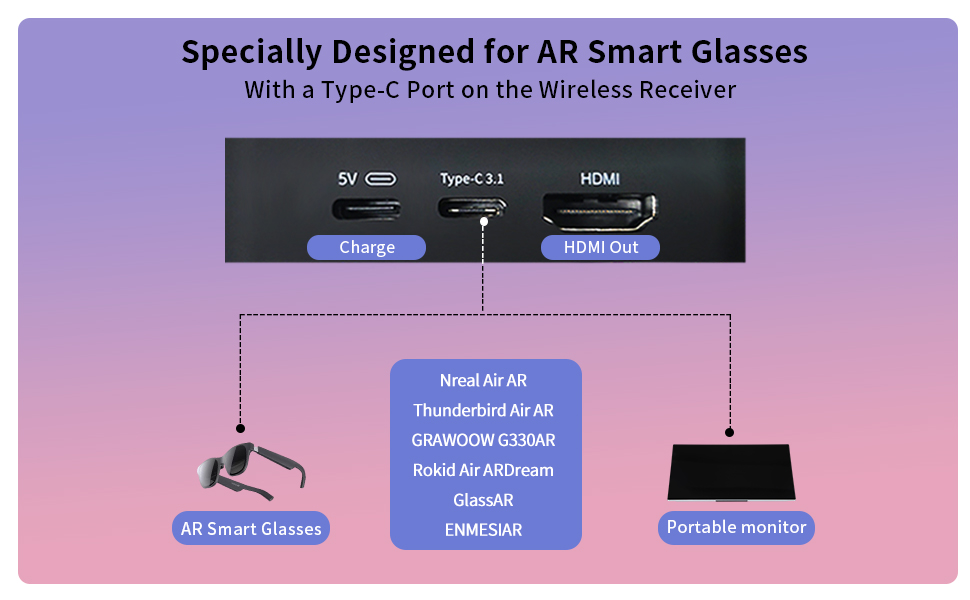
Figure 3: Receiver ports (5V power, Type-C 3.1, HDMI) and AR glasses compatibility.
نوٹ: For certain AR glasses like Nreal, you may need to upgrade their firmware for optimal compatibility. Refer to your AR glasses manufacturer's instructions for firmware updates.
4. آپریٹنگ ہدایات
4.1 پاور آن اور جوڑا بنانا
Once both the Transmitter (TX) and Receiver (RX) units are connected to their respective power sources and devices, they will automatically power on and attempt to pair. The system is designed for plug-and-play operation, requiring no manual pairing steps or software installation.

Figure 4: Plug and Play setup in a meeting environment.
4.2 استعمال کے منظرنامے۔
- گیمنگ: Experience zero-latency gaming on a large screen or through AR glasses.
- گھریلو تفریح: Stream movies, TV shows, or other media from your PC or TV box to any display.
- Presentations/Meetings: Share content wirelessly from your laptop to a projector or large monitor in a conference room.
- AR Experiences: Connect directly to compatible AR smart glasses for immersive gaming or productivity.
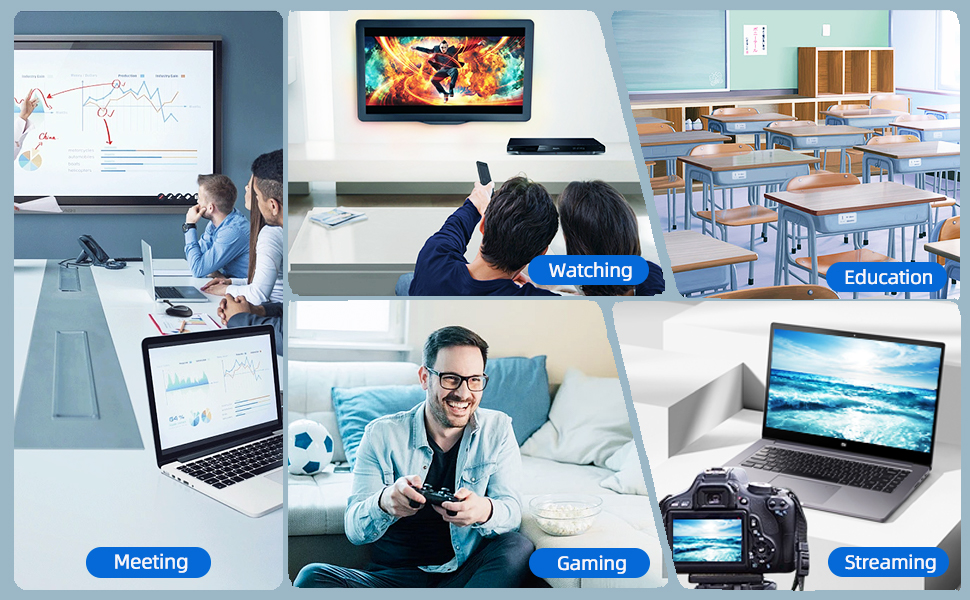
Figure 5: Diverse applications of the PeakDo Wireless HDMI system.

شکل 6: سابقample of a wireless AR gaming setup.
5 دیکھ بھال
The PeakDo Wireless HDMI Transmitter and Receiver P3 S requires minimal maintenance.
- صفائی: یونٹوں کے بیرونی حصے کو صاف کرنے کے لیے نرم، خشک کپڑا استعمال کریں۔ مائع کلینر یا ایروسول استعمال نہ کریں۔
- ذخیرہ: جب لمبے عرصے تک استعمال میں نہ ہوں تو، آلات کو براہ راست سورج کی روشنی اور انتہائی درجہ حرارت سے دور ٹھنڈی، خشک جگہ پر محفوظ کریں۔
- بجلی کی فراہمی: Always ensure both TX and RX units receive adequate power (5V 2A) from a stable power source.
6 خرابیوں کا سراغ لگانا
6.1 No Signal / Black Screen
- پاور چیک کریں: Ensure both the Transmitter (TX) and Receiver (RX) units are properly powered. The RX unit specifically requires sufficient power (5V 2A) and should be powered first before connecting the HDMI/USB-C cable to the display.
- کیبل کنکشن: Verify that all HDMI and USB-C cables are securely connected to their respective ports on the devices and displays.
- ماخذ ڈیوائس آؤٹ پٹ: Confirm that your source device (PC, game console) is outputting video correctly. Try connecting the source device directly to the display with a cable to rule out issues with the source.
- ڈسپلے ان پٹ: Ensure your display (TV, monitor, projector, AR glasses) is set to the correct input source (e.g., HDMI 1, USB-C).
- آلات کو دوبارہ شروع کریں: Disconnect power from both TX and RX units, then reconnect. Also, restart your source device and display.
6.2 Intermittent Signal / Flickering
- فاصلہ اور رکاوٹیں: Reduce the distance between the TX and RX units. Ensure there are no significant physical obstructions (walls, large furniture) between them that could interfere with the wireless signal.
- مداخلت: Keep the units away from other wireless devices (e.g., Wi-Fi routers, cordless phones, microwave ovens) that operate on similar frequencies.
- بجلی کی فراہمی: Ensure stable and sufficient power supply to both units. Fluctuations in power can affect signal stability.
6.3 کوئی آڈیو نہیں۔
- Source Audio Settings: Check the audio output settings on your source device to ensure audio is being sent via HDMI.
- Display Audio: Verify that the audio on your display device (TV, monitor, AR glasses) is not muted and the volume is turned up.
- کیبل کی سالمیت: Ensure the HDMI or USB-C cable connecting the RX to the display is not damaged.
6.4 AR Glasses Compatibility Issues
- فرم ویئر اپ ڈیٹ: As mentioned in the setup, some AR glasses (e.g., Nreal) may require a firmware update to work correctly with external video sources. Consult your AR glasses manufacturer's support.
- Power to RX: Ensure the RX unit is adequately powered, especially when connecting to power-hungry AR glasses.
- USB-C کیبل: Use a high-quality USB-C cable that supports video transmission.
7. وضاحتیں
| فیچر | تفصیل |
|---|---|
| ماڈل نمبر | P3 ایس |
| ویڈیو انکوڈنگ | YUV422 or RGB444 (uncompressed 1080P) |
| ریزولوشن سپورٹ | 1080P مکمل ایچ ڈی تک۔ |
| تاخیر | 0 تاخیر |
| کنیکٹوٹی ٹیکنالوجی | Wireless (Millimeter Wave) |
| ٹرانسمیشن رینج | 100 فٹ تک (تقریباً 30 میٹر) |
| Compatible Transmitter Devices | PC, Laptop, Xbox, PS4, PS5, Switch, PS3, TV Box, etc. |
| Compatible Receiver Devices | TV, Monitor, Projector (via HDMI); AR Smart Glasses, Portable Monitor (via USB-C) |
| کل HDMI پورٹس | 1 (on Receiver) |
| کنیکٹر کی قسم | HDMI, Micro USB (for power), USB-C (on Receiver) |
| آڈیو آؤٹ پٹ وضع | Mono (Digital Audio) |
| سراؤنڈ ساؤنڈ چینل کنفیگریشن | 2.0 |
| بجلی کی فراہمی | 5V 2A (for both TX and RX units) |
| شے کا وزن | 1.08 پاؤنڈ (تقریباً 0.49 کلوگرام) |
| پیکیج کے طول و عرض | 6.73 x 5.83 x 2.48 انچ (تقریباً 17.1 x 14.8 x 6.3 سینٹی میٹر) |
8. وارنٹی اور سپورٹ
For warranty information and technical support, please refer to the official PeakDo webسائٹ یا ان کی کسٹمر سروس سے براہ راست رابطہ کریں۔ وارنٹی کے دعووں کے لیے اپنی خریداری کی رسید اپنے پاس رکھیں۔
- مینوفیکچرر: چوٹی ڈو
- تاریخ پہلی دستیابی: 16 مارچ 2023
- کسٹمر ری۔views: 3.3 out of 5 stars (based on 6 ratings at time of data extraction)