
1. تعارف
This manual provides essential instructions for the safe and efficient operation of your RONGTA SE4770 Rugged PDA Barcode Scanner. This device is a high-performance mobile handheld terminal designed for various applications including retail, warehouse management, logistics, and inventory control. It combines the functionality of an Android 11 smartphone with an integrated Zebra SE4770 barcode scanner, offering robust performance and durability.
براہ کرم ڈیوائس کو استعمال کرنے سے پہلے اس دستی کو اچھی طرح پڑھیں اور اسے مستقبل کے حوالے کے لیے اپنے پاس رکھیں۔
2. پروڈکٹ ختمview
2.1 ڈیوائس کے اجزاء
The RONGTA SE4770 features a rugged design with a 6-inch HD touch screen and an integrated barcode scanner. Key components include:
- سامنے کا ڈسپلے: 6-inch FHD+ 1080P HD screen for clear visual interaction.
- ریئر پینل: Integrated Zebra SE4770 barcode scanner, camera, and battery compartment.
- سائیڈ بٹن: Power button, volume controls, and dedicated scan buttons.
- بندرگاہیں: چارج کرنے اور ڈیٹا کی منتقلی کے لیے USB-C پورٹ۔

شکل 2.1: سامنے اور پیچھے view of the RONGTA SE4770 PDA Barcode Scanner, showing the display and rear scanner module.
2.2 کلیدی خصوصیات
- آپریٹنگ سسٹم: Android 11 for a familiar and versatile user experience.
- پروسیسر: Octa-core 2.0GHz CPU for high performance and stability.
- میموری اور اسٹوریج: 4GB RAM + 64GB ROM, expandable via microSD card (not included).
- ڈسپلے: 6-inch FHD+ (1080P) HD touch screen, visible in strong outdoor light, supports multi-touch with gloves or wet hands.
- بارکوڈ سکینر: Integrated Zebra SE4770 for fast and accurate scanning of 1D, 2D, and QR barcodes, even if blurred, dirty, or worn.
- استحکام: IP68 rated for water and dust resistance, and 1.5m drop resistance.
- بیٹری: 5000mAh large capacity battery with QC3.0 18W fast charging. Features a SuperCap power change solution for seamless battery swaps without shutdown.
- کنیکٹوٹی: 2.4G/5G Dual-band Wi-Fi, 4G Full Network support, and Bluetooth 5.1.
- کیمرہ: 1600W+500W Pixel Camera (details on usage in Operating Instructions).
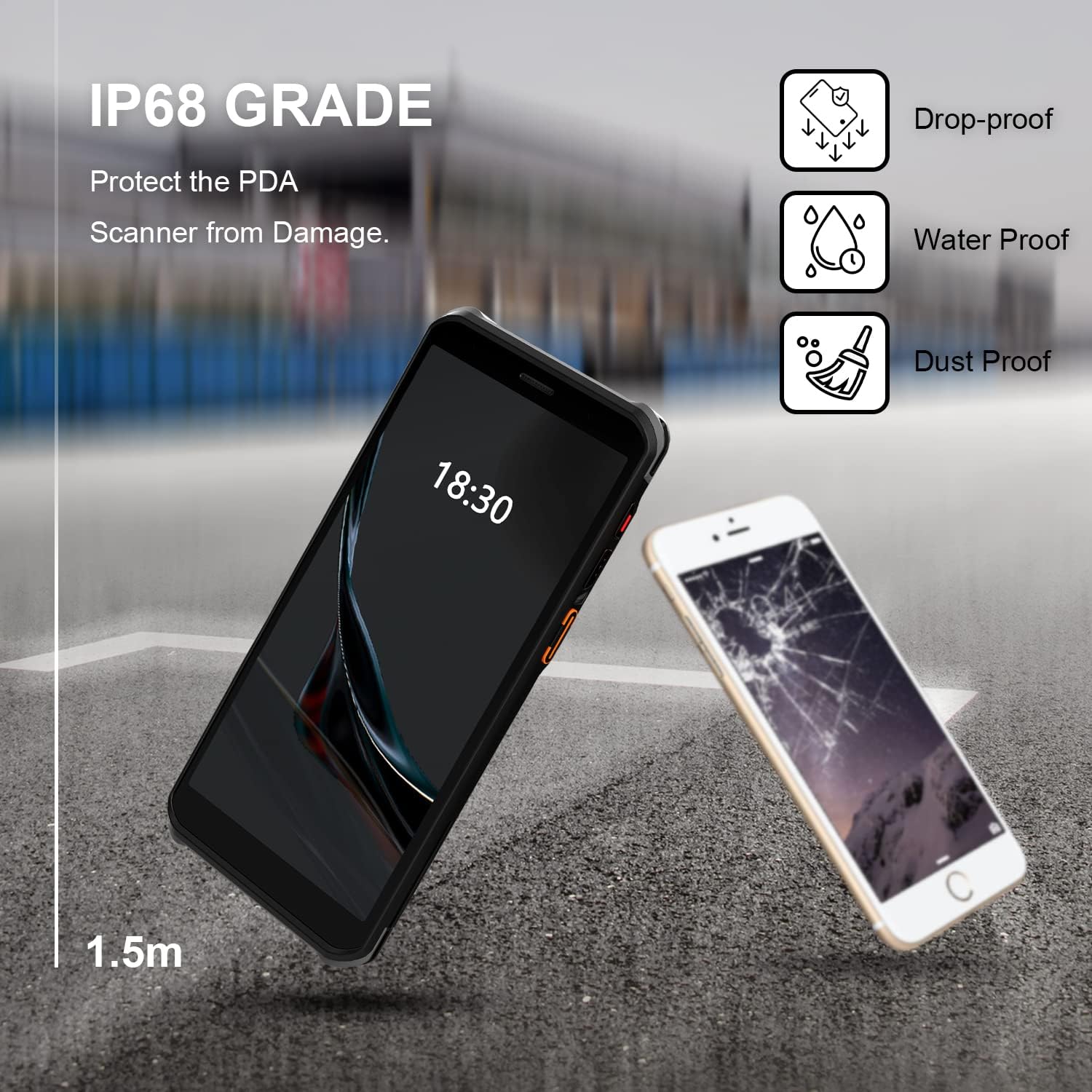
Figure 2.2: The RONGTA SE4770 PDA is designed with IP68 water and dust resistance and 1.5m drop protection, ensuring durability in demanding environments.

Figure 2.3: The device supports 2.4G/5G Dual-band WIFI and Bluetooth 5.1 for reliable wireless connectivity.
3. سیٹ اپ
3.1 ان باکسنگ اور ابتدائی معائنہ
Carefully remove all components from the packaging. Verify that all items are present and undamaged. The package should include the RONGTA SE4770 PDA, a USB-C cable, a power adapter, and a hand-strap belt.
3.2 بیٹری کی تنصیب اور چارجنگ
- ڈیوائس کے پچھلے حصے میں بیٹری کا ٹوکری تلاش کریں۔
- If the battery is not pre-installed, insert the 5000mAh Lithium-Ion battery, ensuring correct orientation.
- بیٹری کے ڈبے کو محفوظ طریقے سے بند کریں۔
- Connect the USB-C cable to the device's charging port and the other end to the power adapter. Plug the adapter into a power outlet.
- Allow the device to charge fully before first use. The 18W fast charging feature will expedite this process.

Figure 3.1: The device charging, indicating battery status.
3.3 پاور آن/آف۔
- پاور آن کرنے کے لیے: Press and hold the Power button on the side of the device until the RONGTA logo appears on the screen.
- پاور آف کرنا: پاور بٹن دبائیں اور تھامیں جب تک کہ پاور آپشنز مینو ظاہر نہ ہو۔ 'پاور آف' کو منتخب کریں۔
- دوبارہ شروع کرنے کے لیے: Press and hold the Power button until the power options menu appears. Select 'Restart'.
3.4 ابتدائی اینڈرائیڈ سیٹ اپ
Upon first power-on, follow the on-screen prompts to complete the initial Android 11 setup. This typically includes selecting your language, connecting to a Wi-Fi network, setting up a Google account (optional), and configuring security settings.
4. آپریٹنگ ہدایات
4.1 بارکوڈ سکینر کا استعمال
The RONGTA SE4770 is equipped with a high-performance Zebra SE4770 scanner capable of reading various 1D, 2D, and QR barcodes.
- Open an application that requires barcode input (e.g., inventory management software, POS application).
- Point the scanner window, located on the top rear of the device, towards the barcode.
- Press one of the dedicated scan buttons on the side of the device. A red aiming beam will appear.
- Align the aiming beam with the center of the barcode. The device will emit a beep or vibrate upon successful scan, and the data will be entered into the active field of your application.

Figure 4.1: A user scanning a package barcode using the RONGTA SE4770 PDA.

Figure 4.2: The SE4770 Zebra scanner in use, demonstrating fast and accurate scanning in a warehouse environment.
4.2 Android 11 پر نیویگیٹنگ
The device operates on Android 11, providing a familiar interface. Use touch gestures to navigate:
- تھپتھپائیں: کسی آئٹم کو منتخب کرنے یا ایپلیکیشن کھولنے کے لیے۔
- سوائپ: فہرستوں کے ذریعے سکرول کرنے یا ہوم اسکرینوں کے درمیان سوئچ کرنے کے لیے۔
- چوٹکی سے زوم: تصاویر کو زوم ان یا آؤٹ کرنے کے لیے اور web صفحات
- اطلاعات: اطلاعات اور فوری ترتیبات تک رسائی کے لیے اسکرین کے اوپری حصے سے نیچے کی طرف سوائپ کریں۔
4.3 کنیکٹیویٹی
ڈیوائس مختلف کنیکٹیویٹی آپشنز کو سپورٹ کرتی ہے:
- وائی فائی: Go to Settings > Network & internet > Wi-Fi to connect to available wireless networks. Supports 2.4GHz and 5GHz bands.
- بلوٹوتھ: Go to Settings > Connected devices > Connection preferences > Bluetooth to pair with Bluetooth-enabled devices like headsets or printers.
- موبائل ڈیٹا (4G): If equipped with a SIM card slot (check device specifications), insert a compatible SIM card to access mobile data.
4.4 کیمرے کا استعمال
The device includes a camera for capturing images or videos. Open the Camera application from the home screen or app drawer. Tap the screen to focus and press the shutter button to take a photo or start/stop video recording.
5 دیکھ بھال
5.1 ڈیوائس کی صفائی
بہترین کارکردگی اور ظاہری شکل کو برقرار رکھنے کے لیے:
- Wipe the screen and device body with a soft, lint-free cloth.
- ضدی smudges کے لئے، تھوڑا سا dampپانی یا سکرین کلینر کے ساتھ کپڑے. سخت کیمیکلز یا کھرچنے والے مواد سے پرہیز کریں۔
- Ensure the scanner window is clean and free of dust or debris for accurate scanning.
5.2 بیٹری کی دیکھ بھال
Proper battery care extends the lifespan of your device:
- Charge the battery regularly using the provided charger.
- بیٹری کو بار بار مکمل طور پر خارج کرنے سے گریز کریں۔
- اگر آلہ کو ایک طویل مدت کے لیے ذخیرہ کر رہے ہیں تو، بیٹری کو تقریباً 50% تک چارج کریں اور ٹھنڈی، خشک جگہ پر اسٹور کریں۔
- The SuperCap power change solution allows for hot-swapping batteries without device shutdown, ensuring continuous operation.
5.3 سافٹ ویئر اپ ڈیٹس
Periodically check for software updates to ensure your device has the latest features and security patches. Go to Settings > System > System update.
6 خرابیوں کا سراغ لگانا
This section addresses common issues you might encounter with your RONGTA SE4770 PDA.
| مسئلہ | ممکنہ وجہ | حل |
|---|---|---|
| ڈیوائس آن نہیں ہے۔ | کم یا ختم بیٹری؛ ڈیوائس کی خرابی | ڈیوائس کو کم از کم 30 منٹ تک چارج کریں۔ اگر یہ اب بھی آن نہیں ہوتا ہے تو سپورٹ سے رابطہ کریں۔ |
| سکینر بارکوڈز نہیں پڑھ رہا ہے۔ | Dirty scanner window; incorrect aiming; unsupported barcode type; application issue. | Clean the scanner window. Ensure the aiming beam covers the entire barcode. Verify the barcode type is supported. Restart the scanning application or the device. |
| وائی فائی/بلوٹوتھ کنیکٹیویٹی کے مسائل | Out of range; incorrect password; interference. | Move closer to the Wi-Fi router or Bluetooth device. Re-enter the password. Restart Wi-Fi/Bluetooth on the device. |
| آلہ سست یا غیر جوابی ہے۔ | بہت زیادہ ایپلی کیشنز چل رہی ہیں؛ کم اسٹوریج؛ سافٹ ویئر کی خرابی. | Close unnecessary applications. Clear cache. Restart the device. Consider a factory reset if issues persist (backup data first). |
7. وضاحتیں
Detailed technical specifications for the RONGTA SE4770 PDA Barcode Scanner:
- مصنوعات کے طول و عرض: 3.03 x 0.51 x 6.41 انچ
- آئٹم کا وزن: 10.6 اونس
- بیٹریاں: 1 لیتھیم آئن بیٹری درکار ہے (شامل)
- طاقت کا منبع: بیٹری سے چلنے والا
- مینوفیکچرر: رونگٹا
- ہم آہنگ آلات: Desktop, Laptop, Smartphone (for data transfer/management)
- کنیکٹوٹی ٹیکنالوجی: Bluetooth, Wi-Fi (2.4G/5G Dual-band), 4G
- آپریٹنگ سسٹم: اینڈرائیڈ 11
- پروسیسر: اوکٹا کور 2.0GHz
- یادداشت: 4 جی بی ریم
- ذخیرہ: 64 جی بی روم
- سکرین کا سائز: 6 inches FHD+ (1080P) HD Touch Screen
- سکینر: Zebra SE4770 (1D, 2D, QR)
- استحکام: IP68 Water and Dust Resistant, 1.5m Drop Protection
- بیٹری کی صلاحیت: 5000mAh
- چارج کرنا: QC3.0 18W Fast Charge
8. وارنٹی اور سپورٹ
For warranty information and technical support, please refer to the documentation included with your purchase or visit the official RONGTA website. If you encounter any issues not covered in this manual, please contact RONGTA customer service for assistance.