
تعارف
This manual provides essential information for the installation, operation, and maintenance of your ASETEK Forte Formula Gaming Steering Wheel. Designed for PC sim racing, this steering wheel features a durable construction, customizable controls, and seamless integration with sim racing setups. Please read this manual thoroughly before using the product to ensure optimal performance and longevity.
باکس میں کیا ہے۔
تصدیق کریں کہ ذیل میں درج تمام اجزاء آپ کے پیکیج میں موجود ہیں:
- Forte Formula Steering Wheel (with Orange accents)
- Shifter Paddles (pre-installed)
- چمٹی
- Gray Handle Cushions
- بٹن اسٹیکرز
- Forte Stickers

Image: Contents of the ASETEK Forte Formula Steering Wheel package, including the wheel, paddles, tweezers, handle cushions, and stickers.
سیٹ اپ
1. جسمانی تنصیب
The Forte Formula Steering Wheel utilizes the Asetek SimSports Quick Release system for secure attachment to a compatible wheelbase. Align the steering wheel with the wheelbase's quick release mechanism and push firmly until it clicks into place. Ensure the connection is secure before use.
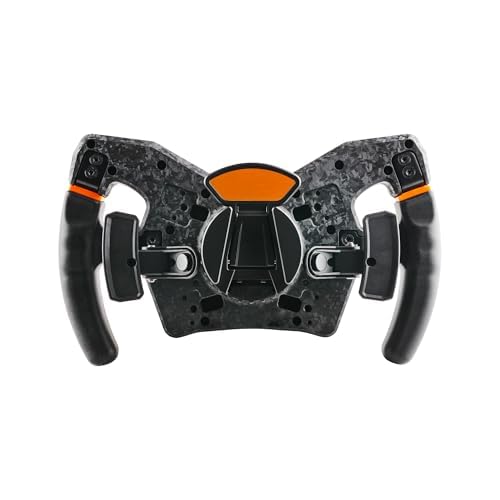
تصویر: نیچے view of the steering wheel, showing the Asetek SimSports Quick Release mechanism.
2. Software Installation (RaceHub)
To unlock the full potential of your steering wheel, download and install the Asetek RaceHub software from the official Asetek SimSports website. RaceHub allows for firmware updates, button mapping, LED customization, and other advanced settings.

Image: Screenshot of the Asetek RaceHub software interface.
3. ابتدائی ترتیب
After installing RaceHub and connecting your steering wheel, launch the software. Follow the on-screen prompts for initial calibration. This typically involves turning the wheel to its full lock left and right, and pressing the pedals (if connected) to their full range. Ensure all buttons and rotaries are recognized and functioning correctly within the software.
Operating the Steering Wheel
کنٹرولز ختم۔view
The Forte Formula Steering Wheel features 27 programmable buttons, tactile paddle shifters, and multiple rotaries for comprehensive control during sim racing. The layout is designed for intuitive access to critical functions.

Image: Close-up of the steering wheel's central panel, showing buttons and rotaries.
حسب ضرورت
The steering wheel offers extensive customization options:
- بٹن میپنگ: Use RaceHub to assign specific functions to each of the 27 buttons according to your preference and the requirements of your racing simulator.
- ایل ای ڈی کی فعالیت: Adjust the aRGB LED lighting and patterns via RaceHub for visual feedback and personalization.
- Removable Handles: The handles are designed to be removable, allowing for future adaptability and potential upgrades.
- پیڈل شفٹرز: The integrated tactile paddle shifters provide precise gear changes. The system is upgradable to optional dual-clutch paddles for advanced control.
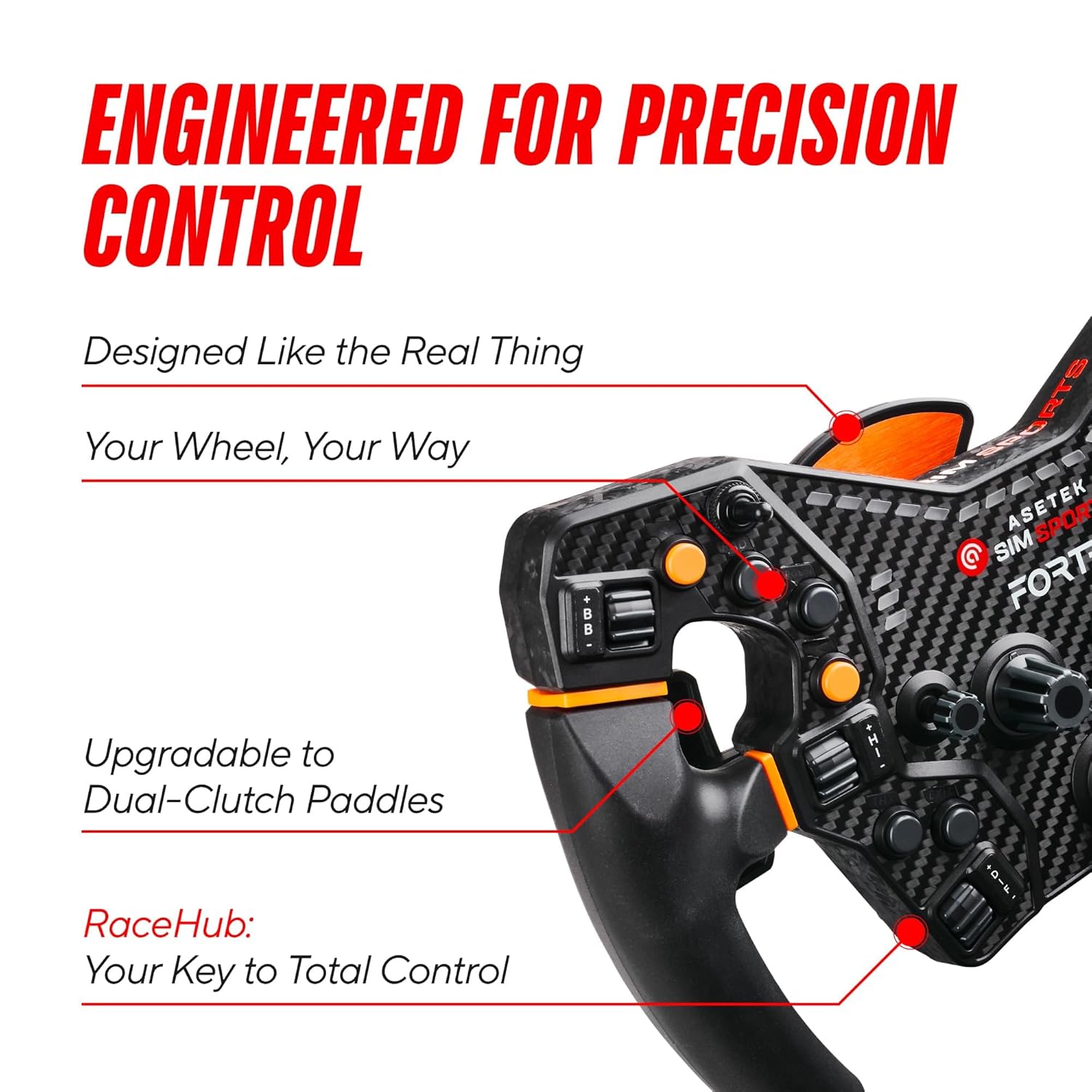
تصویر: سائیڈ view of the steering wheel, showing the paddle shifters.
ڈرائیونگ کا تجربہ
The rigid metal spider interface and carbon, glass, and plastic composite construction ensure a stable, anti-flex design. This contributes to precise handling and a realistic driving experience, allowing you to feel detailed feedback from the track.
دیکھ بھال
- صفائی: Use a soft, dry cloth to clean the steering wheel. Avoid abrasive cleaners or solvents, as these can damage the materials and finish.
- ذخیرہ: When not in use, store the steering wheel in a clean, dry environment away from direct sunlight and extreme temperatures.
- کنکشن چیک: Periodically inspect the quick release mechanism and all cable connections to ensure they are secure and free from damage.
- سافٹ ویئر اپ ڈیٹس: Regularly check for and install firmware and software updates via RaceHub to ensure optimal performance and compatibility.
خرابی کا سراغ لگانا
عام مسائل اور حل:
- Wheel Not Detected:
- Ensure the quick release is fully engaged and secure.
- Check the USB connection between your wheelbase and PC.
- Restart your PC and the RaceHub software.
- Buttons/Paddles Unresponsive:
- Verify button assignments in RaceHub.
- Ensure the steering wheel firmware is up to date.
- Test in a different sim racing title to rule out game-specific issues.
- Inaccurate Steering Input:
- Recalibrate the steering wheel in RaceHub.
- Check for any physical obstructions or damage to the wheel.
If you encounter issues not covered here, or if the problem persists, please refer to the support section for further assistance.
وضاحتیں
| ہم آہنگ آلات | PC |
| کنٹرولر کی قسم | اسٹیئرنگ وہیل |
| کنیکٹوٹی ٹیکنالوجی | Asetek SimSports Quick Release |
| اضافی خصوصیات | Customizable, Ergonomic |
| بٹن کی مقدار | 27 |
| ہارڈ ویئر پلیٹ فارم | PC |
| طاقت کا منبع | Asetek SimSports Quick Release |
| شے کا وزن | 5.7 پاؤنڈز |
| برانڈ کا نام | ASETEK |
| ماڈل کا نام | Forte Formula Steering Wheel |
| کارخانہ دار | Asetek SimSports |
| یو پی سی | 850015843679 |
| ASIN | B0C2CF77S4 |
| رنگ | Gray - Orange |
وارنٹی اور سپورٹ
وارنٹی کی معلومات
The ASETEK Forte Formula Gaming Steering Wheel comes with a standard manufacturer's warranty. Please refer to the official Asetek SimSports website or your purchase documentation for specific warranty terms and conditions, including duration and coverage details.
کسٹمر سپورٹ
For technical assistance, troubleshooting, or warranty claims, please visit the official Asetek SimSports support page. You can find FAQs, driver downloads, and contact information for their customer service team.
Official Asetek Store: Asetek Store on Amazon