
تعارف
This manual provides detailed instructions for the installation, operation, and maintenance of your Strong SRT 7040 Digital Satellite HD Receiver. Please read this manual carefully before using the device to ensure proper functionality and to prevent damage.

Image: The Strong SRT 7040 DTT Tuner and its retail packaging.
The Strong SRT 7040 is a Full HD digital satellite receiver designed for Free-To-Air (FTA) channels. It features a USB port for multimedia playback and software updates, and supports Dolby Audio for enhanced sound quality.
1. سیٹ اپ
1.1 پیک کھولنا
پیکیجنگ سے تمام اجزاء کو احتیاط سے ہٹا دیں۔ یقینی بنائیں کہ درج ذیل اشیاء موجود ہیں:
- Strong SRT 7040 DTT Tuner
- ریموٹ کنٹرول (2 AAA بیٹریوں کے ساتھ)
- پاور اڈاپٹر
- صارف دستی
1.2 ڈیوائس کو جوڑنا
Follow these steps to connect your SRT 7040 receiver:
- سیٹلائٹ ان پٹ: Connect your satellite dish cable to the اندر بیٹھ گیا۔ رسیور کے پیچھے پورٹ۔
- Video Output (HDMI): سے ایک HDMI کیبل جوڑیں۔ HDMI port on the receiver to an HDMI input on your television.
- Video Output (SCART): Alternatively, for older televisions, connect a SCART cable from the ٹی وی اسکارٹ آپ کے ٹیلی ویژن پر SCART ان پٹ کو رسیور پر پورٹ کریں۔
- Audio Output (Digital): For digital audio, connect a coaxial cable from the COAXIAL S/PDIF port to your digital audio ampزندگی
- Audio Output (Analog): For analog audio, connect RCA cables from the AUDIO R/L ports to your audio Hi-Fi ampزندگی
- USB آلہ: If desired, connect a USB storage device to the یو ایس بی port for multimedia playback or software updates.
- طاقت: سے پاور اڈاپٹر کو مربوط کریں 12V === 1.5A۔ input on the receiver, then plug the adapter into a wall outlet.

Image: Rear panel connections of the Strong SRT 7040 DTT Tuner, showing SAT IN, HDMI, TV SCART, COAXIAL S/PDIF, AUDIO R/L, USB, and Power input.
1.3 First-Time Installation and Channel Scan
Upon first power-on, the receiver will guide you through an initial setup wizard. Follow the on-screen prompts to select your language, country, and perform an automatic channel scan. This process will detect and store all available satellite channels.
2. آپریٹنگ ہدایات
2.1 ریموٹ کنٹرول اوورview
The included remote control allows you to access all functions of the SRT 7040. Insert the two AAA batteries into the remote control, ensuring correct polarity.

Image: The remote control for the Strong SRT 7040 DTT Tuner, showing buttons for power, numbers, volume, channel, menu, and special functions.
2.2 بنیادی افعال
- طاقت: دبائیں پاور button to turn the receiver on or off (standby mode).
- چینل کا انتخاب: استعمال کریں۔ CH+ / CH- buttons to change channels sequentially, or use the numeric keypad to enter a channel number directly.
- حجم کنٹرول: استعمال کریں۔ VOL+ / والیوم- آڈیو والیوم کو ایڈجسٹ کرنے کے لیے بٹن۔
- خاموش کریں: دبائیں گونگا آڈیو کو عارضی طور پر خاموش کرنے کے لیے بٹن۔
2.3 مینو نیویگیشن
دبائیں مینو button to access the main menu. Use the arrow keys (UP, نیچے, بائیں, حق) اختیارات کے ذریعے نیویگیٹ کرنے کے لیے اور OK انتخاب کی تصدیق کرنے کے لیے۔ دبائیں باہر نکلیں to return to the previous screen or live TV.
2.4 خصوصی خصوصیات
- ٹائمر: The receiver supports programming timers for recording or switching to specific channels at scheduled times. Access this feature via the menu.
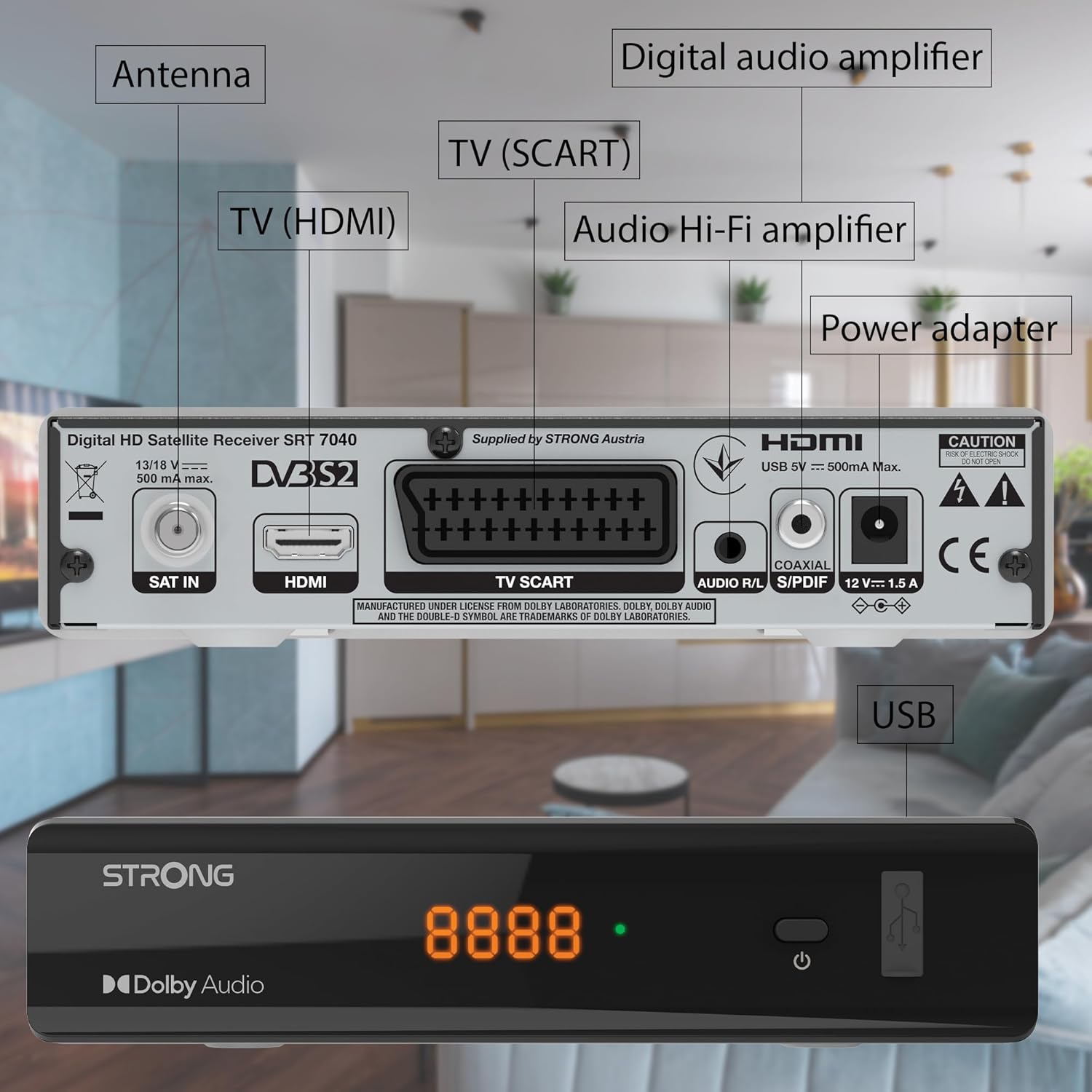
Image: The Strong SRT 7040 DTT Tuner displaying a timer icon, indicating its scheduling capabilities.
- پسندیدہ فہرستیں: Create customized lists of your preferred channels for quick access.
- ذیلی عنوانات: Enable or disable subtitles for compatible broadcasts using the SUB ریموٹ پر بٹن.
- الیکٹرانک پروگرام گائیڈ (EPG): دبائیں ای پی جی بٹن کو view program information for upcoming broadcasts.
- ڈولبی آڈیو: The receiver supports Dolby Audio for a high-quality sound experience.

Image: The Strong SRT 7040 DTT Tuner with the Dolby Audio logo, illustrating its sound processing capability.
3 دیکھ بھال
3.1 صفائی
To clean the receiver, disconnect it from the power supply. Use a soft, dry cloth to wipe the exterior. Do not use liquid cleaners, aerosols, or abrasive materials, as these can damage the finish or internal components.
3.2 سافٹ ویئر اپ ڈیٹس
وقتا فوقتا کارخانہ دار کی جانچ کریں۔ website for available software updates. Updates can improve performance, add new features, or resolve issues. Software updates are typically performed via the USB port following specific instructions provided with the update file.
3.3 حفاظتی معلومات
- رسیور نہ کھولیں casinجی اندر کوئی صارف کے قابل خدمت حصے نہیں ہیں۔ تمام خدمات کو اہل اہلکاروں سے رجوع کریں۔
- Keep the receiver away from direct sunlight, heat sources, and moisture.
- زیادہ گرم ہونے سے بچنے کے لیے آلے کے ارد گرد مناسب وینٹیلیشن کو یقینی بنائیں۔
- صرف فراہم کردہ پاور اڈاپٹر استعمال کریں۔
4 خرابیوں کا سراغ لگانا
If you encounter problems with your SRT 7040, consult the following table before contacting support.
| مسئلہ | ممکنہ وجہ | حل |
|---|---|---|
| کوئی طاقت نہیں۔ | پاور اڈاپٹر منسلک نہیں ہے؛ پاور آؤٹ لیٹ ناقص | Check power adapter connection; Try a different power outlet |
| کوئی سگنل / بلیک اسکرین نہیں۔ | Satellite cable loose or disconnected; Incorrect input selected on TV; Satellite dish alignment issue | Check SAT IN cable connection; Ensure TV is on correct HDMI/SCART input; Perform a channel scan; Consult a professional for dish alignment if necessary |
| ریموٹ کنٹرول کام نہیں کر رہا ہے۔ | بیٹریاں ختم یا غلط طریقے سے ڈالی گئی؛ ریموٹ اور ریسیور کے درمیان رکاوٹ | Replace batteries; Ensure correct polarity; Remove any obstructions; Point remote directly at receiver |
| ناقص تصویر کا معیار۔ | Weak satellite signal; Incorrect display settings | Check satellite signal strength in menu; Adjust TV display settings; Ensure Full HD content is being broadcast |
5. وضاحتیں
The following are the technical specifications for the Strong SRT 7040 Digital Satellite HD Receiver:
- ماڈل: SRT 7040 (SAT FTA Full HD)
- برانڈ: مضبوط
- طول و عرض: 3.39 x 6.46 x 1.38 انچ (8.6 x 16.4 x 3.5 سینٹی میٹر)
- آئٹم کا وزن: 9.2 اونس (260 گرام)
- رنگ: سیاہ
- کنیکٹوٹی ٹیکنالوجی: یو ایس بی
- والیومtage: 100 - 240 وی
- تعدد: 50 - 60 ہرٹز
- بجلی کی کھپت: 18 kWh (operational, typical)
- کام کرنے والے درجہ حرارت کی حد: 0ºC سے 40ºC
- رشتہ دار نمی: 10% - 95%
- بیٹریاں: 2 AAA بیٹریاں (ریموٹ کے لیے شامل)
- تفصیلات سے ملاقات کی: DVB-S2
- شامل: Wally Receiver
6. وارنٹی اور سپورٹ
For warranty information and technical support, please refer to the warranty card included in your product packaging or visit the official Strong webسائٹ وارنٹی دعووں کے لیے خریداری کے ثبوت کے طور پر اپنی خریداری کی رسید رکھیں۔
For further assistance, you may contact Strong customer service through the contact details provided on their official webسائٹ