
تعارف
This manual provides instructions for the VINABTY MBE741 replacement remote control. This remote is designed to be compatible with various AKAI LCD/LED TV models, including ATE-48N1104K, ATE-55N1104K, and ATE-55D1044K. It offers a direct replacement for your original remote without requiring complex programming.
سیٹ اپ
بیٹری کی تنصیب
The VINABTY MBE741 remote control requires two AAA batteries for operation. No programming or setup is needed; simply insert the batteries, and the remote will be ready to use.
- ریموٹ کنٹرول کے پیچھے بیٹری کے ٹوکرے کو تلاش کریں۔
- بیٹری کے کمپارٹمنٹ کور کو کھولنے کے لیے اسے نیچے یا باہر کی طرف سلائیڈ کریں۔
- دو AAA بیٹریاں ڈالیں، اس بات کو یقینی بناتے ہوئے کہ مثبت (+) اور منفی (-) ٹرمینلز کمپارٹمنٹ کے اندر نشانات کے ساتھ درست طریقے سے سیدھ میں ہوں۔
- بیٹری کے کمپارٹمنٹ کور کو واپس اپنی جگہ پر سلائیڈ کریں جب تک کہ یہ محفوظ طریقے سے کلک نہ کرے۔
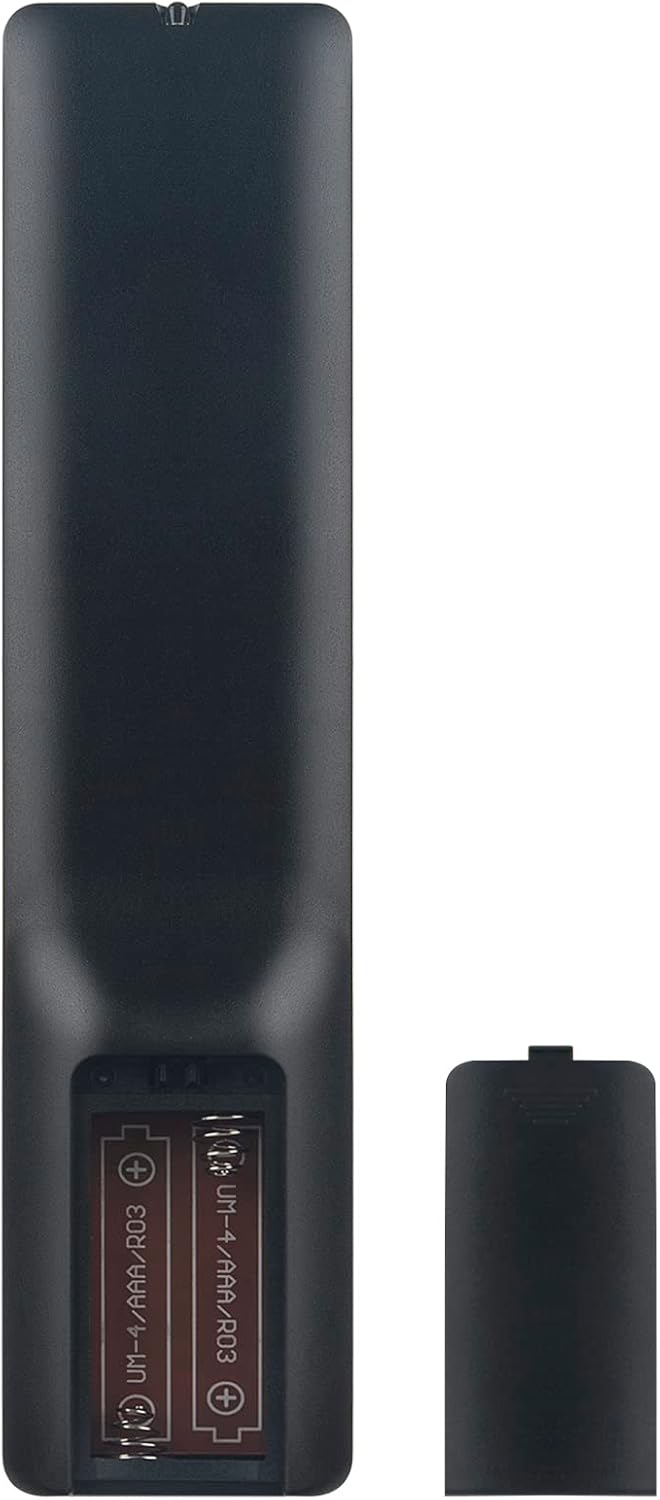
Image: Back of the remote control with the battery compartment open, illustrating correct battery placement.
آپریٹنگ ہدایات
Once batteries are installed, the remote control is ready for immediate use with compatible AKAI LCD/LED TVs. Point the remote directly at your television's infrared receiver.
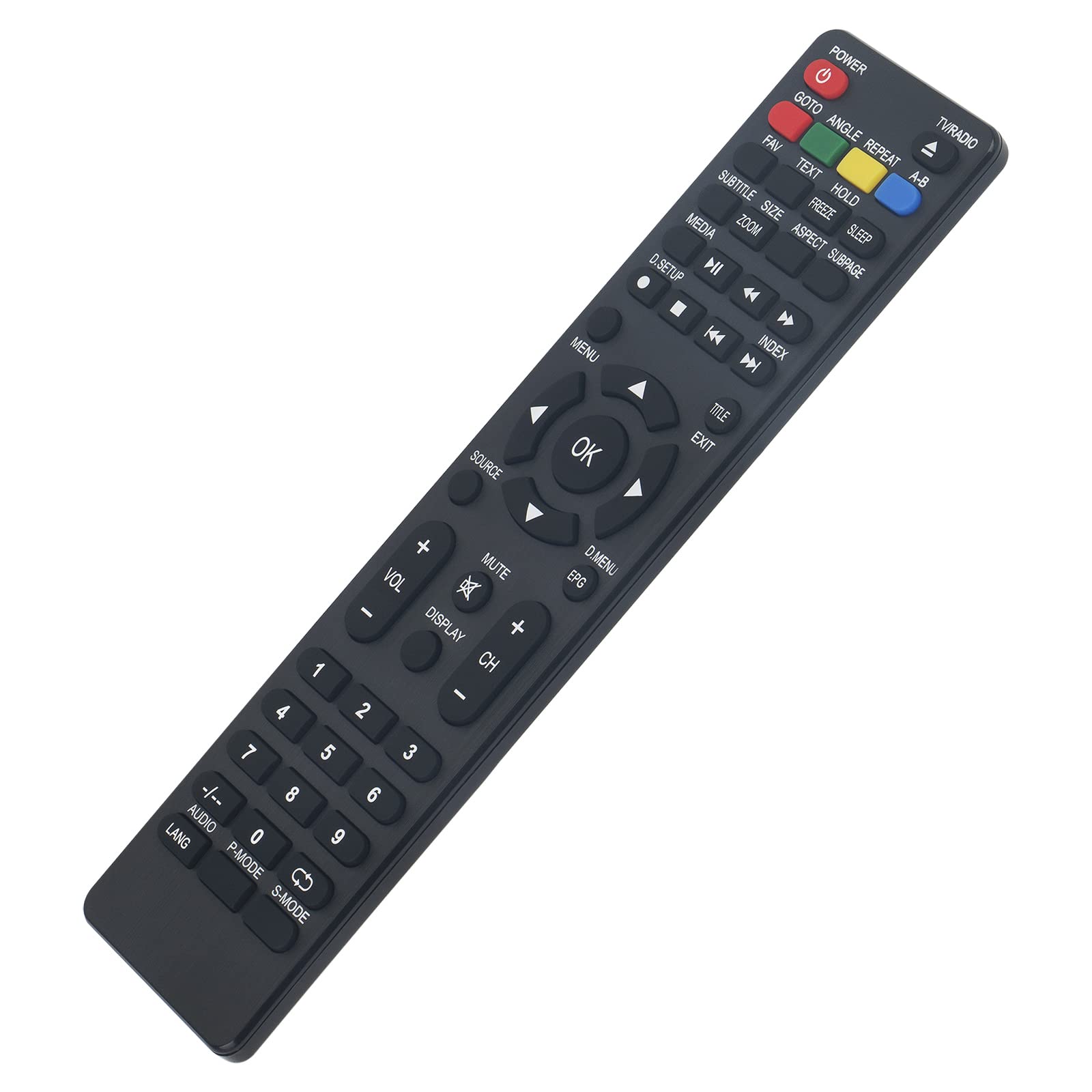
تصویر: سامنے view of the remote control, displaying all function buttons.
کلیدی افعال ختمview
- طاقت: ٹی وی کو آن یا آف کرتا ہے۔
- ٹی وی / ریڈیو: ٹی وی اور ریڈیو موڈز کے درمیان سوئچ کرتا ہے۔
- نمبر بٹن (0-9): براہ راست چینل کا انتخاب۔
- VOL +/-: حجم کی سطح کو ایڈجسٹ کرتا ہے۔
- CH +/-: چینل کو اوپر یا نیچے تبدیل کرتا ہے۔
- خاموش: ٹی وی کی آواز کو خاموش یا چالو کریں۔
- مینو: TV کے مین مینو تک رسائی حاصل کرتا ہے۔
- ٹھیک ہے: مینو کے اندر انتخاب کی تصدیق کرتا ہے۔
- نیویگیشن تیر (اوپر، نیچے، بائیں، دائیں): مینو کے اختیارات کے ذریعے نیویگیٹ کرتا ہے۔
- باہر نکلیں: موجودہ مینو یا فنکشن سے باہر نکلتا ہے۔
- ذریعہ: ان پٹ ذرائع (HDMI، AV، وغیرہ) کو منتخب کرتا ہے۔
- MEDIA Controls (Play, Pause, Stop, Rewind, Fast Forward, Skip): میڈیا پلے بیک کو کنٹرول کرتا ہے۔
- ای پی جی: الیکٹرانک پروگرام گائیڈ دکھاتا ہے۔
- عنوان: سب ٹائٹلز کو آن یا آف ٹوگل کرتا ہے۔
- LANG / AUDIO: Changes audio language or track.
- پی موڈ: Selects picture modes.
- ایس موڈ: Selects sound modes.
- ڈسپلے: آن اسکرین معلومات دکھاتا ہے۔
- Other Function Buttons (GOTO, ANGLE, REPEAT, A-B, FAV, TEXT, HOLD, FREEZE, SLEEP, SIZE, ZOOM, ASPECT, SUBPAGE, D.SETUP, INDEX, TITLE, D.MENU): Provide access to specific TV features as labeled.
دیکھ بھال
صفائی
ریموٹ کنٹرول کو صاف کرنے کے لیے، نرم، خشک کپڑا استعمال کریں۔ ضدی گندگی کے لیے، قدرے ڈیampen the cloth with water or a mild cleaning solution. Avoid using abrasive cleaners, alcohol, or solvents, as these can damage the remote's surface or internal components.
بیٹری کی تبدیلی
Replace batteries when the remote control's response becomes sluggish or stops working. Always replace both batteries at the same time with new AAA alkaline batteries. Do not mix old and new batteries, or different types of batteries, as this can lead to leakage or malfunction.
خرابی کا سراغ لگانا
- ریموٹ کنٹرول جواب نہیں دے رہا ہے:
- بیٹریاں چیک کریں: Ensure batteries are inserted correctly with the correct polarity (+/-). Replace old batteries with new AAA alkaline batteries.
- نظر کی حد: Make sure there are no obstructions between the remote control and the TV's infrared sensor. Point the remote directly at the TV.
- ریموٹ سینسر: Ensure the TV's infrared sensor is clean and not covered.
- Some buttons do not work:
- While this remote is designed for broad compatibility, some specific TV models might have unique functions not directly mapped to a button. Refer to your TV's original manual for specific feature access.
- Ensure the remote is in the correct mode (e.g., TV mode if applicable, though this remote is generally universal for the listed models).
وضاحتیں
| برانڈ | ونابٹی |
| ماڈل نمبر | MBE741 |
| ہم آہنگ آلات | AKAI ATE-48N1104K, ATE-55N1104K, ATE-55D1044K, Linsar LED LCD HDTV TV LS50UHD LS32CHD LS40CFHD LS24CFHD12V |
| کنیکٹوٹی ٹیکنالوجی | اورکت |
| زیادہ سے زیادہ رینج | 10 میٹر |
| بیٹری کی قسم | 2 x AAA (Alkaline recommended) |
| مواد | ABS |
| خصوصی خصوصیت | ایرگونومک ڈیزائن |
وارنٹی اور سپورٹ
VINABTY is committed to customer satisfaction. If you encounter any issues with your product or require assistance, please contact our customer support. We aim to provide a satisfactory response within 24 hours.
For support inquiries, please refer to the contact information provided with your purchase or on the VINABTY official webسائٹ